- NewsmagtagDiv Composer Tutorial
- NewsmagHow to use the Visual Composer plugin
- NewsmagHow to update a plugin
- NewsmagRequirements for Newsmag
- NewsmagInstall via WordPress
- NewsmagInstall via FTP
- NewsmagBlock settings tutorial
- NewsmagPage Menu
- NewsmagCustom ad spots
- NewsmagSmart sidebar
- NewsmagVideo playlist
- NewsmagPage templates
 benjaone1
 Hi 🙂
Stupid question, how do I edit the mobile menu with the TD-composer? Since I only know how to edit the frontpage with the TD-composer.
Thanks
Ben
 smilelondon
 Thanks Bettina for getting back.
We are seeing quite many error logs in our debug file from TagDiv.
Is this all related or are these different things and can you help us with this?
Many thanks
Sven
[04-Apr-2022 07:00:54 UTC] PHP Warning: Trying to access array offset on value of type bool in xxx/td-composer/legacy/common/wp_booster/td_module.php on line 568
[04-Apr-2022 07:00:54 UTC] PHP Warning: Undefined array key 0 in xxx/wp-content/plugins/td-composer/legacy/common/wp_booster/td_module.php on line 391
[04-Apr-2022 07:00:54 UTC] PHP Warning: Trying to access array offset on value of type bool in xxx/LiveTube/wp-content/plugins/td-composer/legacy/common/wp_booster/td_module.php on line 568
[04-Apr-2022 07:00:54 UTC] PHP Warning: Undefined array key 0 in xxx/wp-content/plugins/td-composer/legacy/common/wp_booster/td_module.php on line 391
[04-Apr-2022 07:00:54 UTC] PHP Warning: Trying to access array offset on value of type bool in xxx/wp-content/plugins/td-composer/legacy/common/wp_booster/td_module.php on line 568
[04-Apr-2022 07:00:54 UTC] PHP Warning: Undefined array key 0 in xxx/plugins/td-composer/legacy/common/wp_booster/td_module.php on line 391
[04-Apr-2022 07:00:54 UTC] PHP Warning: Trying to access array offset on value of type bool in xxx/wp-content/plugins/td-composer/legacy/common/wp_booster/td_module.php on line 568
 Calin
Calin Hi,
2. If you can let me know where it should be set the php code of AdRotate, then I will provide the path to that file.
For example if you need to set the code in the header.php of file, then it should be set on this file -> wp-content/plugins/td-composer/legacy/Newsmag/header.php
If the banners appear in incognito, then the problem is with an extension from the browser, or maybe from cookies. Please try other browsers as well.
Thank you!
 seanmccaughan
 I got the video embed to work by uninstalling AMP. I was using the official AMP plugin, which said it was incompatible with the TD Composer.
 yourin
Hii, i updated my site to the latest version ander after the update i get this error if i want to read my news pages. I get the following errow:
wp_booster error:
td_api_base::mark_used_on_page : a component with the ID: single_template_4 is not set.
/mnt/web118/a0/93/510122093/htdocs/Gulp-en-Geul-Journaal/wp-content/plugins/td-composer/legacy/common/wp_booster/td_api.php
Calin Hello,
1. That message appears because you are using the amp and this is set to redirect the mobile users on amp, please disable this option -> https://i.imgur.com/ShXatoR.png
2. If you have hidden it on all devices then it won’t appear anywhere. Open the CSS section in the composer and enter this code in it – https://prnt.sc/pqi1z7 the row should then be visible so you can interact with it. Then you can remove the code, after you make it visible on at least one viewport
.td-pb-row.vc_row {

display:block!important;

}
The elements from the amp are using the mobile theme layout, so the option for those are in the theme panel > mobile theme -> https://i.imgur.com/4VmBIdy.png
The above message/error it is about the jetpack, the problem is coming from there. You need to check the settings from that plugin or disable it.
Thank you!
Calin Hi,
Thanks for your compliments!
If you are using a specific post templates, then you need to edit the file for that post template. For example if is post template 1, then the files will be wp-content/plugins/td-composer/legacy/Newsmag/parts/single/loop-single-1.php and single_template_1.php
Now if is the default post template, the files will be located on this path wp-content/plugins/td-composer/legacy/Newsmag/loop-single.php and single.php
I hope this will help you!
 muslimperspectives
Hi I just purchased the Newspaper theme and have started to use the TD Composer to build my templates. So far everything was going well up until I started to build the home page.
I built a portion of the home page, only to find that whatever I put onto the home page also appears on every other page on the website. Furthermore, if I try to edit another page such as “About” or “Contact Me” using the TD Composer then it pre-loads the content that I put on the home page, onto those pages too instead of giving me a blank canvas to work with.
The home page content also appears on top of my categories pages and my singular post pages.
I deactivated TD Composer and Reactivated with no success. I have litespeed cache installed and have been clearing the database but no luck there either.
Here is a link to my site: https://www.muslimperspectives.com/
 shibam
 getting their…
So I got to activate all the plugins with the help of the host support.
and now the last plugin I could not be able to activate is the Multipurpose plug-in. I got this error:
Fatal error: Cannot redeclare on_tdc_init_multipurpose() (previously declared in /home/xxxxxx/wp-content/plugins/td-composer/td-multi-purpose/td-multi-purpose.php:15) in /home/xxxxx/wp-content/plugins/td-multi-purpose./td-multi-purpose.php on line 14
 HeliR
HeliR for Mobile Theme change
/clickandbuilds/Ganzemedizin/wp-content/plugins/td-composer/legacy/common/wp_booster/td_module_single_base.php
line 1096
            $buffy .= '<div class="td-author-description">';

            $buffy .=  do_shortcode(get_the_author_meta('description', $author_id));

            $buffy .= '</div>';
 keepvid
Warning: require_once(legacy/Newspaper/functions.php): failed to open stream: No such file or directory in /home/rb/public_html/wp-content/plugins/td-composer/td-composer.php on line 189
Fatal error: require_once(): Failed opening required ‘legacy/Newspaper/functions.php’ (include_path=’.:/opt/cpanel/ea-php74/root/usr/share/pear’) in /home/rb/public_html/wp-content/plugins/td-composer/td-composer.php on line 189
A fost o eroare critică pe acest site web.
 lucia116
 I
/wp-content/plugins/td-composer/legacy/Newspaper/parts/login.php
in file
$users_can_register_tab = ‘ <span></span>‘ . __td(‘Join’, TD_THEME_NAME) . ‘‘;
I modified it like this.
It goes to https://domain.com/resister without any problems.
But with WPML the ?lang=ja parameter is gone.
Is it possible to make wpml parameters permanent?
 mverminski
 Hello Calin,
When editing the template in TD Composer both blocks look correct. I just tried your idea of copying the style from the lower box that is correct and pasting it into the top box. It still looks correct within TD Composer, but it is wrong on the front-end.
Back end – https://imgur.com/rjABEIJ
What is showing on the live site – https://imgur.com/4fPRqoE
EDIT: I installed Healthcheck & Troubleshooting. Enabled Newspaper and the required plugins. So all other plugins were disabled except for those required by the theme. The problem still exists.
-
This reply was modified 4 years by
mverminski.
Calin Hi,
The code was for entire website where was injected that code. If you want to be only for the header, then you can try it like this -> https://i.imgur.com/VzscXz5.png
.td-header-template-wrap .td_block_wrap {

    margin-bottom: 0;

}
Like you said, there are elements that by default have set a margin or padding and all elements have in tagDiv Composer a css tab from where can be adjusted. For example this https://i.imgur.com/OFEZBRz.png is a margin -> https://i.imgur.com/CsOlY71.png
I hope this will help you!
 oposum
Hello tagdiv team!
Running a website with 10.3.9.1. In theme panel –> ads there are many adspots. But when editing in TD composer, there are only 7 – header, sidebar, custom ad 1-5. Why is that? All of these are already in use. How can i add others?
Calin Hi,
For this situation I know two solutions.
1. One solution would be to add the excerpt manually to your articles – http://screencast.com/t/mtJF1mvygm7
2. You need to uncomment a code in the theme files, unfortunately, this can not be overwrite in a child theme -> https://i.imgur.com/esvsxKm.png -> wp-content/plugins/td-composer/legacy/common/wp_booster/td_util.php
Thank you!
 zovlogoo.g@gmail.com
Warning: Attempt to read property “ID” on null in /home/englopdh/zovlogoo.com/wp-content/plugins/td-composer/legacy/common/wp_booster/td_wp_booster_functions.php on line 439
Warning: Attempt to read property “ID” on null in /home/englopdh/zovlogoo.com/wp-content/plugins/td-composer/legacy/common/wp_booster/td_wp_booster_functions.php on line 563
 globalcomcl
Hi.
For SEO purposes, I’m only using text, not a logo image in my Default Pro prebuilt website.
I added my site’s title (Logo text) and it’s tagline (Logo text tagline) using tagDiv composer. Unfortunately, the default font size was too big (75px). I fixed its size by adding this CSS code:
.tdb_header_logo .tdb-logo-text-title {
font-size: 40px !important;
font-family: serif !important;
}
I forced my Default Pro prebuilt website to display the site’s title (Logo text) in Phone viewport. Unfortunately, the font size is too big (40px) due to the previous fix.
It seems I may need to modify manually the CSS files.
It would be great if you could provide in the future an easy option in the Default Pro prebuilt website for those customers that may only want to use text and not a logo image.
Just my 2 cents.
Thanks.
 Redlemon
Hi TD team,
I have been having issues with my site loading slow, and it all comes down to 8 queries taking as long as a quarter of a second to execute (one of them 8). Please advise what should I change in my settings to make it load faster, and help take some of the load off the database. It is so intensive it is occasionally crashing my database! I have used Query Monitor plugin to discover the slow queries.
Please see the following screenshots and advise. Cheers!
https://ibb.co/mtK8k6W
https://ibb.co/ZV5ySDm
https://ibb.co/cgJ7QwJ
 Oliagri7
 ok so I’ve realised that it does actually save the desired menu (even through it doesn’t show that in TD composer when editing the menu template) however it’s loading very slowly or only after a second tap on mobile – is there some setting I’ve got wrong? https://www.asian-agribiz.com/
 Gabriel29
 Hello,
we have tried everything suggested in those posts and it is still not working. We are getting however these errors repeated constantly in the error log:
/var/www/vhosts/movilidadelectrica.com/httpdocs/wp-content/plugins/td-composer/legacy/common/wp_booster/td_options.php on line 48
/var/www/vhosts/movilidadelectrica.com/httpdocs/wp-content/plugins/td-composer/legacy/common/wp_booster/td_options.php on line 97
RedlemonI am copying an element within TD Composer, which I am then pasting before or after some other element. On the first attempt I am almost always getting the following error. On the second attempt I am rarely getting the same error; usually it is pasting like it should. When there is the same error a second time, a third attempt has always worked so far. Please review and advise. This is happening after upgrading to the latest version (11.4.1).
_getDestinationModel Error: Container destination not available! Current state has involved an issue. You could try an UNDO operation (CTRL+Z / CTRL+SHIFT+Z)
 SquareMediaAgency
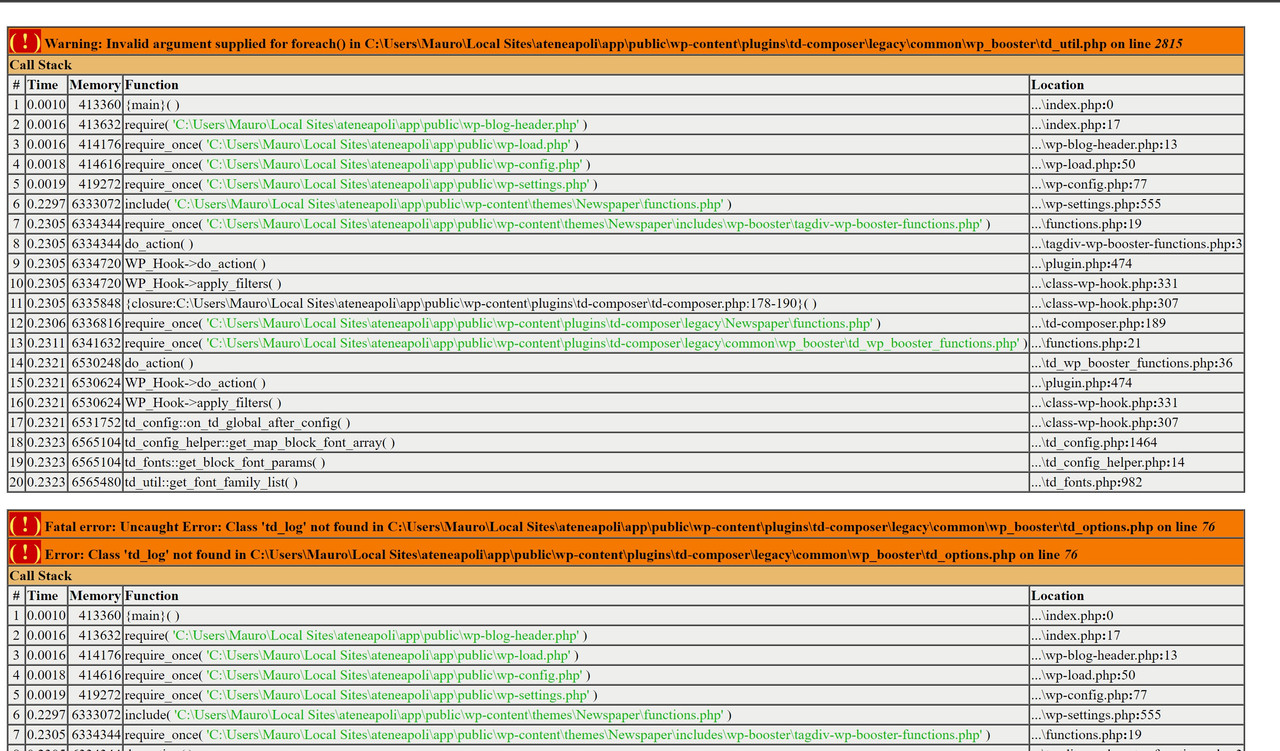
 I run a local wordpress site with local wp by flywheel.
Today i started my site and something stop working. I didn’t make any change in the files, i have only added an admin user on the site.
This the errors i found: https://i.postimg.cc/6pRTMXcv/error.jpg
As i said, none edit is made on this files.
I tried to:
– Change the files with errors.
– Change all the plugin td-composer folder
– Change all the Theme Folder
– Change Php version
I tried to change this file with the new one version of Newspaper and the same i use into my site (Newspaper 11.4).
How can i solve my problem?
Local Site Info:
WP: 5.9.2
Newspaper: 11.4
Php: 7.3.5 (i tried also 7.4 and 8)
MYSQL 8
Thanks
 hanna2390
Hello,
Could you help us to figure out what is the problem with making this error?
We returned all the original files from the files added some codes.
But it shows .thaccess error and td-subscription.php errors until now.
If you do not mind could you come over to our server and check the site?
https://korearadio.org
—————————————————————————————————————
[11-Mar-2022 05:13:01 UTC] WordPress database error Table ‘webkorea_wp_vvd4m.tds_plans’ doesn’t exist for query SELECT * FROM tds_plans made by require(‘/usr/local/cpanel/3rdparty/wp-toolkit/plib/vendor/wp-cli/wpt-wp-cli.php’), require_once(‘/usr/local/cpanel/3rdparty/wp-toolkit/plib/vendor/wp-cli/vendor/wp-cli/wp-cli/php/boot-fs.php’), require_once(‘/usr/local/cpanel/3rdparty/wp-toolkit/plib/vendor/wp-cli/vendor/wp-cli/wp-cli/php/wp-cli.php’), WP_CLI\bootstrap, WP_CLI\Bootstrap\LaunchRunner->process, WP_CLI\Runner->start, WP_CLI\Runner->load_wordpress, require(‘wp-settings.php’), include(‘/themes/Newspaper/functions.php’), require_once(‘/themes/Newspaper/includes/wp-booster/tagdiv-wp-booster-functions.php’), do_action(‘td_wp_booster_legacy’), WP_Hook->do_action, WP_Hook->apply_filters, WP_CLI\Runner->{closure}, require_once(‘/plugins/td-composer/legacy/Newspaper/functions.php’), require_once(‘/plugins/td-composer/legacy/common/wp_booster/td_wp_booster_functions.php’), do_action(‘td_wp_booster_loaded’), WP_Hook->do_action, WP_Hook->apply_filters, tdc_plugin_init, do_action(‘tdc_loaded’), WP_Hook->do_action, WP_Hook->apply_filters, tds_config::on_tdc_loaded, tds_config::get_plans
[12-Mar-2022 05:12:48 UTC] PHP Warning: Use of undefined constant TD_THEME_NAME – assumed ‘TD_THEME_NAME’ (this will throw an Error in a future version of PHP) in /home/webkorearadio/public_html/wp-content/plugins/td-subscription/includes/td_subscription.php on line 513
[13-Mar-2022 05:12:46 UTC] PHP Warning: Use of undefined constant TD_THEME_NAME – assumed ‘TD_THEME_NAME’ (this will throw an Error in a future version of PHP) in /home/webkorearadio/public_html/wp-content/plugins/td-subscription/includes/td_subscription.php on line 513
[14-Mar-2022 05:12:46 UTC] PHP Warning: Use of undefined constant TD_THEME_NAME – assumed ‘TD_THEME_NAME’ (this will throw an Error in a future version of PHP) in /home/webkorearadio/public_html/wp-content/plugins/td-subscription/includes/td_subscription.php on line 513
[15-Mar-2022 05:12:47 UTC] PHP Warning: Use of undefined constant TD_THEME_NAME – assumed ‘TD_THEME_NAME’ (this will throw an Error in a future version of PHP) in /home/webkorearadio/public_html/wp-content/plugins/td-subscription/includes/td_subscription.php on line 528
 mita
mitaHi there,
The theme and tagdiv plugins are up to date but when I updated the “Excerpt Length”, this does not reflect in the website.
Upon looking at the error logs, I get the following:
PHP Warning: A non-numeric value encountered in /home/674182.cloudwaysapps.com/mufumsheed/public_html/wp-c………….. non-numeric value encountered in /home/674182.cloudwaysapps.com/mufumsheed/public_html/wp-content/plugins/td-composer/legacy/Newspaper/includes/shortcodes/td_flex_block_5.php on line 347′, referer: https://wordpress-674182-2230123.cloudwaysapps.com/
The block in question is the one right below the hero unit:
https://wordpress-674182-2230123.cloudwaysapps.com/
Mind taking a look?
Thanks