- NewsmagHow to update a plugin
- NewspaperHow to update a plugin
- NewsmagHow to update the theme
- NewsmagHow to update the WPBakery plugin
- NewspaperHow to update the WPBakery Page Builder plugin
- NewspaperHow to Update the Newspaper Theme
- Apitd_api_top_bar_template::update_key
- Apitd_api_top_bar_template::update
- Apitd_api_single_template::update_key
- Apitd_api_single_template::update
- Apitd_api_footer_template::update_key
- Apitd_api_footer_template::update
- Apitd_api_smart_list::update_key
- Apitd_api_smart_list::update
- Apitd_api_thumb::update_key
- Apitd_api_thumb::update
- Apitd_api_category_top_posts_style::update_key
- Apitd_api_category_top_posts_style::update
- Apitd_api_category_template::update_key
- Apitd_api_category_template::update
 Catalin Catalin
 Hello MamasLT,
Ensure that you have correctly update your theme via FTP way and also, make sure that you are using the latest version of the plugins which come bundled with the theme packet. I suggest you disable the old plugins and reinstall it again from the Theme plugins section from here -> https://www.screencast.com/t/VUmagG7eZ0Ru Check the system status parameters to be correctly increased according to our documentation from here -> https://forum.tagdiv.com/system-status-parameters-guide/
Thanks for the message!
 mayuxi
 Thanks. I think I fixed it after the composer update.
What about Multipurpose plugin. Is multipurpose plugin is a must-install plugin? (mandatory?)
 Simion C.
 @mayuxi No need for anything else, the composer and multi-purpose plugin should update automatically but sometimes it fails. Update them both manually if they are not up to date. Note the theme is now 8.7.1, tagDiv composer 2.1.
 Pierreto
 I’m in php 7.1, and don’t make update again, do you resolve the problem?
-
This reply was modified 8 years by
Pierreto.
Simion C. Hi,
Check if the tagDiv composer has updated automatically (it should be version 2.1 – theme version 8.7.1). In some cases it fails to do so, update the tagDiv composer and multi-purpose plugins manually if that is the case.
The theme version is now 8.7.1, there were some fixes made. Re-download the theme package and install it. Let us know if you still have problems.
Thank you!
PierretoWhen i see all messages, site slower, amp problem, i’m little bit affraid to install it.
I use AMP for WP plugin and i want to know if we can deactivate the AMP mode in Newspaper theme?
And if have no conflict with them?
 Satish Kumar
Hi, I recently updated my theme to 8.7 and want to know how to configure Newsletter as I couldn’t find any documentation related to it?
 prashanth
Hi,
Please see the screenshot. I’ve seen this error after updated to Newspaper 8.7 version.

I can see this error on all the elements “Style” tab irrespective of Block 1, 2 … to News Letter.
But my site is loading as usual.
Please update me.
 dylanswims
Hi,
I had a bit of an issue with the TD page composer. I updated it recently and I seem to have lost a lot of the elements that were available to add before. Things like the Inline Image, Hero, Icons etc. Is there anything you can think of that would cause this to disappear? I am checking for other causes on my end as well.
Appreciate any help on this.
 meri
meriHi,
I used to integrate IG images in posts using a shortcode like that:
[instagram url=https://www.instagram.com/p/BfX-4gOgYgt/]
But it doesn’t work since the update, now I can read the code instead of seeing the image.
Is there something I’m missing?
Thanks for your help
 Jesus Solano
Hello after updating to 8.7.1 I have an error with td-composer if the active does not show me anything in the admin
update all the plugins that come in the package
already probe deactivating the plugins but if I activate td-composer it gives me the error again until I deactivate it
could you help me solve it
Thank you
 marcadefabrica
I’ve updated my website to 8.7, and the homepage seems to work poorly. Thumbnails are not displayed, SEO features are not working when editing, and the option of unique articles isn’t working. I’ve tried to downgrade to 8.5, but it rest the same. Any thoughts? Thanks!
 arrezzo
 it was working great before the update.
 m2sahin
hi,
I thought it was an advanced Membership system compatible with Buddypress when I took this theme.
I’m very upset to see you have no membership system.
When I asked if it would included in next updates, you said you didn’t have a plan like this.
But The Membership system compatible with BuddyPress for me is very important.
so I will ask for your help.
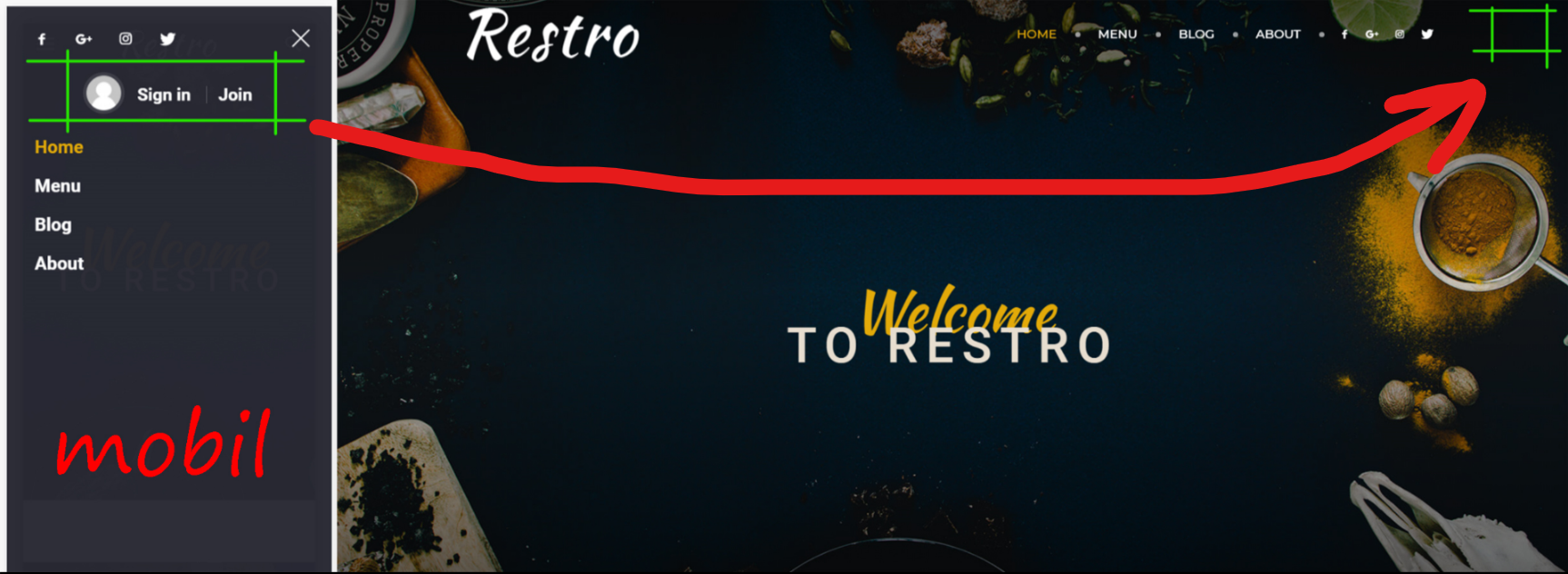
1- can i do it like in a photograph → https://i.hizliresim.com/G9D3d3.png
and can i change CSS settings
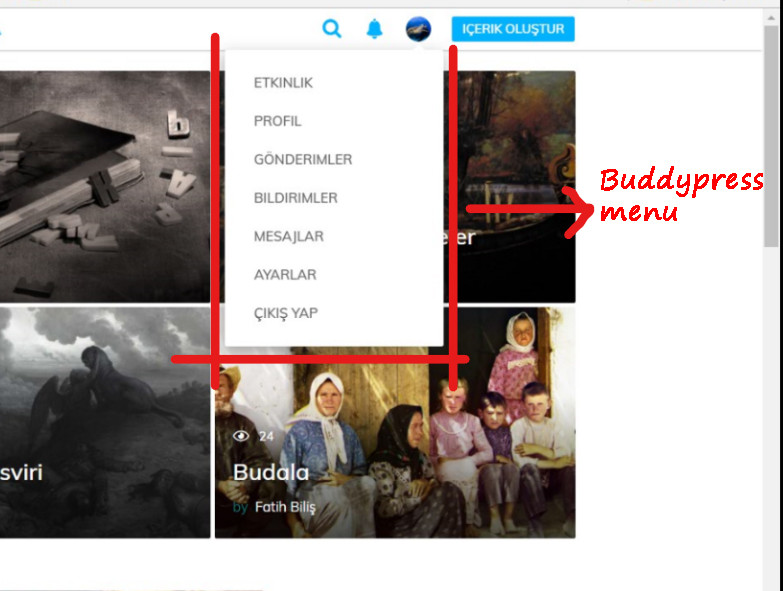
2- Can I put a buddypress menu on the profile like in a photo → https://i.hizliresim.com/kO6G6J.jpg
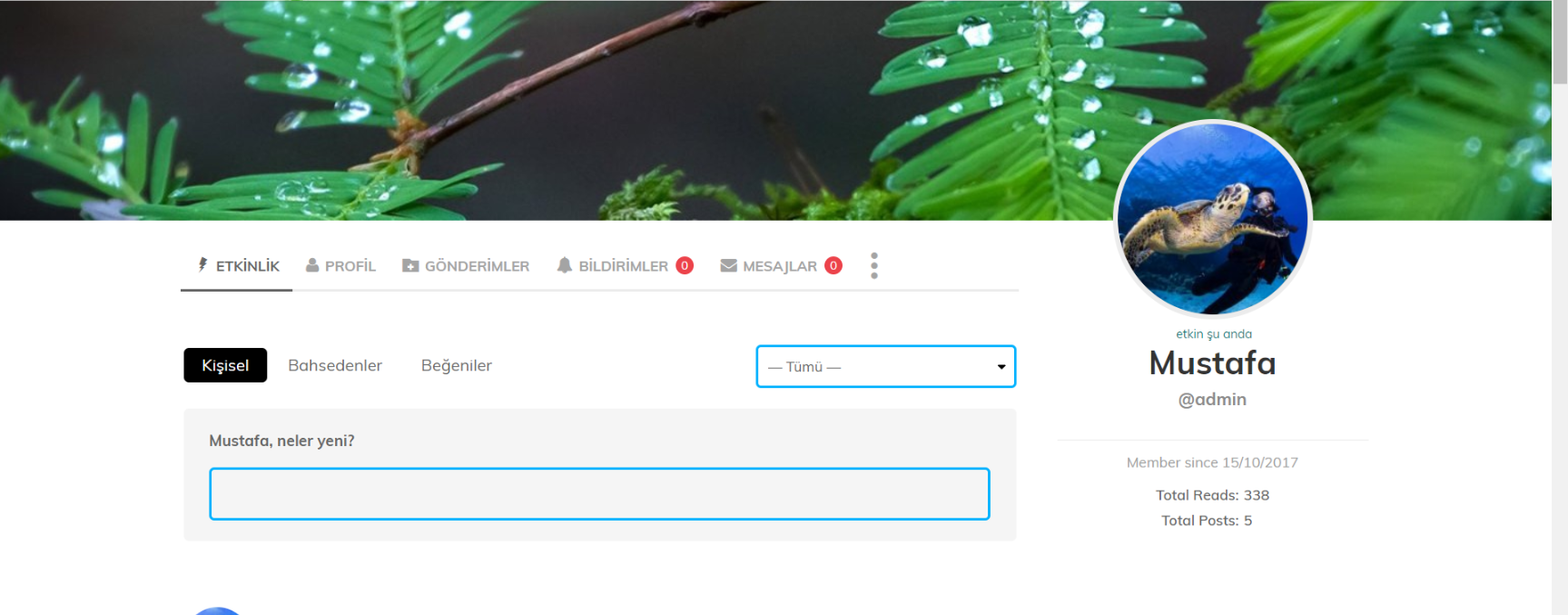
3- is it possible to change BuddyPress profile page css settings → Example → https://i.hizliresim.com/y0qNJ9.png
note: The main slice is not English. If I speak rude, I apologize.
thank you
 gsasho
Hello guys,
I try to install new update for newspaper. He was unsuccessful. I tried to restore the bup but:
Fatal error: Cannot redeclare class td_api_block in /XXX/includes/wp_booster/td_api.php on line 452
 djeep
djeepHi
I need help, after update theme, sub menu not showing
My website adress https://trutop.ru/

 mikevic80
 Curious, did you resolve this issue? We just got this error (theme has been acting up a ton since recent updates) and we are using WP Engine. We haven’t installed any new plugin recently.
 menneskedyr
 I don’t know about your installation, but on mine it seems that WPBakery Page Builder (formerly Visual Composer) started hogging more server resources than in the previous version. It worked okay and now, after the update, its queries are sometimes insane. I probably won’t look deeper into it as I’ll eventually ditch it for TD Composer as recommended.
 reidostorrents
The Top Article Like (Facebook Button) is missing
Everything was functional normally yesterday, I did not install or update any plugins. I cleaned the cache (Wp-Super Cache and Cloudflare) without successfully solving the problem.
Obs: This option is enable on theme settings.
How can i fix it?
Thanks
mikevic80Morning,
Since the second last update – and not if it is related – our photo articles (using Instagram photos) are acting up. We post about 15 images or from Instagram and for whatever reason they are being squished on top of each other. I looked at past articles and they are still loading good so we are baffled on how to correct this.
Here is an example:
http://victoriabuzz.com/2018/02/photos-from-chinese-new-year-lion-dance/
Also, since the last update, when we upload a featured image – the options are not displaying, such as cropping and scaling etc. All we see is: Regenerate Thumbnail.
 Moderner-Landwirt
 Perfekt, Danke genau das war es.
Gibt es noch eine Möglichkeit das es nicht bei jeden Update wieder überschrieben wird ?
Perfect, thank you that’s it.
Is there still a possibility that it will not be overwritten with every update again?
Grüße Josef
-
This reply was modified 8 years by
Moderner-Landwirt.
 Anthony Pernicka
I just updated to the newest version for my site http://www.iHorror.com and now all my images do not show up. Help please.
 dralim
 i updated the theme via them forest plug in but site is real slow with dash board is too slow and while adding to google adscence code to theam header its not saving ! this is the header.php file’s code: <!doctype html >
<!–[if IE 8]> <html class=”ie8″ lang=”en”> <![endif]–>
<!–[if IE 9]> <html class=”ie9″ lang=”en”> <![endif]–>
<!–[if gt IE 8]><!–> <html <?php language_attributes(); ?>> <!–<![endif]–>
<head>
<title><?php wp_title(‘|’, true, ‘right’); ?></title>
<meta charset=”<?php bloginfo( ‘charset’ );?>” />
<meta name=”viewport” content=”width=device-width, initial-scale=1.0″>
<link rel=”pingback” href=”<?php bloginfo( ‘pingback_url’ ); ?>” />
<?php
wp_head(); /** we hook up in wp_booster @see td_wp_booster_functions::hook_wp_head */
?>
</head>
<body <?php body_class() ?> itemscope=”itemscope” itemtype=”<?php echo td_global::$http_or_https?>://schema.org/WebPage”>
<?php /* scroll to top */?>
<div class=”td-scroll-up”><i class=”td-icon-menu-up”></i></div>
<?php locate_template(‘parts/menu-mobile.php’, true);?>
<?php locate_template(‘parts/search.php’, true);?>
<div id=”td-outer-wrap” class=”td-theme-wrap”>
<?php //this is closing in the footer.php file ?>
<?php
/*
* loads the header template set in Theme Panel -> Header area
* the template files are located in ../parts/header
*/
td_api_header_style::_helper_show_header();
do_action(‘td_wp_booster_after_header’); //used by unique articles
 notageek4u
Hi Guys & Gals!
Ever since I updated to 8.6 a couple of weeks ago, my site speed has drastically dropped. FoodnService.com
I used to be a 96-98, and am now a 74-76
What happened?