
 paologalli
Hi
I just downloaded the update but I don’t understand if this is the version 4 or not.
the visual composer was removed?
I didn’t see it into the plugin folder
where can I find documentation to change my home page using td composer?
thanks
 smga
smga Thanks for the quick response!
I believe that the problem appeared after the update WPBakery Visual Composer separately from the template.
If I delete the plugin, and then install it from the template (as written in the instructions here: https://forum.tagdiv.com/how-to-update-visual-composer-plugin/), it will not destroy this previously created entries and pages?
 nitrofox
I see that there is a new update but how can not download, I question whether it can be made available as soon as possible.
Thanks,
 Simion C.
 Hi,
We are aware of this issue with Woocommerce. It will get fixed in the next theme update. You can try the fix provided below and see if it is working for you.
Add this line of code in the wpeditor.php file located in the plugins directory td-composer->includes folder
– https://www.screencast.com/t/chJaSVGCWT
– https://pastebin.com/rTqTHfSa
Then the text elements should work properly
– https://www.screencast.com/t/1qaNudxkXE
Thanks
 benh_82
 Thanks for the responses.
@Bogdan B. You say it makes a few requests per day to the server for updates?
I don’t understand why we don’t ever see it update? Since activating it on the site i think we have seen it update once. We update our Instagram channel a few times per week so why doesn’t it update.
If like you said, it makes a few requests per day for updates that would be fine. But it seems more like an update per month at the moment.
If clearing caches dont help and we cant force updates i guess i have to make do with how it is.
Thanks guys,
 Nano
Nano Hi, Bogdan. In fact, you are right 🙂
When I typed this thread, I was using ‘Mobile screen’ simulation available using ‘Inspect’ under Google Chrome on my desktop.
I request TagDiv developers to work on ‘mobile’ first design for the next updates as more than 80% of traffic on most of the blogs/news sites are coming now from mobile devices.
Thanks.
benh_82Hi Guys,
Im having a little issue trying to get the instagram section to update.
I have cleared every cache i can find but still its not updating with the latest posts from instagram.
Does anyone have the same issue or have a resolution for me?
Thanks all for your time,
Ben
 Bogdan B.
 Hello,
Please read this guide especially the bold part:
https://forum.tagdiv.com/how-to-update-visual-composer-plugin/
Thanks.
 mmirandacr
Hello
When update information, Newsmag Frozen, I change FOOTER COPYRIGHT TEXT, the “Newsmag” don’t save change
http://www.screencast.com/t/wHjBZvAgi
NewsmagVersión: 3.4
WPBakery Visual Composer 5.1.1
Thanks
Mauricio Miranda
 simchris
 Woocommerce update broke several of our plugins including one from woo funnily enough, and they did major patch fix. Make sure you have the newest update to Woo with fixes. Might not be your issue but messed us up.
 Edamame Reviews
Hi Guys, Thank you for your support.
I am experiencing the same error in 2 of my most used WordPress Plugins (Wp-Statistics) and (Woocommerce).
This is the error: Fatal error: Uncaught Error: Call to undefined function get_current_screen()
This appears in the (Text with Title) block in the new TagDiv Editor and prevents anything from being edited or saved…
Currently, I have the two plugins disabled and everything works fine.
If you would like me to send you the full error message please let me know.
Could you please fix this issue in an update…
Thanks.
 slo
sloHello,
i would like to ask why i can not work with visual composer ?
I can not see it in the posts to edit, only primary one.
Also on the top i get a notice:
Hola! Would you like to receive automatic updates and unlock premium support? Please activate your copy of Visual Composer.
Let me please say that i uploaded proper plugin from the downloaded theme.
Thanks for helping.
 pmprkb
Out of the blue, the featured images are not showing on homepage. All plugins and theme were updated to latest versions.
simchris Also, if using Yoast 5.0 note there were some major bugs. Many folks are also having issues with the 5.01 update. If you have many issues with Yoast 5x you may wish to go back to 4.9x until they get to 5.03 or so — this has been common issue with Yoast 3.0, 4.0, etc. Usually takes a couple of dots to fix bugs with stuff they added.
Might not be your issue, but if you look at the Yoast SEO support forum, a lot of issues popping up including many conflicts with other plugins, themes, widgets, etc.
 northbridge
After last plugin updates, visual composer stops translate block modules!!
Please help!!
website is http://soccerplus.gr
 edlie
edlie *Update:
I edit the post, and just click update..The primary category change..
quick edit is the cause of this problem.
But still Is there any way i can change it in a quick way, i have around 600 post like this X_X
edlie Still in auto select category
It only happens in the block labelling, i wonder why..
Something broken with terms / meta? I didn’t know how the block get that value.
Maybe you guys can help me with this..
*Update: I try to delete the uncategorized category, and now it’s not showing any label*, i think the database meta/terms is the cause, here’s from one of the post with wrong post label meta_value a:1:{s:14:”td_primary_cat”;s:1:”1″;}
This is the culprit
Maybe because i change the category from quick edit, and the primary category not generated?
Is there any way i can change it in a quick way, i have around 600 post like this >,<
Thank you
Simion C. Hi,
Thank you for your appreciation of the theme. The developer team try their best to implement new features and options with every update.
Please note that the tagDiv composer is yet from being complete, or in a final stage. In coming updates more elements will be added to this builder exclusively. The elements you mention or similar ones may be added in these updates.
A two column layout is not possible with the tagDiv composer. I believe nothing will change in this regard, in the theme. This kind of layout is possible with Visual composer, but it was never recommended. Using the suggested row layouts ensures that your blocks will look and work perfectly.
The tagDiv composer is a front-end composer, a back-end view of the website structure is not possible. The editor is not meant to be a copy of Visual composer, try to think of it objectively.
You can still use Visual composer, if for the moment the tagDiv composer does not have the options you require for your website. You can make the transition at a later time, when you consider the time is right for you.
Thanks
Simion C. Hi,
Please note that the theme is to be used only with the Visual composer version provided with the theme. Updates for this plugin are provided in the theme package after they are tested.
The Visual composer addons were not tested for compatibility. They may not work properly with this theme, and they may work with others. Not all themes are the same.
You could test while having all your other plugins except Visual composer and these addons, maybe something else is the problem. If you have both the tagDiv composer and Visual composer active, deactivate the tagDiv composer.
The Visual composer version included with the theme already has the option to customize the row background, and it is working properly.
Thanks
 Muhammetok
 Someone who has the same problem :
Hi, sir! i was use yoast seo more 3 years now it working good :), but before 3 days ago from now i started facing problem every time create new post or updated post is saying to me : “Connection lost. Saving has been disabled until you’re reconnected. We’re backing up this post in your browser, just in case.”, i test all the plugin but the only one not working good is “yoast seo” please help me sir! im very tired because this problem, Thank you Very Much
Muhammetok 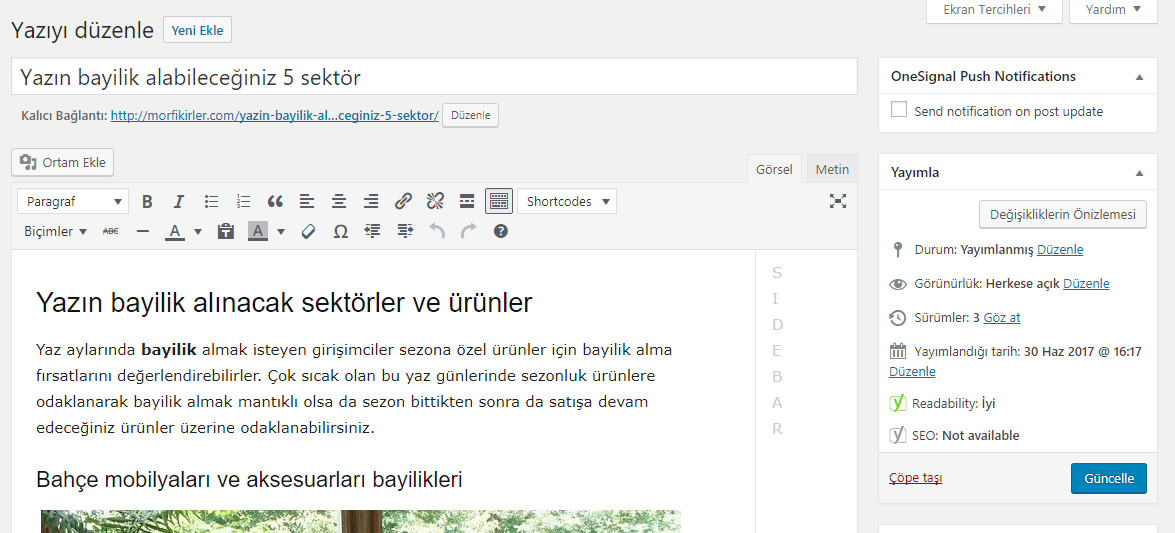
The problem is that when you write update you say. Yoast is updating when it is canceled.
-
This reply was modified 9 years by
Muhammetok.
Simion C. Hi,
I could not make any promises, but more sorting options may be added in future updates. I cannot give you an exact time, but please understand that there are many suggestions and recommendations on our list, and the developers have the hard task to decide what has priority and what gets delayed.
Thanks
 Catalin
 Hello disneylandparisinfo,
Unfortunately, I try to access your website and I cannot do this because it seems to be in maintenance mode -> https://www.screencast.com/t/ajgaO8GpA Please ensure that you have right installed the latest theme version of the theme via FTP way because this is the surest way in this regard and also, check the plugins used to be our recommended and make sure to be updated. Also, if you are using some untested plugins, please remove all of them, leave just our plugins and rule out any conflicting plugins.
Hope this helps!
Thanks for your understanding!
 barnisayz
Hi,
My site breaks. When I updated to v.8 and activate the tagdiv composer, I got blank screen of death. When I deactivate and activate visual composer, the site breaks and the design was affected. How can YOU aid me have my site design look back? Seems the css is not connected to the site.
Url: http://mogulettesafrica.org
Awaiting your response.
With regards
simchris About the only way to stop this is to put an index.php file in there with something like a message not a public page with noindex and redirect to main site. Drop that into the theme folder before FTP update. Or, use some kind of ‘maintenance’ plugin, when doing theme changes/updates. I’ve done both, and neither 🙂
