- Apitd_api_top_bar_template::update_key
- Apitd_api_top_bar_template::update
- Apitd_api_single_template::update_key
- Apitd_api_single_template::update
- Apitd_api_footer_template::update_key
- Apitd_api_footer_template::update
- Apitd_api_smart_list::update_key
- Apitd_api_smart_list::update
- Apitd_api_thumb::update_key
- Apitd_api_thumb::update
- Apitd_api_category_top_posts_style::update_key
- Apitd_api_category_top_posts_style::update
- Apitd_api_category_template::update_key
- Apitd_api_category_template::update
- Apitd_api_module::update_key
- Apitd_api_module::update
- Apitd_api_block::update_key
- Apitd_api_block::update
- Apitd_api_header_style::update_key
- Apitd_api_header_style::update
 Castle Yen
 Hello Bogdan
Thanks for your help.
I successfully update the visual composer but there still exists bugs, like the following screenshot:
The block editor did not show up any function editor for me to edit.
Please help me fix this:)
 248Shooter
 I am in the same boat as well. Please update on status when fixed.
 EN site
 Hello, I have updated the theme through wordpress and updated the VP plugin and visual composer has returned but the functionality of Visual Composer is not working, we are unable to add images, the separator text line is not working and other glitches. What do we do now? Thank you.
 now4dw
 Hi Catalin,
I want to update you and others who may experience this issue. It is caused by a conflict with the CodeCanyon User Pro ‘Private Messages’ add-on.
http://codecanyon.net/item/private-messages-for-userpro/7124805
Up until yesterday, the problem was sporadic. Images would load one time and then wouldn’t the next. As any tester knows, intermittent faults are very hard to trace. Yesterday we updated multiple plugins and the Newspaper theme. I then discovered that the issue had become worse. After a lot more testing, I am DEFINITELY certain it is a conflict between the plugin and the theme.
I have advised the developer of the plugin, Deluxe Themes, but it is possible, although unlikely, that it is your code that is causing the problem.
I will post back here when I get a response from Deluxe Themes.
DW
 dmalhotra
 Worked for me as well. Thank you so much!! After last WP update mishap, I had promised myself not to ever update WP again without checking this forum but got lazy and pressed the update button … then rushed to the forum for a fix. 🙂
Images seem to be loading as before … thanks again for the fix.
 jboepple
 Update: I found some settings in Theme Panel > Post Settings > Featured Images.
When I turn off both options (Show Featured Image and Featured Image Placeholder) it still leaves room on the page where the featured image would go, rather than pushing the text over to fill this space.
Is there anything I can do to fi that? Thanks!!
 TheIndiependent
 Hi,
Have updated to the latest version of the theme and updated the Visual Composer plugin, however the images still aren’t showing up on my site?
Any light you could shed on this matter would be much appreciated
 brasilnaitalia
 I had the same problem after updating to the latest version of wordpress.
I had also installed the new version of Newspaper, 6.7.. but nothing. I can only edit my pages manually.
So I’ll wait for an update, ok?
Let me know if there’s any news about this.
anyway, Newspaper is always the best theme ever!
 travisnw
I updated the Newspaper theme and followed your instructions for deleting the old VC and installing and activating the new version. When I look at VC in the plugins list it shows activated. Plus, It seems to be working great. But, I have a message at the top of my Dashboard asking if I want to activate my copy of VC. Do I need to do this? Or am I supposed to ignore it since I get VC through Tagdiv?
This is the message: “Hola! Would you like to receive automatic updates and unlock premium support? Please activate your copy of Visual Composer.”
 Syams
Syams I have just instal new update Newsmag and Visualcomposer. but it need to be activate.
How to fix this?

-
This reply was modified 10 years by
Syams.
 Andrei L.
 Hi
I’ve checked your site and noticed that you’re using an older version of Visual Composer plugin. Try to update the plugin at V 4.11.2 which is included in theme’s path: https://forum.tagdiv.com/newsmag-how-to-update-visual-composer-plugin/ clear all caches and test again.
Let me know how it goes.
Thanks!
 akobryan
 Hi Andrei,
Does this solution needs to have a child theme ?
Or no problem when I will update Newsmag ?
Thanks,
 Catalin
 Hello eduardo,
Please try to update the theme to the latest version (4.7.1) because this has the latest version of Visual Composer and Revolution Slider or you can check the plugins area and try to download from there the latest version of this plugin -> http://screencast.com/t/LZR6GDGm
Thank you for the message!
Catalin Hello wwth,
We know about the problem which was caused by the latest version of the WordPress (V.4.5). We noticed that the widgets from the sidebar were moved in the footer section. As a temporary fix, please check your Widgets area from your panel and please simply move the widgets from Footer 3 to the Newspaper default, like this -> http://screencast.com/t/nK2tEqMuORO
We have added this issue to our list of fixes and we will fix it in near future update.
Thank you for the message!
 Bogdan B.
 Hi,
You can update visual composer and the theme the same way you would on the online version. You can use the theme files and simply replace the old ones for a theme update and for a plugin update you can follow this topic:
https://forum.tagdiv.com/how-to-update-visual-composer-plugin/
Thank you!
 eronat
After we update our WordPress system from 4.4.2 to version 4.5 we face a major problem working under Visual Composer.
The part of in Backend Editor which is showing us the structure was not visible… And the adding popup was disappeared.
First of all our designers are working on localhost, before we put the pages to online. The update method that shows in https://forum.tagdiv.com/how-to-update-visual-composer-plugin/
is not working on localhost.
How can we update the Visual Composer under the theme Newspaper on localhost?
Thanks
Catalin Hello eduardo,
Please try to update the Visual Composer to the latest version (v. 4.11.2), clear all cache and test it again. -> https://forum.tagdiv.com/how-to-update-visual-composer-plugin/
Thank you for the message!
Andrei L. Hi
Try to update the theme at latest version available on themeforest, V 2.3.6, and also update Visual Composer plugin at V 4.11.2 which is included in theme’s path. Here you can find our update documentation: https://forum.tagdiv.com/topic/visual-composer-not-working-6/#post-106390 – https://forum.tagdiv.com/newsmag-how-to-update-visual-composer-plugin/
Thanks!
Andrei L. Hi
Try to update the theme at latest version available on themeforest, V 2.3.6, and also update Visual Composer plugin at V 4.11.2 which is included in theme’s path. Here you can find our update documentation: https://forum.tagdiv.com/topic/visual-composer-not-working-6/#post-106390 – https://forum.tagdiv.com/newsmag-how-to-update-visual-composer-plugin/
Thanks!
 eduardo
Good Morning! the visual composer screen, which gives to drag buttons, disappeared here after updated the wordpress version 4.5 to make as to the visual composer appear again ?
following print screen:
Andrei L. Hi
Try to update the theme at latest version available on themeforest, V 2.3.6, and also update Visual Composer plugin at V 4.11.2 which is included in theme’s path. Here you can find our update documentation: https://forum.tagdiv.com/topic/visual-composer-not-working-6/#post-106390 – https://forum.tagdiv.com/newsmag-how-to-update-visual-composer-plugin/
Thanks!
Catalin Hello benjoHH,
Please ensure that you have correctly installed the Visual Composer and also, make sure that you have the latest version of this. Please set your Visual Composer, according to our documentation here -> https://forum.tagdiv.com/how-to-update-visual-composer-plugin/ Also, please check your system status and try to increase all the parameters, according to our documentation here -> https://forum.tagdiv.com/system-status-parameters-guide/ Please try to disable all plugins except visual composer, clear cache and reset CDN files if you use it.
Hope this helps and let us know how it goes!
Thanks.
 CUSPMag
Hello,
I am running this site: http://cuspmagazine.com/ and I can’t access my visual composer anymore. I did the updates and nothing is working. Please help.
Andrei L. Hi
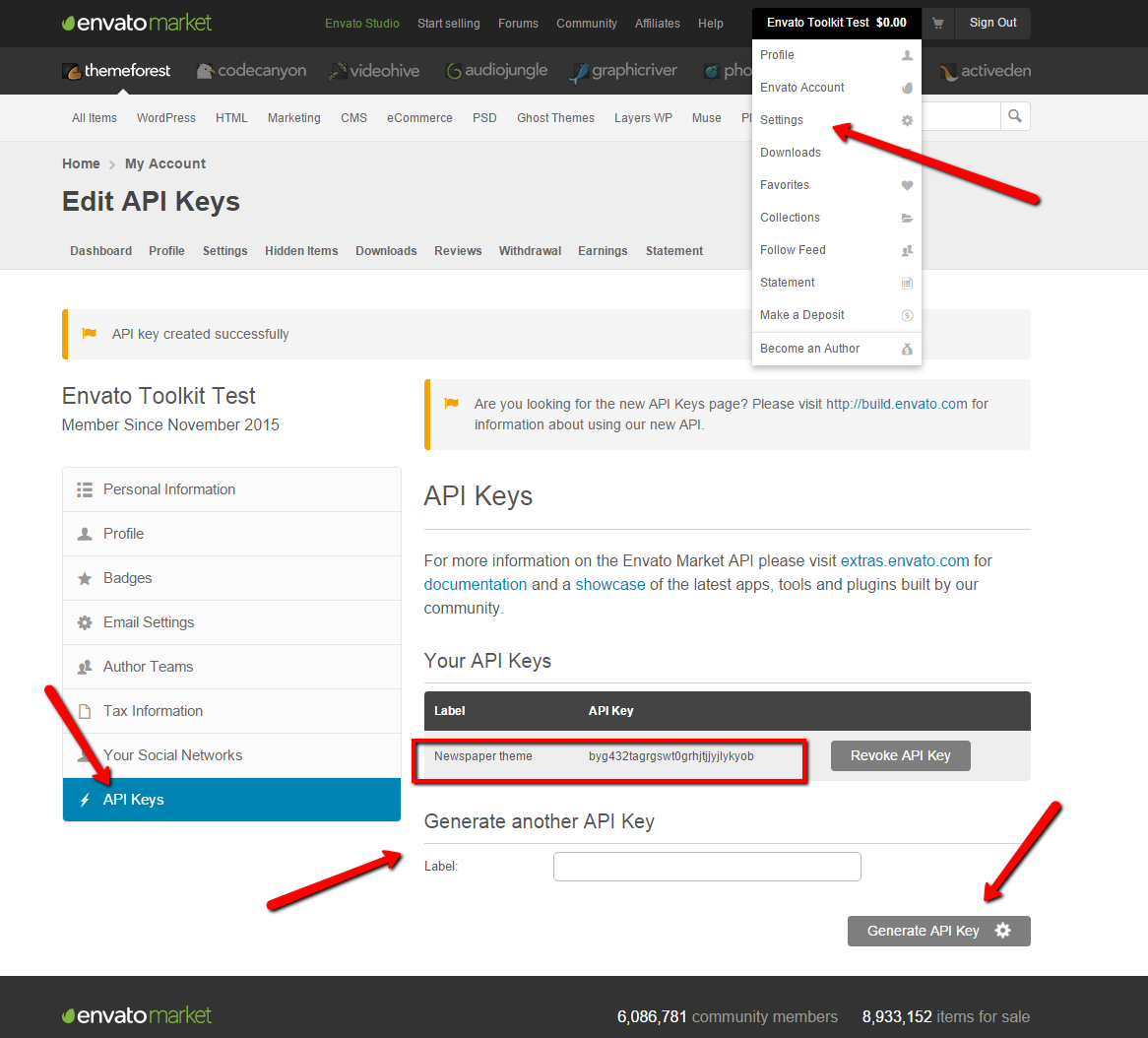
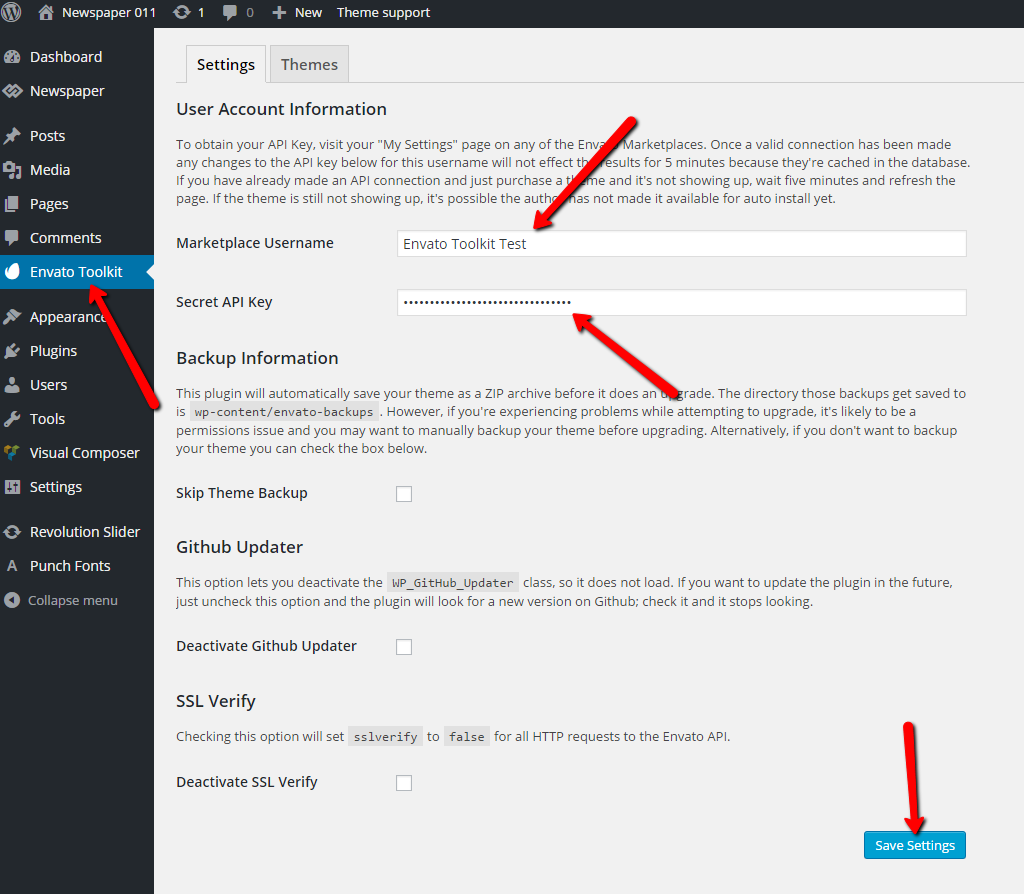
The API key can be found in your envato account following this image: https://forum.tagdiv.com/wp-content/uploads/2015/11/2015-11-18_1503.png The key must be add in plugin’s panel as it’s indicated here: https://forum.tagdiv.com/wp-content/uploads/2015/11/2015-11-18_1505.png
If you still can’t manage to connect with you themeforest account use the ftp method to make the update, or update it via wordpress. Both methods are detailed in our documentation: https://forum.tagdiv.com/how-to-update-the-theme-2/
Thanks!
 benjoHH
Hi there,
I’m having problems lately saving changes in the theme panel editor.
After pressing “Save settings” button, it gets stuck trying and nothing happens.
I already updated to 6.7.1 as well as VC to 4.11.2 after updating WP to 4.5.
Any ideas?
Thanks
Ben