- Apitd_api_top_bar_template::update_key
- Apitd_api_top_bar_template::update
- Apitd_api_single_template::update_key
- Apitd_api_single_template::update
- Apitd_api_footer_template::update_key
- Apitd_api_footer_template::update
- Apitd_api_smart_list::update_key
- Apitd_api_smart_list::update
- Apitd_api_thumb::update_key
- Apitd_api_thumb::update
- Apitd_api_category_top_posts_style::update_key
- Apitd_api_category_top_posts_style::update
- Apitd_api_category_template::update_key
- Apitd_api_category_template::update
- Apitd_api_module::update_key
- Apitd_api_module::update
- Apitd_api_block::update_key
- Apitd_api_block::update
- Apitd_api_header_style::update_key
- Apitd_api_header_style::update
 rustypig54
Hello,
Christopher had mentioned hes working on integrating buy sell ads pro into the theme. I just wanted to know if there was any time line on when we might see it and if it will be for newspaper or just newsmag? It would be nice to have a rough idea as if its still a whiles away I may need to hire a developer to make a mode on my theme for it to work. Any update is appreciated. Thanks 🙂
 Lukas
Lukas Hi Lucian,
Thanks for the update. Can’t wait for the fix! 🙂
Lukas
 Lucian
 Hi,
The ajax system works based on js so check your console for js errors and also check this without any plugin active and also make sure you empty cache and purge files.
I’m not sure to which grid columns shortcodes you refer too so please provide more details about this.
The list style was modified so you can use this arrow list format: http://screencast.com/t/MJVb7iNwl
See this post: https://forum.tagdiv.com/topic/bullet/
I will add this on our feature requests list and we will consider it for future updates, however we have almost 200 feature requests and we have to pick very carefully what we implement, if more people will request this we will consider it and do it.
You can also add it like this: http://screencast.com/t/UziMcrzL
Result: http://screencast.com/t/BqCMstIi
Thanks for your suggestion and for your message!
-
This reply was modified 11 years by Lucian.
Lucian Hi,
I have checked your site again and did noticed that even if the ‘Droid Serif’ font family is set the ‘Times New Roman’ is rendered: http://screencast.com/t/qOraBNesH
I’ve also checked your page source and noticed that ‘Droid Sans’ is loaded: http://screencast.com/t/lsyHvLY3a
Please make sure that you disable html/css/js minify option as I’ve noticed you use it compressed and also disable plugins/ empty cache and purge files if you use CDN.
This should not happens if you use the latest theme version (1.4) as I have also checked this and haven’t found any issues with this, the fonts are loaded and rendered fine: http://screencast.com/t/1dSQ61HRb
If nothing solves this I suggest you re-upload your theme files via FTP using this guide: https://forum.tagdiv.com/how-to-update-theme/ and make a backup of your current theme installation in case something goes wrong.
Thanks
 Marius
 Hi,
Great!, is already included in the next update.
Thanks!
 Alin [tagDiv]
 Hi,
I checked your site and I found JavaScript errors in console: http://screencast.com/t/PJbZgOA0 which means that a plugin’s script is conflicting with theme’s js and causes this.
Please make sure that you use this right using this guide: https://forum.tagdiv.com/video-playlist-newsmag/
and check this without any plugins active, empty all caches/purge files if you use CDN host services then check again (leave just the Visual Composer plugin active).
I have also tested this with last theme update(1.4) and found no issues with it: http://screencast.com/t/zsDoB2yfJD
Thanks!
 Plexus7
 And please just one thing you may plan to add to next updates – an option to put small size text “advertisement” around ads blocks plus option to translate this word in different languages in your translation section in theme panel. Most sites put such text to be quite correct to their visitors.
-
This reply was modified 11 years by
Plexus7.
 nikkidale
 Hell Alin,
Thanks for the suggestions. I’ve updated my theme to 4.6.1 and tried disabling all of the plugins except for Visual Composer, but the font still doesn’t load in Firefox. Do you have any other suggestions?
Thank you,
Nikki
 rparlier
 I’m using 4.6.1 version of the theme, but the tagDiv social counter plugin says version 2.1. There isn’t an available update for it either.
The only counter I am having trouble with is the Twitter, which now says 0 followers after I retyped the user name into the configuration.
Website: trojansnews.com
 simchris
 Sorry….. trying to setup a WooCommerce thing at same time (and using Newsmag!), and bouncing from one thing to another.
I will try to do this today and update ticket with results 🙂
 PiqueT
 Hello
Thanks for the reply.
I think I realized the problem: I am using the 4.3 version of the theme. I did not realize that now in V 4.6.1.
Sorry.
The best way to do the update is to replace all the theme files?
Thanks!
 newsthrottle
 To confirm, the latest in the bundled folder for Newspaper Theme for Visual Composer is 4.3.5? This is the tested and certified correct? We still receive the update message for VC within WP dashboard FYI. The latest VC has numerous updates, will this be applied and tested soon to Newspaper Theme? This was the original topic and questions from all. Thank you for the support
 Ecofame
Hi!
The youtube video playlist on the homepage is not working after I updated the them to the latest version. I tried to fix it but it is not easy.
I wonder why it is not working and I hope you can help me to solve this problem.
website: http://www.ecofame.com
Best Regards
Ecofame
Alin [tagDiv] Hi,
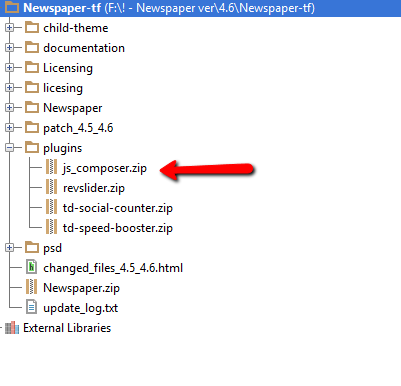
Please make sure you are uploading the right .zip file because the .zip file you get is this: http://screencast.com/t/Q0SZ8ZUcTd which contains all theme files like ../plugins/a patch which you use to update from the previous version/ documentation/ licensing/ child theme… so this is not the right theme file you need to upload, this one is: http://screencast.com/t/OiXSsFHEj0
If you still have this issue, edit php.ini and search for the upload_max_filesize http://screencast.com/t/ZEunYQKA and make sure you save the file afterwards.
If you don’t have access to the php.ini file please contact the host administrator and let him know about this issue.
Thanks!
Lucian Hi,
I have tested this using the latest theme version (4.6.1) and haven’t found any issues of this type so please make sure that you also download and use the latest theme version and also check this without any plugins active, empty cache, purge files if you use CDN and try this again. If you don’t use the latest version please update it and use this guide and the FTP method to update the theme: https://forum.tagdiv.com/how-to-update-the-theme/
Please let me know how it goes and also provide your site’s URL so I can inspect this and also let me know what version of IE have you use.
Thanks
Alin [tagDiv] Hi,
I checked your site and found that your theme is not updated. Please update the theme to the latest version(4.6.1) following this instructions: https://forum.tagdiv.com/how-to-update-the-theme/
After that disable all plugins(leave only Visual Composer active) and see if the issue persist.
This should solve the issue because you also have some errors in console: http://screencast.com/t/WtqnlxlbjT
If you still have issue with this please provide more details about the steps you have made to loads custom fonts.
Thanks!
Lucian Hi,
You can see here that if you disable the post view count from theme panel the view counter shouldn’t update anymore: http://screencast.com/t/AQUXXagm3M
Please make sure you have this option disabled: http://screencast.com/t/AQUXXagm3M then check again for this an let me know.
I have also tested this using the latest theme version and disabling that option stops the custom filed counter to update.
Please let me know and also test this without any plugins active, empty cache and purge files if you use CDN.
Thanks
Lucian hi,
Thee theme doesn’t have an option for that unfortunately and you will need custom modifications for that or you can also try to find and use a plugin for that or get someone to help you with this as unfortunately we cannot offer custom work because we work hard on the development, updates, fixes and support. You can always get a freelancer from sites like: http://studio.envato.com/ if you don’t know how to do it yourself.
Sorry for the inconvenience!
Thanks for the message!
Lucian Hi,
Please make sure that you update and use the latest theme version (4.6.1) and also update your social counter plugin to version 2.7 from the /plugins folder then check again without any other plugins active. I have also tested this using your fb user and worked fine:
configuration: http://screencast.com/t/4Mw4g9xdiE
result: http://screencast.com/t/vTtif01MfyDz
If you still have issues after this make sure that you also check this without any plugins active then check again and also provide your site’s URL and more details about this.
Thanks
Lucian Hi,
Not sure about this! Please also try this without any plugins active and also make sure you empty cache and purge files if you use CDN host service.
I have also tested this using the latest theme version and haven’t had any issue of this type so you shouldn’t experience this also.
Please make sure that you use the latest theme version which is 1.4. If you are not please download and update it to the latest version from themeforest: http://themeforest.net/downloads and use this guide and the FTP method to update your theme: https://forum.tagdiv.com/how-to-update-theme/
Hope this helps!
Thanks
Lucian Hi,
Thanks for your suggestion! We will consider it for future updates. I will also add this on our feature requests list, however we have almost 200 feature requests and we have to pick very carefully what we implement, if more people will request this we will consider it and do it.
Thanks for your suggestion and for your message!
Lucian Hi,
I have checked your facebook sharer and noticed that it looks good now: http://screencast.com/t/fKHuEt2M
The title/description/image that fb uses are set using this og: property meta tags: http://screencast.com/t/Vdva9Hd5td79 which you can set using the WordPress SEO by Yoast plugin which I have noticed you also use. Please note though that facebook isn’t fetching you new meta info right away so you need to wait a while the new info are updated or you can use this fb debugger toll: https://developers.facebook.com/tools/debug/ to see exactly how fb pulls your posts info and manually fetch new scrap info: http://screencast.com/t/J9uL9VYO
Hope this helps!
Thanks
simchris Yes, you don’t need the update for anything yet … the updated version of Visual Composer has bugs and not fully stable.
A new version tested to work with the theme will be included with next theme update.
As noted in second post on this thread, current version tested compatible with the theme is 4.3.5.
The bundled version is only updated when the theme is updated. You cannot update it separately, nor would you want to as it might break the theme custom modules 🙂
SEE STICKY TOPIC TOP OF FORUM FRONT PAGE:
https://forum.tagdiv.com/topic/how-to-update-visual-composer-2/
The Visual Composer plugin that comes with the theme is licensed to the theme, the license specifies that only we can provide the updates and you don’t have to buy it or register it. We provide updates on a regular basis, after we test the plugin for theme compatibility the plugin is included in the latest theme update, inside the Plugins folder:
https://forum.tagdiv.com/wp-content/uploads/2015/01/visualc_newspaper.png
Here is guide on how to update the plugin – https://forum.tagdiv.com/update-the-visual-composer-plugin-wpbakery/
Emil G.
 kramllahu
 Hey Lucian,
Issue still occuring with IE version 11.0.9600.17498 (update version 11.0.15). After further investigation, the issue is the background color is not applying and the menu becomes transparent except for the nav titles plus the search icon. The menu background fades in with the site background and remains the tiled background image (the fade in is something i would like to disable as well).
The issues only occur with menu-style-1 in IE but issue is not present when scrolling down the page as seen below:
Transparent Menu with Search icon floating
http://www.screencast.com/t/ndksJVpaEk2
Issue Resolved when menu snaps to top(when td-affix applies)
http://www.screencast.com/t/aQ2svfQibpa
 Anonymous
 When can we update to v4.4 downloaded the theme again an there is no update to the js_composer