- Apitd_api_top_bar_template::update_key
- Apitd_api_top_bar_template::update
- Apitd_api_single_template::update_key
- Apitd_api_single_template::update
- Apitd_api_footer_template::update_key
- Apitd_api_footer_template::update
- Apitd_api_smart_list::update_key
- Apitd_api_smart_list::update
- Apitd_api_thumb::update_key
- Apitd_api_thumb::update
- Apitd_api_category_top_posts_style::update_key
- Apitd_api_category_top_posts_style::update
- Apitd_api_category_template::update_key
- Apitd_api_category_template::update
- Apitd_api_module::update_key
- Apitd_api_module::update
- Apitd_api_block::update_key
- Apitd_api_block::update
- Apitd_api_header_style::update_key
- Apitd_api_header_style::update
 GAMax
GAMax Unfortunately, this update caused the issue and I have had the tagdiv standard pack plugin activated. Also, I had added the plugin that was helping me do that but now It isn’t allowed due to the new update. I’m referring to the top header bar login (which is directly related to the templates.
 pinnaclecompass
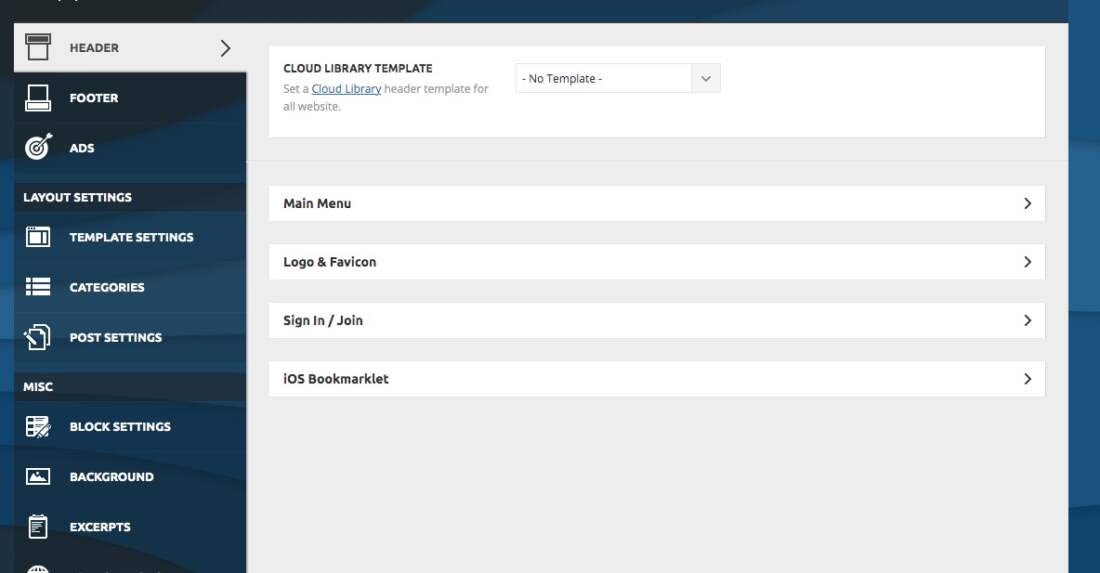
 Updated theme today. Header and footer options in theme panel disappeared. We now have to recreate our old basic headers that we had to find and download from cloud library. Full width headers don’t look the same as before, even if we choose the ‘basic’ header styles that were there for last 5 years.
We used multipurpose headers with buttons on one of our sites. That option is gone as well.
We are really thinking on restoring the whole site. This is way too much work to rebuild the headers and footers from scratch, especially when alignment is off (ex. ad and main menu is not centered, even though that’s what the downloaded template showed. There isn’t no option for global settings (ex. social links, footer copyright text, etc…) like in the past versions.
This might be fine for new sites where you can just install a demo, but on existing sites this is way too much work.
-
This reply was modified 5 years by
pinnaclecompass.
 luqueriasas
Hello there, with the last update the header style config has disappeared from the admin dashboard. I can’t change anything related to this, and the logo has disappeared too. The website is https://www.brufol.org
https://www.brufol.org/wp-content/uploads/2021/06/Captura-de-pantalla-2021-06-18-a-las-19.25.20.jpg
I have downgrade and upgrade and deactivate all plugins. Nothing worked.
Thanks in advance,
Lucas
 cheryldimof
Hi, I have a few posts where I need to toggle AMP off. I use the mobile theme for AMP (and have Newspaper 11 installed and the mobile theme updated to its current version). The AMP plugin (yes, this is the one by Automattic) usually inserts a toggle in screen options for the individual post to toggle AMP on or off for the single post. This is missing now. I switched to a base theme and it reappeared in post settings, so I am sure this is a theme issue. How can I get it back?
I do note that there is a toggle to switch the mobile theme itself off or on for the single post but this doesn’t disable AMP for the post.
Thanks
Cheryl
 dmbo2023
 or this about updates theme? my newspaper is version 9.8, and i don’t see button updates version 10
 Alex
Alex Hi @Anamaria,
Thanks for the reply. I went back to version 10.4 because I have no problems with the old version. When version 11 is stable and bug free then I will update newspaper.
Thanks.
 Bettina
 Hello!
First of all, please make sure you have a backup done and then you can update the theme and the TagDiv plugins also.
Please take a look for this advice before updating: https://forum.tagdiv.com/topic/action-required-please-read-how-to-update-to-the-newspaper-theme-v-10/
I recommend you to make a backup and update plugins and the theme via file transfer, so that you don’t face any error: https://forum.tagdiv.com/how-to-update-the-theme-2/
Let me know about your results after update the theme and plugins!
Thank you!
Bettina Hello!
First of all, please make sure you have a backup done and then you can update the theme and the TagDiv plugins also.
Please take a look for this advice before updating: https://forum.tagdiv.com/topic/action-required-please-read-how-to-update-to-the-newspaper-theme-v-10/
I recommend you to make a backup and update plugins and the theme via file transfer, so that you don’t face any error: https://forum.tagdiv.com/how-to-update-the-theme-2/
Let me know about your results after update!
Thank you!
Bettina Hello!
First of all, please make sure you have a backup done and then you can update the theme and the TagDiv plugins also.
Please take a look for this advice before updating: https://forum.tagdiv.com/topic/action-required-please-read-how-to-update-to-the-newspaper-theme-v-10/
I recommend you to make a backup and update plugins and the theme via file transfer, so that you don’t face any error: https://forum.tagdiv.com/how-to-update-the-theme-2/
Let me know about your results after the update!
Thank you!
Bettina Hello!
I’m glad that you have such great results.
Our developers are working a lot to improve the page speed in every update and also to add more settings and more possibilities to change the design or the structure of the websites based on the client’s requirements.
Thank you so much for your feedback and kind words!
Have a nice day!
Bettina Hello!
First of all, please make sure you have a backup done and then you can update the theme and the TagDiv plugins also.
If the problem is still there, then please send an email at contact@tagdiv.com and provide wp-admin, so we can investigate more into this issue. Also paste a link to this topic so we can easily identify you.
Thank you!
 leejaehak
 Until the update, when applying a boxed layout and ‘fixed’ the top header menu, the layout didn’t go out of place.
However, if the top header menu is ‘fixed’ after the update, the layout is wrong.
I hope you understand that I am not good at English because I am Korean. Thank you for your interest.
-
This reply was modified 5 years by
leejaehak.
 embarcado
Team TagDiv, have updated my webside (www.embarcado.net) to latest AMP version 2.1.2 but once did started to get this message:
Notice: amp_has_paired_endpoint was called incorrectly. Function called while AMP is disabled via ‘amp_is_enabled’ filter. The service ID “paired_routing” is not recognized and cannot be retrieved. Please see Debugging in WordPress for more information. (This message was added in version 2.1.1.) in /home2/adepton/public_html/wp-includes/functions.php on line 5171
Which forced me to deactivate AMP. How can I fix it? Thanks for reverting.
 Anamaria
 Hello,
If I understand correctly, this problem persists with the last theme update(Newspaper 11).
If it is so, please make a fresh install on the staging of WordPress and Newspaper 11 and check again.
Thank you!
 fashioninsiders
Hi,
We have updated our staging site to V11 and have what seems to be an additional empty row inserted which is causing css issues, don’t seem to have to option to remove through page editing.
Thanks
 cyrus
cyrusHello,
We have 5 licenses to Newspaper 9 Themes. Our main site, theaiorganization.com is on old newspaper9 version. Our speed for homepage has never been faster than 2.4 seconds, and 1.6 for post pages, with usual 3.0 seconds on main page which is not satisfacory. Each technician we consulted with stated it is the coding inside Newspaper9.
1. When we updated to the new WordPress 5.72, it broke the Tagdiv Composer, we had to uninstall, reverse to previous wordpress version, and reset the entire website for theme to work with Tagdiv Composer. Is it because Tagdiv has bugs related to new wordpress or not yet compatible? Also, how should we get to upgrade to Newspaper 10 and to 11?
2. Tag Div AMP app for faster speed, after installing the AMP app, the Tagdiv Composer also has issues. Why?
3. What is the general speed Newspaper 9 is supposed to achieve for load in? Our testing process was with pingtool and mostly with Gmetrix speed test. We see other themes or your competitors, achieve 1.0 seconds with more data than we have, compapered to the Newspaper 9 3-4 seconds.
Please provide solutions and direct answers to each question and issue with pictures, and directions so we can obtain around 1 second. We use Cloudflare to ensure good security and fast service, so the Theme here is the issue. We also have Plugin for Cache.
Thank you,
Jill O’Connor
Staff,
The AI Organization
Anamaria Hello,
If you follow the steps which are presented in this tutorial here: https://tagdiv.com/how-to-increase-page-loading-speed/ you’ll be able to increase the speed of your website.
Also, to increase the page speed you can check these similar topics for more solutions:
– https://forum.tagdiv.com/topic/optimize-script-to-improve-site-speed/
– https://forum.tagdiv.com/topic/a-few-tips-for-newspaper-x-speed-high-cpu-usage-issues/
– https://tagdiv.com/how-to-increase-page-loading-speed/
– https://developers.google.com/speed/docs/insights/v5/about
– https://forum.tagdiv.com/topic/score-100100-pagespeed-with-newspaper-wordpress-theme/
– https://forum.tagdiv.com/topic/newspaper-theme-speedify-your-website/
Please note that page speed is not covered by the support team: https://forum.tagdiv.com/newspaper-theme-support/
Please give it a try and follow the steps which I presented above about page speed.
Also, check our guide from here: https://forum.tagdiv.com/how-to-make-the-site-faster/
Please make sure to use our newest tool called tagDiv CSS Analyzer which comes in handy to resolve some of your issues. Take a look at the video guide here: https://www.youtube.com/watch?v=tnkVapqhIHc
“This custom tool performs an automatic test to find missing CSS rules applied by user interaction. Moreover, you can manually interact with a chosen section/component from the page while the tool records all the involved CSS. It will generate the final CSS file for this page and also will split the rules in Critical CSS to be loaded in the website’s header.” ( https://tagdiv.com/whats-new-in-the-newspaper-theme-10-4-update/ )
We tested our tool on our demos, and we have such great results!
Take a look at this topic because it could help you: https://forum.tagdiv.com/topic/css-analyzer-step-by-step-and-doubts/
Let me know the results!
Thank you!
 trisquelmedia
Hi:
Since i updating to newsppaper 11 header y footer are in content and this code has been added
.td-boxed-layout #td-outer-wrap {
max-width: 1164px;
margin: 0 auto;
}
Before the update header and footer are full width, now are in this container size, how i solve this?
 Thomas
Hello
Till the last update, afer activate Shop plugin, WooCommerce Side Cart Premium plugin doesn’t work anymore.
It is all empty.
So we deactivate it for use your My Account and Cart buttons in the header.
Question is simple : how we could add those 2 elements in the header (especially the dynamic Cart with info under it)?
For now we have 2 differents header:
https://www.virtualmagie.com/
https://www.virtualmagie.com/boutique/
 Calin
Calin Hi,
Yes, there was a problem with tagDiv Composer, but this is now fixed.
Also if you want to try the updated, you can do it on staging or subdomain and if everything is ok, then you can update it on live website.
Thank you for your understanding!
 TLC815
 Update wiped all of my settings in the Theme Panel, most critically all of my custom CSS.
TLC815 Thank you for responding regarding how to turn off automatic updates. However, my most critical question was not addressed.
Why would the update to version 11 wipe all of my settings in the Theme Panel (especially my custom CSS)?
On your What’s New in v 11 page, it states “The performance optimizer tagDiv CSS Analyzer Tool removes all the unnecessary CSS, generates the Critical CSS for the above the fold, and moves the non-critical CSS to the bottom of the page.”
Is that why all of my code under Custom CSS in the Theme Panel was removed? The custom CSS that I entered was very necessary and now has to all be redone.
What can be done to ensure that after I redo all of my custom CSS in the Theme Panel (and all of the other settings for that matter) that it won’t be removed by another update again?
 bookman53
I updated my website to Newspaper 11 today. Every page that I have tested has had greatly improved page speed CLS scores. I already had fast hosting, a cdn, and Wp Rocket running, but updating the theme made a massive difference on desktop and mobile.

This is a page with almost 2,600 words, 4 large images, and AdSense ads running.
I’ve gotten similar results on every page I’ve tested thus far.
I’m very well pleased with the results.
Good job, TagDiv!
 serthant
The wordpress and theme updates are done.And also “show more” button isn’t working.
 EUCMH
EUCMHCan someone give me the css command to have all the texts (posts) aligned ‘justify’ (in additional screen or CSS file)
I also need to know where to change / modify the font for the posts in the css file
Thank you