
 rajkumartrivedi
Getting the following error and this is the primary reason which the home page is loading very slowly.
[08-Jan-2021 17:36:52 UTC] PHP Fatal error: Cannot redeclare tdc_on_remove_core_updates() (previously declared in /srv/htdocs/wp-content/plugins/td-composer/includes/tdc_main.php:353) in /srv/htdocs/wp-content/plugins/td-composer/includes/tdc_main.php on line 352
Website URL: https://blog.toothache.care/
What should be done?
I have updated the plugins and it is still the same issue
 Calin
Calin Hi,
If was an update from IonMag it is possible toe be some files that are miss work set different.
Please let me know the results!
Have a nice weekend !
 cruising-sea
Hi
The WP Backery doesn’t let me update it. How come?https://www.screencast.com/t/pNQAU4vV
 Bettina
 Hello!
Our team is currently working for this issue and a solution will appear in the future updates.
Sorry for the inconvenience!
 mi0o
mi0oHello,
after update theme I got this error:
PHP Fatal error: Uncaught Error: Class ‘td_global’ not found in C:\inetpub\wwwroot\intranet\wp-content\themes\Newspaper\vc_templates\vc_row.php:3
Stack trace:
#0 C:\inetpub\wwwroot\intranet\wp-content\plugins\js_composer\include\classes\shortcodes\core\class-wpbakeryshortcode.php(271): require()
#1 C:\inetpub\wwwroot\intranet\wp-content\plugins\js_composer\include\classes\shortcodes\vc-row.php(40): WPBakeryShortCode->loadTemplate(Array, ‘[vc_column][td_…’)
#2 C:\inetpub\wwwroot\intranet\wp-content\plugins\js_composer\include\classes\shortcodes\core\class-wpbakeryshortcode.php(366): WPBakeryShortCode_Vc_Row->content(Array, ‘[vc_column][td_…’)
#3 C:\inetpub\wwwroot\intranet\wp-content\plugins\js_composer\include\helpers\helpers.php(1317): WPBakeryShortCode->output(”, ‘[vc_column][td_…’)
#4 C:\inetpub\wwwroot\intranet\wp-includes\shortcodes.php(343): vc_do_shortcode(”, ‘[vc_column][td_…’, ‘vc_row’)
#5 [internal function]: do_shortcode_tag(Array)
#6 C:\inetpub\wwwroot\intranet\wp-includes\shortcodes.php(218): preg_repla in C:\inetpub\wwwroot\intranet\wp-content\themes\Newspaper\vc_templates\vc_row.php on line 3
but when I check location : Newspaper\includes\wp-booster\ there is tag-div_global.php not tg_global.php
Any ideas?
Thanks
 Anamaria
 Hello,
When you create or edit a post or a page you can set a featured image => https://www.screencast.com/t/ymIXqkWcRH and also you can write a description right there => https://www.screencast.com/t/ffjoaFPx and set like the featured image after that you need to publish or update.
To share a post with featured image, please follow this guide: https://forum.tagdiv.com/facebook-share/
Hope this helps you!
Thank you!
 gcamara
 I meant remove mode-less.js and text.js errors following your advice, seeking for a plugin conflict and enable and disable td plugins and rising memory.
Theme is up to date because it was a migration (coming from IonMag) and it was tested in a vagrant machine without any of these new problems.
Child theme package was extracted from last update.
I must to recheck everything if nginx pagespeed module could be messing in these issues. I’ll update here as soon as have some time to test it.
Thank you Calin and have a nice weekend.
Calin Hi,
Please notice that we do not recommend to edit or remove the code from the theme or theme plugins, this can caused problems.
Also we recommend to keep the theme updated, in this way there should not be problems.
Also before to make the theme update on live website we recommend to test it on sub-domain, localhost… and f there are some problems, let us know.
Do you updated the child theme with the one from package 10? because this has a different structure and the theme files has a different path https://forum.tagdiv.com/the-child-theme-support-tutorial/
Also let me know if there are other problems that you are facing and I ill try to help!
Thank you!
 pyro2212
 update
-
This reply was modified 5 years by
pyro2212.
 vivekvag__
 Yes, bring this update as soon as possible
Anamaria Hello,
Please check if you use the last WordPress 5.6 version with a last theme version Newspaper 10.3.9.1 and check to see if the problem persists.
If you have the last version a the theme and WordPress, you will have to first start looking for a plugin conflict. Please deactivate ALL plugins except tagDiv ones, also if you are using child theme or cache plugin, deactivate them, clear all cache and try again.
Also, you can try and remove and re-install the tagDiv Composer plugin.
If it is an old theme version, before to update, make a full backup to all files and the database, in case something goes wrong. => https://forum.tagdiv.com/how-to-update-the-theme-2/
What I suggest is to try this on staging or sub-domain to not affect the live website and after the update is stabilized you can change it on the live website.
Let me know about your results!
Thank you!
vivekvag__ Kindly, bring this option with future updates…
 Vlad S
 Hello !
My advice is to make a full backup of your website, start updating the wordpress first, then update Newspaper Theme but update it manually as you can see here: https://forum.tagdiv.com/how-to-update-the-theme-2/
Also don’t forget to update and activate the plugins.
Thank you !
Vlad S Hello !
My advice is to make a full backup of your website, start updating the wordpress first, then update Newspaper Theme but update it manually as you can see here: https://forum.tagdiv.com/how-to-update-the-theme-2/
Also don’t forget to update and activate the plugins.
Thank you !
 STARSonTV
 Hi there,
i also have a problem with td composer because i can’t save or delete anything there. I’m trying to edit templates, but it doesn’t work. I assume that this has been the case since the last theme update. There are no conflicts with plugins. I’ve also uninstalled and reinstalled. It did not work. I also deleted the browser cache. That didn’t work either. I’ve sent you an email with all the information you need to help me. Thanks a lot for this.
Many Greetings,
Sebastian
 codexxx
 Hello Vlad,
Thank you. That info you are requesting has now been sent to contact@tagdiv.com.
Please investigate and reply back the update to that email.
Thanks
Anamaria Hello,
Indeed this is a bug at the moment in the theme. Our developers are working on it. As soon as we have an update on it we will let you know.
We are sorry for the inconvenience!
Thank you!
 ned4spd8874
I know I’ve been slacking, so please go easy on me. My WP version is 4.9.16 and Newspaper version is 8.1. Any suggestions for the best way to get current? Should I update newspaper first then WP, vice versa, or does it matter? Also, as far as updating newspaper, can I just do the normal drag and drop the new files or because I’m so far off, I need to do it a different way?
Thanks in advance for the help!
 LarsHindsley
I have two licensed installs.
DangerMansLair.com
DangerManMedia.com
For months I’ve had a problem I’ve just dealt with. But now there are more. I’ll start with the initial problem.
Upon logging in to EITHER SITE’s WordPress dashboard running Newspaper 9.2.2 all the TAGDIV related plug-ins shut off creating page display errors with broken code. Subsequently, anytime I log-in, I immediately report to plug-ins, turn them on and life is normal again until the next log-in.
Next is about two weeks ago, a new error displays on DangerMansLair.com WordPress dashboard header below the main menu:
Deprecated: has_cap was called with an argument that is deprecated since version 2.0.0! Usage of user levels is deprecated. Use capabilities instead. in /home/—-MY ACCOUNT NAME—/public_html/wp-includes/functions.php on line 5143
Last is, over the past few months, now I’m getting AMP page invalid errors when submitting posts for indexing with Google Search Console.
Over the months, I’ve routinely searched for solutions but have always been confounded and stomached the problem. It’s now reached a point I need help. Things are breaking and I’ve not installed any whacky plug-ins, I have not loaded up my sites with huge amounts of plug-ins, in fact, other than updates, I have not installed any new plug-ins in perhaps over a year.
EDIT: Also, I’ve turned off ALL plug-ins, one at a time on both sites until every single one was off, (except for the required TAGDIV plug-ins). The site still had the same issues.
I’m not a heavy-duty admin. I can pull off basic things such as install and configurations. But I’m more or less a small business owner who knows enough to get himself in trouble. I spoke to my hosting provider who has a few solid WordPress folks on staff and they pointed me back here as the obvious source but please be careful not to speak over-my-head. 🙂
If anyone can provide answers, direction or individual solutions for me to apply, I’m eager. Thanks.
 Ranpajac
I still have a problem with my theme saving new updates.
 cpsharp
Hi guys,
I have the single post template set up to show 5 posts in a row as you scroll down – infinity scroll setting. When I do scroll, the new story loads but it doesn’t use a new URL like it should which I need for Google Analytics tracking/sharing purposes. Can you help? Here is an example – http://sgwdbusiness2.com/256today/northwest-alabama-company-tiffin-motorhomes-purchased-by-thor-industries-for-300m/
 spurt
spurtI’ve set background image in Themepanel >> Background, and added link under Ads >> Background click Ad. Still background image does not appear. What’s wrong here? Earlier this was working, but I think it disappeared after Newspaper update.
Calin Hi,
This situation appear if you make update to last version of WordPress 5.6, then the button for composer is remove from Gutenberg, but the pages still can be edited from frontend or from pages -> https://i.imgur.com/7LgjYE1.png
Also if you set the classic editor then the button will be set back.
Thank you!
Vlad S Hello !
This is happening because the version of your theme is not the updated one: 10.3.9.1, We suggest you to create a backup and update your theme. Our suggestion is to do this on a test environment first if possible.
Thank you !
 aaronqur
A few days ago my site changed for the worse, only showing empty columns when I go to edit in the TDComposer. Here’s what I see when I edit any page:
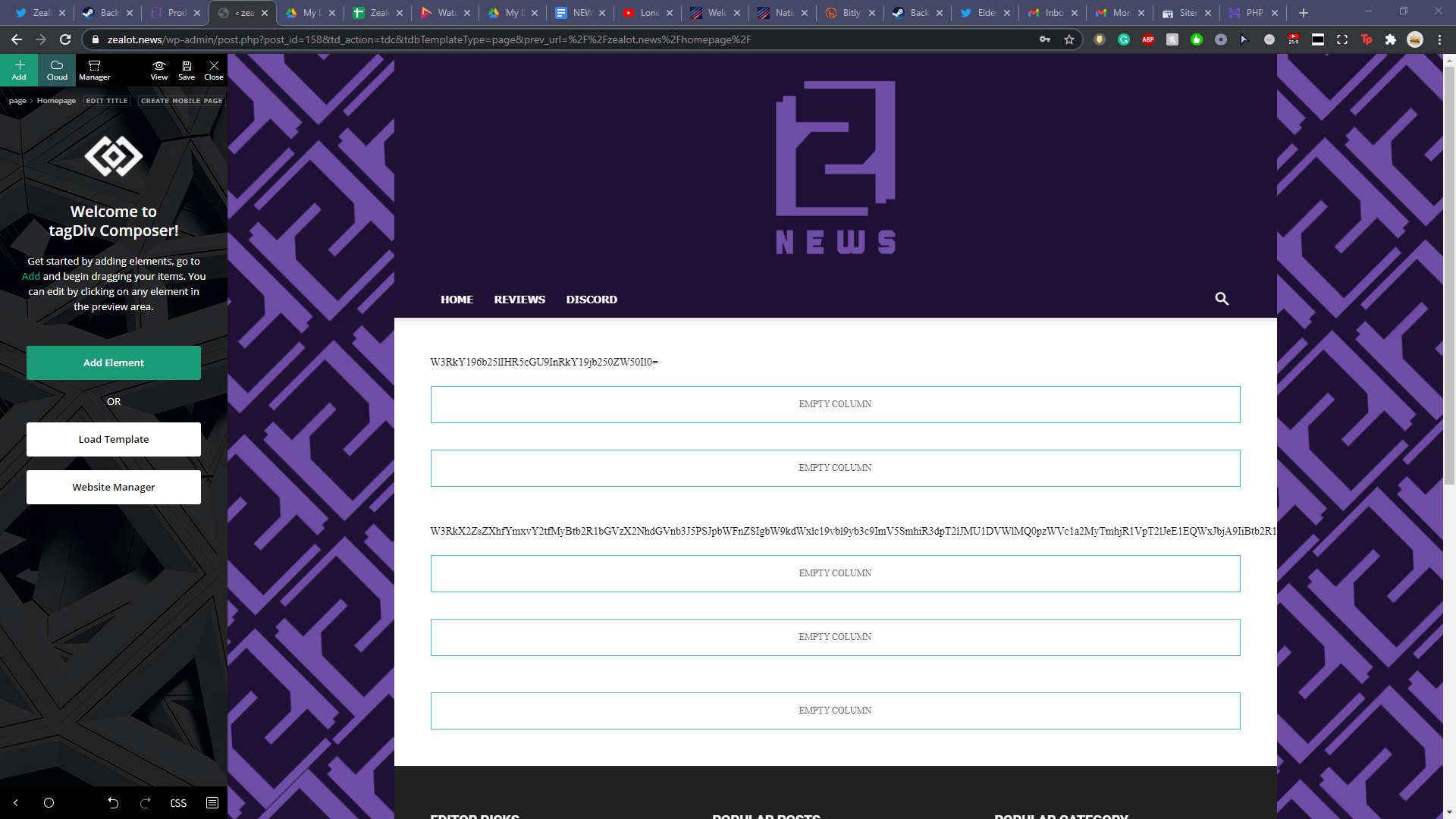
I already ran through all my plugins, deactivating them one at a time hoping for a fix. Sadly that didn’t work. I also updated my PHP to 7.4. I reverted back to 7.2 when I noticed the issue but that didn’t fix it either. Any help would be much appreciated, I’m trying to avoid restoring a backup so I don’t lose an immense amount of work over the past few days.

