
 debasishsinha
 Just now discovered that Manu bar’s are also not changeable which means not working so i am can’t change and make the necessary updated for the website.
 atmoloch
Hi guys,
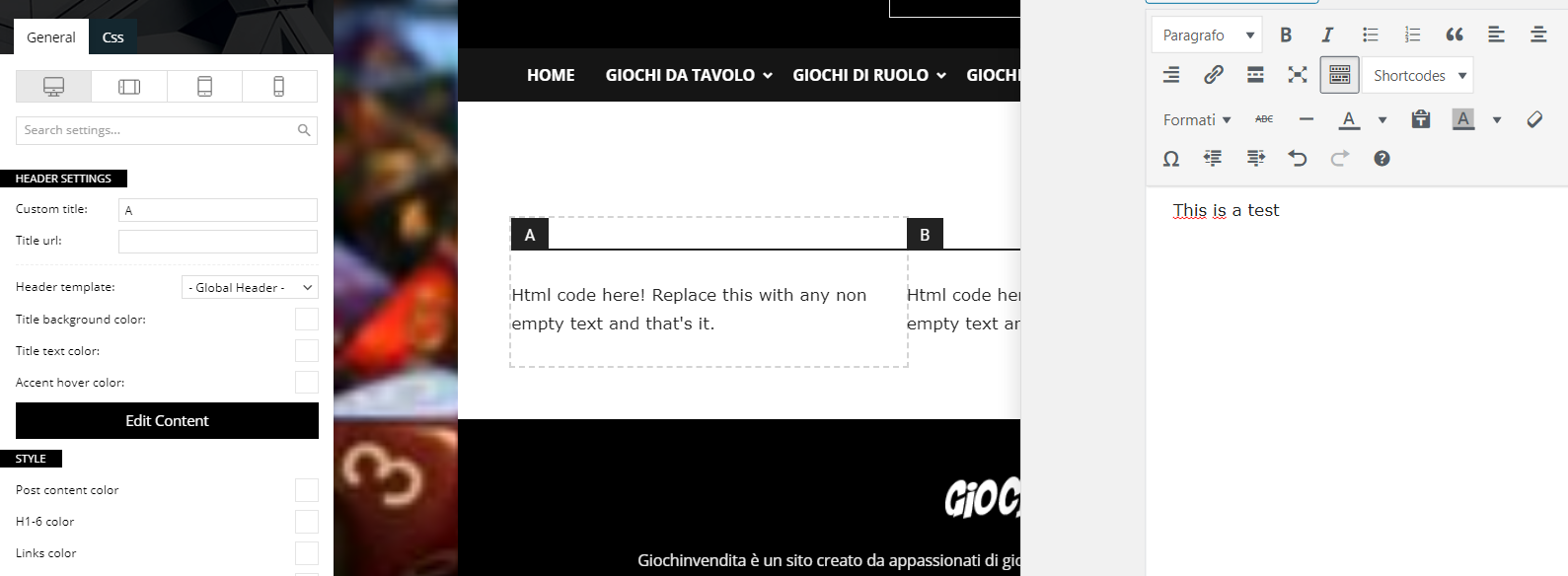
I’m having some problems with the composer and specifically with the text blocks. When I click on edit content and start writing, the page doesn’t update and I can’t figure out how.
Can you help me?
Newspaper Version: 10.3.9.1
WP Version: 5.6
PHP Version: 7.3.25
 Kodasinho
Hello, I’ve tried to find a solution to this issue, but nothing worked.
I’ve got Instagram feed on my footer, (connected with API) but when new post is added on my Instagram, it’s not on my website. Just the last post when I logged my Instagram with API. How to solve it? I’ve tried to reconnect it multiple times, I’ve tried to use just ID of my profile (but all the posts were blank)
Thank you
 erickimani
I am trying to update to php 7.3 but when I chage it in my cpanel the site does not load instead get this message on the browser
https://paste.pics/c477d17c6aa8981f06cca14612477466
When I check debug log this is what I get
Is it something to do with the theme?
 eranelevate
Hi im trying to upgrade a website that uses newspaper 4.6 to the latest version 10, the site is on a child theme,
is it even possible? what are the things i need to know? what actions to take?
looks like theres something called wp-boost that was in the old version and now its gone, what should i do about it? getting a lot of errors because of it
tried updating plugins – tagdiv composer etc. looks like its now working, it says failed after i install or update
thanks and appreciate any help
 leytol
Hi, after the last update to the “London news pro” template, the “More articles box” has disappeared and its menu of options in the “Theme panel” of Newspaper has also disappeared, as you can see in the attached screenshot:

On the web: https://www.leyendasdetoledo.com
Any solutions? Thank you!
 atamanatilkan
I wrote manual translation from the Newspaper translation panel. However, it is not updated on the page. I do not use the cache plugin. I cleared the cookies and cache in the browser. See also: screenshots
Can you help me ASAP?
Translation issue 1
http://prnt.sc/wfrzn2
http://prnt.sc/wfrzri
Translation issue 2
http://prnt.sc/wfrztc
http://prnt.sc/wfs196
Note: I tried translate with loco translate. Nothing changed.
 Bettina
 Hello!
Please try to update the plugins and also the theme.
Let me know about your results!
Thank you!
Bettina Hello!
1. You can add the element called “Single Post Via” with TagDiv Composer plugin and the element will update the post in that zone where you put it with the plugin.
2. If is only after the theme update, please make a full backup and send us an email at contact@tagdiv.com and set the link of this topic in the email. We will inspect the situation and provide a fix.
Thank you!
 embarcado
 I have just updated to newest Newspaper version.
 LuisGyG
Hello guys!
I am updating my blog with Newspaper. All good, however, my old “Post Pages” have problems as they did not automatically adapt to the theme.
Is there a way to do this update easily? What would have to be the “normal” method to make the change?
 photeando
I propose an idea for future updates of the newspaper theme. It is in reference to the comments (single post comments). Would it be possible to include a text field in the composer tagdiv to be able to put the data of responsble, etc. to comply with the RGPD?
On the other hand, would it be possible to also include another text field in order to include the text “I accept the privacy policy” and an option to put a url to “privacy policy”?
If it is possible to do so without waiting for an update, please let me know. Now I have to depend on different plugins and I would like not to depend on them.
Thanks a lot.
 pyro2212
 We all hope that update is coming soon. Most have big problem with your theme.
 Kekow
KekowHi !
I have an issue with my Instagram Footer on my website https://kekow.fr/ : the images are not showing. It seems my website can find the content of my feed, because the link to the Instagram posts works. I tried disconnect and reconnect my account from the Panel, disconnect all my plugins to see if there was a conflict, clear the cache… Nothing seems to be working. My token is not expired yet and my theme is updated with the latest version.
I am running out of ideas. Any tip would be helpful. Thanks !
 EightyFiveTech
Hi, whenever I try to update my changes, I get “Error at zones: 6(models) : 7(dom). The model does not match the content Current state has involved an issue. You could try an UNDO operation (CTRL+Z / CTRL+SHIFT+Z)”.
I lost my entire home page created, please anybody can help me with this.
 lchfdieta
 Hi, I update Newspaper to the newest version and when I produce new post and wanted see it before publishing I get this information:
Warning: require(/home/platne/serwer15223/public_html/lchfdieta.pl/wp-content/plugins/td-standard-pack/Newspaper): failed to open stream: No such device in /home/platne/serwer15223/public_html/lchfdieta.pl/wp-includes/comment-template.php on line 1532
Fatal error: require(): Failed opening required ‘/home/platne/serwer15223/public_html/lchfdieta.pl/wp-content/plugins/td-standard-pack/Newspaper/’ (include_path=’.:/usr/local/php56-fpm/lib/php’) in /home/platne/serwer15223/public_html/lchfdieta.pl/wp-includes/comment-template.php on line 1532
I check with my webbhotell and they can`t help. There som wrong with the theme and I need help
lchfdietaHi, I update Newspaper to the newest version and when I produce new post and won’t see it before publishing I get this information:
Warning: require(/home/platne/serwer15223/public_html/lchfdieta.pl/wp-content/plugins/td-standard-pack/Newspaper): failed to open stream: No such device in /home/platne/serwer15223/public_html/lchfdieta.pl/wp-includes/comment-template.php on line 1532
Fatal error: require(): Failed opening required ‘/home/platne/serwer15223/public_html/lchfdieta.pl/wp-content/plugins/td-standard-pack/Newspaper/’ (include_path=’.:/usr/local/php56-fpm/lib/php’) in /home/platne/serwer15223/public_html/lchfdieta.pl/wp-includes/comment-template.php on line 1532
I check with my webbhotell and they can help. There som wrong with the theme and I need help
 mally
mallyHi.
Ever since the new Newspaper theme update (10.3.9.1) I’ve noticed a few issues and things that I can’t do, that I used to be able to do on the older theme prior to the update.
1. When working on a post, the “Via name:” section does not show up at the bottom of the article when I publish an article. I used to be able to display that before.
Via name: https://www.screencast.com/t/P2l1GNlc3l
Article display: https://www.screencast.com/t/V17j2MTYY8kS
2. When uploading a featured image, once I set the caption, it doesn’t show up under the published article. Again, this used to show up happen before I updated the theme.
Featured image caption: https://www.screencast.com/t/yux6oXlqCpLL
How it shows up: https://www.screencast.com/t/O4vwkstlv32
These are very important for me because it is how I credit people whose content I’m using so please let me know how I can fix these issues so I can have them display.
 tokography
 Wow, that’s been a quick reply. Thanks a lot for your help!
I thought about going this way but I need to edit these files once again every time after an update is it right (well…in case they’re part of the update for sure). Is there any way to solve this without losing the changes after an update?
Most recent articles: Indeed, my mistake, sorry for that. Was a little too late tonight 😉
Thanks for your help and keep up the great work as well as the fast support. That’s how you make a client happy!
 sanjuavi
 Hi,
Thanks ! theme updated but theme is not updated please help
https://www.celebsbiography.in/wp-admin/admin.php?page=td_cake_panel
 Calin
Calin Hi fabioweb90, those are set in inactive widgets. When you are using widgets is recommending to update the theme using FTP or cPanel, in this way the widgets are not set in inactive widgets.
Thank you!
 Vlad S
 Hello !
Please make sure you updated and properly installed all the required plugins: https://forum.tagdiv.com/newspaper-how-to-update-a-plugin/
Thank you !
 virajbpd
 Hi,
Thank you for your quick response.
I can’t share the admin details with you it’s against the company policies.
But it happens after updated the WordPress version, before that it was working fine.
Wordpress 5.6 version deprecated some jquery functions, so please update your theme and plugins compatiable for WordPress 5.6
 iirina_1968
I have installed the WordPress 5.6 update.
Updated Nevspaper to version 10.3.9.1.
Bookmarks are not active on the “theme panel” page
TagDiv logo enlarged in size
 simchris
 Did you also update the plugin(s) for theme same time updating theme?
