
- NewsmagHow to use the Visual Composer plugin
- NewsmagtagDiv Composer Tutorial
- NewsmagWhat’s included in Newsmag theme package
- NewsmagNewsmag documentation
- NewsmagBlock settings tutorial
- NewsmagHow to update the WPBakery plugin
- NewsmagCustom ad spots
 arvind
hello theme admin my website insidesport.co used newspaper theme 7 used.my visual composer not working in theme page.please help me.
page Screen shotVisual composer not working http://prntscr.com/iarsy2
 Simion C.
 Hi,
The latest version of Visual composer provided in the theme package (5.4.5) is tested with the theme and it works properly. So there should be no problem using updating it.
When the tagDiv composer is active, Visual composer elements may be affected. That would be the only situation when issues are present.
So keep the tagDiv composer deactivated and there should be no problem with the pages, if the pages were built with Visual composer.
If you used this Elementor page builder as well on those pages, note that we have not made any tests with it and the theme or compatibility tests between all these three builders.
Pages should be created using only one composer, also not edited with a different one. That will not cause any problems such as the ones you mention. Use only the page builder that was used initially to build the pages.
We will be able to provide a refund in this case, if you cannot use the theme and theme page builders included in the package for the website.
Thanks
 robsabo10
I don’t know where this issue popped up from, but I noticed it yesterday. We’ve added some code by way of speeding up the site while deleting many plugins. Already troubleshooted by disabling every plugin on the site and removing any code that was added.
On every TAG page, our images display the WORDPRESS CAPTION CODE for some strange reason. Never has this happened over two years prior to yesterday.
example of tag: elitesportsny.com/tag/greg-bird

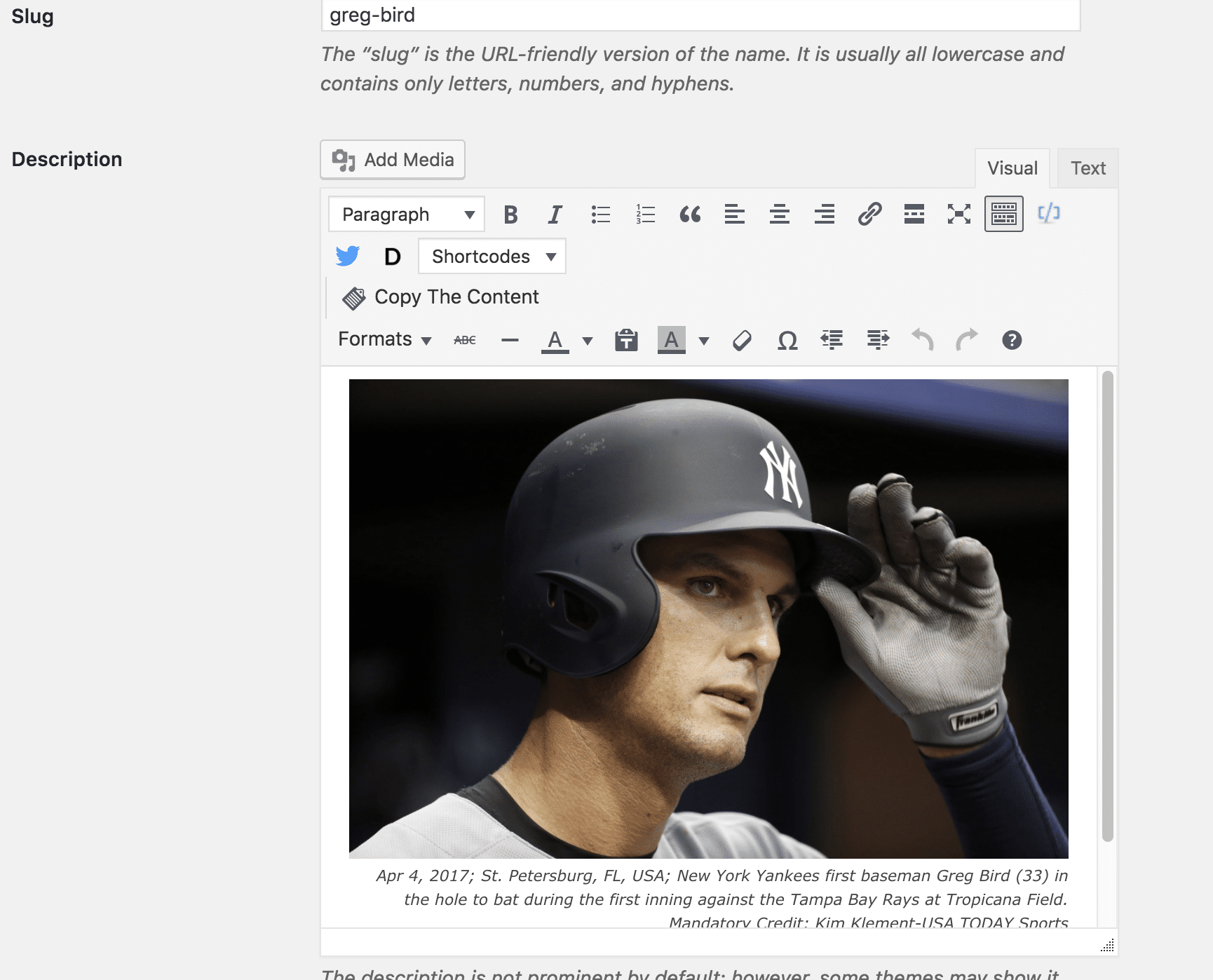
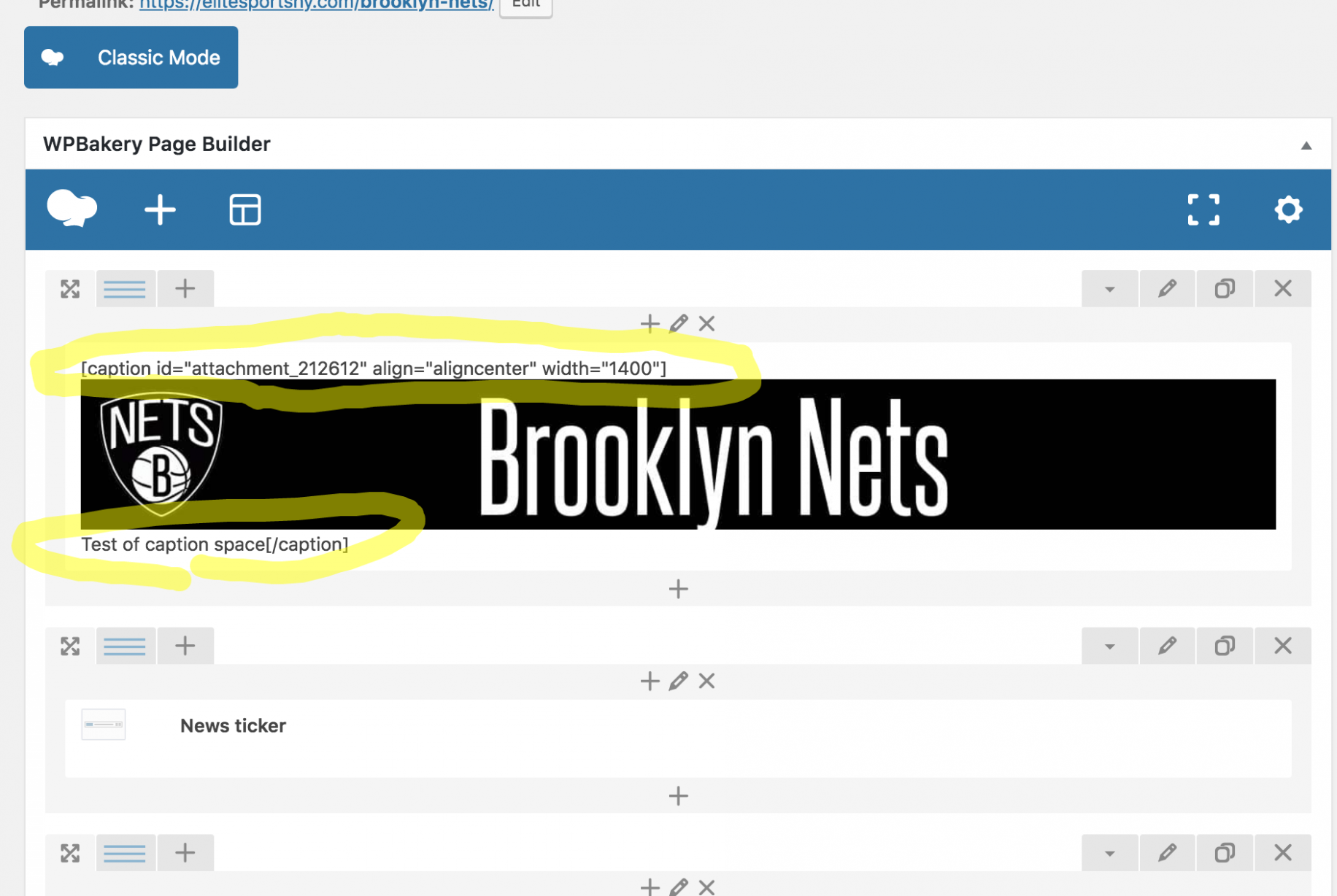
So the backend of the tag and post shows fine, yet the Tag shows up completely screwed up. The backend of the Page is messed up, yet shows up on the front end as perfectly fine. It feels like a Visual Composer issue, but I’ve always used the regular version coming with the theme. (Just updated it tonight out of desperation in looking to fix the issue.)
Definitely need help here. Thanks.
 Jerrad
I am trying to use a plugin called Easy Table of Contents. Easy Table of Contents uses v.4.0.0 of Waypoints jquery. Currently the Visual Composer supplied with Newspaper uses Waypoints v.2.0.2 which was released on Feb 3, 2013. Is it possible to get this updated in a future release of Newspaper?
Thanks,
Jerrad
Simion C. Hi,
I don’t quite understand what you mean. If you have a problem, please provide a link to your website we will inspect it.
Usually layout issues are caused by modifications to the theme, custom code or maybe having both composers active at the same time.
Try deactivating all plugins except theme plugins, leave only the composer you are using active (either Visual composer or tagDiv composer) and other theme plugins. Temporarily remove any custom code used in the theme panel, or code entered in theme files.
If you use a child theme switch to the main theme. Try these suggestions and see if you can identify what is causing the issues.
Thanks
 Bogdan B.
 Hello,
If you use both visual composer and tagdiv composer, then there will be compatibility issues. We do not recommend using 2 page builders at the same time.
Thank you!
Bogdan B. Hello,
This is because you updated the theme and the tagdivb composer page builder installed automatically. If you do not plan on using the tagdiv composer, you should disable it and not use it together with the visual composer plugin.
Thank you!
 Ladiesabroad
I am fully aware you are saying in the TagDiv Composer update guide not to use the TagDiv Composer on an excising page build in Visual Composer. Regardless this, I tried to do it on the homepage of my test blog. I open the page in TagDiv Composer, edited something and saved it. I looked about 90% fine; I had to remove and add Revolution slider and do some smaller adjustments adding empty spaces. Is this shortcut totally stupid to do, even if the page looks OK after some small adjustments using TagDiv Composer?
If I cannot use the shortcut described above, I need to re-build all 10 pages build in Visual Composer. That will take some time. You also recommend not to have TagDiv Composer and Visual Composer installed at the same time, but if I am really careful regarding which page opened in which composer, is this OK? Or is the problem related to technical issues having two different composers installed at the same time?
If I have to re-create all pages; how do I set a page as the homepage? When originally creating it using Visual Composer I did a copy of the content in my demo, and edited the existing one, so I have never created a homepage from scratch.
 ogrencipano
How is the use of shortcode in Tagdiv Compser? I could not understand
for example (Visual Composer ) :
Use in WordPress text
[gallery id="123" size="medium"]
okay. I need your help
 Sportguide
 I just did so!
The longer the more I think it has something to do with the Visual Composer because all or most of the pages that are concerned are done with it. It seems to me that you guys are not aware of that problem with the Visual Composer.
 julien101
Hello ,
When i post an article i can’t use any editor in Visual mode , after click Submit or Update it show 404 Error

But when i post it as a text without any edit everything is ok . So please help me out
Thanks
Simion C. I simply placed the shortcode in a Visual composer page text element, and added the function in the child theme functions file
– https://www.screencast.com/t/owFJ6Kmi
– https://www.screencast.com/t/FPuc0vHVQN
The page ID used was of a different page which contained a block
– https://www.screencast.com/t/QzZESJGFz1
The result is like this – https://www.screencast.com/t/9bh39BGq0Gor
The block placed on the other page is displayed on the page with the shortcode. I did not do anything else additionally.
I couldn’t say why this is not working for you as well. You could continue testing, or maybe think of another way of doing this.
Thanks
Simion C. If you do not want users to be able to use Visual composer, note that this plugin has options to customize user roles
– https://www.screencast.com/t/PH5DxwP0FqaH
The page seems to display if you use the code like this
– https://www.screencast.com/t/MvNsEsFTiT
Maybe you can modify it further if needed, here it is
– https://pastebin.com/W2QG7zuS
Thanks
 corxar
Hello
i have a big problem with TD composer, it has worked 2 times and since it load to infinity,
i checked the other posts on this topic, so i increased my cache from 40MB to 128MB,
i disabled all the addons, emptied the cache, i tested with OPERA, Chrome, Firefox, with and without addons,
i tried Visual Composer it works perfectly, but i would like to use TD Composer! and it’s just impossible I have no more solutions 🙁 maybe downgrade WordPress/PHP ??
Simion C. Hi,
That would be the only solution. Only one page builder should be active at a time. Single image elements are affected by both composers when they are simply active, they have a different functionality in each composer.
For example the tagDiv composer uses the image as a background in the single image. Visual composer single image has a different implementation. When both are active the single image will not display properly.
You will have to eventually decide on the composer you want to use, and deactivate the other. Simple as that. The tagDiv composer is considered the main page builder in the theme and it will receive many more features in the future.
Thank you!
 pstgibson
 Bogdan,
I dont think I have any image optimization plugin. See the list of all my plugins below and advice:
Add to Cart Button Custom Text and Color
Select Ajax Search Lite
Select All In One WP Security
Select All-in-One WP Migration
Select AMP WooCommerce
Select Autoptimize
Select Code Snippets
Select Email Users
Select Hide products count
Select HTML5 Responsive FAQ
Select Jusibe SMS Notifications for WooCommerce
Select Lazy Load
Select ManageWP – Worker
Select Media Search
Select Ninja Popups
Select PageLoader by Bonfire
Select Paystack WooCommerce Payment Gateway
Select PDF Light Viewer Plugin
Select Peter’s Login Redirect
Select Regenerate Thumbnails
Select Remove Query Strings
Select Responsive Pricing Table
Select SB WooCommerce Email Verification
Select Slider Revolution
Select Social Login WordPress Plugin – AccessPress Social Login Lite
Select Super Socializer
Select tagDiv Mobile Theme
Select tagDiv Social Counter
Select tagDiv Speed Booster
Select User Password Reset
Select Visual Form Builder Pro
Select WC Fields Factory
Select Woo Align Buttons
Select WooCommerce
Select Woocommerce Custom Tabs
Select WP Email Users
Select WP Hide & Security Enhancer
Select WP Hide Plugin Updates and Warnings
Select WP Image Size Limit
Select WP Mail SMTP
Select WP Notification Bar Pro By MyThemeShop
Select WP Pro Ad System
Select WP Smush
Select WP Super Cache
Select WP-Optimize
Select WPBakery Visual Composer
Select YITH Advanced Refund System for WooCommerce Premium
Select YITH Live Chat Premium
Select YITH WooCommerce Badge Management Premium – Shared by DownLoadFreeAZ.Com
Select YITH WooCommerce Deposits and Down Payments Premium
Select YITH WooCommerce Multi Vendor Premium
Select YITH WooCommerce PDF Invoice and Shipping List Premium
Select YITH WooCommerce Surveys Premium
Select YITH WooCommerce Waiting List Premium
Select YITH WooCommerce Zoom Magnifier Premium
Select Yoast SEO: WooCommerce
Thanks
Bogdan B. Hello,
The Revolution slider plugin as well as the Visual composer editor plugin are provided pre-activated in the theme package, and you do not have to activate either of these. You already have full access to the plugin features and you can use it without activation. Updates for the plugins bundled within the theme package will be included in the theme updates.
Please ignore any at all activation messages from Revolution slider and Visual composer.It’s just a missing condition from the plugin authors for these versions and we cannot make any changes to the plugins as it will break the license agreement we have with the plugin authors.
Thanks
Bogdan B. Hello,
Please do not use both visual composer and the tagdiv compose. You most likely used the visual composer page builder on posts to create your content. The new tagdiv page builder will conflict with that so you will need to disable the tagdiv composer plugin.
Thank you!
 sai542
Need help in In-feed Ads Integration in the Blocks that I used with visual composer.
you can check the homepage where I want to add the in-feed ads here: highlightstore.info
Thanks
 oneprimalscream
I see this topic has been asked several times. I need a response with a solution, please.
1. BOTH COMPOSERS ARE NOT BEING UTILIZED ON THE PAGE – please do not tell me to deactivate one plugin or another, since the theme relies solely on TD Composer yet my content relies on Visual Composer. They’re not being used at once on the posts or pages, so this isn’t a ‘solution’.
2. Please tell me where in CSS code I can remove this custom cropping that Newspaper or TD Composer is forcing upon my pages. When I say I want to add a single image in Visual Composer and put in a custom size, I need that custom size to work. I have multiple posts and pages this is happening to.
Again, I’ve searched for this answer in the forums and while there are several threads, all have the same response: deactivate one plugin, or the other. NOT A POSSIBLE SOLUTION. Just tell us where to modify the code, please.
I need to launch this site within a few days, so a timely response is appreciated. My last requests never even got a response.
Attached is a photo of the images. They are all supposed to be 100px in height, but something is overridding it, and I can’t seem to find where/what is causing this while using Inspector.

Thank you for your time.
Simion C. Hi,
The images are displaying fine at the moment from what I can see, on the whole website
– https://www.screencast.com/t/OA2JjvvyxQGs
Only the latest version is available for download. In order to update the theme please follow this guide
– https://forum.tagdiv.com/how-to-update-the-theme-2/
The most recommended method would be by FTP, and as always make a backup first. Update the theme plugins as well (deactivate and remove, then reinstall from latest theme package).
Note that in version 8 of the theme, the tagDiv composer was introduced. This composer will be activated by default when the theme is updated or installed. In order to use it all the pages have to be recreated with it. Or you can continue using Visual composer for the moment, and make the transition when you want, if you want. More about it here
– https://forum.tagdiv.com/tagdiv-composer-tutorial/
– https://forum.tagdiv.com/visual-composer-tagdiv-composer-transition/
Also a multi-purpose plugin was introduced, this adds many more elements and options to the tagDiv composer only
– https://www.youtube.com/watch?v=C0ARTSimnUY&t=287s
Visual composer (now WPBakery Page Builder) is still provided in the theme package and updates are included along with the theme
– https://forum.tagdiv.com/how-to-update-visual-composer-plugin/
Let us know if you should encounter issues after the update. It is a general recommendation to always keep WordPress and the theme updated.
Thanks
Simion C. Hi,
The tagDiv composer is a plugin as well. It can be deactivated in the plugins section if needed. Note that it will automatically be activated after a theme update, that is the current functionality.
The theme package includes the Visual composer page builder, check the plugins folder
– https://forum.tagdiv.com/whats-included/
It will be updated along with theme updates.
If you do not want to use this bundled version included in the theme package, you could purchase a separate plugin with license. In that case try to use similar versions as the one provided with the theme. When the plugin is updates by it’s developers, we will test it first and only then include it. More about this here
– https://forum.tagdiv.com/how-to-update-visual-composer-plugin/
Thanks
Simion C. If you were to try and edit the shop page after being set, it would cause an error in the tagDiv composer when trying to edit it.
With Visual composer there should be no problem. Either way you should decide on the composer you are going to use, and deactivate the other. They can influence each other when they are active at the same time, certain elements can be affected.
Visual composer does not have a title element, it has a text with title. The tagDiv composer with the multi-purpose plugin has a title element.
So build your page with the composer you want, deactivate the other. There should be no issues in this case.
Bogdan B. Hello,
You use visual composer on posts Here is the code from the inspector on that post: https://www.screencast.com/t/toQpYPoF
That is why it now behaves like so
If you are not sure if you use vc on posts, simply disable vc and check the post again. If you see shortcodes on your post, then it was created using VC.
In this case you have 2 options
Option 1: disable the tagdiv composer and use vc just as before. (the new tagdiv composer activates automatically on a new theme update so you have to manually disable it)
Option 2: Remove any vc elements from your posts and start using the tagdiv composer and no longer use a page builder to create your posts.
Thank you!
Simion C. Hi,
Indeed that is a pretty old version of the theme. Much has changed in the theme since then. Also there might be issues with the latest version of WordPress.
This is an update guide that you can follow
– https://forum.tagdiv.com/how-to-update-the-theme-2/
The most recommended method would be by FTP, and as always make a backup first. Update the theme plugins as well (deactivate and remove, then reinstall from latest theme package).
Note that in version 8 of the theme, the tagDiv composer was introduced. This composer will be activated by default when the theme is updated or installed. In order to use it all the pages have to be recreated with it. Or you can continue using Visual composer for the moment, and make the transition when you want, if you want. More about it here
– https://forum.tagdiv.com/tagdiv-composer-tutorial/
– https://forum.tagdiv.com/visual-composer-tagdiv-composer-transition/
Also a multi-purpose plugin was introduced, this adds many more elements and options to the tagDiv composer only
– https://www.youtube.com/watch?v=C0ARTSimnUY&t=287s
Visual composer (now WPBakery Page Builder) is still provided in the theme package and updates are included along with the theme
– https://forum.tagdiv.com/how-to-update-visual-composer-plugin/
Let us know if you should encounter issues after the update.
Thanks
