No search results were found in Documentation!
 Vlad S
 Hello !
Yes, that is correct but please note, that option can be influenced by your website speed too.
Thank you !
 Mattsteve20
Hey guys,
Cloudways demand that I enable the Breeze caching plugin, which will help add Gzip compression. I already use Super Cache, as recommended by tagDiv. Is there a way I can configure the Breeze plugin to mimic the Super cache configurations? Does the Breeze plugin conflict with the Newspaper theme?
The speed of the website is quite poor, considering its servers. What are your recommendations?
Thanks.
 Calin
Calin Hi,
The speed of your website depends on how well your site is optimized, if you follow the steps which are presented in this tutorial here -> https://tagdiv.com/how-to-increase-page-loading-speed/ you’ll be able to increase the speed of your website.
Also you can check this similar topic for more solutions: -> https://forum.tagdiv.com/topic/optimize-script-to-improve-site-speed/
Thank you for your understanding!
 themenewspaper321
How to properly customize to optimize site speed up to 90%above my website is always 60 below in newspaper
Vlad S Hello !
Please make sure that your system requirements are up to date and also take a look at our page speed tutorial here: https://forum.tagdiv.com/how-to-make-the-site-faster/ Deactivate the coming soon plugin so we can inspect your website too.
Please note that we answer the topics from Latest to Newest Monday – Friday from 08:00AM to 05:00PM GMT+2 So multiple replies to your topic will only make us to get harder to your topic.
Thank you !
Calin Hi jamiesharpe,
To optimize your images you can use some plugins, you can use the suggestion from mattsteve20
The speed of your website depends on how well your site is optimized, if you follow the steps which are presented in this tutorial here -> https://tagdiv.com/how-to-increase-page-loading-speed/ you’ll be able to increase the speed of your website.
Also you can check this similar topic for more solutions: -> https://forum.tagdiv.com/topic/optimize-script-to-improve-site-speed/
Thank you for your understanding!
Calin Hello,
The speed of your website depends on how well your site is optimized, if you follow the steps which are presented in this tutorial here -> https://tagdiv.com/how-to-increase-page-loading-speed/ you’ll be able to increase the speed of your website.
Also you can check this similar topic for more solutions: -> https://forum.tagdiv.com/topic/optimize-script-to-improve-site-speed/
Thank you for your understanding!
 Adeba
Adeba Thanks for helping me. My main problem is probably that I some how believed the promise of a 98 or 99 on your weppage without paying for the sercice extra or installing addons.
So I spend a lot of time instaling multible times the pro versions (as I told before I lost some categories when I did this) and have now a legal slow website.
For testing:
I deactivated everything except your Newspaper Theme and got a 53 on desktop for sitespeed google. Also not so impressive.
But of course I need my DGVO for beeing legal in europe and my VBSEO for beeing in google.
So I will live with my on mobile the speed number 5 because I am not paying the additional 200 Dolars for helping me with this case, because it’s a niche project for parents in german language :-).
For you nice to know I extended my licence today.
Calin Hello,
The speed of your website depends on how well your site is optimized too, not only on theme, also your page content is very big -> http://prntscr.com/q5017s, also all the plugins that you have install and activate can slow the page speed, if you follow the steps which are presented in this tutorial here -> https://tagdiv.com/how-to-increase-page-loading-speed/ you’ll be able to increase the speed of your website.
Also you can check this similar topic for more solutions: -> https://forum.tagdiv.com/topic/optimize-script-to-improve-site-speed/
Also we do offer page speed services over a fee, if you want us to increase your page speed you can check our custom services from here -> https://tagdiv.com/premium-customization-services/
Thank you for your understanding!
Calin Hi,
The speed of your website depends on how well your site is optimized, if you follow the steps which are presented in this tutorial here -> https://tagdiv.com/how-to-increase-page-loading-speed/ you’ll be able to increase the speed of your website.
You can try that or if you want we are able to offer you a refund if you make a request here: https://themeforest.net/refund_requests/new
Thank you!
Calin Hi ToniLaird,
Maggo explained very well how this plugin is working, the standard pack is for the old customers and for these that want to have and standard demo install, but this will load all the style more that the theme/demo need, so if you create a new website, or you use only cloud elements and flex blocks on your website then you can deactivate the standard pack ( also you can replace the block with flex block ) in this way you’ll achieve a better loading speed, because will be loading only the css style that is need for the elements that you are using.
Thank you!
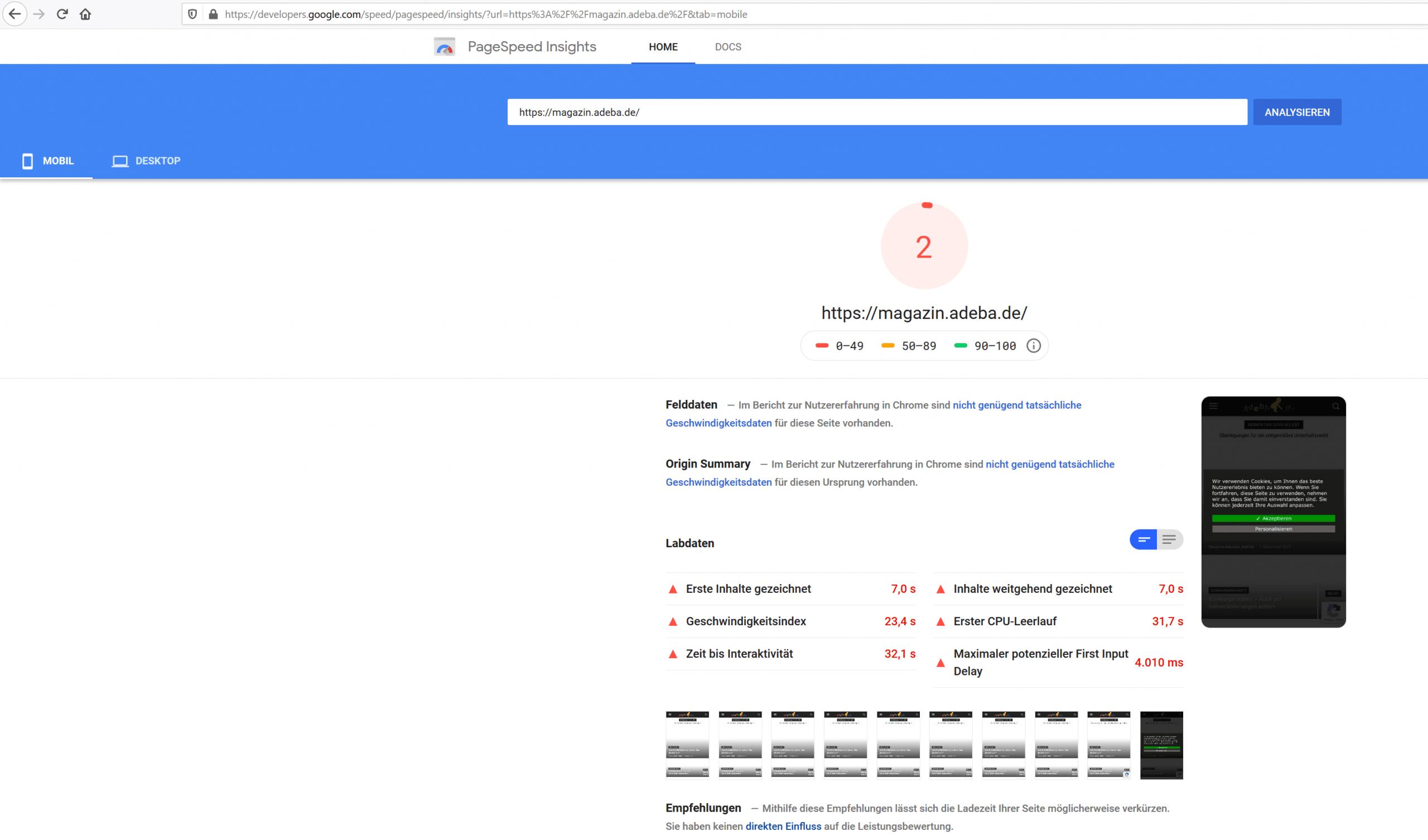
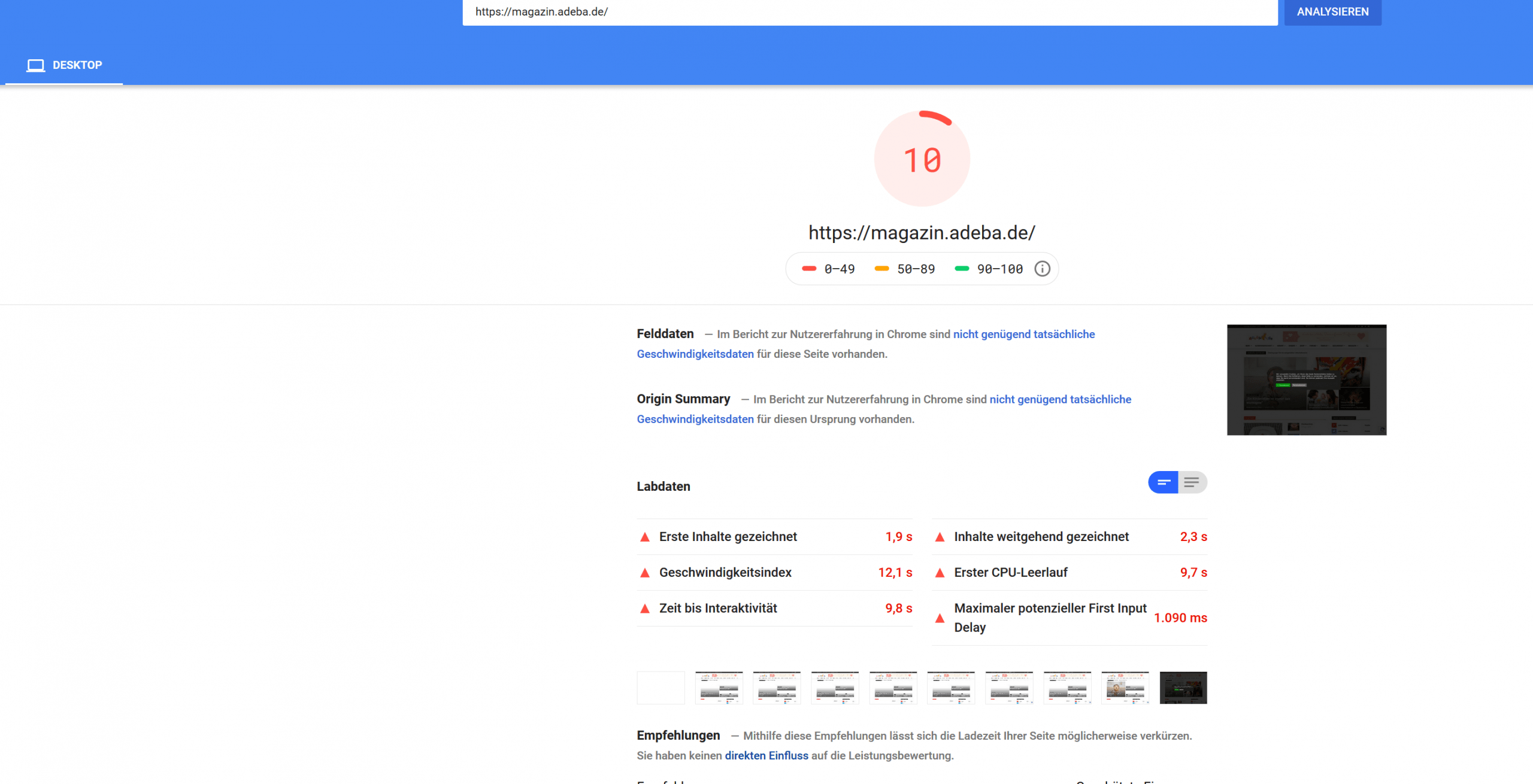
AdebaA new record on my website. After updating to the new design 10.2 and deinstalling Standad Pack I got a new negative speed record.
Sitespeed 2
https://developers.google.com/speed/pagespeed/insights/?url=https%3A%2F%2Fmagazin.adeba.de%2F&tab=mobile
https://magazin.adeba.de/wp-content/uploads/2019/12/2-scaled.png
Sitespeed 10
https://developers.google.com/speed/pagespeed/insights/?url=https%3A%2F%2Fmagazin.adeba.de%2F&tab=desktop
https://magazin.adeba.de/wp-content/uploads/2019/12/1adeba-scaled.png
Even an own server 🙁
So any help is welcome, because things are really getting interesting.
https://tagdiv.com/newspaper-10/
Blazing-Fast Websites
We’ve been working on the idea of making the Newspaper Theme light and fast for a long time. We’re now delighted to give you an excellent way to build a website that is optimized for fast loading speed out-of-the-box.
When you deactivate it, things are starting to get interesting, and your website tends to speed up by itself. ?
 jamiesharpe
 Hi Amit – I’ve taken a lot of time and followed your instructions to optimize all the images on my website. On the homepage, I’m still getting low ratings from both Google PageSpeed (https://www.screencast.com/t/TmTeFaIpiJg) and GT Metrix (https://www.screencast.com/t/MrsO35TU). On those screenshots, it appears that both services are highlighting images that I’ve replaced with the Photoshop process that you suggested. What do I need to do to get rid of those old images so both Google and GT Metrix do not punish me for them?
I appreciate your help.Thank you.
 Sumit
SumitHello, Let me know to improve Google page speed for my website.
Website: oispice
 Maggo
Maggo Just from my experience: If you disable it and nothing breaks, leave it disabled. Then you have built your website like it has to be according to Newspaper 10. When it is disabled, you have the speed advantage that comes with Newspaper 10.
The confusing part is that they advertise the Standard Pack as a Premium Plugin while it is just a necessary plugin if someone wants to keep the “old” websites alive, that were made with old Newspaper versions.
So just a weird move from the markting department 😉
Calin Hi,
Please try this tutorials for speed optimization, is possible that some of them to have can minifie that code and this problem will be solved.
– https://tagdiv.com/how-to-increase-page-loading-speed/
– https://forum.tagdiv.com/cache-plugin-install-and-configure/
– https://forum.tagdiv.com/how-to-make-the-site-faster/
– https://www.infophilic.com/get-almost-100-pagespeed-newspaper-theme/
– https://forum.tagdiv.com/topic/score-100100-pagespeed-with-newspaper-wordpress-theme/
– https://forum.tagdiv.com/topic/newspaper-theme-speedify-your-website/
– https://forum.tagdiv.com/topic/tutorial-chriss-custom-optimizations-for-functions-php-etc/
– https://forum.tagdiv.com/cloudflare-cdn/
– https://forum.tagdiv.com/topic/theme-causing-high-cpu-usage-2/
– https://forum.tagdiv.com/topic/sql-querys-high-cpu/
– https://forum.tagdiv.com/topic/newspaper-theme-slow-to-respond/
– https://premium.wpmudev.org/blog/optimizing-your-wordpress-database-a-complete-guide/
– https://underconstructionpage.com/optimize-wordpress-database/
– https://crunchify.com/better-optimize-wordpress-database-all-in-one-guide/
Hope this will help you!
Thank you!
Maggo Hallo,
I have the same issue. The information about the Standard Package are somewhat confusing.
What I understand from it is, that if I want a faster website, I have to deactivate the Standard Package.
But on your website it still sounds like a good-to-have plugin: “For this, we’ve added a premium legacy plugin called Standard Pack. It brings you all the previous functionality of the Newspaper Theme. When you deactivate it, your website gains page loading speed.”
So I deactivated it. Then everything looked broken. So I switched from a normal Demo to a Pro Demo and built everything new while using templates from the cloud library. Furthermore I only used Flex Blocks. I used templates for all the sites I can. Then I deactivated the Standard Package. And everything looks fine now on the website. But on GTMetrix I get the same message similar to the one in the first post: “There are xx components that can be minified as below
inline <style> tag #x
inline <style> tag #x
…”
The only thing I can imagine is the template for homepage because I did not change that one, because I assumed it already is Pro because I use a Pro Demo.
Therefore I tried to load a Pro template for “Homepage”. I still get the same problem with GTMetrix. So it is not the template from Homepage.
Then I used a Pro Header, because maybe it is the header I thought, so I sent it through GTMetrix. Only the header, nothing else. And still it shows the same message but with less components that can be minified.
What am I doing wrong?
Thank you for your support.
Vlad S Hello !
You will have to find that photo and remove it because it causes a 404 error, which means that it doesn’t load. Try looking for it in your media library and if you can’t find it in there check your cpanel, you should find it in your wordpress files.
Yes, that is a correct method if you want to achieve great speed. Also we have noticed that you have 3 fonts and your photos are way to big which hold your website back. We would recommend using compressed images, and rescale them. A good way would be to rescale your images in an app like photoshop to a smaller size, when using photoshop for example that resizes and compresses your images which should provide greater results.
I hope this was helpful !
Thank you !
Vlad S Hello !
After inspecting your website we have found that one of your problems is that you are facing a photo issue as you can see it here: https://www.screencast.com/t/To2D7f17NOL9
Also please take a look at our page speed tutorial: https://forum.tagdiv.com/how-to-make-the-site-faster/
Also you can try and convert your website to fully cloud templates and remove the standard pack but that means to re-design your website using only the templates available after deactivating the standard pack.
Thank you !
Calin Hello,
The speed of your website depends on how well your site is optimized, if you follow the steps which are presented in this tutorial here -> https://tagdiv.com/how-to-increase-page-loading-speed/ you’ll be able to increase the speed of your website.
Also you can check this similar topic for more solutions: -> https://forum.tagdiv.com/topic/optimize-script-to-improve-site-speed/
Also we do offer page speed services over a fee, if you want us to increase your page speed you can check our custom services from here -> https://tagdiv.com/premium-customization-services/
Also make sure that you’ve checked our documentation from here:
-> https://forum.tagdiv.com/topic/action-required-please-read-how-to-update-to-the-newspaper-theme-v-10/
-> https://tagdiv.com/newspaper-theme-update-standard-pack-or-tagdiv-cloud-templates/
Thank you for your understanding!
 ToniLaird
 Hi Calin
I’m not asking for ways to speed my website which is already fast but I renewed my support here just for this fix. This is an error I would like solved as there are 53 components that can be minified as below which i was informed due to the theme!
Calin Hello,
The speed of your website depends on how well your site is optimized, if you follow the steps which are presented in this tutorial here -> https://tagdiv.com/how-to-increase-page-loading-speed/ you’ll be able to increase the speed of your website.
Also you can check this similar topic for more solutions: -> https://forum.tagdiv.com/topic/optimize-script-to-improve-site-speed/
Also we do offer page speed services over a fee, if you want us to increase your page speed you can check our custom services from here -> https://tagdiv.com/premium-customization-services/
Thank you for your understanding!
Vlad S Hello !
That is no longer available without standard pack. If you want to be up to date you have to make adjustments. If you deactivate the Standard Pack plugin you are forced to use the Cloud Library which means your website will rely on shortcodes only which will provide a greater speed.
Thank you !
 huma1985
Dear sir,
after updating my site to newest version of theme now my site is not loading less than 3 sec kindly check website and tell me what i do change to make site speed faster.
 Amit
Amit Hello,
You must optimize all images on your website manually and reupload them.
For progressive images, you can follow this guide: https://www.infophilic.com/make-progressive-images-increase-site-speed/
You can also reduce the work by using image optimization plugin, but as I can see, most of the images you have on your site are larger than 1MB. In this case, no free plugin will help. You will need to purchase a premium plugin. So better use photoshop.
I hope you will find this helpful.
Thank you!