

 Edward
 Please read me carefully.

themeforest-5489609-newspaper.zip -> Newspaper-tf -> code -> Newspaper-child
Extract all 3 files
functions.php

screenshot.png

style.css
to a folder
wp-content/themes/Newspaper-child/
via FTP.
This folder
wp-content/themes/Newspaper-child/
on the hosting (server) you have to create manually via FTP client (like Filezilla for example).
After this activate the Child Newspaper Theme in admin-panel of your WordPress site.
Edward Extract all 3 files
functions.php

screenshot.png

style.css
from the Themeforest archive
/code/Newspaper-child/
to a folder
wp-content/themes/Newspaper-child/
on your hosting (server) with your wordpress-site
and activate the Child Newspaper Theme in admin-panel.
That is all. Try it.
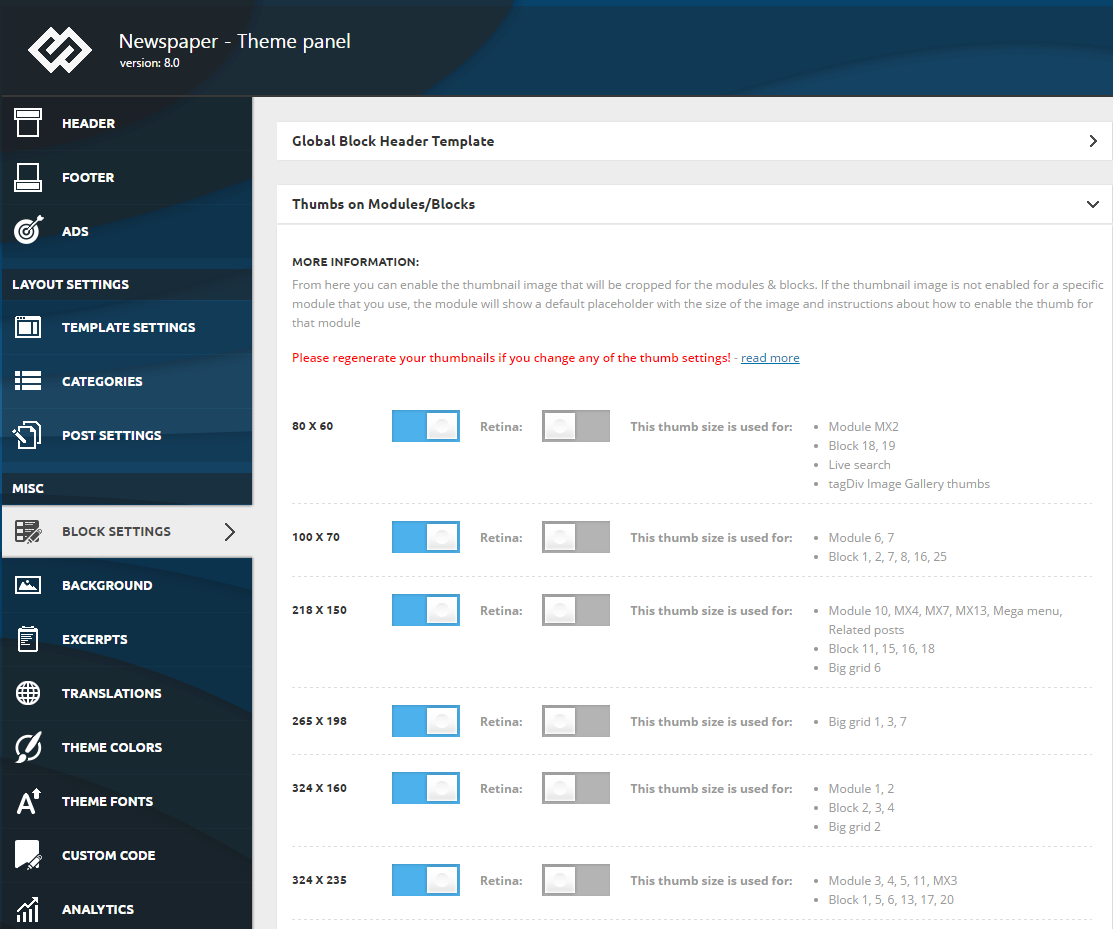
Edward To make your website faster, you can control which thumbnail is generated. To do this go to Theme Panel > Block Settings > Thumbs on Modules/Blocks and disable the unused ones to save space on your server:
Edward Search the forum works wonders.
For example: https://forum.tagdiv.com/topic/increase-indent-lists/
Edward https://forum.tagdiv.com/how-to-update-the-theme-2/
Update the theme via FTP.
Edward Если речь идёт о расстоянии между абзацами в тексте статьи, пробуйте этот код:
.td-post-content p {

     margin-top: 2px;

     margin-bottom: 2px;

}
Edward A similar topic is this one, that is a common WordPress issue caused usually by insufficient resources, mainly the upload max size parameter
– https://forum.tagdiv.com/topic/where-is-the-newspaper-8-8/
Edward Edward Edward And now…
A new, modern publishing experience is coming soon.
The new editor will be enabled by default in the next major release of WordPress.
Edward Extract all 3 files
functions.php

screenshot.png

style.css
from the Themeforest archive
/code/Newspaper-child/
to a folder
wp-content/themes/Newspaper-child/
on your hosting (server) with your wordpress-site
and activate the Child Newspaper Theme in admin-panel.
Edward A sample child theme is available in the /code/ folder in the package that you downloaded from Themeforest.
Edward Check Link Target options.
Read carefully here for example: https://www.wpbeginner.com/wp-tutorials/how-to-add-nofollow-links-in-wordpress-navigation-menus/
Edward I removed it a long time ago author and dates weren’t shown on the blocks 21 or any but completely forgot how.
====
Check it:

Edward Edward There are some quote styles available
– https://demo.tagdiv.com/newspaper/blockquotes-pullquotes/
These are located in the Formats section
– https://www.screencast.com/t/24KVFSWnhWkL
Also check the quotes section of the theme panel
– https://www.screencast.com/t/6zMN76Q6H
Edward Системные требования проверили?
https://forum.tagdiv.com/system-status-parameters-guide/
Похоже тупо на нехватку памяти в настройках ВопрдПресса.
Тут схожая проблема: https://forum.tagdiv.com/topic/author-box-on-top-of-the-article/#post-244700
И тут: https://forum.tagdiv.com/topic/tagdiv-cloud-library-causes-error-500/
Если не поможет, опишите вкратце ваши шаги по-аглийски и ждите официального ответа от разработчиков в понедельник.
В принципе, если библиотека с шаблонами не нужна, временно отключите плагин tagDiv Cloud Library и можете продолжать работу с сайтом.
Edward После активации темы проверьте системные настройки:
Edward тему через фтп убейте и залейте заново.
Edward Если тема по умолчанию устанавливается без белого экрана, и есть доступ а админку, деактивируйте все плагины, потом инсталлируйте Newspaper самой новой версии, установите плагины, которые идут в дистрибутиве.
Белый экран после этого?
Edward Бэкап делали? Верните обратно.
Попробуйте активировать другую тему, которая идёт по умолчанию с ВордПрессом, например, Twenty Eleven. По-прежнему белый экран?
Edward 1. На всякий случай создайте бэкап текущего сайта.
2. Удалите через ftp полностью папку с Темой на вашем сервере / хостинге: не бойтесь, все опубликованные статьи и материалы никуда не денутся:
Your content will not be lost, but please note that if you have modifications to the theme code they will be lost. You have to reapply them after the update is over.
3. Залейете на это же место новую версию Темы.
Более подробно читайте тут:
How to update the theme – https://forum.tagdiv.com/how-to-update-the-theme-2/
Обновляйте тему через ftp (см. пункт A. Update the theme via FTP)
Edward 1. Don’t publish here private data.
2. Try to activate the Theme manually:

Edward Check the settings in Yoast SEO and the author archives (set in Enabled):

Edward Don’t publish here private data.
From my side your site is not loaded, сonnection timed out.
