

 Edward
 Important Note: Do not use both page builders on the same page!
Read carefully here: https://forum.tagdiv.com/visual-composer-tagdiv-composer-transition/
Edward Change this field in Translation section of Theme panel.
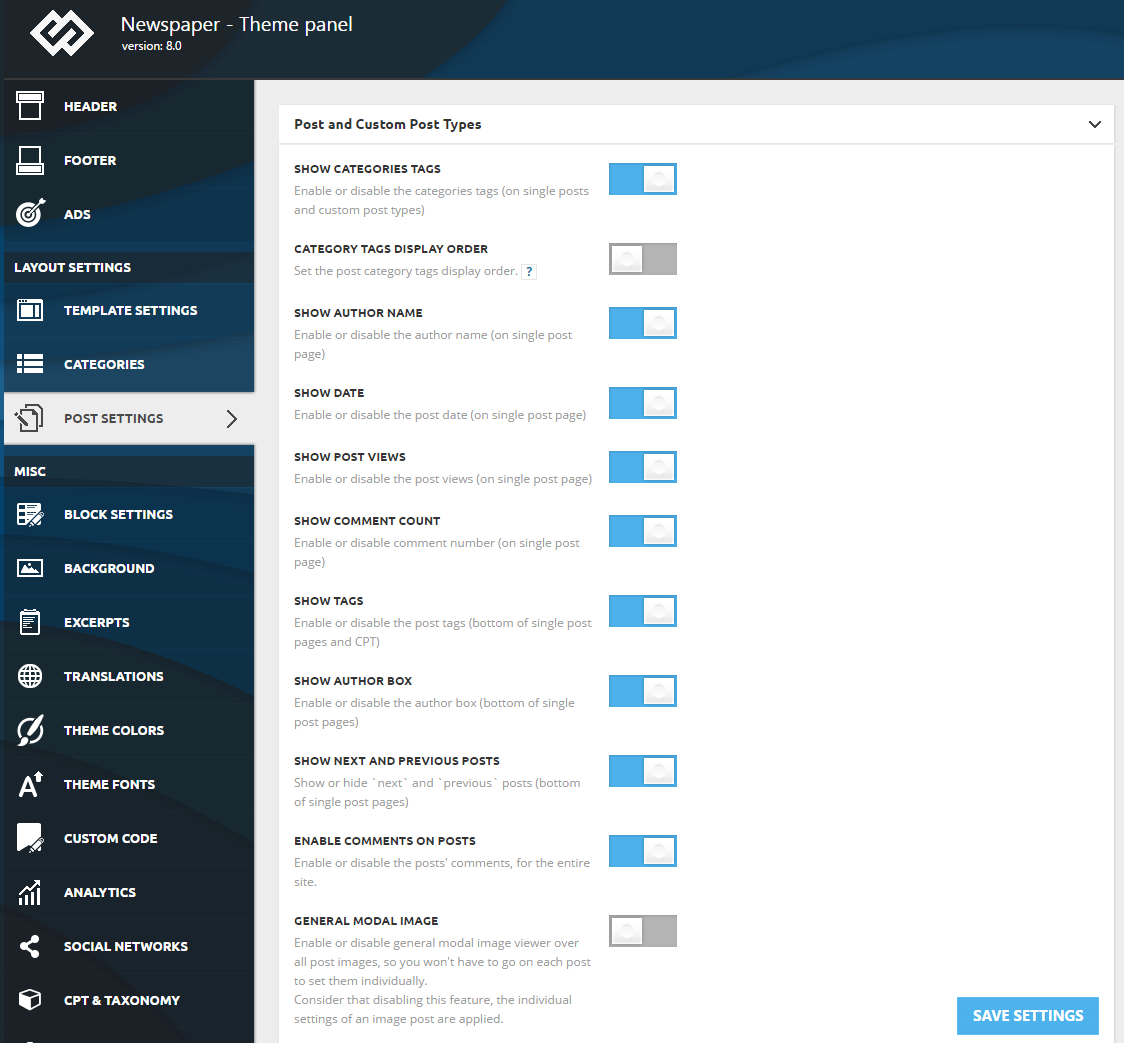
Edward Disable Show Author Box here:
Edward Forgot to mention – see here: https://www.labnol.org/internet/embed-responsive-google-maps/28333/
Edward Thank you. I found a solution. Inserted into the page (full side, for example) iframe code in a Google map:
<div class=”google-maps”>
<iframe src=”YOUR-GOOGLE-MAP” width=”1068″ height=”480″>
</div>
And in the “Live CSS Editor” of this page insert this code:
<style>
.google-maps {
position: relative;
padding-bottom: 75%; // This is the aspect ratio
height: 0;
overflow: hidden;
}
.google-maps iframe {
position: absolute;
top: 0;
left: 0;
width: 100% !important;
height: 100% !important;
}
</style>
Edward > We put the GMAP Iframe but it is not responsive.
Edward Yes, problem confirmed, waiting for an answer from the developers.
Edward Yes.
Edward You inserted wrong code.
Here’s how it looks on your site: view-source:http://swoop.kr/

Edward Where you place Analytics code?

Edward The main novelty of the 8-th version:
You can now make pages on the front end using our tagDiv composer – the first pagebuilder ever created for blogs, news and magazine websites. The pagebuilder is much lighter than Visual Composer and it’s much easier to use.
tagDiv Composer tutorial: https://forum.tagdiv.com/tagdiv-composer-tutorial/
Edward 
Edward You can now delete visual composer but keep in mind that some elements will have to be recreated using the tagdiv composer. We recommend when making the change from one builder to another to recreate the entire page using the tagdiv composer only.
Do not edit a page with the new builder if it was created using visual composer. The page will have to be recreated in the new builder luckily, the process is much simpler now as you can see the changes live.
The move from one builder to another will be a bit of a hassle at first but we suggest moving over to the new builder as in the future the theme will rely on our own builder and not visual composer.
Future options and features will only be available in the tagdiv composer.
Our builder is also much lighter than VC ?
https://forum.tagdiv.com/topic/upgrading-to-newspaper-v8/#post-174552

Edward > upload the theme via FTP and overwrite.
No. It is better to first completely remove via FTP the folder with theme from hosting (your site/wp-content/themes/Newspaper) then upload the new version from Envato.
(sorry for my poor English) ))
Edward Also interested in the answers to these questions.
Do I understand correctly that the Visual Composer in the future more will not be supported?
I think the documentation (which is currently under update) all these details will be outlined.
Thank you!
Edward There is an issue with the manual activation and we will release an update for it. But the normal activation should work, we have tested it and I have successfully activated a client’s theme without any issue.
Hi!
Does this mean that it is better to wait with the update?
Thank you!
Edward Now! Version 8.0!
You can now make pages on the front end using our tagDiv composer – the first pagebuilder ever created for blogs, news and magazine websites. The pagebuilder is much lighter than Visual Composer and it’s much easier to use.
Video: https://www.youtube.com/watch?v=yCoy4jbfoEA
-
This reply was modified 9 years by
Edward.
Edward The counter is updated with each page load.
For example: press F5 (reload page in browser) +1 Post Counter.
Edward Edward Also:
What you can do, and what is commonly done in WordPress news portals, is upload images via FTP into an /images/ folder, and then put the explicit URL for the image in the HTML of the article, and don’t use the media manager except for the featured image.
Note that WP makes images from anything added to the media manager, per the default sizes shown on the settings > media page for *all* themes, defaulting to those most commonly used by the default blog themes included with WP.
So, *all* themes follow this behavior by adding additional add image classes to fit theme layouts, and for this theme they can be disabled based on the theme panel.
The only solution that works across all themes, is to simply use the FTP method for common images, and then use the media manager only for the ‘featured’ image for a story.
Anyway, that’s how we’ve done it the past 12 years on our news portals.
-
This reply was modified 9 years by
Edward 
-
This reply was modified 9 years by
Edward By the way for recipes Google recommends that you follow the rules of microdata (Recipe Markup).
https://developers.google.com/search/docs/data-types/recipes
Edward Try reinstall Visual Composer: https://forum.tagdiv.com/how-to-update-visual-composer-plugin/
If this does not work, you will have scratch to re-install WordPress and the Theme.
-
This reply was modified 9 years by
Edward Thank you. All right now.
Edward 
But please note that Visual Composer will work correctly only on Pages, not for Post.
