

 Edward
 This is not a problem of Theme.
See here:
Edward https://forum.tagdiv.com/topic/full-width-template-2/
Also: https://forum.tagdiv.com/topic/make-page-width-wider/#post-170071
Unfortunately the theme width cannot be changed in our theme as we built the theme on a fixed width and all elements depend on this fixed width. Sorry but we cannot provide any solution in changing the content width.
You can however create full width sections on pages using the visual composer stretch row option: https://www.screencast.com/t/6umF8z4xU9
And one more: https://forum.tagdiv.com/topic/site-is-thin-how-can-i-make-the-site-width-more/#post-168360
Edward Edward Edward Edward SEO – Titles & Metas – Archives:

Edward As for the images, you can replace the default placeholder images here: http://screencast.com/t/ZFYxku1ggNs
You will have to keep their name and thumb size though otherwise they will not work.
Edward Edward Кстати, как вы думаете избавлятся от разрыва (большой перенос появился между строками) в заголовках-названии товара в списке товаров? У меня такая же проблема.
Добавьте в Custom CSS:
(Add in в Custom CSS)
/* The Title of Woocommerce */

.woocommerce-loop-product__title{

line-height:20px!important;

}
Плюс в похожих товарах появилась плашка-подсветка под заголовком товаров – тоже не смог побороть.
I don’t know too.
Edward Используйте кнопки шаринга от Яндекса:
https://forum.tagdiv.com/topic/how-to-add-a-vk-sharing-button-on-your-posts/#post-143261

Edward https://forum.tagdiv.com/topic/when-will-newspaper-be-compatible-with-php-7-1/
PHP 7.0 is compatible.
PHP 7.1 not yetFrom the next theme version we plan to add full compatibility with the latest version of PHP.
Edward Try this:
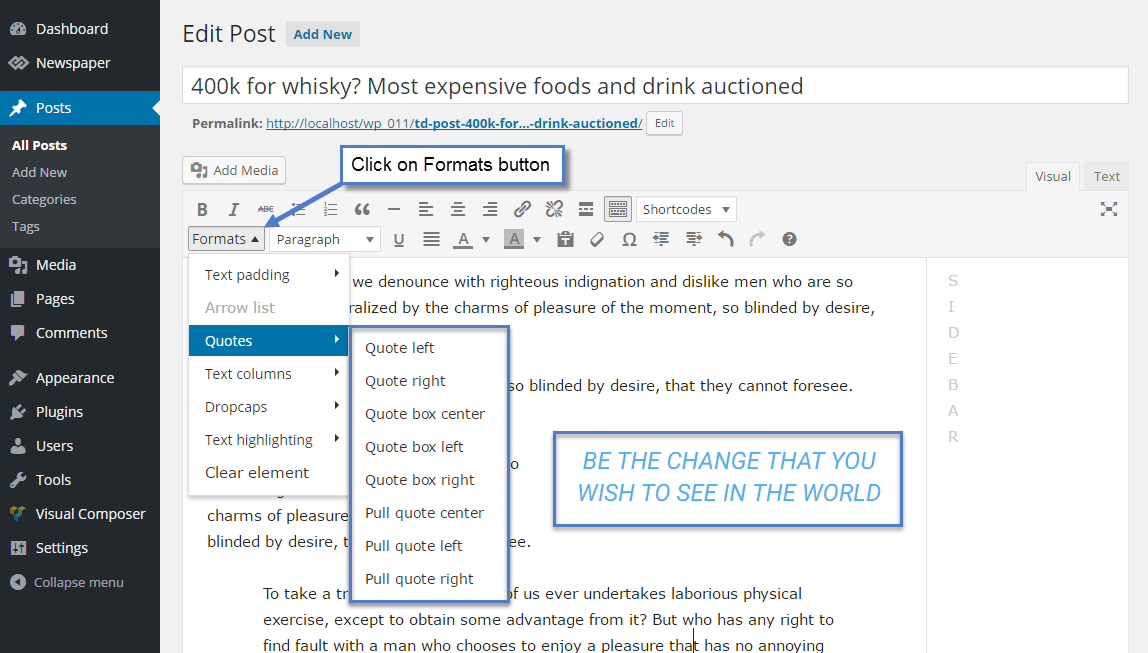
Result: https://demo.tagdiv.com/newspaper/blockquotes-pullquotes/
Also you can change font options for quotes here:

Edward Edward Thumbnails – Fix strange looking images on blocks:
https://forum.tagdiv.com/thumbnails-fix-strange-looking-images-on-blocks/
Edward Edward Please keep in mind that our theme has not been designed to be displayed in full-width and do not have any such an option that allows you to change the width.
If you want to make your body be wider, you should increase the theme width and notice that our theme has not been designed to have a dynamic width, sorry! We do not recommend to increase it because you can break the theme layout.
https://forum.tagdiv.com/topic/size-of-template/
https://forum.tagdiv.com/topic/how-can-i-have-full-width-elementsposts/#post-159841
-
This reply was modified 9 years by
Edward.
Edward The theme includes a license for this plugin so you don’t have to buy it.
https://forum.tagdiv.com/how-to-update-visual-composer-plugin/
Edward Scroll down this page https://themeforest.net/item/newspaper/5489609 before point CHANNGELOG.
OR
Download Archive with Theme from themeforest.net and check there file update_log.txt
Edward Edward Edward Edward How to update the theme: https://forum.tagdiv.com/how-to-update-the-theme-2/
Read section A. Update the theme via FTP
Edward We are experiencing some technical issue, but the Newspaper theme will be available again soon! We estimate this may take an hour or two, depending on Envato team.
Please rest assured! We are developing, updating and supporting this theme and we don’t plan to give up on it.
I’m sorry for any inconvenience this surprising situation might have caused you!
Thank you for understanding!
https://forum.tagdiv.com/topic/newspaper-theme-was-removed-from-themeforest/#post-165841
-
This reply was modified 9 years by
Edward Carefully read the documentation for the Theme. And in particular this section: https://forum.tagdiv.com/post-formats-for-tinymce/
😉
