

 lighterside
 I’m running into this exact same problem also. Using Newspaper 8.
How did you fix this?
lighterside Yes! Thank you.
We’re in the process of rebuilding our site from scratch with Newspaper 6. The transfer protocol didn’t work so well for us. Thanks again.
lighterside Bogdan, either I suck at explaining things, or you just aren’t understanding.
First, how could you have really this problem on my website without having login credentials? If you are referring to editing CSS in Chrome’s browser inspector, then yes, that obviously works for me too. But those edits are cosmetic and temporary as you know.
What ISN’T working… is when I enter ANY code in the tablet panels. My custom edits just don’t show up in chrome at all. And it’s not because my code is typed in wrong. So please, let’s move on from browser answers.
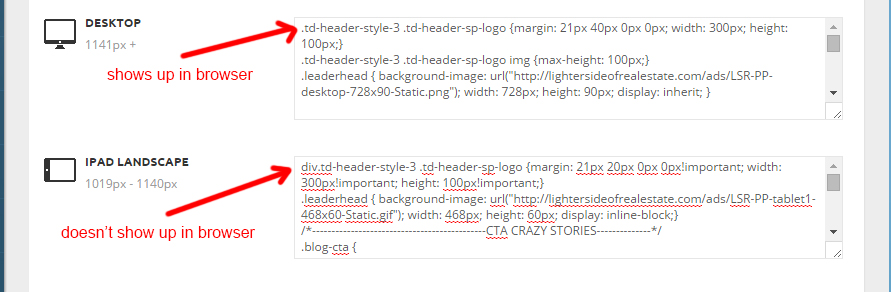
CSS entered into either “Tablet” CSS areas in the theme panel simply isn’t being recognized or reported by the browser.
That’s the problem I’m having.
I’m thinking it’s something that can’t be troubleshot from the browser. I can give credentials if need be.
lighterside Thanks Bogdan, and I understand all that. I’m using the same inspector in chrome and not seeing my code.
Those examples you screencapped are Newspaper CSS entries, not mine.
If you look at my code in my original post, it is different than what’s on your screenshots.
Can you please re-read and let me know?
Thank you sir.
lighterside Thanks Lucian, email is sent with reference to this post.
lighterside I hear you Chris. And I’m reconsidering. I mean, the child theme works flawless on the main site (NP4), just something not configured the right way on NP6.
Lucien, now that we know the site works when I activate the main theme, does that help triangulate what could be incorrect in the child theme?
lighterside Thanks Lucian,
When I switched to the normal theme, the posts populated. So something’s definitely incomplete with the child theme’s setup.
One thing I haven’t done yet is implement the API part of this new theme.
The instructions are a little too technical for me. But could this be the reason the child theme isn’t working right?
Here’s an image of the child’s functions.
(I’m about to install 6.2)
Thanks again for the help.
lighterside Thanks much for the help Chris. When you say “stuff” what are you referring to? At the moment all plugins (other than VC) are shut off. Assuming you’re referring to VC then?
lighterside Yeah, according to VC, I have posts turned off. (screenshot)
It’s only wordpress “posts” that aren’t showing up from what I can tell — although when I edit them in wordpress… the post code is all there.
“Pages” (which I do build in VC) show up fine. (eg: http://dev.lightersideofrealestate.com/contribute)
lighterside Thanks Alin,
All plugins disabled, cache cleared, CDN purged. Still no change.
Thankfully this is in my sandbox. Any other ideas what could be causing it?
lighterside Thanks Chris,
I did exactly what you recommended (in a sandbox), sans redbull. 🙂
I went with NP6 due to not wanting to go back to the drawing board on redesigning many graphical elements that fit NP4. I have a feeling Newsmag is in our future though. One thing I need to do is find a solution for modifying a manually added width=”700″ on all our image tags in posts since Newsmag is narrower.
Once we do switch… do you think this guide will still be relevant if switching to NM from NP6?
https://forum.tagdiv.com/topic/how-to-guide-to-moving-from-newspaper-to-newsmag/
Thanks man.
-
This reply was modified 11 years by
lighterside.
lighterside Regarding different place:
I was wondering if there was a different spot to add the code to. Right now it’s added under the “// this is the default header configuration” comment in header.php. The same place you told me to add it to.
But, it seems to be placing it between the nav menu and the main body section below.
I’m wondering if there’s a different spot in a php file to add the same code, in order for the ad to appear within the body section, at the top. Hard to explain. I tried to imply with the first arrow in the screenshot in my last message.
Hope that makes sense.
lighterside Thanks a ton Alin. It worked like a charm.
There’s one problem tho. I’m noticing that inserting the ad right there creates a gap between the nav menu and the main article block. The blue part (in the screenshot) is actually our background image showing through.
Is there a different place I can insert the “echo do_shortcode(‘[td_ad_box spot_id=”custom_ad_1″]’);” code so that it shows up in the (top) of the main body section?
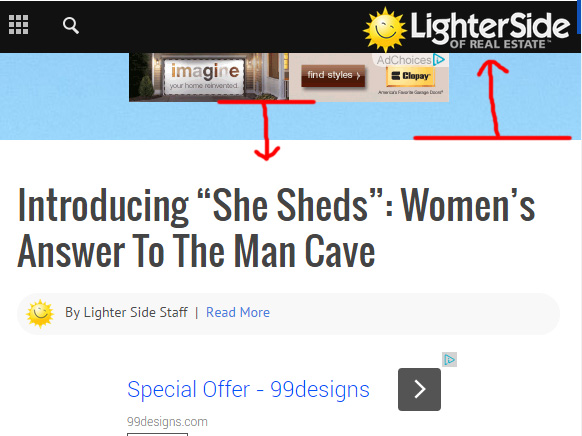
Thanks again Alin.
-
This reply was modified 11 years by
-
This reply was modified 11 years by
lighterside looks like everything worked. I found both files, although different in name, and in different folders.
added the “custom ad #4” line of code to /includes/shortcodes/td_ad_box.php
and added the larger associated set of code to /newspaper/wp-admin/panel/views/panel_ads.php
It seemed to work.
My only question is this… when I update to the latest version of newspaper, will the directory structure change and will I have to do this over again?
Thanks for confirming if I’m on the right path.
lighterside Alin,
Actually I found the same code you mentioned here: http://screencast.com/t/g0EhX0jYqlY0
But it was in the td_ad_box.php file. Not the td_config file.
Is this right?
lighterside Where exactly is this td_config file located?
This is what my includes folder looks like. Version 4.6.1.
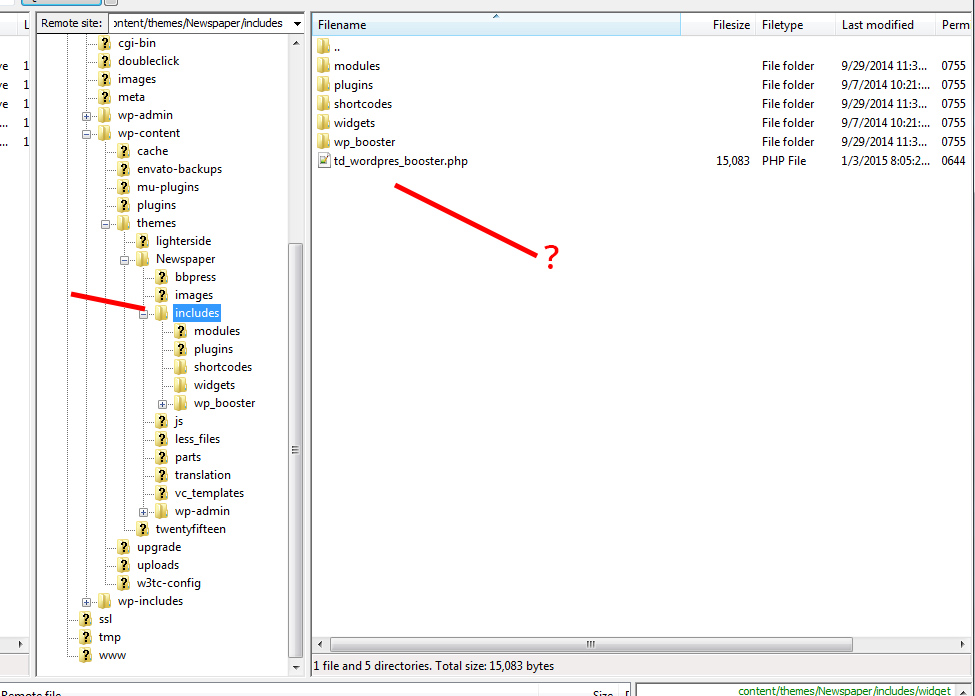
Is the config file in a different location in 4.6.1?
Definitely looking to ad more custom ads in the theme panel.
Thanks
lighterside Okay, finally found the culprit using W3C. It was “Facebook Custom Audience pixel”
Although the code was identical to what FB originally gave me, when I removed it, all was fixed.
lighterside Thanks Alin 🙂 Much appreciated
lighterside Oh, one more question, is there a way to set category pages to infinite load?
lighterside God, the whole time I thought it was TD based. Thanks Christopher
lighterside Actually, just noticed something. Ever since I popped that code in, the “unique articles” function for the homepage isn’t working anymore.
I tried turning it off – still duplicate posts. Then turned it back on – still duplicate posts.
Does the new code somehow disable the U.A. function?
lighterside Yep, using a child theme, finally realized the culprit was a non-updated header.php. *facepalm*
Why is it that 7 hour code expeditions that never yield results are always 2 second fixes in the end? 🙂
Thanks a ton Lucian. Mobile menu sliding smooth as intended now.
lighterside Awesome, you rock Lucian. Thanks for the fix.
Replying to the mobile menu issue now. Unfortunately, that one isn’t going as well.
lighterside Finally got permission to deactivate the registered users lockout.
Can take a look without logging in now.
lighterside Yeah, I’m no expert programmer, but after 7 hours straight troubleshooting this, I’m at my wit’s end. I cannot get the mobile menu to open at all on my friend’s Galaxy S3 (default browser), nor can I get it to load visibly on my Nexus 5 (Chrome browser). And we’re supposed to go live this Sunday for a large audience.
I tried disabled all plugins. Re-installed 4.5 again. Combed through very basic CSS items I’ve added. Nothing seems to make a difference. I’m obviously missing something, but steering blind at this point.
I noticed your demo site works fine on both our phones, as well as a few other sites people in the forum have referenced load fine too. But my site doesn’t.
Lucian, Radu… I have a registered user lock on the site, but will give credentials if you can please take a look.
Could really use some support on this. Thanks in advance.
