Robert Turner
 Are you kidding me? You have an actual page outlining how to create a contact form using your theme and ACF. Here it is.
https://forum.tagdiv.com/create-form-contact-page/
Problem is, from the look of it, that article is either dodgy or the latest version of Newspaper is glitchy. And no, our host does not block SMTP, it works perfectly on our other sites.
So my question remains, why does your Post Forms Button return an error when you click on it to submit fields created in ACF?
Robert Turner Hi, I am encountering the exact same issue and it is incredibly annoying that you don’t add resolutions to these problems on any of the associated threads. Latest version of Newspaper, tried everything, it just refuses and returns the error message “An unexpected error has occurred and the mail could not be sent” below the form, so clearly not resolved.
Robert Turner That’s funny. It’s like me selling me a car with a door that doesn’t work, and telling me its okay, I wont use it all the time. If your company is okay selling a product with known faults and annoying your customers, who then spend hours fault finding, go for it and good luck with that.
Robert Turner Thanks Anamaria
Cloudflare is one of the most popular platforms in the market, and if one of its most used plugins conflict with your template, shouldn’t you look to fix this? I love the template and we use it across many sites, and for the most part, its very stable and well supported. I’d appreciate it if you could add this to your todo list for the next update. It was in fact Rocket loader that had disabled the functionality.
Rob
Robert Turner We’ve figured out how to change the shortcode by using the standard WordPress page editor, but you clearly have an issue here. We cannot place any new shortcodes on new pages without the Column Text box being functional.
Robert Turner I think I might understand the issue here, your system doesn’t allow for a full value discount does it? In other words if somethings sells for $500 and the discount voucher is $500, it doesn’t know what to do. If this is the case, its very relevant and should be mentioned somewhere in your support or on the page where you create the discounts.
We have the issue that some of our doctors sign up on a different platform, and have already “paid” for their subscription through the other platform. How do we allocate a “free” subscription to these doctors without placing the free subscription on the wizard page (where everyone can select it)? The only route appears to be the Discount voucher, but that clearly creates an issue.
It also doesn’t explain why the actual PayPal button on the checkout page redirects to the Subscription summary page in the My Account section rather than processing the payment immediately.
Robert Turner Third issue, to add to the above, there is no Subscribe Now button on the checkout page, only PayPal, which makes it impossible now to transact if you use the voucher code? Image below. By the way, this is for the Doctors template.

Robert Turner Anamaria, is there another way to add shortcodes to the template pages instead of using the column text?
Robert Turner Hi Bettina
I didn’t mention issues with the TagDiv composer, that’s functioning fine. It’s the post editor in WordPress that isn’t showing all the options for quotes, ie: no block or pull quote option? It’s simply not there. It disappeared three updates ago, around the same time we migrated to Nginx which is why I assume the problem is related.
I don’t however see how permalinks, which are functioning perfectly, could affect this part of the editor. Do you suggest the workaround you offered would resolve issues in the post editor?
Robert Turner If there isn’t, can you advise on a suitable plugin for search that will integrate with Newspaper? Our site visitors make frequent use of the search field.
Robert Turner Thanks, Anamaria, bizarrely reinstalling the Composer fixed it.
Robert Turner if you want to have such a great result??? Are you serious?
Here’s what happened on Google after your update. It added another 6 pages with Core Web Vitals issues. LCP on some pages is over 5 seconds We have over 2 million hits a month on this site, and in excess of 1500 articles so just switching it over isn’t a 2-minute exercise, although I’m now starting to wish it was.
What I’d like is for you to actually live up to the claims you make about your template’s speed.
Robert Turner You can say a lot of good things about Newspaper but suggesting it’s fast is just complete rubbish. It’s one of the slowest themes we use and I’m sitting with over 400 pages on Search Console flagged as being slow, and not just a little either. Definitely issues.
We use a pro theme, having updated because Tagdiv suggested the old themes were slow. Marginal improvement. So little as not to be noticeable.
Robert Turner And, here is a page that simply isn’t interested in any Composer changes, ignores them and refuses to save the Content section.
https://medika.life/education/consumer-safety/
Robert Turner Hi Calin. I’d suggest opening this article and then attempting via the Composer to edit the template. You can try deleting the right-hand column image and replacing it. Doesn’t work. Any Inline Image or Single image placed into the template won’t accept an image
https://medika.life/meet-the-author-dr-hesham-a-hassaballa/
Occasionally, on some of the templates, it will also not update changes, say if we are trying to replace an old block style with a new one. It all looks good on the template but when you try and save the template, it simply ignores the changes.
Emails with logins have been sent.
Robert Turner Hi Calin
Okay sorted Social Share problem. The image issue still exists. The second time we have disabled all plugins. Still can not add an image to a temple, in fact, we cannot seem to save any changes to any templates. The header and footer save, the content doesn’t.
I have sent you an invite to create a password on our cPanel for Medika and will email you logins for the WP site.
Robert Turner This sounds like the same issue we are having where changing images is simply ignored by the composer, it doesn’t add them. It also won’t change the existing images in a template. You can delete them and then the composer doesn’t update the content. Started with 10.3.9
Robert Turner Calin, we’ve got Vlad chatting to us on a similar thread as well, perhaps the two can be brought together to avoid duplication.
https://forum.tagdiv.com/topic/tagdiv-composer-wont-save-templates-or-update-existing-ones/#post-378603
Robert Turner There is another thread on this that Calin is chatting to us on. You might want to join the two.
https://forum.tagdiv.com/topic/tagdiv-composer-wont-add-images-to-templates/
Robert Turner Hi Vlad
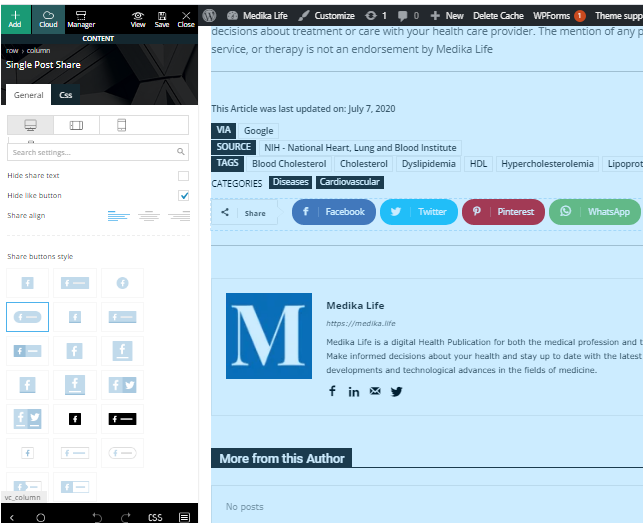
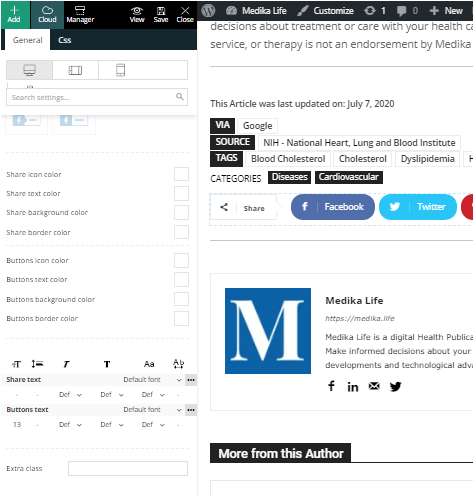
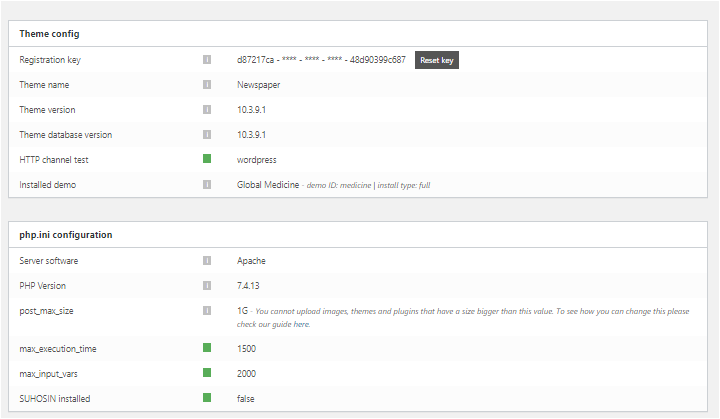
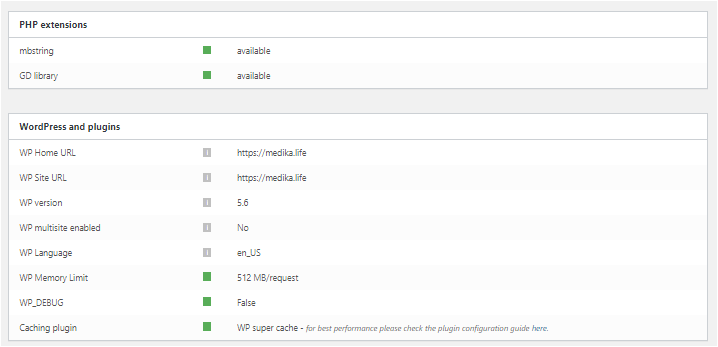
As you can see from the post above we have ALREADY tried all those solutions before contacting you. Here are the screenshots you requested, also included are the options the SocialPost share buttons now offer us on Composer. Perhaps that may offer a little more insight. You’ll notice how the section to add social media accounts has now evaporated from the options box. We are stuck with the four SM icons it defaults to,
These are in four separate files, sorry no other way of sharing them.
https://medika.life/wp-content/uploads/2020/12/SinglePostShare1.png
https://medika.life/wp-content/uploads/2020/12/SinglePostShare2.png
https://medika.life/wp-content/uploads/2020/12/Status-1.png
https://medika.life/wp-content/uploads/2020/12/Status-2.png
Robert Turner I’ve corrected the CROS issue above. Obviously an issue but it doesn’t impact the Composer problem, thanks for picking that up.
Robert Turner Calin, we are clearly on different pages. Here is my issue which I posted again this morning.
The site may look fine to you however the social media share isn’t working. It is completely broken, we don’t have either Pinterest or Wahtsapp. Those are the only four platforms the plugin shows in the front end and the option to add any addresses in the Composer has been completely blanked out.
Our problem is the Composer. It refuses to add ANY image to a template or update the page settings. It only saves the header and footer, not the content, so we cannot make any changes to existing templates, new ones don’t work either.
The reason the sticky header is no more is that it won’t allow us to repair the header by adding an image back to the template, so I have had to disable it. Trust me this isn’t a plugin issue, we have disabled everything. Also, we’ve noticed that Profilegrid has lost some of its functionality since the TagDiv upgrade.
Again, we are WP latest version, tagdiv and PHP latest versions, 512k ram allocated. No other issues, site functions, but we cannot change anything using composer.
If we disable the Standard pack sections disappear of the site, new Pro sections that should be visible. Tried a pro template to see if that would make any difference as we are running on Medical one, no change, just crashed older pages.
Robert Turner Perhaps also relevant, we have already tried upgrading to the pro template. It doesn’t resolve the issue and if we disable the standard pack, then certain elements on the site are no longer visible, even if they are new Pro elements.
Robert Turner I have applied update 9.1 and this hasn’t resolved the problem with the composer. I have the single post template from London Pro open in the composer. I cannot add an image using a single image block and the single post share doesn’t show any details for adding accounts in the options screen. Some other functionality is also missing.
I had no issue with images not showing on the site, this is restricted to the composer, and older templates I created don’t want to edit properly? Any ideas? We are trying to move onto London pro and I need to update each template to stop it using the older blocks before I activate the pro template to ensure everything keeps displaying.
Robert Turner Hi Calin. No that isn’t the problem at all. Images cannot be updated or changed through Tagdiv composer when you’re working with templates. Simply doesn’t work. Social media share the s similarly affected. Tried rollbacks etc with different versions of WP, no different. I assume you guys mad changes to the TagDiv composer plugin as well, and this is where the problem lies.
The images on the site are fine except for logo on sticky menu. Gone and now can’t put it back.