
 Vlad S
 Hello !
We have reviewed the issue you have mentioned but we couldn’t reproduce it on any device. That can be an issue from your host or internet connection but thank your for bringing that up !
Also for the header you have to edit the sticky version too from the header manager: https://www.screencast.com/t/s6mCIR6O
Thank you !
Vlad S Hello !
You can change it using this CSS code: .td_module_15 .entry-title {
font-size: 20px;
}
The code must be inserted here: https://www.screencast.com/t/J1Nxw5s5
Or you can edit the blocks and change it from there as you can see here: https://www.screencast.com/t/wDO0NM7InBn5
Thank you !
Vlad S Hello !
That can be done from wordpress features on posts wich is located here: https://www.screencast.com/t/pJkYIWQIrEm
Thank you !
Vlad S Hello !
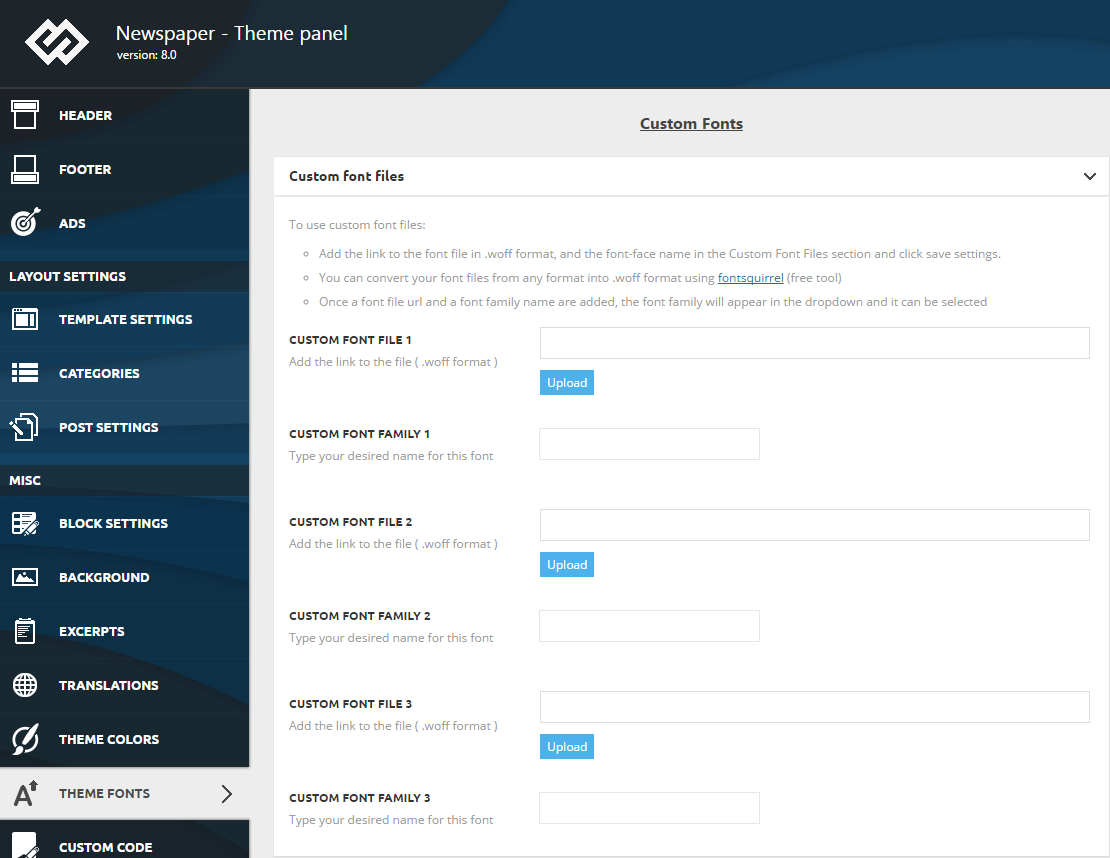
If you want to use a custom font file make sure it has a .woff extension, else just convert it to .woff using one of the multiple online solutions.
In order to use a custom font file it is enough to upload the font file by using the font upload buttons and provide a name for your fonts in the designated fields:
Thank you !
Vlad S Hello !
Please make sure that the photos are uploaded to their full size as you can see here: https://www.screencast.com/t/NPSkRItadj4s
Thank you !
Vlad S Hello !
Unfortunately in order to change that size you will have to mix up multiple css tags wich can be hard. I suggest to you, either change the header template or add one from the Cloud library or you can simply upload a bigger logo.
We are sorry for the inconvenience !
Thank you !
Vlad S Hello !
The background can be achieved by editing each ROW as you can see here: https://www.screencast.com/t/bphdTKjLkq
Thank you !
Vlad S Hello !
That padding can be disabled with TagDiv Composer by checking the CSS tab and set it how you want it: https://www.screencast.com/t/y6bM0qd4
Thank you !
Vlad S Hello !
Please make sure that you do not have a plugin conflict, please deactivate ALL non theme-related plugins, also if you are using child theme or cache plugin, deactivate them, clear all cache and try again.
Also please note that this issue is not related to Newspaper Theme and we cannot offer support for it.
Thank you !
Vlad S Hello !
WP Bakery is a PAGE builder. You cannot create posts with WP bakery. The only options you have from wordpress are Gutenberg or Classical editor for creating posts.
Thank you !
Vlad S Hello !
From 9.8 you can reuse Child theme since it has been updated. Please find out more about that here: https://forum.tagdiv.com/the-child-theme-support-tutorial/
Unfortunately there is no other option at the moment to achieve what you want.
Thank you !
Vlad S Hello !
Please provide a link to your website so we can take a look !
Thank you !
Vlad S Hello !
Please contact us via email at contact@tagdiv.com and provide admin login, as well as cPanel or FTP if possible. We will take a look. Include a link to this topic in the email.
Thank you !
Vlad S Hello !
You can simply check what elements you have on your homepage sidebar ( If you click on them you will see their title and settings: https://www.screencast.com/t/4yQVEYCMw3fI
After that you simply search them through your elements and add them.
Thank you !
Vlad S Hello !
Please contact us via email at contact@tagdiv.com and provide admin login, as well as cPanel or FTP if possible. We will take a look. Include a link to this topic in the email.
Thank you !
Vlad S Hello !
Please contact us via email at contact@tagdiv.com and provide admin login, as well as cPanel or FTP if possible. We will take a look. Include a link to this topic in the email.
Thank you !
Vlad S Hello !
You can achieve that by creating a new page, edit it using the tagDiv Composer and add the Authors box in it: https://www.screencast.com/t/nT7NDY4M0l
Thank you !
Vlad S Hello !
Unfortunately this option is not available with Newspaper theme but wordpress gives you that option as you can see here: https://wordpress.org/support/article/roles-and-capabilities/ Simply set the user to Author and that should be more than perfect.
Author (slug: ‘author’) – somebody who can publish and manage their own posts.
Thank you !
Vlad S Hello !
Please make sure that you are not zoomed in the page ( CTRL and – ). I have reviewed your pages on multiple browsers and everything looks perfect: https://www.screencast.com/t/SWpPiBiFQ58d
Thank you !
Vlad S Hello !
Unfortunatelly it doesn’t work because a category page displays all the content in one block layout. And the offset function cannot be used there.
We are sorry for the inconvenience !
Thank you !
Vlad S Hello !
Unfortunately you cannot remove anything from the CSS files. If you are experiencing rather low speed you can make sure that all of our theme requirements are up to date as you can see here: https://forum.tagdiv.com/requirements-for-newspaper/
Or you can check out our page speed increasing tutorial: https://tagdiv.com/how-to-increase-page-loading-speed/
Thank you !
Vlad S Hello !
Please contact us via email at contact@tagdiv.com with the mentioned title. Also include a link to this topic.
Thank you !
Vlad S Hello !
This category pages or what are they are not created by the Newspaper Theme. Please make sure that you do not have a plugin conflict, please deactivate ALL non theme-related plugins, also if you are using child theme or cache plugin, deactivate them, clear all cache and try again.
Thank you !
Vlad S Hello !
The only way you can replace the images is doing it manually in each posts by editing the post, delete and add new image.
The default posts are created only to help the customer so he or she can have an ideea of what the site would look like. Those posts are meant to be deleted after you create your own content.
Thank you !
Vlad S Hello !
Unfortunately that option is not available at the moment !
We are sorry for the inconvenience !
Thank you !
