
- NewsmagUsing the theme translations together with WPML
- NewsmagHow to update a plugin
- NewsmagCustom Post Type Support
- NewsmagAbove footer ads
- NewsmagWeather Widget
- NewsmagHow to update the theme
- NewsmagIntroduction
- NewsmagLogo & Favicon
- NewsmagFooter templates
- NewsmagUsing other ads
- NewsmagCustom ad spots
- NewsmagArticle ads
- NewsmagSidebar ads
- NewsmagHeader ads
- NewsmagLoading image effects
- NewsmagCategory top post styles
- NewsmagSmart Lists
- NewsmagGeneral settings
- NewsmagTheme thumbs
- NewsmagtagDiv slider gallery
 curistorian
My shop pages, for example (https://www.houselore.com/product-category/art/) have the Attribute Filter checked to show the filter on mobile. However, when this shop page is opened on a mobile device, the attribute filters do not appear. How can I fix this?
 simchris
Reminder to folks it’s time to fully retire use of AMP as another failed abandoned Google attempt to take over the web when it was pointless and stupid for many sites where a print ready page would have worked just as well for mobile. It was a money grab to track folks usage by loading your content on their server. Ugh.
At this point, more than a year after AMP was retired as “end of life,” it’s time to move on.
Requires three things
a) setup proper 301 redirects to keep links if you had lots of inbound traffic, but frankly Google recommends simple 404 so they stop caching the /amp or ?amp URL — keep in mind normal htaccess redirect of /amp –> not /amp is tricky in case you have a post url slug of mycontent/amplify-your-cake — would kill that URL.
You need to try something like this in your root htaccess file, then *test* a amp url to make sure it redirects
e.g.,
RewriteEngine On
# Removes "amp" (or "amp/") from the end of the URL-path

RewriteRule (.*)amp/?$ /$1 [R=301,L]
this code also shared quite a bit online
RewriteCond %{REQUEST_URI} (.+)/amp(.*)$

RewriteRule ^ %1/ [R=301,L]
2) deactivate any ‘AMP’ plugins in WordPress – which will remove the rel= link in your post headers; to remove a loop
3) clear AMP cache with Google: https://developers.google.com/amp/cache/update-cache
// I don’t work here, just started to do this last year, and catching up on final nail in the AMP coffin for our other sites this month //
*also posted in Newspaper forum; but copied here for all the rest of us //
simchrisReminder to folks it’s time to fully retire use of AMP as another failed abandoned Google attempt to take over the web when it was pointless and stupid for many sites where a print ready page would have worked just as well for mobile. It was a money grab to track folks usage by loading your content on their server. Ugh.
At this point, more than a year after AMP was retired as “end of life,” it’s time to move on.
Requires three things
a) setup proper 301 redirects to keep links if you had lots of inbound traffic, but frankly Google recommends simple 404 so they stop caching the /amp or ?amp URL — keep in mind normal htaccess redirect of /amp –> not /amp is tricky in case you have a post url slug of mycontent/amplify-your-cake — would kill that URL.
You need to try something like this in your root htaccess file, then *test* a amp url to make sure it redirects
e.g.,
RewriteEngine On
# Removes "amp" (or "amp/") from the end of the URL-path

RewriteRule (.*)amp/?$ /$1 [R=301,L]
this code also shared quite a bit online
RewriteCond %{REQUEST_URI} (.+)/amp(.*)$

RewriteRule ^ %1/ [R=301,L]
2) deactivate any ‘AMP’ plugins in WordPress – which will remove the rel= link in your post headers; to remove a loop
3) clear AMP cache with Google: https://developers.google.com/amp/cache/update-cache
// I don’t work here, just started to do this last year, and catching up on final nail in the AMP coffin for our other sites this month //
 nadruaapps
Below error occured and afterwords by entire site went down. I had to restore an old backup.
Howdy!
WordPress has a built-in feature that detects when a plugin or theme causes a fatal error on your site, and notifies you with this automated email.
In this case, WordPress caught an error with one of your plugins, tagDiv Composer.
First, visit your website (https://website.com/) and check for any visible issues. Next, visit the page where the error was caught (https://website.com/wp-login.php) and check for any visible issues.
Please contact your host for assistance with investigating this issue further.
If your site appears broken and you can’t access your dashboard normally, WordPress now has a special “recovery mode”. This lets you safely login to your dashboard and investigate further.
To keep your site safe, this link will expire in 1 day. Don’t worry about that, though: a new link will be emailed to you if the error occurs again after it expires.
When seeking help with this issue, you may be asked for some of the following information:
WordPress version 6.5
Active theme: Newspaper (version 12.6.5)
Current plugin: tagDiv Composer (version 4.8 | built on 11.03.2024 11:04)
PHP version 8.1.27
Error Details
=============
An error of type E_ERROR was caused in line 49 of the file /home/u238372/domains/website.com/public_html/wp-content/plugins/td-composer/legacy/common/wp_booster/td_wp_booster_functions.php. Error message: Uncaught Error: Failed opening required ‘td_block.php’ (include_path=’.:/opt/alt/php81/usr/share/pear:/opt/alt/php81/usr/share/php:/usr/share/pear:/usr/share/php’) in /home/u238372/domains/website.com/public_html/wp-content/plugins/td-composer/legacy/common/wp_booster/td_wp_booster_functions.php:49
Stack trace:
#0 /home/u238372/domains/website.com/public_html/wp-content/plugins/td-composer/legacy/Newspaper/functions.php(21): require_once()
#1 /home/u238372/domains/website.com/public_html/wp-content/plugins/td-composer/td-composer.php(191): require_once(‘/home/u238372…’)
#2 /home/u238372/domains/website.com/public_html/wp-includes/class-wp-hook.php(324): {closure}()
#3 /home/u238372/domains/website.com/public_html/wp-includes/class-wp-hook.php(348): WP_Hook->apply_filters()
#4 /home/u238372/domains/website.com/public_html/wp-includes/plugin.php(517): WP_Hook->do_action()
#5 /home/u238372/domains/website.com/public_html/wp-content/themes/Newspaper/includes/wp-booster/tagdiv-wp-booster-functions.php(3): do_action()
#6 /home/u238372/domains/website.com/public_html/wp-content/themes/Newspaper/functions.php(19): require_once(‘/home/u238372…’)
#7 /home/u238372/domains/website.com/public_html/wp-settings.php(663): include(‘/home/u238372…’)
#8 /home/u238372/domains/website.com/public_html/wp-config.php(104): require_once(‘/home/u238372…’)
#9 /home/u238372/domains/website.com/public_html/wp-load.php(50): require_once(‘/home/u238372…’)
#10 /home/u238372/domains/website.com/public_html/wp-login.php(12): require(‘/home/u238372…’)
#11 {main}
thrown
 Anamaria
 Hello,
We no longer recommend using AMP because it is deprecated https://developer.bigcommerce.com/docs/storefront/wordpress/platform-integration/enabling-amp
For mobile theme + Amp the content need to be added in Mobile Editor -> https://www.screencast.com/t/xbgZG8kH
Please check this topic where I explained each mobile version -> https://forum.tagdiv.com/topic/mobile-version-not-working-properly-2/ -> https://forum.tagdiv.com/topic/amp-pages-not-working-well-with-this-theme/ and choose what mobile version you want.
Also, please let me know what plugin for the cache you use now.
Thank you!
 Herodie
On our website for some time now, when entering from a mobile phone, things do not work as they should and the elements go out of place.
We did not find the solution until deactivating the AMP plugin. In the plugin it indicates that it is not compatible with tagdiv. Is that so? Can something be done?
 Bettina
 Hello @sotirow96!
I think it would be better if you could take the project with duplicator plugin and make a staging so we can check your issues from there. I need more information about this situation. Also, check the rule for your field group to be equal to Resources, for example: https://app.screencast.com/S08n3HQiJ3oE5
Thank you!
Bettina Hello @ericarrache!
If you use cloud templates, then you can edit every page with the tagdiv composer and check if you have set any color on the hover. For example, here: https://app.screencast.com/4mEGO0dbxKzwQ?conversation=a7HFaN0kwMAgjzRGyDg587
The first square option is the normal color, and the second one is the color for the hover effect. Click there and delete any color from there.
Thank you!
 BLAY
BLAY Hello Betina,
Fyi Your link for Mobiles pages is broken I obtained Error 404
On my website I have Mobile pages but for a few days I don’t have these mobile pages on my mobile phone but the desktop version !!! why ?
I don’t use mobile theme plugin and don’t use AMP and no new plugin only the new newspaper version
-
This reply was modified 2 years by
BLAY.
 acqua
acqua I did and it does not behave as I need.
I will try to explain better.
You click on one photo and you get for example this URL:
https://www.backdoorpodcast.com/boucher-esperimento-raptors/photo1
then click next and you get
https://www.backdoorpodcast.com/boucher-esperimento-raptors/photo2
….
https://www.backdoorpodcast.com/boucher-esperimento-raptors/photo3
so at each photo a new URL is generated
An example from another template using a plugin
https://www.sportoutdoor24.it/lifestyle/ambiente/animali-piu-aggressivi/
Anamaria Hi,
Did you check the wordpress files? Please do the following steps:
– Change admin passwords and delete admin accounts you are not familiar with;
– Delete any weird/unknown plugins;
– Delete the weird/unknown themes;
– Clean unfamiliar Theme Panel injected code (example – https://i.imgur.com/4q70kCv.png);
– Clean WordPress files (example – https://i.imgur.com/stJCqiK.png)
Anamaria Hello,
The logo image can be blurry when the image is smaller and need to be stretched or when you have set a smaller thumb for that image, make sure that you set the full size for the image that you have set as logo, for example-> https://www.screencast.com/t/jpRewXcCd
Thank you!
 dharma3d
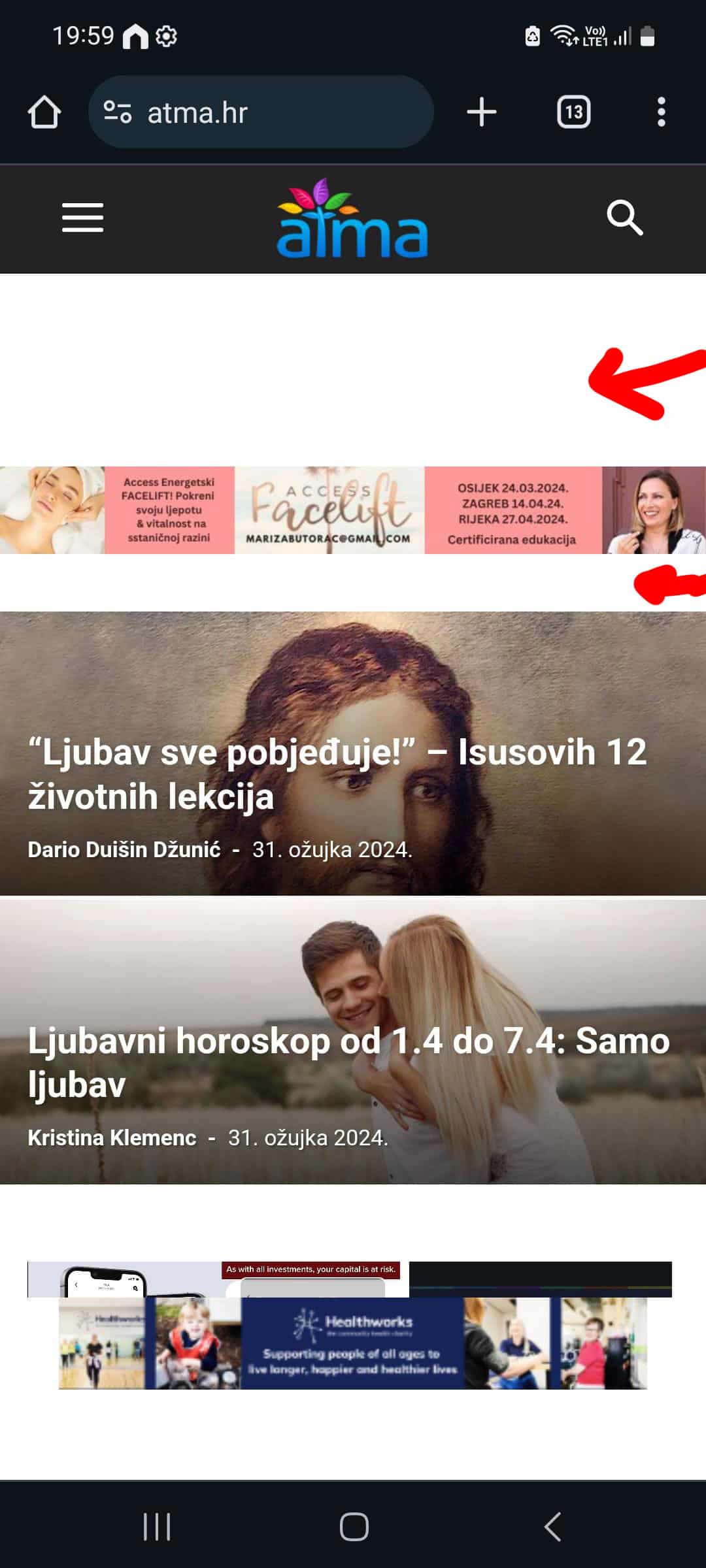
I’m having some undesired spaces in the hearder of my mobile theme, and I’m tryin to resolve that through custom css and that works when I load the mobile theme on desktop but on mobile phone I don’t see those changes.
For example
:
.td-a-rec-id-header_mob {
margin: 0;
}
This is how it looks on mobile phone:
And this is the result is see in DevTools when I switch to mobile view:
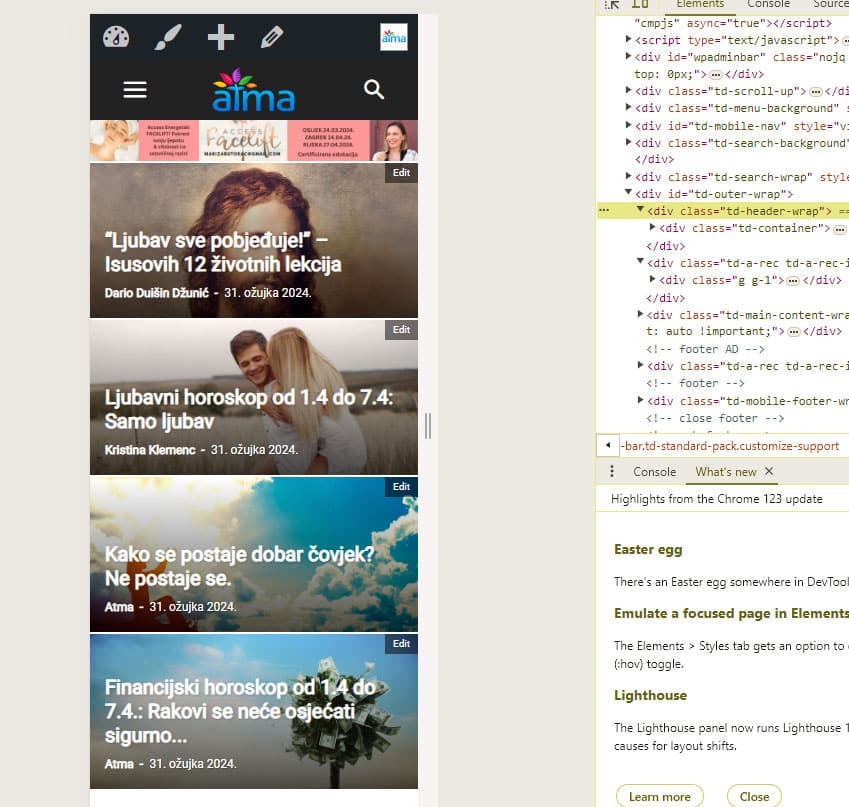
Or is there another way to get rid of those spaces?
Thanks!
My site is https://atma.hr/
 christianmuda
 Hi,
A follow up question to this answer
“Looks fine, but may be worth meeting this criteria on GS:
https://developers.google.com/search/docs/appearance/favicon-in-search
Your favicon must be a multiple of 48px square, for example: 48x48px, 96x96px, 144x144px and so on.”
– Where in the theme shall I upload all these different sizes? How shall they be named and organized? In all my other themes, this just works out of the box.
Best regards Christian
christianmuda Hi, i also found this site
https://realfavicongenerator.net/favicon_checker?protocol=http&site=matochresebloggen.se
That found many errors. Does this help your tech team understand what is wrong and how I can solve this?
Best regards Christian
 successbank
hello
“This content is for subscribers only.” I would like to know about this feature.
Some of the content set as samples can be viewed by subscribing to the message, and I am also curious about how to use it.
yes)
https://ebook.or.kr/wp/2024/03/28/concert-shows-will-stream-on-netflix-amazon-and-hulu-this-year/
Well then, have a nice day today.
 GEORGI
hi,in my site,on the mobile version,i add logo but the resolution on zoom its come blurry,can you help me to fix that:
this my site:
https://newspoint.bg
its looking like:

i check another similar news paper and its loock good here example:

best regards
GEORGI
 Craig
CraigHi Team,
Some of my blocks on mobile are not going to full width? In TDC they look fine and as expected and even on desktop they are fine.
Also I have some white space and a small smiley face under the footer.
Pages with the issues are:
http://www.newzealandguide.co
& https://newzealandguide.co/category/destinations/south-island/
Let me know what you think?
Cheers, Craig
acquaIs there a way to open a photo (from a photo gallery) on a new URL?
check example of a gallery here https://www.backdoorpodcast.com/nba-blazers-lultimo-atto-di-carmelo-anthony/
 Assadujaman
Hi,
I am Assadujaman from Nagorik Television. It is a satellite television of Bangladesh. We are using the Newspaper theme.
We got the litespeed cache plugin with hosting. Our Page Performance score was up to 97 when using the litespeed cache. But we were having some loading or Broken issues. Then we stopped using the litespeed cache and started using your recommended WP Super Cache. But performance score is showing 85.
If you use WP Super Cache settings, you will get a very good performance score or if you use a light-sized case, if you use these settings, there will be no problem.
Thank You
Assadujaman Chowdhury
Nagorik Television
Whatsapp: +8801519807060
Anamaria Hi,
Looks fine, but may be worth meeting this criteria on GS:
https://developers.google.com/search/docs/appearance/favicon-in-search
Your favicon must be a multiple of 48px square, for example: 48x48px, 96x96px, 144x144px and so on.
Have you indexed your website via Google Search Console?
Thank you!
 Abder Fath
 Hello, I can’t add a full link since the posts links may differ, so if I put in the link example.com/post1 and the user is on example.com/post2 and clicks on “log in to leave a review” and goes to the login page and signs in, he will be redirected to example.com/post1. So is there a way to redirect the logged in users to the post they were in before clicking on “log in to leave a review”.
Thank you
-
This reply was modified 2 years by
Abder Fath.
-
This reply was modified 2 years by
 Unickow
https://islandfishermanmagazine.com/
I apologize, I’m not that technical, so please bear with me. All my articles (I have hundreds) now have images clickable, and when clicked they show as a full size jpg with the full url of the image. The only way to get back to the article is to use the browser back button. I don’t want this feature. Something in the new update has turned this on and I ca’t figure out what as I am not technical enough.
I have turned off GENERAL MODAL IMAGE, DISABLE MODAL IMAGE ON MOBILE, and SMARTLIST MODAL IMAGE, and dumped the cache and restarted pages, but there is no effect.
Example article (old article): https://islandfishermanmagazine.com/3-tips-for-better-float-fishing/
In a new article I posted today, if I turn modal image on, then the image doesn’t have that functionality, which is the way I want all my article images to be, as they were before the update. In the same article, the feature image does not have an option.
today’s article:
https://islandfishermanmagazine.com/reel-in-relaxation-with-nootka-marine-adventures/
I really need help to make all the images in my entire site not clickable and expanding, as they were before this update, please.
 lindoma
https://drinks-and-more.ch/
Recently I have the following problem: In the BigGrid Blocks the same articles are displayed on all category pages. At the moment the last articles of the News category. For example, if I go to the Interviews category and set the filter to “Interviews”, Interviews is displayed on all pages. What could be the problem?
Thank you for your quick help.
Michel
simchris I don’t work here, but I’ve found over the years it’s always better to load the favicon in various sizes for Windows/Mac in the root of your domain, like where WordPress typically installed.
Tons of examples online, but this site is safe to read
https://mailchimp.com/resources/favicon-size/


