- NewsmagUsing the theme translations together with WPML
- NewsmagHow to update a plugin
- NewsmagCustom Post Type Support
- NewsmagAbove footer ads
- NewsmagWeather Widget
- NewsmagHow to update the theme
- NewsmagIntroduction
- NewsmagLogo & Favicon
- NewsmagFooter templates
- NewsmagUsing other ads
- NewsmagCustom ad spots
- NewsmagArticle ads
- NewsmagSidebar ads
- NewsmagHeader ads
- NewsmagLoading image effects
- NewsmagCategory top post styles
- NewsmagSmart Lists
- NewsmagGeneral settings
- NewsmagTheme thumbs
- NewsmagtagDiv slider gallery
 curistorian
Hi- I have a sticky sidebar on either side of my blog content (example: https://www.houselore.com/2024/04/10/the-magic-behind-talking-portraits/). All I want to do is have the smaller columns on either side stick to the top as the middle content is scrolled through. I have tried multiple settings for sticky offset, but none are working. Is there an easier fix for this?
 Bettina
 Hello @BLAY!
Oh, ok. That’s great! You need to assign the mobile pages to your desktop pages in order to display on your mobile version.
Clear all the cache and see the results.
Do you use CDN? Follow this guide: https://forum.tagdiv.com/cloudflare-cdn/
You need to disable the Rocket Loader.
We’ve discussed the issue here as well: https://forum.tagdiv.com/topic/mobile-pages-instead-of-mobile-theme-or-amp/
Let me know the results!
Thank you!
 dscom
dscom We’ve reviewed the guide, but unfortunately, it didn’t offer a solution. We’re interested in using the ‘ARTICLE INLINE AD’ option from the mobile theme to achieve the same effect on the AMP page(showing inline ads between the articles paragraph). While we understand that this feature isn’t supported by default in the theme, could you please provide guidance on which theme files to edit in order to accomplish this?
https://app.screencast.com/op6RUX7p2Vibk
 lpecchiproper
 Hi
this is what I see in TD composer, first row is aligned to the top, last row is aligned to the bottom
Row layout settings are
If i change vertical align type like that
I see this in TD composer
As you can notice, First row (with Logo) is not aligned to the top, and last row is not aligned to the bottom, the vertical colums are evenly distributed.
I need to have the FIRST display solution, but when I save the page I always get the same result, with both Row Layout settings
You can see the live page here
https://symt2023.proper-milano.cloud/landing-page-sample/
Please let me know if you need more info.
Best regards, Luca
lpecchiproperI need to create a full height page, a landing page, with no header and footer, just three elements, the first one aligned at the top, the last one aligned at the bottom, the second one occupying the middle part.
With TD Composer I’ve created a page with a full height row with three horizontally oriented columns (width 100%), and I chose the “space between” option in vertical align (see Row Layout Setting Image).
In TD Composer I see the page as I would like it (see image 1), while if I select the “space evenly” option the three blocks are correctly evenly distributed in TD Composer (see image 2).
However, the same the same displayed page ALWAYS shows the three blocks evenly distributed, even when the vertical align option is space between (see image 3).
How can I fix this situation?
I am using Newspaper 12.6.5, and the example I am showing you is simplified, just to show you the malfunction.
Thanks in advance, Luca
Image 1 https://imgur.com/cn2Ddzg
Image 2 https://imgur.com/K5zUspZ
Image 3 https://imgur.com/t6R0oLt
Row Layout Settings https://imgur.com/8sm9jKI
dscomHello,
We would like to load AMP ads inside the article ads in the mobile template. We are currently only using the mobile theme for AMP, and we would like to utilize the Article ADS section to load AMP ads. Could you tell us if something like that is supported by your theme? If not, can you guide us on how to achieve this?
Thank you.
 smga
smgaHello
Please tell me if it is possible to make a links of the main navigation menu items with scrolling to the class within one page
We decided to make a landing page, but couldn’t find any direct instructions or template examples.
Thanks
Bettina Hello @mathclash!
We have 3 options available for mobile versions that you can use:
1. Responsive version: A responsive version of your website looks similar to the desktop version. TagDiv Composer is used to edit the page.Click on the mobile viewport: https://www.screencast.com/t/XDQJedlggSB. There, you can see your mobile version and edit or adjust the elements to look better.
2. Mobile pages: https://tagdiv.com/newspaper-10-3-7-update-brings-customizable-and-fast-mobile-pages
3. Mobile theme plugin: The Mobile Theme is a performance-optimized theme included in the main Newspaper theme that only loads on mobile devices. It comes with its own templates and designs for pages, posts, categories, etc., so your current templates from the desktop theme will get converted to the mobile theme layout. Please see https://forum.tagdiv.com/the-mobile-theme/ and https://forum.tagdiv.com/mobile-theme-introduction/ for more information.
A full explanation is here: https://www.youtube.com/watch?v=SpGkOnJeNZY
If you need to use mobile version 1 or 2, then you need to uninstall the Mobile Theme plugin and AMP.
Thank you!
 sotirow96
Hello, I am using the Job Hunt PRO and I would like to ask how can I create an function for boosting an Ad, for example ad will get a special badge or ad will be on top for X amount of days.. is this possible ?
Thanks
Bettina Hello Joachim!
Do you mean these thumbs?: https://forum.tagdiv.com/thumbs-on-modules-and-blocks/
If you deactivate a dimension from there, next time when you will upload an image, it will not be resized to that dimension.
After changing the thumbnail sizes you need to regenerate your thumbnails using a plugin. Check this: https://forum.tagdiv.com/using-the-theme-with-existing-content/
NOTE: If the thumb specific for that block is not enabled, then the image won’t be displayed.
NOTE: The Mobile theme layout is not customizable as the responsive version or mobile pages. Please see https://forum.tagdiv.com/the-mobile-theme/ and https://forum.tagdiv.com/mobile-theme-introduction/ for more information.
Please provide an example of the issue you have now, and it wasn’t when you installed the theme, so we can check if there is a bug or not. You have the option to hide the featured images from Flex Block, for example.
Thank you!
 christianmuda
 Hi,
Is there a reason why you link to a guide that is not revelant to the newspaper theme? Should not the theme itself take care of the favicon?
Looking at the results in this page
https://realfavicongenerator.net/favicon_checker?protocol=https&site=www.matochresebloggen.se%2F
I would really appreciate if you can tell me how to fix this with the actual theme i have.
Best regards Christian
 datingvergleich
Dear Support Team
I am having the same issue with the TownTalk Child theme. LCP check is failing for mobile view in Google Page Speed tests. LCP for the mobile view of posts is about 5 seconds.
I am using WP Rocket Premium with all optimizations turned on.
Obviously, this is mainly related to the thumb image on top of the posts. This image is loaded in full size and then resized to the mobile width.
For some reason, I did not have this issue when installing the theme first time. Could it have turned up with the latest version updates?
Example URL: https://www.dating-vergleich.com/alternativ/gleichklang/
There must be a better way to include this image. I assume, that all your child themes have this same issue.
If there is no way of optimizing this part from a developers point, would it be possible to do a custom workaround: removing this feature image from the mobile theme for posts and pages?
Looking forward to a feedback on this.
Best regards
Joachim
Bettina Hello @anshulrajora!
We have 3 options available for mobile versions that you can use:
1. Responsive version: A responsive version of your website looks similar to the desktop version. TagDiv Composer is used to edit the page.Click on the mobile viewport: https://www.screencast.com/t/XDQJedlggSB. There, you can see your mobile version and edit or adjust the elements to look better.
2. Mobile pages: https://tagdiv.com/newspaper-10-3-7-update-brings-customizable-and-fast-mobile-pages
3. Mobile theme plugin: The Mobile Theme is a performance-optimized theme included in the main Newspaper theme that only loads on mobile devices. It comes with its own templates and designs for pages, posts, categories, etc., so your current templates from the desktop theme will get converted to the mobile theme layout. Please see https://forum.tagdiv.com/the-mobile-theme/ and https://forum.tagdiv.com/mobile-theme-introduction/ for more information.
A full explanation is here: https://www.youtube.com/watch?v=SpGkOnJeNZY
If you need to use mobile version 1 or 2, then you need to uninstall the Mobile Theme plugin and AMP.
Thank you!
 simchris
 Sorry, forgot to mention, Google has made it harder to do the ‘clear amp cache’ thing. SHould have been a button in the official wordpress for amp plugin, but nooooooo.
If you serve 404s for the AMP endpoints, or do optional 301 redirects, that should suffice. There are no penalties or anything with removing AMP forever. Do it! 🙂
(I don’t work here, just loooooong time user.)
__ Chris S.
simchris My pleasure. Also, note that Google has actually made it harder to clear the amp cache. So, really, no need to bother with that as either the 404 amp endpoints, optional 301 redirects, and removing the rel= links in the post meta data will solve that. At some point they will just switch AMP off entirely as they really don’t care.
 anshulrajora
Hi,
I have Installed “tagDiv Mobile Theme” and added the Mobile Template for Homepage, Category Page, Tag Page, Single Page & Author Page but when I am checking the settings on my mobile it’s not reflecting and showing a default structure. Also when I am trying to open the Menu in Mobile it’s responding too late.
 haipo
haipo Hi Bettina
In Tagdiv – mobile, images fly out of the frame – example:
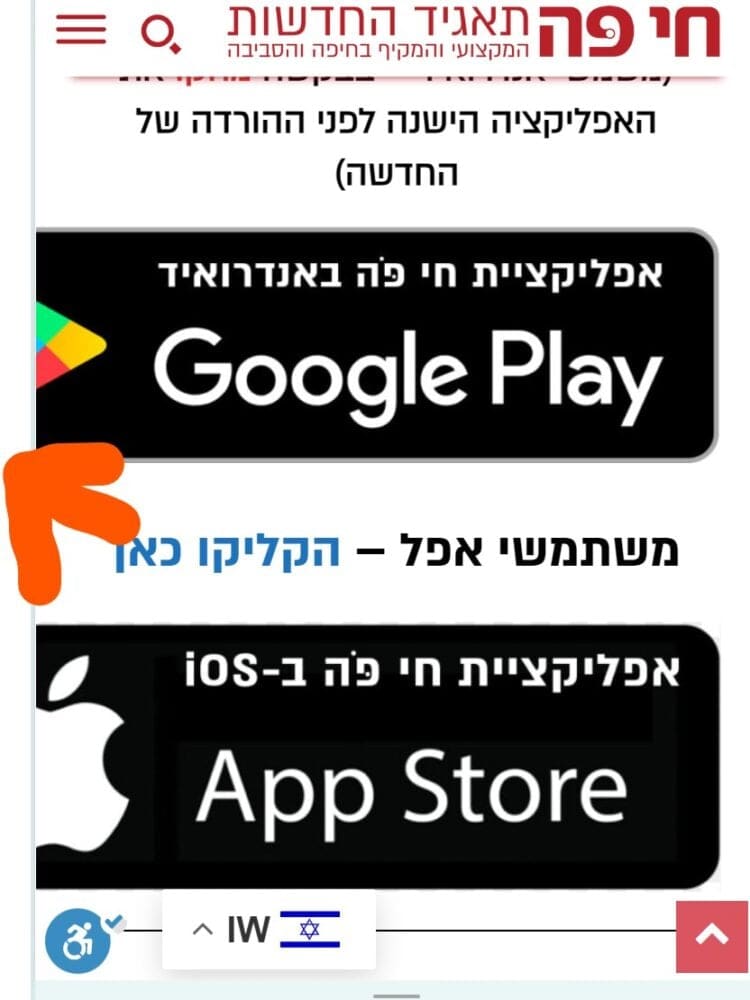
–
In my old version (publisher) – the frame alignes the images – example:
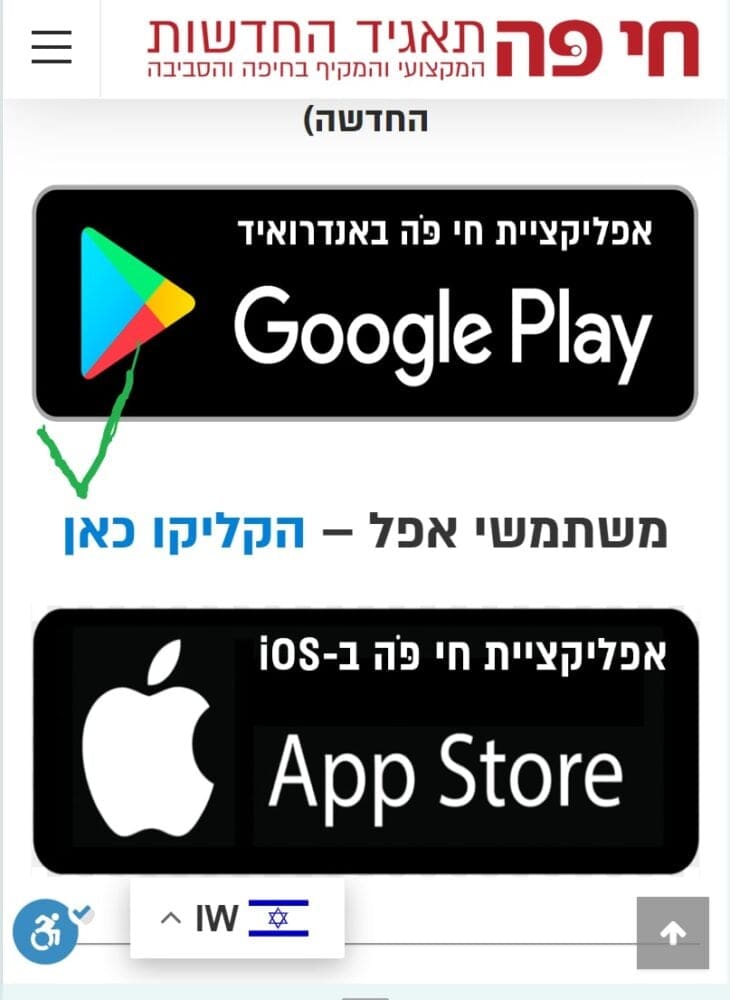
 Anamaria
 Hello,
Thank you for sharing this information; I’m sure it will help other users who are considering abandoning the AMP version.
Have a great day!
Anamaria Hi,
This malware infects not only theme files but also WordPress files or other plugin files. This malware was not detected only in our theme but also in many other themes and plugins https://www.bleepingcomputer.com/news/security/massive-balada-injector-campaign-attacking-wordpress-sites-since-2017 / -> https://cybernews.com/security/wordpress-malware-epidemic-balada-injector/ -> https://www.geoedge.com/balda-injectors-2-0-evading-detection-gaining-persistence /
You could consider reinstalling the WordPress version, reinstalling the theme, and checking for this plugin wp-zexit.php. It might be wise to inspect via FTP if it doesn’t appear in the WordPress -> Plugins. Additionally, using Wordfence to scan the website and remove unknown users would be prudent.
Thank you!
 Calin
Calin Hi simchris, thank you for sharing on our community the steps for how to redirect amp URLs.
Best regards, Calin
simchris We started building websites March of 1995; so have seen a lot come and go. AMP was a good idea if you had a busy site someplace with slow server, etc., but when Google basically ‘forced’ people to be on AMP for mobile search results (much like G+ was *required* for a local business listing), their “do no evil” mantra was dead and buried. So, they keep abandoning things (RIP, Feedburner), that I won’t invest in any of their tech unless no other choice. We were so happy to see AMP go the way of another bad idea, as far as I was concerned. The idea of having to waste huge amounts of time building second version of content was dumb when stuff like ‘print friendly’ pages have been around for 25+ years. Anyway… good riddance, I say 🙂
 waleed9
 Hello simchris
I hate google
I don’t know, in this time people are allowed to say, “I hate.”
It seems that we are living in a slave-like time, with new ideologies now dominating our collective culture and controlling our thoughts.
The strange thing is that despite the presence of many technology companies and browsers, no one acts as a god like Google, It seems that the gods Google, make a lot of mistakes
Although I like the simple design style in amp
The idea was good and practical
However, Google failed to build the infrastructure for this project, and it did not seem serious or convincing, and this is what is strange about the matter.
-
This reply was modified 2 years by
waleed9.
simchris if using redirection plugin
REGEX
Redirect AMP pages
http://site.com/article/amp/ ⇒ http://site.com/article/
Source
^/(.*?)/amp/$
Target
/$1/
Redirect ?amp pages
http://site.com/article/?amp=12 ⇒ http://site.com/article/
Source
^/(.*?)/\?amp=.*
Target
/$1/
simchris if using redirection plugin
REGEX
Redirect AMP pages
http://site.com/article/amp/ ⇒ http://site.com/article/
Source
^/(.*?)/amp/$
Target
/$1/
Redirect ?amp pages
http://site.com/article/?amp=12 ⇒ http://site.com/article/
Source
^/(.*?)/\?amp=.*
Target
/$1/
 JhonnySan
how to avoid duplicate posts on the home page and other parts of the page
On the front page of my site I have several grid blocks, I selected them by tags, but I have seen that the publications are being duplicated in another block.
In the individual entries, they are also duplicated in the related content and latest entries section,
The Newspaper theme will have some function to avoid duplicate content throughout the site.
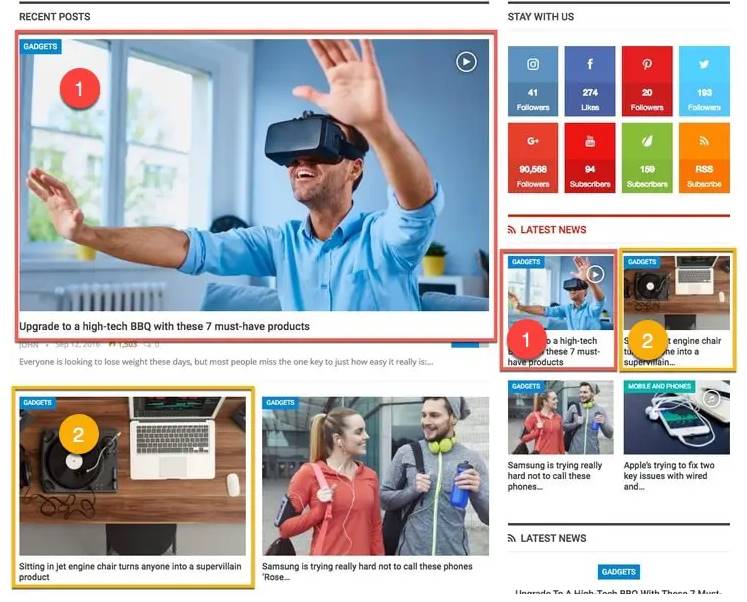
What are “duplicate posts”?
Sometimes it happens that you have multiple blocks and widgets and they display the same content (due to a common category, tags or taxonomy). We call it “duplicate posts.” As an example of duplicate content, see the image below.