
- ApiPractical example – How to add a new Block and Module
- Apitd_api_top_bar_template::delete
- Apitd_api_top_bar_template::update_key
- Apitd_api_top_bar_template::update
- Apitd_api_top_bar_template::add
- Apitd_api_single_template::delete
- Apitd_api_single_template::update_key
- Apitd_api_single_template::update
- Apitd_api_single_template::add
- Apitd_api_footer_template::delete
- Apitd_api_footer_template::update_key
- Apitd_api_footer_template::update
- Apitd_api_footer_template::add
- Apitd_api_smart_list::delete
- Apitd_api_smart_list::update_key
- Apitd_api_smart_list::update
- Apitd_api_smart_list::add
- Apitd_api_thumb::delete
- Apitd_api_thumb::update_key
- Apitd_api_thumb::update
 Simion C.
 Hi,
I don’t understand why you would like the previous version. There is nothing different in this matter between the theme versions. The example provided above is perfectly achievable in both the theme versions, using Visual composer or the front-end tagDiv composer as well.
However, it would be best if you would create your pages with the new composer, in future theme updates more options will be available just for this editor.
Please try the steps as described and you will achieve the same result easily. It is not hard to use the tagDiv composer, once you get used to it.
If you could tell me what exactly does not work, I will try and help you.
Thanks
 Catalin
 Hello pedroxi,
I have inspected your website and I saw that your loading page is poor when I access at the first time your homepage. Also, I checked your source page and I saw that you are using a lot of unknown plugins which can interact with the theme core files and causes a lot of unknown issues, like Autoptimize and lazy load plugin. I suggest you remove all of them, leave just our required plugins which come bundled with the theme core files and rule out any conflicting plugins. Also, I have checked your website on Google Insights and your loading page is not a good one, as you can see here -> https://www.screencast.com/t/W1tRoq9CUM You need to do some customizations as in that list is suggested if you want to achieve best theme results.
Please notice that the speed of your website depends on how well your site is optimized. Notice that is not a simple task and if you do not have any experience in this regard you will do not bring good results for the theme. Also, notice that we have a speed optimization tutorial but this is addressed only to advanced users. So, if you follow the steps which are presented in this tutorial here -> https://forum.tagdiv.com/how-to-make-the-site-faster/ you can increase the page speed loading and if you are not aware of the steps in this regard, please consider hiring a freelancer/developer to help you because the speed optimization services is not covered by our support policy, as you can read here -> https://forum.tagdiv.com/support-policy-2/ Check our documentation here -> https://forum.tagdiv.com/requirements-for-newspaper/ regarding on dedicated server to fit to our requirements. For an example, you should check our demo preview because this website is optimized.
Thanks for your understanding!
Simion C. Hi,
There was a problem in receiving the access token in the previous social counter plugin version. Please make sure you are using the latest version from the theme package. Deactivate and delete the plugin you are using now, and install the latest one. Then clear your browser cache (Example for Chrome – https://www.screencast.com/t/f9Q66lPx1fY) and try again. Or use a different browser when configuring the plugin. Here is a tutorial about the social counter
– https://forum.tagdiv.com/tagdiv-social-counter-tutorial-2/
Please let us know how it goes.
Thanks
 FredAstair
 Thanks for helping.
I think we are misunderstanding each other. I do not have problem with showing same posts from different grids.
My print screen examples shows the error if you click on “Load More” from one grid, in eg Beaches (Stränder), there you can see that the same posts appear you twice in from the same grid and category.
 steebostech
Hi, I’m noticing that since I installed the Artcreek demo, I’ve been having issues with rows. When I create a row with columns 1/6 + 4/6 + 1/6 and only put content in the 4/6 column for example, the content will show up on the left still.
Another issue I’m noticing is how big the top and bottom margins are now. I have to manually edit the margins because of the excessive white space otherwise.
How can I fix these issues while still keeping the artcreek demo?
 Bogdan B.
 As far as goole is concerned, your page speed is pretty low and optimization not done on your site:
https://developers.google.com/speed/pagespeed/insights/?url=http%3A%2F%2Fwww.vapekrew.com%2F&tab=desktop
Please follow the suggestions posted by google in the results and use this guide: https://forum.tagdiv.com/how-to-make-the-site-faster/
As a note on speedbooster: https://forum.tagdiv.com/topic/tinymce-advanced-and-other-various-disabling-speed-boster/
Thank you!
Simion C. Hi,
You can display the custom posts in any of the theme blocks for example. The blocks have the option to filter posts by custom post type
– https://forum.tagdiv.com/block-settings-guide/
Thanks
Catalin Hello Auttachai Jantasang,
Unfortunately, I do not exactly understand what you mean, sorry! Please provide more details about this and also, so I will be able to provide a more accurate response. Where exactly do you want to create a Facebook Link? For example, if you want to have a link for your social icons, Facebook, in this case, you should simply add the Facebook URL of your Fb account, like here -> https://www.screencast.com/t/sn6Hhel06QN
Hope this helps!
Thanks for the message!
Catalin Hello coupleofjourneys,
I cannot access your website because it seems to be in maintenance mode. Unfortunately, notice that we do not recommend to increase the header style size because you can damage the theme layout. If you do not like this header template, you simply switch it to another one which displays the logo in full-width, for example, header style 10. For more information about header styles, please check here -> https://forum.tagdiv.com/header-styles/
Thanks for your understanding!
Catalin Hello erastus,
Unfortunately, please notice that our product does not have such an option for dynamic width and we do not recommend to do that through the custom CSS code because the layout of the theme will be damaged. If you want to change the width of the theme to be in full-width mode, please notice that is not a simple task and you will have to adjust the entire theme to the new width for better results.
Above, my colleague gave you an example from where you should strat to increase the theme width, but notice then you will have to make some additional customizations to adjust the other theme elements if you want to bring best results.
If you want to display more levels in our theme and you are not aware of the steps in this regard, please consider hiring a freelancer/developer to do this for you because we cannot provide customization services at the moment, sorry!
Thanks for your understanding!
Catalin Hello pablojmelian,
Unfortunately, I do not exactly understand what kind of plugins you are using to optimize your javascript and what customizations you have in this regard, sorry!
Please notice that the speed of your website depends on how well your site is optimized. Notice that is not a simple task and if you do not have any experience in this regard you will do not bring good results for the theme. Also, notice that we have a speed optimization tutorial but this is addressed only to advanced users. So, if you follow the steps which are presented in this tutorial here -> https://forum.tagdiv.com/how-to-make-the-site-faster/ you can increase the page speed loading and if you are not aware of the steps in this regard, please consider hiring a freelancer/developer to help you because the speed optimization services is not covered by our support policy, as you can read here -> https://forum.tagdiv.com/support-policy-2/ Check our documentation here -> https://forum.tagdiv.com/requirements-for-newspaper/ regarding on dedicated server to fit to our requirements. For an example, you should check our demo preview because this website is optimized.
Thanks for your understanding!
 immamh77
Hi,
I have a problem with the facebook video upload.When I upload the video this works fine but the problem begins from the settings.If I choose the video format that video shows twice in the same post .If I choose the standard format that video shows once .After that, The feature video doesn’t show me the video at the page even if I paste the link in the required field.this happens with my other video format as well.I am choosing the required video post template as well.here is the link,http://www.imhnews.com/wp-admin/post.php?post=1082&action=edit.
 3btest
Hi,
I have several questions about how to change the layout at the bottom section of the homepage (my web site URL: http://www.badmintonplanet.com).
1. How to update section A and section B as shown in attached video-example2.jpg to look like video-example3.jpg.
2. How to section B as shown in attached video-example2.jpg to look like areas circled with red rectangle in attached video-example1.jpg
 TerribleTowel
Hello!
We recently purchased the Newspaper theme & downloaded the Travel Guide demo with content.
We are trying to update the banner.jpg at the top of the front page with an image of our own, but I cannot figure out where to go to do this.
Please let us know how we can replace this header image with an image of our own.
Thank you!
 hollymarie
I recently noticed that Google is indexing a bunch of pages from my site that it shouldn’t be. Some, like the image attachment pages make sense to me (and I understand how to noindex them in Yoast).
Others, I don’t understand why they’re being generated. I spoke to my hosting support, and they said since it’s not a default WordPress thing, they may be created by theme settings.
For example, there’s multiple posts that were created with all the content on a single page (so there shouldn’t be a page 2 or 3), but these posts now have variations showing up in Google’s index with a 2 or 3 appended to the URL like this:
https://choosytraveler.com/best-travel-books-2017/2/
I also don’t understand what this is, it looks like an attachment page, but it has multiple images on it (and again, my hosting support says this format isn’t WordPress default):
https://choosytraveler.com/fuji-xt2-best-travel-cameras-2017-125/
The attachment pages with multiple images are just sort of weird to me, but mostly I’m concerned with preventing the theme from generating duplicate content with slightly different URLs. What is going on with the first example? Can I stop it from happening?
 capnsmak
Hello, I recently changed my site (www.r3sist.com) to HTTPS so that it wouldn’t appear unsecure in Chrome. However, now I’m getting issues where some of the images on the site aren’t loading – and when I diagnose it via the Chromo developer panel, it’s giving me errors like the one below. Looks like the images aren’t being served via HTTPS, so it’s not loading them all in. Do you have any tips to solve this? Here is the example error message I’m seeing:
Mixed Content: The page at ‘https://r3sist.com/’ was loaded over HTTPS, but requested an insecure image ‘http://r3sist.com/wp-content/uploads/2017/06/deutsche-bank-ignores-u-s-trumprussia-query-democratic-staffer’. This request has been blocked; the content must be served over HTTPS.
 Jacob85
Hi!
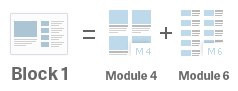
I use Newsmag and I want to use a widget to show Block1. When I go to the page with the widget I only see 1 column. But how can I get 2 columns like the example?
Bye
Jacob
 LKennedy
Hi I updated two of my four websites to Newspaper 8 and all the areas in the site that use js-composer are broken. What can I do quickly so I don’t have to remake all my sites!!! For example look at http://gf-verified.com/. Under the slider was an image box with 4 equal boxes of images and text. They are all huge now. PLEASE HELP!!!
 ravdror
Hi, every time I create a page, with a right side bar, the page goes full width, and UNLESS I made a <div class=”td-container”> the whole page would not go normal like I had them before my update.
For example, this page had a side bar, not any more. https://emunah.com/es/papi/
Please help me,
 MochileroInfo
Hello. Does anyone can answer why I cant insert this simple code in a post or a page?
<script language=’Javascript’ src=’http://www.bookhostels.com/files/index.php?UserID=Mochilero.info&File=bighw&Language=Spanish&Currency=USD&NewWindow=1&PropTypeSelect=’ charset=’utf-8′></script>
I want to insert the code here: https://www.mochilero.info/hostels
This code doesnt need to modify the header code, usually it works directly if I copy it in the body section.
In the past, with another themes, I didnt have any problem.
And if I test it with a simple html file in the same hosting, it works fine: http://www.mochilero.info/hostelworld.html
 PhilCreighton
Hopefully this view will work
 pstgibson
Dear support,
I am redesigning my home to suit business purpose. But I am having hard time locating some default features, so I can remove them. I want to remove the following from by home page:
1. MOST COMMENTED
2. LATEST IN FASHION
3. FOOD & RECIPE
4. Category list on the block 2 (All BusinessECOMMERCE MARKET FOR GOODS AND SERVICES)
Thanks
 ron
ronAs seen in a previous post, I’m using this code to remove the category name from the cagegory-container:
.category .td-page-title{
display:none!important
}
But using Category Template Style 8, the category container still holds the names of the active categories. I would like to remove those names from the container. Example image:
Any custom css? Thanks in advance!
 vishesh999
 Further to my query, even the woocommerce search displays only 4 products by default.
 ponlork
Hello, please help reply
i’m not use wordpress.
i want to use only template file. how can i use. i c ur description in ThemeForest Files Included: PHP Files, CSS Files, JS Files, but when i use it it error.
Error message:
Fatal error: Call to undefined function get_header() in /Applications/XAMPP/xamppfiles/htdocs/rasmeinews_v2/page.php on line 7
please help
