- NewspaperWP Rocket and Newspaper Theme: Optimization Guide
- TutorialsFrom WPBakery to tagDiv Composer
- TutorialsOffset Feature
- TutorialsWhat is Ajax preloading?
 Bettina
 Hello!
Yes, I reported again. The problems and the bugs are discussed on the forum.
A simple workaround for the category list is to create a menu in Appearance -> Menus: https://prnt.sc/w1MrA8C8U3-R and add the product categories there. Anywhere you can add a menu in Composer is by using the list menu element, for example.
Thank you!
 Calin
Calin Hi asr9611 ,
The anchor for amp is displaying, what I do not see is the amp ad in the anchor ad – https://i.imgur.com/Aw0Qnit.png – https://support.google.com/adsense/answer/11418825?hl=en
Thank you!
 cjr
cjrHi,
for some reason my site displays an outdated mobile version that I had before removing AMP + the mobile theme.
After I scroll down, it shows the updated version.
I linked the homepage correctly and cleared all cache.
Do you know what can be the problem?
 DCBast
I have added Custom CSS and Custom Javascript to my theme panel, in hopes of setting up an accordion on a post. It’s not working (http://appletonwi.org/?p=1505&preview=true).
Does the Custom Code not work on posts? What am I missing?
 creativeopole
 Hello
1. Implementation of the woocommerce category menu
Above is our correspondence, a year ago I reported that the Tagdiv Shop module does not have a module or widget that will allow you to display full Category and Subcategory navigation in a store based on your Tagdiv Shop module.
Something like: https://electro.madrasthemes.com/product-category/video-games-consoles/
I think that this is the most important element in an online store and should be shorcode and properly styled using css.
A long time ago Sep 21, 2021 at 8:15 am Calin wrote that it was a good suggestion and saved it as a task. I don’t believe you can’t do that. And this is very important in terms of a large shop and a wide range.
With large stores, and even small ones with several categories, your solution for sorting categories does not work, and we do not have a module for ordinary categories that are in the WooCommerce standard.
I started doing something once based on a standard widget and loading it in a template using the widget module.
I used code for this:
jQuery(document).ready(function($) {

  $('.cat-parent > a').after('<span class="toggle">+</span>');

  $('.cat-parent > ul').hide();

  $('.toggle').click(function(){

    $(this).text(function(i, text){

      return text === "+" ? "-" : "+";

    });

    $(this).siblings('ul').slideToggle();

  });

});
And css styles:
.toggle {

  display: inline-block;

  float: right;

  font-size: 20px;

  text-align: center;

  cursor: pointer;

  vertical-align: middle;

}
Example: https://moderncosmetics.pl/kategoria-produktu/kosmetyki/
However, I’m not satisfied because entering a lower level subcategory causes the navigation to collapse and you can’t see the current level.
Due to the fact that I am not a programmer, the project has been lying for a year and I cannot finish it and wait for development on your part.
Woocomerce categories are a basic element and you don’t have them.
2. Woo Attribute Filters – set the order
How to set the order of filters and move categories to the top and others to the bottom?
Bettina Hello Chris!
The smart snap sticky type (header only appears when you scroll up) lets you control when the sticky will appear.
This is an offset for the sticky header, where to begin: https://prnt.sc/pqYmB3Aw6Eta
It is useful when you do not want to cover any banner, for example.
If you hover over the setting and you have this toggle enabled: https://prnt.sc/SxseKWMXE0Nt, then you can see what it means.
The transition effect refers to the animation of your sticky. You can choose the style of the effect (none, slide down, opacity), and you can control the speed of this action.
There is an issue with the second offset because the second one should be placed in the mobile header sticky section.
You can choose the sticky type always in order to not disappear.
Thank you!
 Anamaria
 Hello Alessandro,
1. Please let me know where on the page you have set and please provide the link to your website. Do you use the module popup?
2. Please let me know the type of ad. If the ads are auto ads, then you need to add the code between head tags, this can be set in our theme in Theme Panel -> Analytics/Js Codes. Example: https://prnt.sc/1tju9qf -> https://prnt.sc/10jk7fq, the code needs to be set only once per page -> https://www.wpbeginner.com/beginners-guide/how-to-add-google-adsense-to-your-wordpress-site/
3. For this you need to use custom CSS to change it -> .td-adspot-title
{
font-family: Lato;
}
Set the code in Theme Panel ->Custom code -> Custom CSS
Thank you!
Bettina Hello!
There is a special field for Google Analytics (theme panel>analitics/js code) and you do not need to add the code in the multiple fields. Make sure it is not a plugin conflict issue. Please make a test and deactivate ALL plugins except tagDiv ones, also if you are using a cache plugin, deactivate it, clear all cache and try again.
Every template has its own settings and it shouldn’t interfere if you edit a different template.
“J’ai beau essayé, mais à chaque fois que j’effectue un changement dans la page d’une catégorie, le même changement s’effectue sur le reste des catégories. ” -> If the categories use the same template, then of course every setting will reflect on all your categories. If the category template has the same header, and you add a new element to it, then it will reflect on all pages that have been assigned that header template.
The responsive version should be the same as the desktop ( PC version ). Do not confuse the mobile pages with the responsive version. Some settings should be the same also, the elements should coincide with the desktop version and others could be set regarding the size of the screen. These are not bugs, but the way they are working.
Please provide an example, a screenshot or a video with the issue ( modification d’une page “catégorie” qu’on apporte sur TagDiV Composer ne se verra sur mobile ! ), so I can better understand and explain everything.
You have the right to ask everything, and I will always reply and try to help you as much as I can. Every “issue” or “bug” should be solved and clarified.
Thank you!
 laurenskok
Hello,
I had a question concerning the mobile menu. Is it possible to create and select a menu in mobile mode that is different from the desktop?
I’ve already tried with tag div composer but the problem is when I select another menu in mobile, it changes the desktop.
At the moment, I have this type of menu : https://pasteboard.co/jCmFSvYHQLgY.png
For example I would like to erase the avatar picture + logout button and replace them by a company logo.
Is it possible with Tagdiv and the prebuilt sport theme?
How can I proceed?
Thank you
Anamaria Hi,
We usually recommend for this to use an SEO plugin that will add og:image and other elements to the theme. For example, you can try the steps from this guide -> https://forum.tagdiv.com/facebook-share/
Also, you can check your website links using this tool -> https://cards-dev.twitter.com/validator
-> https://developers.facebook.com/tools/debug/
Thank you!
Anamaria Hello,
The post view is not available for the AMP version.
You can see the post view in Google Analytics https://i.imgur.com/DRAinO2.png
Thank you!
Anamaria Hi,
This is how the homepage looks on mobile the responsive version -> https://i.imgur.com/KWkwi9y.png
For the post you use amp -> https://i.imgur.com/m74bXW7.png
Thank you!
 Lakuma
Does Newspaper offer a similar feature for the main menu to click on the right to slide in more menu items?
I know Newspaper offers the More menu options when you click on it but I’m looking for the animation of the slide effect, especially for the MegaMenu.
For example if you go to https://9to5google.com/ then scroll down a little, you will see the sticky menu. If you click on the right arrow it slides in “more” menu items. Does Newspaper offer this feature if not can I request it?
Here’s an example of it in action:
https://i.imgur.com/vSd3abv.gif
 IdentidadyFuturo
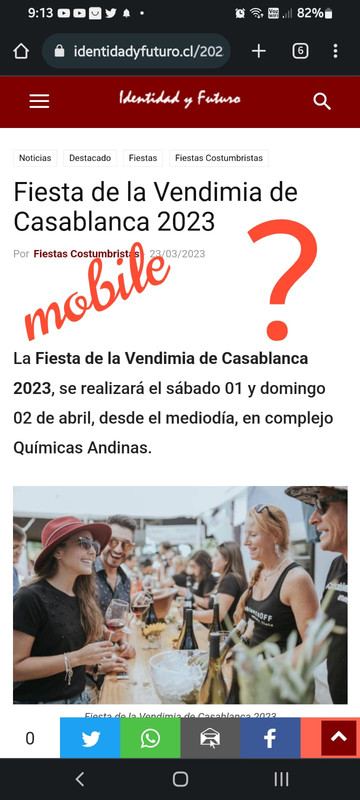
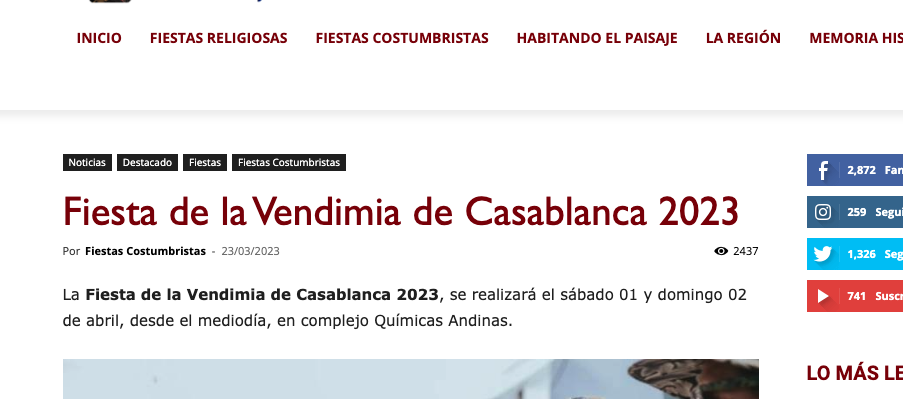
I just activated the identidayfuturo.cl AMP and you can’t see the post-vierw it on the different pages and posts, also nor the shares of the Addthis plugin.
Mobile:
Desktop:
 DIGITPROD
Hi, we have a problem with the Newspaper theme or the TagDiv plugin and the home page of the http://www.digitalproduction.tv site as it returns error 500 and Error at zones: 6(models) : 0(dom). The model does not match the content Current state has involved an issue. You could try an UNDO operation (CTRL+Z / CTRL+SHIFT+Z), Internal error (specific information not available): AH01075: Error dispatching request to : (passing brigade to output filters), referer: https://digitalproduction.tv/wp-admin/post.php?post_id=5155&td_action=tdc&tdbTemplateType=page&prev_url=%2F%2Fdigitalproduction.tv%2F.
This problem occurs only when the page is set as “Homepage” of the site. If instead I replace the page with another one, I can modify it.
How can we fix?
 sfj
sfj I would like, for example, to edit an already pre-created column, let’s assume that it is a rectangle already inside the div tag, but I want to edit it and transform it into a square.
for example in the prints, I use Flex Block1. I wanted to edit the properties of this column, for example change the font of the message, increase the format, decrease it, in short… modify the column properties in a more detailed way
 dahlnewpage
 Thank you, so just to clarify. If I want to change font size on a Page, I need to go to each page using TagDiv composer to General, Style, Post Content and change the font size to for example 20. And there is no way I can change ALL Pages to font size 20 at the same time as in Theme Panel with Posts? I have to make the individual change on each Page?
Can I create a template I can use for each Page?
 tanteidee
 Like this example https://codepen.io/electerious/pen/JXNEPr (but slide of article).
 Maxxxxx
 I need to change the default <p> font to Verdana for example.
I did the changes from Newspaper – Theme Panel – Theme fonts. https://prnt.sc/DZxYluBI5ZIP
But new posts are still using other fonts, not Verdana… https://us.jubo.com.ua/2023/03/23/%d0%bd%d0%be%d0%b2%d0%b8%d0%bd%d0%b0-%d0%bf%d1%80%d0%be-%d0%bc%d0%b0%d1%80%d0%ba%d0%b5%d1%82%d0%b8%d0%bd%d0%b3-%d0%b2-%d1%83%d0%ba%d1%80%d0%b0%d1%97%d0%bd%d1%96/
How to change the default font settings?
 SP1
SP1 Hi,
Like this (it show both) – https://www.gadgetbridge.com/news/nokia-c12-launched-in-india-at-rs-5999/
The thing is – for many posts we update at times. We cannot go into each one and delete the time stamp manually it will be a cumbersome job. As we are a live news site.
Hence asked if it happens automatically in any way.
Also, both of them are appearing on the posts.
Is there a way if an author updates a post, then only the updated time stamp/last update/last modified only shows and not both. like this – https://prnt.sc/Z7okLL69WmxC

 ngotuannghia
Dear Admin,
I very happy with your theme.
Currently, we are doing migrate to tagDiv Cloud Library to make website faster.
We are following this guide: https://tagdiv.com/newspaper-theme-update-standard-pack-or-tagdiv-cloud-templates/
But we still have confusions when removing dependencies.
As guide notice: ” Almost every template from the theme panel already exists in the tagDiv Cloud Library. …”
But I cannot find any same name block in tagdiv Cloud Library
Example:
Current Header: https://i.ibb.co/W63g421/current-header.png
Current Theme import: https://i.ibb.co/j5npD5w/current-import-theme.png
Tagdiv Cloud Template search: https://i.ibb.co/QfWS2yc/Header-tag-Div-Cloud-templates.png
Please kindly guide me or let me know document which help me migrate to Cloud Library smoothly from Standart Pack plugin
Thanks
 grdevan
 Hi, Please go through the below-mentioned link
https://imgur.com/a/qgPuzMX We request you kindly go through the below-mentioned Link
Image One- While Editing in WordPress Dashboard – Icon appears fine.
Two & Third: While Pages in Live.
Ourwebsite : https://bit.ly/3THB14Z
-
This reply was modified 3 years by
grdevan.
 syed2023
The webpage at https://g-technews.com/wp-admin/post.php?post_id=313&td_action=tdc&tdbTemplateType=footer&prev_url=https%3A%2F%2Fg-technews.com%2Fwp-admin%2Fadmin.php%3Fpage%3Dtdb_cloud_templates might be temporarily down or it may have moved permanently to a new web address.
ERR_HTTP2_PROTOCOL_ERROR
The theme is not editing with the plugin tagdiv composer. We encounter same error while editing header footer and whole theme
Anamaria Hi,
Various factors can influence page speed, including server response time, network latency, image optimization, caching, and more. While the PHP version itself may not directly affect page speed, it can impact the web application’s performance, which in turn can affect page speed. For example, newer versions of PHP often have performance improvements that can speed up the execution of code and reduce server response times. There are many optimization guides provided by our users here in the forum, some made by us; you could check some of them
– https://forum.tagdiv.com/cache-plugin-install-and-configure/
– https://forum.tagdiv.com/how-to-make-the-site-faster/
– https://forum.tagdiv.com/topic/high-number-of-ajax-request/
– https://www.infophilic.com/get-almost-100-pagespeed-newspaper-theme/
– https://forum.tagdiv.com/topic/score-100100-pagespeed-with-newspaper-wordpress-theme/
– https://www.andraware.com/wp-rocket-for-newspaper-theme/
– https://spraythemes.com/newspaper-theme/how-to-speed-up-the-newspaper-wordpress-theme-using-wp-rocket/
– https://forum.tagdiv.com/topic/page-speed-guide-for-2023-beginners-and-advanced/
– https://forum.tagdiv.com/topic/newspaper-theme-speedify-your-website/
– https://forum.tagdiv.com/topic/tutorial-chriss-custom-optimizations-for-functions-php-etc/
– https://forum.tagdiv.com/cloudflare-cdn/
– https://forum.tagdiv.com/topic/theme-causing-high-cpu-usage-2/
– https://forum.tagdiv.com/topic/sql-querys-high-cpu/
– https://forum.tagdiv.com/topic/newspaper-theme-slow-to-respond/
– https://premium.wpmudev.org/blog/optimizing-your-wordpress-database-a-complete-guide/
– https://underconstructionpage.com/optimize-wordpress-database/
– https://crunchify.com/better-optimize-wordpress-database-all-in-one-guide/
If you use Wp Rocket, you can try to exclude the following files
/jquery-?[0-9.](.*)(.min|.slim|.slim.min)?.js
/jquery-migrate(.min)?.js
/wp-content/plugins/td-composer/legacy/Newspaper/js/tagdiv_theme.min.js
tdBlocksArray
Thank you!
 libertylens
Is there a way to define the “weight” of a post to direct the location of the post on its category page? For example, the higher (or lower) the weight, the higher on the page it would be positioned. I’d also like to find a way to either force a post to the primary location on a given category page, or force it to NOT appear in the primary location of a category page.
Thanks!
Ken