
- NewspaperWP Rocket and Newspaper Theme: Optimization Guide
- TutorialsFrom WPBakery to tagDiv Composer
- TutorialsOffset Feature
- TutorialsWhat is Ajax preloading?
 Vincent
Hello,
1. how can I customize the mobile theme of AMP? I didn’t find any options on the theme design.
2. the limit of title length and the exerpt length seems to be not working for Chinese characters. How can i fix this?
 grezako
Hi.
I specify once again that we are currently using the Theme “Newspaper – The Rimont Pro” whose demo link is: https://demo.tagdiv.com/newspaper_the_rimont_pro/.
We want to add videos on the Home Page in the form of Stories on Facebook and a bit like the CGTN news site already does as you can see on the part circled in RED on this screenshot: https://imgur.com/a/NOZ1qNV.
So, we would like to move the avatar located at the bottom of the Title of each post from the “STORIES” part circled in RED on the following screenshot: https://imgur.com/a/Bf82Q1D.
So that it goes up and positions itself at the bottom of the post card like this: https://imgur.com/a/3dB5uac.
But, the problem on my end is that when I try to do that, adding a margin-top: -122px; for example, hoping to succeed in bringing up the icon of the avatar in question, it does not work at all. Here is the code and CSS class of the avatar in question that I am trying to pull up to the bottom of the post card:
img.avatar.avatar-96.photo.td-animation-stack-type0-2 {

  margin-top: -122px;

}
How then, manage to move this icon of the avatar in question to the bottom of each post so that it looks like the second screenshot above ???
Please, answer us through sample demonstrations in screenshots because it will help us best to quickly understand and solve our problems.
Thank you please help me.
 RobertByrne97
Hello! I’m a new Tagdiv Newspaper user and I am loving my experience so far. However I need your help to solve this strange issue I have discovered, perhaps it’s an easy fix and I’m simply not pressing a button properly (although I have been thorough)
When I load up an incognito tab and visit my webpage my nav bar is not functional. The only link that works on it is my homepage. The other links on there are categories for my magazine articles e.g. news, music, art etc but the links do not work, my mega menu does not load and they are not even clickable. Are they not loading as a href? I’m quite confused.
When I use my admin site the links work perfectly. What is happening?
 Bettina
 Hello!
Edit the cloud single post template with the TagDiv Composer and there you can add a new row, drag & drop the elements you need there (or “copy-paste after” the elements).
Thank you!
 heisks
my site under the building is http://test.aving.net/
1) replace logo in Header>Logo
I uploaded my PNG file but it did not replaced. where/how could I make it?
2) Background color
Where/how could I change the colors?
3) Add Korea Social Share/Networks link in Themepanel?
Kakaotalk https://www.kakaocorp.com/page/service/service/KakaoTalk?lang=ENG&tab=all
regards,
 mclanfranconi
I’ve been trying for months to figure out how to fix this LCP problem on my blog.
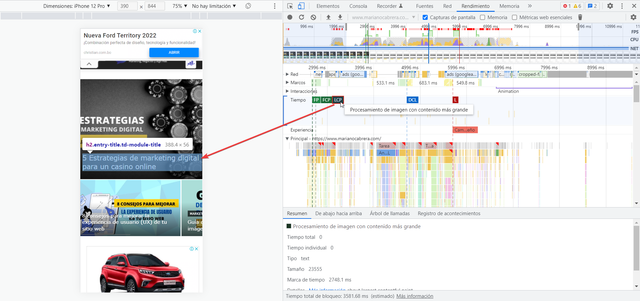
Basically there are 2 problems (I attach images)
#1 – In the first case, you can see that the biggest LCP impact is in the title of a block. I can’t find how to fix this. Or do I remove the title?
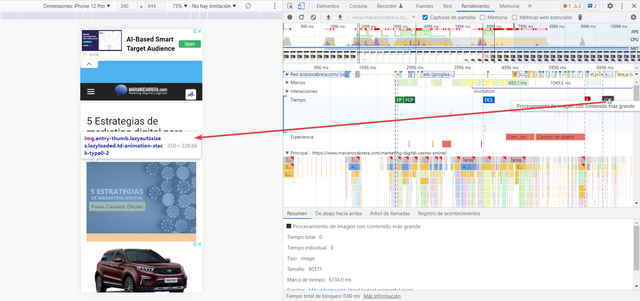
#2 – Within the articles, the post image seems to be the LCP problem. any ideas?
Currently my LCP on home is 4 seconds and the same is true for posts. For this reason I can’t get past the Core Web Vitals.
Any ideas?
Thanks
PD: Please, i want a REAL answers, no only a list of guides and tutorials. I saw ALL the links and i can´t find the solution.
 Brit
Brit P.s. I do not have the AMP or tagDiv Mobile Theme plugins installed. I had both installed previously, but then the mobile design I created didn’t work at all, so I have disabled them. Thank you so much for your help!
 mgencev10up
Hi,
We are getting errors when trying to preview a Draft post in wp-admin after the update to 11.4.3.
In wp-admin we see this error:
wp_booster error:

td_api_base::mark_used_on_page : a component with the ID: single_template_2 is not set.

/nas/content/live/xxxxx/wp-content/plugins/td-composer/legacy/common/wp_booster/td_api.php
In logs we see this:
PHP Fatal error: Allowed memory size of xxxxxxx bytes exhausted (tried to allocate xxxxxxxx bytes) in /nas/content/live/xxxxx/wp-content/plugins/td-composer/legacy/common/wp_booster/td_util.php on line 2491, referer: https://site.com/wp-admin/edit.php?post_status=draft&post_type=post
PHP Fatal error: Allowed memory size of 536870912 bytes exhausted (tried to allocate 400560128 bytes) in /nas/content/live/xxxxxx/wp-content/plugins/td-composer/legacy/common/wp_booster/td_util.php on line 2491, referer: https://site.com/wp-admin/edit.php?post_status=draft&post_type=post
Stack Trace
rray

(

    [0] => Array

        (

            [file] => /nas/content/live/xxxxx/wp-content/plugins/td-composer/legacy/common/wp_booster/td_api.php

            [line] => 336

            [function] => error

            [class] => td_util

            [type] => ::

            [args] => Array

                (

                    [0] => /nas/content/live/xxxx/wp-content/plugins/td-composer/legacy/common/wp_booster/td_api.php

                    [1] => td_api_base::mark_used_on_page : a component with the ID: single_template_2 is not set.

                )
)
we’ve increased the memory limit within the wp-config.php file for the server and also tried to downgrade to the older version but its still giving the same issue. Please check this.
 tagdiv@schneidermedia.eu
Hello,
the LightBox for images does not work in Firefox and in Chrome.
An empty box is displayed. Only below it you can see the image (after scrolling).
I just pasted the images and enabled “LightBox”. In Safari everything works.
Like here for example
https://myilands.de/aufatmen-mallorcas-fruehling-darauf-freut-sich-familie-kelly/
 RECORD EUROPA
 Hi, I’ll give you an example.
As I said the category filter is ‘single – related from tags’, ‘filter by tag slug’ is in this case ‘video-p’ and there are some categories that are excluded (but apparently they do not interfere with the results obtained).
I created a single template for a type of post (programs).
In this template, there is a sidebar that displays all the videos related to this program. For this, the videos have in common with the program the tag with the ‘name of the program’ and another ‘video-p’ (exclusive to program videos).
So the filtering is done this way, whatever the program with this template, it presents videos that have the same tags (program name) through the ‘single – related from tags’ + ‘filter by tag slug’ is in this case ‘ video-p’. And in version 11.4.2 it works, see the following image (program ‘Reis’, video ‘Reis’):
https://miramar352649001.wpcomstaging.com/wp-content/uploads/2022/04/v1142-1.png
For reference, in this same version (11.4.2), if we remove the filter by tag slug, all the latest published posts appear (see next image):
https://miramar352649001.wpcomstaging.com/wp-content/uploads/2022/04/v1142-2.png
After the update to 11.4.3, the filter no longer works, see next image (conditions are the same as in the first image):
https://miramar352649001.wpcomstaging.com/wp-content/uploads/2022/04/v1143-1.png
As a reference, if you then remove the ‘video-p’ tag, there are no changes to the posts that appear (they are the same as the last posts published), which shows that it is not working in this case.
https://miramar352649001.wpcomstaging.com/wp-content/uploads/2022/04/v1143-2.png
If you need more information or access to staging, please let us know.
Thank you,
Best regards,
Samuel Pereira
 Calin
Calin Hi,
The global colors can be set with tagDiv Composer by selecting the manager -> https://i.imgur.com/9ev64Gq.png then that color will be display on elements -> https://i.imgur.com/OdEknIy.png
Here https://imgur.com/pSsFAYz choose the consumer.
Here https://imgur.com/PIvM5vA is just an example of how it should look the auto redirect link it is not working for you?
If you want you can try this guide for Facebook login or this one https://help.sharetribe.com/en/articles/666072-configure-facebook-login
Thank you!
Calin Hi,
It is not absolutely necessary, but there are people who want to use it, this is especially used for articles.
If you want you can check this article -> https://www.link-assistant.com/news/is-amp-relevant-in-2020.html
Thank you!
 Campus Courier
Hello Support Team,
I bought Newspaper theme and activated it for a domain, then, I discovered that I needed to change the domain name. However, I successful got my domain name changed with my hosting provider.
My website came live with the new domain however, every click on the links on the homepage on the new domain url is currently landing on the changed domain url from which I have removed my contents.
My live website url is https://www.campulse.com.ng while the previous website url which I changed is https://www.campuscourier.com.ng
Please how can I solve this problem.?
Thank you very much
Kolawole
grezakoHello.
I specify once again that we are currently using the Theme “Newspaper – The Rimont Pro” whose demo link is: https://demo.tagdiv.com/newspaper_the_rimont_pro/.
We are facing two problems:
1 – We want to remove the blue framed part at the top of the “YMag” Category Page ONLY. To be precise, it is only on the “YMag” Menu page that we want to delete this part framed in blue on the following screenshot: https://imgur.com/a/iOGeWIV.
How then to succeed in deleting this Line framed in Blue, ONLY on the Page or the Header of the Page of the “YMag” Category without deleting on the Category Page of the other Menus ???
IMPORTANT: We just want to remove this line (the line framed in Blue on this screenshot: https://imgur.com/a/iOGeWIV) on the “YMag” Category Page and not on the Category Page on the rest of the Menus.
2 – How to change the color of the line (framed here in Red: https://imgur.com/a/va4OY85) visible on the Categories Page of the “Newspaper – The Rimont Pro” Theme ???
Please, answer us through sample demonstrations in screenshots because it will help us best to quickly understand and solve our problems.
Thank you for answering us.
Awaiting your reply.
 Prateek
 Thanks for the confirmation. Just wanted to know. Not at all that necessary on amp, actually.
 tlonero
 is it important to use the amp plugin?
 phase3av
 Hi!
I have multiple attributes and have added the Woo Attribute Filters element which works great. There is an option turn on “Multiple Selection” for the Product Categories Filter but not for the other attributes. Is there css to be able to allow for the other attributes filters to have multiple selections? For example, the my “Manufacture” attribute filter on the page below, to be able to select more than one at a time?
https://new.phase3rentals.com/wp/product-category/audio/
Thanks!
phase3avHi,
I have created a product categories widget and added it to my page using the widget sidebar. Is this the correct way to add it as it’s not actually in a sidebar but the main page? Also, how do I change the style on it? I see it uses the Block Header Template selection in the theme panel and it says I can overwrite it for the widget but in the widget and in the tagdiv composer it does not give me the option to edit it without css, which I am struggling to find the right code for. There are things specifically for this widget I would like to change. For example, I would like to change the hover colour of the dropdown menu and I am unable to figure out the css for that.
Thank
Calin Hi blazenews.in,
We are sorry for this inconvenience and we believe that this is not a pleasant situation.
Many similar situations have been resolved just by making the necessary settings for the theme, for example you set this code -> https://i.imgur.com/ssBuZr1.png -> https://forum.tagdiv.com/requirements-for-newspaper/ if everything has been set up then please contact us by email at contact@tagdiv.com provide wp-admin and cPanel access, include this topic and set a message like “urgent” and we’ll check this problem as soon as we get you email.
Thank you for your understanding!
grezakoHello AGAIN.
This is the third time that we have contacted you to explain our concern without success and without any reliable response from you. Even yesterday, through this post: https://forum.tagdiv.com/topic/how-to-define-a-unique-template-category-in-the-ymag-menu/, we had contacted you and until now, no response from you.
So allow us to resume our explanation and/or concern:
We just want to assign the “Romania News” Category Pages (Menu) template to all Menus or Categories (as shown in this screenshot: https://imgur.com/a/h7y213O) except the “YMag” Menu which should be the only one using the Template of Category “The Rimont Pro” as also explained in the following other screenshot: https://imgur.com/a/bBXO2a2.
How, then, to define a unique category template for the “YMag” Menu unlike all the other Menus which use a common template ???
How to make sure that only the “YMag” Menu uses the template category “The Rimont Pro” unlike all the other Menus which should use a Global Category Template from “Romania News” ???
IMPORTANT: the “YMag” Menu, must not use the same Template Page for the categorie as the other Menus which, on the contrary or unlike the “YMag” Menu, use the same Page style for the categories.
We hope this time we have made ourselves understood.
Please, answer us through sample demonstrations in screenshots because it will help us best to quickly understand and solve our problems.
Thank you for answering us correctly this time.
Awaiting your reply.
Calin Hi,
The background image can be blurry when the image is smaller and need to be stretch or when you have set a smaller thumb for that image, make sure that you set the full size for the image that you have set as background, for example -> https://i.imgur.com/A9lX4Ok.png -> https://i.imgur.com/UVlTXgy.jpg
Hope this will help you!
Thank you!
RECORD EUROPA Hello, we are developing a site identical to ours in staging, when we upgraded the problem appeared.
For example, on the homepage, we have a trending now block that has a filter for a specific slug. But all the latest posts appear.
How can we give you access to verify?
 sagarmahajan
Hi Team,
My website don’t have static ads placed on pages so what is proper way to disable your default image ads?
Also my website don’t have post thumbnail/feature images for both desktop & mobile, how can I disable it?
Thanks
 Anne
AnneHi, I use a footer template, and has added instagram to it. And it shows this error code:
“Instagram GalleryBlock Render failed – no data received, please check the Instagram ID or connect & configure your Instagram Personal or a Business Account.”
I have connected the instagramaccount, but it is a creator account, can that be the issue?
Calin Hi,
Please give us some examples of how you would like it to be and we will see if we can help you. If it’s just css, then it won’t be a problem, but if is need to implement code, then we can’t help you.
Thank you!



