- NewsmagUsing the theme translations together with WPML
- NewsmagHow to update a plugin
- NewsmagCustom Post Type Support
- NewsmagAbove footer ads
- NewsmagWeather Widget
- NewsmagHow to update the theme
- NewsmagIntroduction
- NewsmagLogo & Favicon
- NewsmagFooter templates
- NewsmagUsing other ads
- NewsmagCustom ad spots
- NewsmagArticle ads
- NewsmagSidebar ads
- NewsmagHeader ads
- NewsmagLoading image effects
- NewsmagCategory top post styles
- NewsmagSmart Lists
- NewsmagGeneral settings
- NewsmagTheme thumbs
- NewsmagtagDiv slider gallery
 Calin
Calin Hi,
If you are referring to have a fix background like in this demo https://demo.tagdiv.com/newspaper_sport/ then it can be done by setting an image in the theme panel > background -> https://i.imgur.com/RkCV4dH.png
If the problem is due to the fact that there are too many links on the page, then maybe you should reduce the number of links. For example, on a block that displays 1 post, in addition to the link on the title, there may also be the link on the user and on the category. I would recommend that you no longer display the categories by posts, because you have already set them on blocks -> https://i.imgur.com/oEZGqp5.jpg in this way it would be 20 links less.
Thank you!
 honlim
How to edit the the title shown on the AMP version which is different from the non AMP one?
AMP’s “title” is different from non-AMP
Thanks in advance.
Calin Hi,
2. If you can let me know where it should be set the php code of AdRotate, then I will provide the path to that file.
For example if you need to set the code in the header.php of file, then it should be set on this file -> wp-content/plugins/td-composer/legacy/Newsmag/header.php
If the banners appear in incognito, then the problem is with an extension from the browser, or maybe from cookies. Please try other browsers as well.
Thank you!
 Anamaria
 Hello,
The mobile pages are empty because you are using the mobile theme with amp, and when you are using the mobile theme this will overwrite the responsive version to make it faster the pages need to be made using the mobile editor -> https://i.imgur.com/bK2ykfh.png (because most of the time those are made using builders).
What you can do is to set a mobile content for those pages, or use the mobile theme with amp only for posts -> https://i.imgur.com/PM9X2ln.png
Also, please check this topic where I explained each mobile version -> https://forum.tagdiv.com/topic/mobile-version-not-working-properly-2/ and choose what mobile version you want.
Thank you!
 seanmccaughan
 I got the video embed to work by uninstalling AMP. I was using the official AMP plugin, which said it was incompatible with the TD Composer.
 grezako
Hi.
How to put a live audio playback system on the Home Page of our Newspaper – The Rimont-Pro (https://demo.tagdiv.com/newspaper_the_rimont_pro/) based theme ???
For example, when you go to the RFI-France site for example (https://www.rfi.fr/fr/), you can see that there is an “audio” icon (framed at the top of this screenshot blue screen: https://imgur.com/a/lOtlpqj). And when you click on it, you automatically start playing the audio from Radio “RFI”.
So, how do you do something like this to display “on our home page”, a “Play” icon (behind which we will add our voice Podcast in audio) and when you click on this “Play” icon “, we automatically hear the audio playing without reloading the home page as can be seen on the second screenshot of the RFI-France site at the level of the part circled in green: https://imgur.com/a/hiHWBvD ???
In other words, how to achieve on the home page an audio playback like this: https://imgur.com/a/oIwCLUL ???
Please reply to us.
We are really stuck.
Awaiting your reply.
 Bennettheyn
Hi, how can I delete the more stories popup on mobile. When I scroll down, it blocks a lot of text. I like it on desktop but not on mobile.
Also, how can I change the width of the box the text is in. Here is how it currently looks with your theme:
https://imgur.com/a/Od9R1WS
Here’s what i want it to look like:
https://imgur.com/a/oksHXlD
 Nickolas Combatente
i set my amp page to be in standard mode, but the amp plugin dont acept, and i have the recommendation to set to standart mode and when i doing that and purged all cache the transiction mode is that one active, how to resolve?
 Abdul Mueed
 I am getting this warning from google
1 issue detected
Google has detected harmful content on some of your site’s pages. We recommend that you remove it as soon as possible. Until then, browsers such as Google Chrome will display a warning when users visit or download certain files from your site.
Description
These pages attempt to trick users into doing something dangerous, such as installing unwanted software or revealing personal information. Learn more
Sample URLs
N/A
 hobnobmediaventures
Hi. After installing the Newspaper Magazine Pro prebuilt website, I realized that the mobile version on the demo is different from the one displaying on my website. How do I fix this.
Additional issues that I’m having is there is a “Sign in” and “Click here – to use the wp menu builder” displaying on the menu on mobile instead of the categories. How do I fix this too?
I also cant see in the theme panel mobile theme option.
i disable the mobile theme plugin.
because i dont want to use the mobile theme or AMP.
Nickolas Combatente well im editing my website and i make a mobile theme, this mobile theme: https://imgur.com/LMgqd3v but when i activate the function mobile theme + AMP is this template that appears in the mobiles devices: https://imgur.com/ewyw8QN how can i integrate the funcionalite of AMP with the desing of my mobile theme?
Nickolas Combatentewell im editing my website and i make a mobile theme, this mobile theme: src=”http://https://imgur.com/a/El6BeXS” alt=”null” /> but when i activate the function mobile theme + AMP is this template thar appears in the mobiles devices: 
 ilouge Media
Hi,
I am facing the following error on my website at AMP Settings
Because of plugin issue(s) detected, you may want to review and suppress plugins. You may also want to browse alternative AMP compatible plugins.
tagDiv Composer
by tagDiv
Version 2.5 | built on 11.11.2019 15:07
 harding13
 Hi,
usually post view count starts from zero and it increments by one for every visit.
Is it possible to start from (for example) 213 ?
thx
grezakoHello.
We asked a few questions previously, two of which were not answered enough and were clear to us.
So we come back through this new post to redo our requests. So please answer us step by step.
In fact, we want:
1 – We want to create a block (like this one: https://imgur.com/a/eNc1ct5) that will place 4 or 5 videos side by side (on the same line). And when you click on one of these videos to play it, “the playback of this video opens in Pop-up without reloading the page”. And so, we can directly watch this video in Pop-up.
How to add a block of video (like this one: https://imgur.com/a/eNc1ct5) but automatically readable in Pop-up each time you click on one of them ???
2 – When you go to the RFI-France site for example (https://www.rfi.fr/fr/), you can see that there is an “audio” icon (framed at the top of this screenshot blue screen: https://imgur.com/a/lOtlpqj). And when you click on it, you automatically start playing the audio from Radio “RFI”.
So, how do you do something like this to display “on our home page”, a “Play” icon (behind which we will add our voice Podcast in audio) and when you click on this “Play” icon “, we automatically hear the audio playing without reloading the home page as can be seen on the second screenshot of the RFI-France site at the level of the part circled in green: https://imgur.com/a/hiHWBvD ???
3 – How to do this kind of automatic animation of the articles which appear for a few seconds and then disappear to give way to other articles at each change and also for a few seconds at the top of this screenshot on the part circled in orange: https://imgur.com/a/cpjqArF ???
4 – How to activate “AJAX Pagination” on the part circled in Yellow on the following Screenshot: https://imgur.com/a/jBlH1ZM ???
Please reply to us.
We are really stuck.
Awaiting your reply.
 AbeWakama
Whenever we enable the tagDiv Mobile Theme and AMP plugin, page content disappears.
Is there any way to keep page content visible?
 mgiannelis
Hello
I have a bit of a complicated question you may not understand. However, I will try by best to explain this.
Currently my site is giving too many internal links on the front page causing it to bleed off internal page authority. After some doing some research I believe I may have found how to solve this problem but do not know how to implement it. I was hoping it could be done with some custom CSS
My site is http://www.techbusinessnewscom.au
As you will see. When you scroll down all the items are part of the same front page. I have noticed in other themes/sites they do things a little bit different
Example of what I need to achieve. itnews.com.au (As you will see on the site when you scroll up and down the page there is kind of a background that stays static/still and the content area is what is what scrolls up and down. There seems to be two layers there. From what I can understand and explain. It brings the content area off the main page. This actually stops any links on the page being counted as internal
As the scroll happens on the site itnews.com.au you will see the content moves up and down with a background staying still and the footer area will stay static on the base of the page
It like the content area is lifted off the main html page or something.
If you have understood what I am trying to say here. Can you explain to me how this achieved
 Max
Maxif I save http://www.sitoesample.com ok but if I save https://www.sitoesample.com/dir/page-nome.asp it doesn’t save … is it a bug?
Anamaria Hello,
You can use AMP, but we offer support for the mobile version only with mobile theme + AMP plugin and set for AMP -> https://forum.tagdiv.com/tagdiv-amp-plugin-tutorial/ => https://i.imgur.com/1kMs1ds.png and set the AMP for posts => https://i.imgur.com/GLEeeoZ.png, but you can’t customize the layout for AMP with tagDiv Composer.
Also, please check this topic where I explained each mobile version -> https://forum.tagdiv.com/topic/mobile-version-not-working-properly-2/ and choose what mobile version you want.
Thank you!
 limitlessv
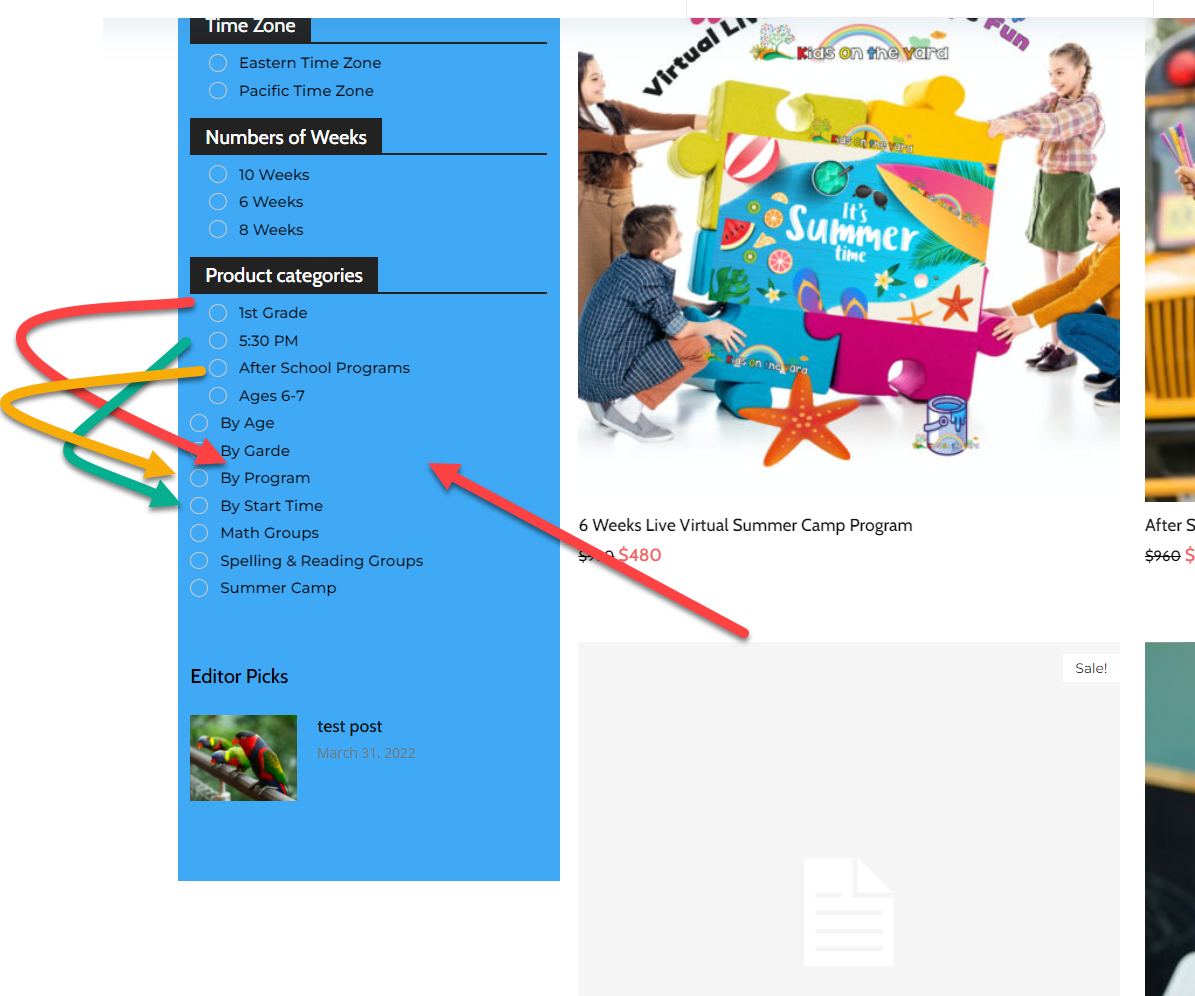
We try to understand why the product category is not shown correctly any advice?
Instead of showing:
By Grade (Parent):
– 1st Grade
– 2nd Grade
– …
By Subject
– Reading
– Math
It’s shown in a wired way like all on the same level and not under the parent group
https://assets.kidsontheyard.com/support/2022/04/2022-04-01_4-37-49.png
 suneedhm
Desktop site looks the way I designed it, but the AMP pages look totally plain and nothing like I designed the site to be like.
 CarolienBovyn
 Dear TagDiv,
We are encountering this issue too on our test environement, but not on the production environement because they are essentially clones of one another… Both settings & securitywise they are identical, yet on the test environement, things go awry.
We have already disabled all other plugins and checked our security settings. Still the problem persists. We also encounter the problem on brand new pages without any form of content/shortcodes.
Error at zones: 6(models) : 0(dom). The model does not match the content Current state has involved an issue.
Sadly, due to security reasons, we are not able to provide access to external parties, which makes this problem all the more difficult to solve.
Do you have any suggestions how we can debug this matter further?
Could you also inform us what the ‘zones’ in this error refer to?
Thank you in advance
Kind regards
-
This reply was modified 4 years by
CarolienBovyn.
 Bettina
 Hello!
1. A workaround there could be this one: https://www.screencast.com/t/qJZARQex3
2. Unfortunately, you do not have the possibility to add new elements or create a slide with the block’s elements, sorry.
3. A shortcode can be inserted by using the element called “Column text” or “Text with title”. For example, in the step3 here: https://forum.tagdiv.com/add-cryptocurrency-price-ticker-widget/
Now, it’s possible to be a plugin conflict there if that plugin wasn’t tested with our theme, but you can make a test on a test page.
4. You can set a Featured Video there. Please check our guide from here: https://forum.tagdiv.com/featured-image-or-video/
The video image and button will appear in the flex block and when you click on it, then the video will appear in a modal.
5. You can set a featured audio for your posts as featured video.
Thank you!
Calin Hi,
It looks that the problem related to the menu it is coming from this css -> https://i.imgur.com/PIyv6qg.png
This problem it is also aspiring when you are logged in?
The admin top bar is not display, or it is displayed a different one? If is a different one, then it can be from a plugin, for example from the Jetpack, if is not display, then it can be from a strong cache plugin, or object cache.
Thank you!
Calin Hello,
1. That message appears because you are using the amp and this is set to redirect the mobile users on amp, please disable this option -> https://i.imgur.com/ShXatoR.png
2. If you have hidden it on all devices then it won’t appear anywhere. Open the CSS section in the composer and enter this code in it – https://prnt.sc/pqi1z7 the row should then be visible so you can interact with it. Then you can remove the code, after you make it visible on at least one viewport
.td-pb-row.vc_row {

display:block!important;

}
The elements from the amp are using the mobile theme layout, so the option for those are in the theme panel > mobile theme -> https://i.imgur.com/4VmBIdy.png
The above message/error it is about the jetpack, the problem is coming from there. You need to check the settings from that plugin or disable it.
Thank you!