- NewspaperWP Rocket and Newspaper Theme: Optimization Guide
- TutorialsFrom WPBakery to tagDiv Composer
- TutorialsOffset Feature
- TutorialsWhat is Ajax preloading?
 Bettina
 Hello!
Your current demo is indicated here: https://www.screencast.com/t/dC2nQSoagjwl
You can verify for example from the settings which font is used, or by inspecting the website -> Computed: https://forum.tagdiv.com/create-custom-code-using-the-browsers-inspector/
Usually, we use the fonts from Google Fonts for the demos. The theme comes with two preset default Google Fonts: Open Sans and Roboto.
Thank you!
 Calin
Calin Hi rlwilkinson80,
All that you need to do is to set an image with big size, the one that you set it right now is small and has some transparent margins -> https://i.imgur.com/djoXKOK.jpg, set for example one like this one -> https://i.imgur.com/365NIja.jpg this has 852 height px and it will looks like this -> https://i.imgur.com/jXNqC6L.jpg
I hope this will help you!
Also, please do not share your privet credentials here on the forum, this is accessible for all members.
Thank you!
Calin Hi palpalnewshub,
For this you can use more elements, for example Image info box, Text with image -> https://i.imgur.com/V1MxdHf.pngor better if you can use column text or text with title elements, there you can use the WP Editor and set the link like in posts -> https://i.imgur.com/tBrsu1d.png
I hope this will help you!
Thank you!
 jtoney
There are a few pages I don’t want anyone to access. These pages are found when you type in the url for example (www.example-website.com/categories/category-name). These pages showing the categories were never intended for anyone to see and so I want to hide them and bring up a 404 page instead. What are my options?
 Tdoc31
4 articles out of 17 do have the wp_booster error
https://lemagdici.com/2021/07/pour-une-meuse-potable-des-villes-se-mouillent/
https://lemagdici.com/2021/07/une-maison-de-sante-cest-plus-que-quatre-murs/
https://lemagdici.com/2021/07/axoncable-de-retour-sur-mars/
https://lemagdici.com/2021/07/a-lecole-dingenieurs-la-securite-se-pense-globale/
I read a lot, and can get my head around why they have this error
Version: 11.3.2
Active plugins
tagDiv Cloud Library
tagDiv Social Counter
tagDiv Mobile Theme
Official AMP for WP
system status is ok ( cache addon is not being detected)
PHP Version 7.4.26
WP Memory Limit 265 Mo
PHP Execution Time 120
PHP Max Input Vars 5000
I really dont know what to do !! any help out there ?
Bettina Hello Gus!
You can install many cloud post templates and you can see them in a list here when you access a post: https://www.screencast.com/t/9mY3SZgZn
In this case, Global means that the template it’s set up for all posts by default. But, for example, you can have a post with different template and without Global. This you can do by accessing the post you want to choose other template, select from the list the template you need, that’s all. You can see how they are looking by select other template for example. The settings will be different because it’s other template, but when you assign/select the global template again you will have the same settings and you won’t lose it.
So, every changes that you make in a global template it will display for all the posts you have assigned the global template.
Or you can duplicate a template and change the name, so it could be different than the original one. Check this topic: https://forum.tagdiv.com/topic/different-logo-in-categorypage/ ; Here I explained step by step how you can duplicate a template.
Hope that helps you!
Thank you!
Bettina Hello @samstrat!
AMP is faster and works better only with Mobile Theme plugin. If you’ll use Mobile theme plugin, then you can not edit the pages with TagDiv Composer.
You have only some settings for this layout, which you can find in Theme panel -> Mobile Theme. The same thing for AMP plugin too.
If you really want to change the way it’s working and looking, then this will require custom work which is not covered by the support team.
If you use default templates, then please make sure you have Standard pack plugin installed and active.
Thank you!
Bettina Hello Mesut!
The standard pack plugin became deprecated. For more customizations, we recommend to use cloud/PRO templates in order to have the possibility to edit them with the TagDiv Composer which contains a lot of functions and features, please check our tutorial here: https://forum.tagdiv.com/tagdiv-composer-tutorial/
Documentation here:
– https://forum.tagdiv.com/cloud-library-templates/
– https://forum.tagdiv.com/design-post-pages-using-cloud-library-templates/
– https://forum.tagdiv.com/cloud-library-category-templates/
Check also our video tutorials here: https://www.youtube.com/c/tagdivThemes/videos
For cloud/PRO templates: you should add the sidebar from tagdiv Composer. Steps:
1. Add 1 row
2. Split into 2 columns( 2/3 + 1/3 )
3. You can add whatever you want into the second column and consider it a sidebar.
Take a look here in this video for example where I build 6 columns: https://www.screencast.com/t/mZ2c5XamTFN
For example, you can add a flex block with one post or any other block placed in the row or inner row for more than 4 columns: https://www.screencast.com/t/lMTepr9Uwc
Let me know the results!
Thank you!
Calin Hi ventz,
First you need to make sure that the post view count is enabled for posts.
For example if you use standard template the option need to be enabled from the theme panel -> https://i.imgur.com/s905T16.png or if you have a cloud you’ll need to set the element with tagDiv Composer -> https://i.imgur.com/k4l1Ca6.jpg
After that if you are using some cache plugin, make sure that this option -> https://i.imgur.com/yjNzTwW.png is enabled.
If you checked all those and the problem persist, then it may be a plugin conflict. Please make a test using only tagDiv plugins and see if the view post is counting when you visit a post.
Let me know the results!
 joit
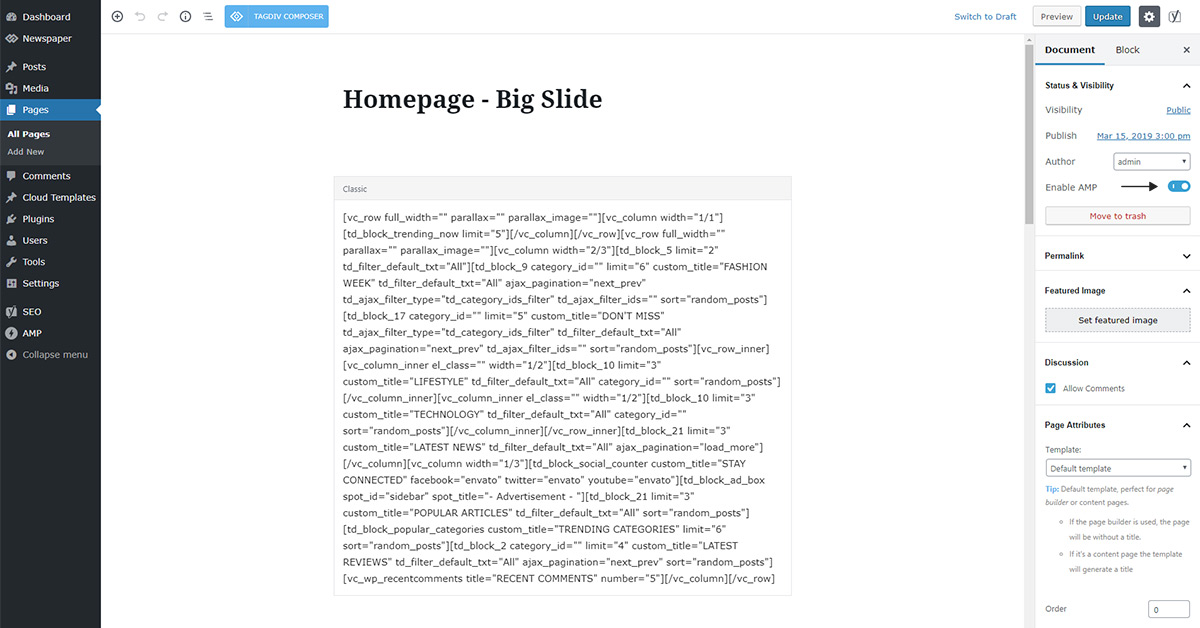
joitI can’t find the toggle button – [enable AMP].
Acccording to this document (https://tagdiv.com/amp-newspaper-theme/), there looks like a toggle button.
※image URL: https://tagdiv.com/wp-content/uploads/2018/02/page-amp-activate.jpg
Please tell me where the toggle button is.
Thanks.
Bettina Hello!
You can install many cloud post templates and you can see them in a list here when you access a post: https://www.screencast.com/t/9mY3SZgZn
In this case, Global means that the template it’s set up for all posts by default. But, for example, you can have a post with different template and without Global. This you can do by accessing the post you want to choose other template, select from the list the template you need, that’s all. You can see how they are looking by select other template for example. The settings will be different because it’s other template, but when you assign/select the global template again you will have the same settings and you won’t lose it.
So, every changes that you make in a global template it will display for all the posts you have assigned the global template.
Thank you!
 samstrat
Using the AMP plugin, first of all, not seeing where/how I can customize the page to look similar to the responsive theme (non-amp). Second, category listings have short codes exposed instead of a category list.
I get this… [vc_wp_categories title="#News" options="hierarchical"] instead of category list.
Please advise.
 artsetsu
 Hi Team,
I have install both Mobile Theme plugin+ AMP. I already email the details to contact@tagdiv.com please have a look
Bettina Hello!
I can see the ad placeholder. Please make a test, deactivate all the cache plugins and the extra non-tagdiv ones, clear the cache from your browser and see the results.
Please make sure you activated the Google Adsense code and check the permissions from your google account.
If the AdSense code needs to be set between head tags, this can be set in our theme in Theme Panel -> Analytics/Js Codes. Example: https://prnt.sc/1tju9qf -> https://prnt.sc/10jk7fq
If you use auto ads, then the code must be placed in analytics too.
Let me know the results!
Thank you!
Bettina Hello @artsetsu!
From my point of view, if you don’t use the Mobile Theme plugin, then there is no reason or benefit from AMP.
Please make sure you downloaded the right AMP plugin which is installed and active and you’ve set the option Mobile + AMP.
If the problem is still there, then please contact us via email at contact@tagdiv.com and provide the following:
– admin url and credentials
– a link to this topic in order to identify you
Our team will take a look!
Thank you!
 celhil
 Hi Bettina,
thank you. I have tried this:
But it shows only 8 comments, not 100. Do you know whats wrong? Please click here:
https://www.android-user.de/gewinnspiel-weihnachten-2021/?khjvbmhvnhvcdfvvfv
At the moment the cache is not cleared. You have to open the site with ?fsdsgsfd (for example) at the end to bypass the cache.
-
This reply was modified 4 years by
celhil.
Bettina Hello Andre!
Yes, for example, you can do something like this: https://www.screencast.com/t/qcW6W17GxVbv with those settings: https://www.screencast.com/t/x8jGn7fPet6Z
Thank you!
Bettina Hello @andreabarbieri!
If you do not want to see any AMP pages then please disable the amp plugin and if you use the Mobile theme plugin, please make sure you use the option without amp.
Please make a test, deactivate all the cache plugins, clear the cache from your browser and see the results.
Please make sure you save it like that and also after modifications reindex by Google.
Thank you!
Bettina Hello!
For example, you can use a flex block 1 with those setting to achieve this: https://www.screencast.com/t/f8d1BLGIisJ
Please note that you need to use a cloud template for that page.
Hope that helps you!
Thank you!
Bettina Hello!
Unfortunately, you can’t set up a widget in amp footer.
Thank you!
Calin Hi,
If you need to edit the theme files to set your code, then you need to edit the files that correspond for the post style that you are using, for example if you are using post style 1 the file path is -> wp-content/plugins/td-composer/legacy/Newsmag/parts/single/loop-single-1.php -> https://i.imgur.com/GMCyLr7.png if you make changes in those files, it will be better to set them in a child theme, making this the changes will not be lost when the theme will be updated.
I hope this will help you!
artsetsuHi Team,
Hope you are doing well. AMP in my website is not working and it is only work when i enable the redirect.
After enable the redirect some of the url of my website not working.
i have follow all the step: https://forum.tagdiv.com/tagdiv-amp-plugin-tutorial/
website url: https://whatson.guide/
work in mobile version if i enable the redirect.
please have a look.
 danvcreative
Hello,
Im experiencing a lot of 502 and 504 errors. Our site is westfaironline.com. Back in October I was told to update the theme to its latest version. Which I did, but we are still having the same issues. I contacted our hosting provider and this is what they are telling me:
We have identified high admin-ajax.php utilization originating from the westfairsite install. Currently there is excessive ajax usage recently which is affecting the servers CPU Usage and affecting other users on the Shared server environment.
/wp-admin/admin-ajax.php?td_theme_name=Newsmag&v=5.1
Because hits to admin-ajax.php can’t be cached, they tend to utilize a lot of the server’s resources. Therefore, you will want to contact your developer in order to reduce this usage so that the site performs better.
There are also a large amount of requests from the same IPs and user agents hitting the site at the moment. If these are legitimate, we suggest placing the site behind our Advanced Network/CloudFlare directly, and/or taking steps to minimize these hits either with a robots.txt crawl delay, or a code delay if these are part of a service. If they are not expected, we can assist with implementing blocks if you would like.
75333 Mozilla/5.0 (Macintosh; Intel Mac OS X 10.15; rv:92.0) Gecko/20100101 Firefox/92.0
60978 Mozilla/5.0 (Windows NT 10.0; Win64; x64) AppleWebKit/537.36 (KHTML, like Gecko) Chrome/96.0.4664.93 Safari/537.36
35467 Mozilla/5.0 (compatible; bingbot/2.0; +http://www.bing.com/bingbot.htm)
24205 Mozilla/5.0 (iPhone; CPU iPhone OS 15_1 like Mac OS X) AppleWebKit/605.1.15 (KHTML, like Gecko) Version/15.1 Mobile/15E148 Safari/604.1
19987 Mozilla/5.0 (Windows NT 10.0; Win64; x64) AppleWebKit/537.36 (KHTML, like Gecko) Chrome/96.0.4664.93 Safari/537.36 Edg/96.0.1054.53
19257 Mozilla/5.0 (compatible; AhrefsBot/7.0; +http://ahrefs.com/robot/)
18804 Mozilla/5.0 (compatible; Googlebot/2.1; +http://www.google.com/bot.html)
17663 Mozilla/5.0 (iPhone; CPU iPhone OS 15_1_1 like Mac OS X) AppleWebKit/605.1.15 (KHTML, like Gecko) Version/15.1 Mobile/15E148 Safari/604.1
17001 Mozilla/5.0 (compatible; BLEXBot/1.0; +http://webmeup-crawler.com/)
15278 Mozilla/5.0 (iPhone; CPU iPhone OS 14_8_1 like Mac OS X) AppleWebKit/605.1.15 (KHTML, like Gecko) Version/14.1.2 Mobile/15E148 Safari/604.1
14606 Mozilla/5.0 (compatible; SemrushBot/7~bl; +http://www.semrush.com/bot.html)
12779 Mozilla/5.0 (Linux; Android 7.0;) AppleWebKit/537.36 (KHTML, like Gecko) Mobile Safari/537.36 (compatible; PetalBot;+https://webmaster.petalsearch.com/site/petalbot)
11527 Mozilla/5.0 (Windows NT 10.0; Win64; x64) AppleWebKit/537.36 (KHTML, like Gecko) Chrome/96.0.4664.45 Safari/537.36
10147 Mozilla/5.0 (Linux; Android 6.0.1; Nexus 5X Build/MMB29P) AppleWebKit/537.36 (KHTML, like Gecko) Chrome/96.0.4664.93 Mobile Safari/537.36 (compatible; Googlebot/2.1; +http://www.google.com/bot.html)
9524 Mozilla/5.0 (Windows NT 10.0; Win64; x64; rv:95.0) Gecko/20100101 Firefox/95.0
9235 Mozilla/5.0 (Windows NT 10.0; Win64; x64) AppleWebKit/537.36 (KHTML, like Gecko) Chrome/81.0.4044.141 Safari/537.36
8482 Mozilla/5.0 (Windows NT 10.0; Win64; x64) AppleWebKit/537.36 (KHTML, like Gecko) Chrome/64.0.3282.140 Safari/537.36
8374 Mozilla/5.0 (Windows NT 10.0; Win64; x64) AppleWebKit/537.36 (KHTML, like Gecko) Chrome/70.0.3538.102 Safari/537.36
8071 Mozilla/5.0 (Windows NT 10.0; Win64; x64) AppleWebKit/537.36 (KHTML, like Gecko) Chrome/79.0.3945.130 Safari/537.36
7996 Mozilla/5.0 (Windows NT 10.0; Win64; x64) AppleWebKit/537.36 (KHTML, like Gecko) Chrome/79.0.3945.136 Safari/537.36
celhilHello,
this week we make a giveaway and at the moment (day 3 of 7) we have over 1500 comments on this page:
https://www.android-user.de/gewinnspiel-weihnachten-2021/
Is it possible to limit the comments for example to 100 per page with a button to show the next 100? (desktop and mobile)
Thank you and best regards
Andre
 attila@erdely.tv
 Hi,
Unfortunatelly your answer
- does not help at all
There is no need to translate anything. The site will have one single language: HU.
When setting site language to HU in WP, the correct date format is wrongly returned by the theme.
This is the same for some other languages as well. Those pictures were sent as examples.
-
Kindly offer a sollution for capital letters in date format when using Newspaper with WP in HU language.
Thanks!
.
-
This reply was modified 4 years by
attila@erdely.tv.