
- NewspaperWP Rocket and Newspaper Theme: Optimization Guide
- TutorialsFrom WPBakery to tagDiv Composer
- TutorialsOffset Feature
- TutorialsWhat is Ajax preloading?
 juanca1612
Hello,
How could I solve the problem I have in the categories of my website in mobile theme? I explain the topic:
In the mobile theme issue when I enter a category which has sub categories I get some tags but they do not match the category itself, they are from others or sometimes they are missing …
I put two examples of my own website:
In this category there are missing sub categories, it only shows two:
https://www.lasrecetasdeangy.com/category/postres/
And in this sample sub categories that do not belong to the category itself:
https://www.lasrecetasdeangy.com/category/carnes/
Thank you!!
 pavel@earnware.com
Hello,
There is a problem regarding the backgrounds for rows/columns any kind of backgrounds. These backgrounds load last on any page, and they may not even appear if.. there is a problem with the Google Ads.
Here is an example, on this page here: https://teapartypac.org/
The background image and background color won’t appear if there is a conflict like this one, here are 2 screenshots, with Google Ads:

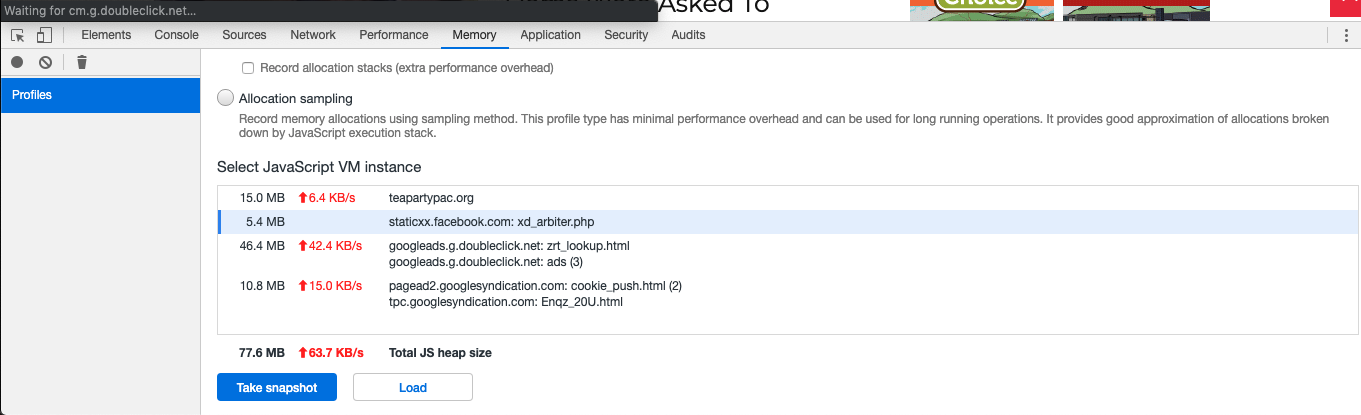
The solution would be to somehow make it a priority – for the page to load all it’s backgrounds, and Google ads afterwards, since when it is loading the background the last, and there is a conflict – these rows/columns look white and it is a real problem!
If you got another solution – please let me know,
Thank you!
 MrOrsh
I have done a little bit more research regarding this “issue” (as started in this thread) and just wanted to share my thoughts to be forwarded to developers, or if anyone can give me an answer right now.
- Basically, whenever auto loading is enabled, as soon as a user scrolls the page any URL ending (#comments, #respond etc.) gets replaced with the actual article url (for example: http://www.mysite.com/my-article). Instead of retaining the “#-ending”.
- This is also true for the canonical URLs that gets seen by the browser when selecting “view source”. Hence the #comments, #respond etc. never seems to be in the actual URL for webcrawlers to find.
- All the above does also apply, not only paginated comments, but to normal paginated posts. When using the built in WordPress-function for pagination (<!–nextpage–>) this results in that no matter which page of a paginated post a user is at, it will always be displayed in the code as (ex.) http://www.mysite.com/my-article, instead of http://www.mysite.com/my-article/2, http://www.mysite.com/my-article/3 etc.
- Using the above approach it also results in that the link rel=”next” is always http://www.mysite.com/my-article/2 no matter if the next page is actually /3, /4, /5 etc. It also makes the link rel=”prev“ never appear since the page always believes that it is the first page in a series of pages because of the URL change.
I´m far from an expert at SEO but this clearly must be something that will confuse web-crawlers and have an impact on SEO. A lot of confusion must also arise for the crawlers when the same page URL have completely different content (as it will be for paginated posts and for paginated comments).
Would be great with some answers regarding this topic. I would love to enable the auto loading function since it´s great for decreasing bounce rate and making visitors stay longer. But right now I´m to scared for the possible SEO side-effects of doing so.
 jsbjm
jsbjmWhenever i open a post and scroll down, i see related posts. Here, category name is written over the thumbnail images of the related articles. I want to remove that caregory name from the thumbnail image.
For example see this here i want to hide “featured“..
 stephanwhelan
Hi guys – can you stop the Mobile Theme / AMP from showing on pages (only posts, homepage and categories)? Doesn’t seem to be an option to do that from what I can see.
 Tojama
 1 & 2 is fixed… a plugin was to blame for everything.
My only question:
is it possible to hide the template name?
https://prnt.sc/owpqc7 (i want to hide this “News”)
 urbandigital
Hello,
why is the feautered image on mobile version cut? I set “Full” in the themes options for both desktop and mobile version and yet it doesnt show properly…
Example: https://urban-digital.de/studie-digitales-staedteranking-deutschland/
Screenshot: https://ibb.co/XCV0WFc
Thanks
 chasedesign
 Thank you. Where do I find documentation on the TagDiv classes/methods, etc. I can use within the new plugin for developers?
I saw these in the example you sent.
td_api_block::add()
td_util::tdc_is_live_editor_ajax()
td_util::get_block_error()
td_util::tdc_is_live_editor_iframe()
Thanks!
 Vlad S
 Hello !
Yes, AMP Plugin works with Mobile Theme. Please follow this tutorial to achieve better results: https://forum.tagdiv.com/tagdiv-amp-plugin-tutorial/
Thank you !
 murray
Just having this from WordPress. Can anyone help explain what’s happening?:
Howdy!
Since WordPress 5.2 there is a built-in feature that detects when a plugin or theme causes a fatal error on your site, and notifies you with this automated email.
In this case, WordPress caught an error with one of your plugins, tagDiv Composer.
First, visit your website (http://staging.koparacreative.co.nz/) and check for any visible issues. Next, visit the page where the error was caught (http://staging.koparacreative.co.nz/wp-admin/post.php?post_id=1266&td_action=tdc&tdbLoadDataFromId=127&tdbTemplateType=category&prev_url=%2F%2Fstaging.koparacreative.co.nz%2Fcategory%2Fschool-resources%2Fhome-school-partnerships%2F) and check for any visible issues.
Please contact your host for assistance with investigating this issue further.
If your site appears broken and you can’t access your dashboard normally, WordPress now has a special “recovery mode”. This lets you safely login to your dashboard and investigate further.
To keep your site safe, this link will expire in 1 day. Don’t worry about that, though: a new link will be emailed to you if the error occurs again after it expires.
Error Details
=============
An error of type E_ERROR was caused in line 649 of the file /home/kopara/public_html/staging.koparacreative.co.nz/wp-content/plugins/td-composer/includes/tdc_main.php. Error message: Allowed memory size of 268435456 bytes exhausted (tried to allocate 3707173 bytes)
 CBTNews
This morning when we got in we noticed there is now a large band of white space in the topic of all of our post pages. I didn’t perform any updates lately but did try to update a few plug-ins after the noticed the problem. Can someone please help with this? Thanks!
Here’s an example:
https://www.cbtnews.com/five-tips-for-handling-internal-staff-transition-within-your-dealership/
On our pages with video code embedded the white space appears below the video, like this:
https://www.cbtnews.com/daily-automotive-newscast-august22-2019/
 dfrosso
Hi.
The question is:
Is there any way to assign a single template to a specific category of posts?
For example: I want that all posts from “Cars” category use the Single Template 1… and all posts from “Trucks” category use the Single Template 2.
Thanks.
 Rh Destek
Hello,
I use newspaper theme on my site. I configure my homepage without any problem. But I have problem with my mobil AMP homepage. It does not seem like desktop homepage and example pics which is in mobile newspaper guide page. Also my mobil menu doesn’t work. I click links but nothings happen.
My website: https://www.akademidenhaberler.com
Example pics in quide page: https://prnt.sc/ow41c2
Mobile Homepage: https://prnt.sc/ow43t3
 Jorge Guevara
 Hi, this is somewhat embarrassing, I am not able to load the image correctly.
The URL of my site is http://fintechlo.com/ and what I want is to be able to modify the heights of the different blocks of the header, for example where is the submenu (top global news ……) I want to change the height and leave it as seen in the original bussines theme that is approximately half the height as seen on my current site.
 brael
braelHi, how can I target an entire column of elements? If I have 3/4 setup for example and I want to target the 1/4 column. There are multiple elements in that column.
Say for example, to change the background colour of the entire column?
Or to put box-shadow effect around entire column.
____
Oh and in addition to this, how can I add box-shadow effect to one element? When I look at css, there is always a random number associated with that element. I will be changing that element often but it will be in the same position and I don’t want to have to keep finding out the random number for that element in each time.
Thankyou.
 Priant Taruh
Can I use the newsmag theme for the main domain and subdirectory with only use 1 license? Example: domain.com and domain.com/blog
 Calin
Calin Hi,
You’ll need to use the mobile theme with amp plugin, in this way you’ll have the mobile template on amp, choose the amp option -> http://prntscr.com/opwh8s in this way the missing url will be remove/fix.
The Mobile Theme -> https://forum.tagdiv.com/the-mobile-theme/
-> tagDiv AMP Plugin Tutorial -> https://forum.tagdiv.com/tagdiv-amp-plugin-tutorial/
Thank you!
 MOHAMMAD SHAHBAZ
Dear sir, I have recently use Tagdiv Amp plugin. After installing the tagDiv AMP plugin, and it all seemed to be working okay. but in my Google Search Console, every post this error shows “Missing URL for attribute ‘href’ in tag ‘link rel=manifest'”. please tell me How can I fix this Amp problem?
 Sprint News
 Hi Vlad
what i want to do is simply display the news ticker also on to ALL Category & Tag Pages not only in posts.
Category & Tag Pages that already are on the site using templates that are on the actual site structure without import Blank Templatea and rebulit posts, category and tag pages templates or use pre made templates in library.
Can you help me?
 mohamedbouhssaie
How do I create a Next and Back button in the NewsPaper template?
 DUNKy
DUNKyHi,
In order to be as precise as possible: I am currently using the smart list module to create image galleries.
– I used the Cloud Library and the following template: Smart List Template 5.
– For the Smart List type setting : I used Smart List
Everything works perfectly except one thing: The display of slide numbers.
Indeed, it is not mobile friendly (clumsy display occupies many pixels).
Do you have a CSS or PHP code to hide the numbering of slides?
Link example : https://test.vamely.com/quand-disney-sinspire-de-personnes-reelles-pour-creer-ses-dessins-animes/
Picture that show what i want to hide : https://image.noelshack.com/fichiers/2019/34/3/1566401568-zzz.png
Thanks,
DUNKy Hello,
I have implemented everything you indicated (add CSS + modify PHP) but nothing changes.
– I always have a pagination with numbers and not arrows in single post
– At the end of the pagination on the single post, I don’t have a “next article” proposal.
I have followed every step of the way.
Here is an example of the rendering: https://test.vamely.com/doublures-de-stars-quand-la-ressemblance-est-troublante/
Calin Hi,
In our example https://test.vamely.com/quand-disney-sinspire-de-personnes-reelles-pour-creer-ses-dessins-animes/20/ the next button is gray because you are to the last slide.
Also if you want to use the Infinite Loading please check this article ->https://tagdiv.com/infinite-loading-for-single-posts/
-> https://forum.tagdiv.com/design-post-pages-using-cloud-library-templates/
Hope this will help you!
Than you!
DUNKyHello,
In order to be as precise as possible: I am currently using the smart list module to create image galleries.
For this, I used the Cloud Library and the following template: Smart List Template 5.
Everything works perfectly except one thing: I would like to post the following article when the visitor arrives at the end of the gallery.
Currently, when the visitor arrives at the end, the next button is grayed out.
Here is an example on my website: https://test.vamely.com/quand-disney-sinspire-de-personnes-reelles-pour-creer-ses-dessins-animes/20/
Ideally, I would like the “next” button to redirect to the next article (of the same category for example).
Thank you,
MrOrsh That is true, not sure you saw the edit in my last post. I would very much like to use the auto loading feature. However it feels that it might have an impact on SEO when it behaves like this. Since the actual URL change. Or am I being paranoid? 🙂
Also thought i might be good to be able to link to a certain comment page for example. Hence it would be nice to see the link for it.

