- TutorialsFrom WPBakery to tagDiv Composer
- NewsmagHow to update the WPBakery plugin
- NewspaperHow to update the WPBakery Page Builder plugin
- TutorialsHow to Update the WPBakery Page Builder plugin
- NewspapertagDiv Composer Tutorial
- NewspaperWhat’s Included in the Newspaper Theme Package
- Apitd_api_block::update
 komsak
 dirtymedia
Trying too activate Visual Composer but having problems.
I deactivated WPBakery and tried to upload the plugins but get the following message:
Installing Plugin from uploaded file: themeforest-5489609-newspaper.zip
Unpacking the package…
Installing the plugin…
The package could not be installed. No valid plugins were found.
Plugin install failed.
HELP…!!!
 jshipka
 Solved the issue. I had to uninstall the WPBakery Visual Composer and upload the updated one provided by the template. Seems to be working ok now.
 virjik
Hi!
I have this problem with latest theme of newspaper. Basically when i press f5 key (when refresh page multiple times) my server crashes.
In this moment i’ve isolated the site from the rest of the server , i bought an ssd hosting with 8 gb ram and 8 cores to test it, and despite the resources allocated to it when i press refresh it brings down the whole server, cpu usage is very high.
Ihave all the latest plugins installed. Here is my list o plugins:
Akismet
Wordfence Security
WP Super Cache
WPBakery Visual Composer v4.12.1
I’ve tested the f5 “feature” with a fresh install of wordpress and with another theme from themeforest and both websites are working properly, no server crash and no high cpu load.
Please Tag Div help me!
 theleaderdotinfo
Help! My installation is going crazy!
I had the “Newspaper -> News Magazine” installed and it was working fine. I then started to play around with other themes and installed the “Newspaper -> Local News” theme. For some stange reason article posts are being inserted automatically into my database! I don’t know how! I have reverted back to “Newspaper -> News Magazine”. I haven’t got any feeds installed to import articles. I haven’t set up any rss import feeds. I only have “tagdiv mobile theme”, “tagdiv social counter”, and “wpbakery visual composer” plugins installed.
What is going on???
Regards,
Neil.
 insomniac79
 I am not using Jetpack. Here are my installed plugins:
BackWPup
Deactivate | Edit
WordPress Backup Plugin
Version 3.3.4 | By Inpsyde GmbH | View details | Documentation
Select MOJO Marketplace
MOJO Marketplace
Deactivate | Edit
This plugin adds shortcodes, widgets, and themes to your WordPress site.
Version 1.0.2 | By Mike Hansen | View details
There is a new version of MOJO Marketplace available. View version 1.0.4 details or update now.
Select tagDiv Mobile Theme
tagDiv Mobile Theme
Deactivate | Edit
tagDiv Mobile Theme
Version 1.0 | By tagDiv | Visit plugin site
Select tagDiv Social Counter
tagDiv Social Counter
Deactivate | Edit
Social counter for WordPress. Widget and visual composer block.
Version 4.1 | By tagDiv | Visit plugin site
Select Thrive Leads
Thrive Leads
Deactivate | Edit
The ultimate lead capture solution for WordPress
Version 1.95.4 | By Thrive Themes | Visit plugin site | Check for updates
Select W3 Total Cache
W3 Total Cache
Premium Support | Settings | Deactivate | Edit
The highest rated and most complete WordPress performance plugin. Dramatically improve the speed and user experience of your site. Add browser, page, object and database caching as well as minify and content delivery network (CDN) to WordPress.
Version 0.9.5.1 | By Frederick Townes | View details
Select WPBakery Visual Composer
WPBakery Visual Composer
Settings | Deactivate | Edit
Drag and drop page builder for WordPress. Take full control over your WordPress site, build any layout you can imagine – no programming knowledge required.
Version 4.12 | By Michael M – WPBakery.com | View details
There is a new version of WPBakery Visual Composer available. View version 5.0 details. Automatic update is unavailable for this plugin. To receive automatic updates license activation is required. Please visit settings to activate your Visual Composer. Got Visual Composer in theme?
Select Yoast SEO
Yoast SEO
 simchris
 Yes, as stated in the docs and sticky post at top of forum;
** VC plugin is ONLY updated when the theme is updated
** YOu don’t get a paid license to the plugin
** It is bundled version and cannot be “activated” through WP Bakery for support/updates
** You cannot update it via WP Bakery as you don’t get a paid license with bundle version
See the theme docs:
https://forum.tagdiv.com/newsmag-how-to-update-visual-composer-plugin/
 clasione
 This is exactly what I needed thank you. It looks as though I am using Newspaper V 6.5.1 – I do not see any update notifications anywhere so I have not even thought about updating it. As far as the Plugin, I am using WPBakery Visual Composer Version 4.7.4 (VC Seems up to date but maybe it is the wrong VC Plugin). Thank you again.
simchris Yes. You can’t update to v 5.0 unless you go buy a copy from WP Bakery.
The version included with the theme is 4.12.1 or whatever. The free bundled version is ONLY updated when the theme is updated per the links and info provided.
Sorry – tried to help. I don’t work here. Good luck!
 bilimsenligi.com
Merhaba,
Visual Composer eklentisini yükledim ancak “WPBakery Visual Composer için yeni bir sürüm mevcut. 5.0 sürümü detaylarını görüntüle. Bu tema için otomatik güncelleme mümkün değil. To receive automatic updates license activation is required. Please visit settings to activate your Visual Composer. Got Visual Composer in theme?” uyarısı alıyorum.
Ne yapabilirim.
Ayrıca türkçe destek neden yok.
Ben geçen hafta temayı aldım ve bazı sorunlar yaşıyorum.
 newsguru
 I have updated the theme and is not requesting for any theme update except the update for WPBakery Visual Composer
simchris sticky post means the post that is ‘stuck’ at top of the forum every time you look at it
https://forum.tagdiv.com/topic/how-to-update-visual-composer/
REF:
Emil G
#34790
Jan 19, 2015 at 8:57 am
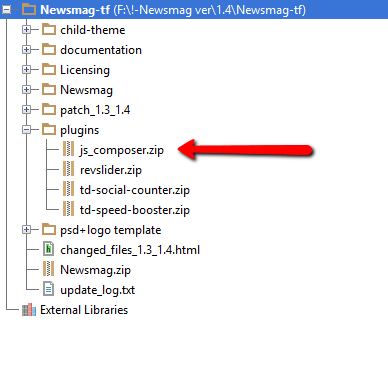
The Visual Composer plugin that comes with the theme is licensed to the theme, the license specifies that only we can provide the updates and you don’t have to buy it or register it. We provide updates on a regular basis, after we test the plugin for theme compatibility the plugin is included in the latest theme update, inside the Plugins folder:
https://forum.tagdiv.com/wp-content/uploads/2015/01/visualc_newsmag.png
Here is the guide on how to update the plugin – https://forum.tagdiv.com/how-to-update-visual-composer-plugin-wpbakery/
Conclusion – We’re testing the plugin latest version, if everything is ok we will include it in the next update and only then you can update the plugin by downloading the theme latest version and following the procedure presented in the plugin update guide.
Emil G.
 richardgaspa
WPBakery Visual Composer has been upgraded for a while now to version 5.0. I just downloaded the newest version of Newspaper but don’t see the upgraded VC 5.0 upgraded plugin. When will it be available as it has many new features?
 francisco33
I already have updated my theme newspaper V7 and Visual composer 4.7, but when i want to use the visual composer Takes me to the website to pay for an update for 34 dollars
https://vc.wpbakery.com/?utm_campaign=VCplugin&utm_source=vc_user&utm_medium=backend_editor
Could you guide me?¡
thanks in advance
Francisco
 Kundurnews
 Hello Catalin
Thanks for your suggestion, Sir.
I have remove all plugins, and than reinstall the theme, finally i found that WPBakery Visual Composer plugins to make My sidebar Theme not to be smart.
Our WPBakery Visual Composer plugins problem, i see the plugins need to update. i have many times install and reinstall, but same result.
As You Know, I have install the Newspaper theme V 7.5. and plugins that come bundled with the theme.
Pls Give me some help, Sir
thanks you for your kind attention
 Catalin
 Hello zcarmichael,
Unfortunately, our theme does not have any such an option that allows you to make a Clipboard Button, sorry! The actual packet of Visual Composer does not include this feature, sorry! Exist an Add-on from Visual Composer which have this functionality, like this -> https://vc.wpbakery.com/addons/clipboard-addon/ Notice that this Add-on is not tested with our theme and we cannot say for sure if it will work or not with the theme, sorry!
Thanks for the message!
 Manuela
It says this
An error occurred while updating WPBakery Visual Composer: To receive automatic updates license activation is required. Please visit Settings to activate your Visual Composer. Got Visual Composer in theme?
How to update and receive support if I do not purchase direct license?
In such case you need to wait on your WordPress theme author to update Visual Composer on their side and push it to you. Also support related questions should be addressed to your WordPress theme provider.
Thank you
simchris I think some folks are using their own licensed versions, with the theme, but not tested. Remember theme has some custom blocks, and as long as there is no conflict with the new additions, might work okay.
You can always try it, then go back if things not working right. 🙂
4.12x isn’t that old, really.
https://wpbakery.atlassian.net/wiki/display/VC/Release+Notes
Normally you get a new version of the plugin with the next full theme update.
simchris Just ignore it. TagDiv tried to suppress that, but WP Bakery folks keep changing way that works.
 logosi
 Reading on the forum, I disabled all plugins and then the demo installed. However, there was another issue with WPBakery Visual Composer, which I understand is a required plugin. More on that in this thread
https://forum.tagdiv.com/topic/wpbakery-visual-composer-issue-fatal-error/
logosiI was able to solve my issue of installing the demo, discussed in this thread, by disabling all plugins and installing the demos.
https://forum.tagdiv.com/topic/installing-multiple-demos-removing-old-data/#post-142671
The issue came when re activating PBakery Visual Composer which I understand is a required plugin. When the plugin is turned OFF/de activated, the front end appears fine. When the plugin is running/active, I get the following error…
Fatal error: Call to undefined function vc_shortcode_custom_css_has_property() in /home/search/public_html/drmarkdemo/wp-content/themes/Newspaper/vc_templates/vc_row.php on line 53.
Is there a solution for this? Please help, my client is anxious to see the demo, but I need things to be working properly.
Thank you.
simchris You don’t need to activate it. Activation only gives you support from the WP Bakery folks, which is not included with the bundled version.
 kostaskir
 Hello Bogdan,
I didn’t translate something yet manually.
I also checked some other settings of the theme and until now it seems that everything works fine.
So, I deactivated all the plugins as you proposed except “visual composer” and “WP Super cache”. I cleared the cache and tried again without any luck.
I don’t use wordfence and I don’t have any cdn files.
Plugin list that I use: Admin Columns, Coming soon and Maintenance mode WpDevArt, Enhanced Media Library, EWWW Image Optimizer, greeklish-permalinks, Regenerate Thumbnails, tagDiv Mobile Theme, tagDiv Social Counter, tagDiv Speed Booster, WP Super Cache, WPBakery Visual Composer and Yoast SEO
Now should I start translating from English to Greek ? 🙂
 enestedt
 What I’m aware of the problem have always been there
I made a test site where you can se the problem.
http://enestedt-playground.se/test/exempelsida/
I have only installed the theme and the “WPBakery Visual Composer”
And set the menu to sticky
 ayuve
ayuveHi!
You write that it is not possible to update the Visual Composer automatically. We should wait until the next theme release.
https://forum.tagdiv.com/update-the-visual-composer-plugin-wpbakery/
Actually a new plugin version of visual composer is available.
Usually it is important to update wordpress plugins asap because of security reasons.
Can i buy a wp bakery licence an update it automatically? So it could cause theme errors but i think security of a professional blog is more important.
Greetings