
- NewspaperFlex Block Builder and Flex Loop Builder
- NewspaperHow to use the Flex Blocks cache option
- NewspaperHow to edit modules for Flex Block X
- NewspaperHow to insert a block inside the content of a post
- NewspaperFlex Block Settings Guide
- NewspaperMeta Info on Modules and Blocks
- NewspaperTheme modules and blocks
- TutorialsDefault Block Settings Guide
- NewsmagBlock settings tutorial
- NewsmagCategory tag on modules/blocks
- NewspaperThumbnails – Fix strange looking images on blocks
- NewspaperBlock settings tutorial
- NewspaperCategory Tag on Modules/blocks
- ApiPractical example – How to add a new Block and Module
- Apitd_api_block::delete
- Apitd_api_block::update_key
- Apitd_api_block::update
- Apitd_api_block::add
- ApiAPI – Blocks – Introduction
- NewspaperWP Rocket and Newspaper Theme: Optimization Guide
 wertikoo
Hello,
I’d like to greet your wonderful team of developers behind the Newspaper theme. Unfortunately, I have encountered a small issue that I hope you can help me resolve.
I installed the Newspaper theme along with the pre-built website “ECHOVERSE”. In some places, I’m using ready-made blocks from Cloud Templates. Visually, everything looks fine, but when I inspect the HTML, I notice that the headings are rendered with extra CSS coming from the templates.
I’m attaching a screenshot from the browser’s SEO inspection tool, where you can see that the headings are “cluttered” with unnecessary code. I suspect this might be due to unclosed tags in the templates.
Could you please take a look? If you need anything from me, just let me know — I’ll be happy to provide it.
Thank you!
https://kando.md/wp-content/uploads/2026/01/2026-01-12_16-24-17.png” alt=”” />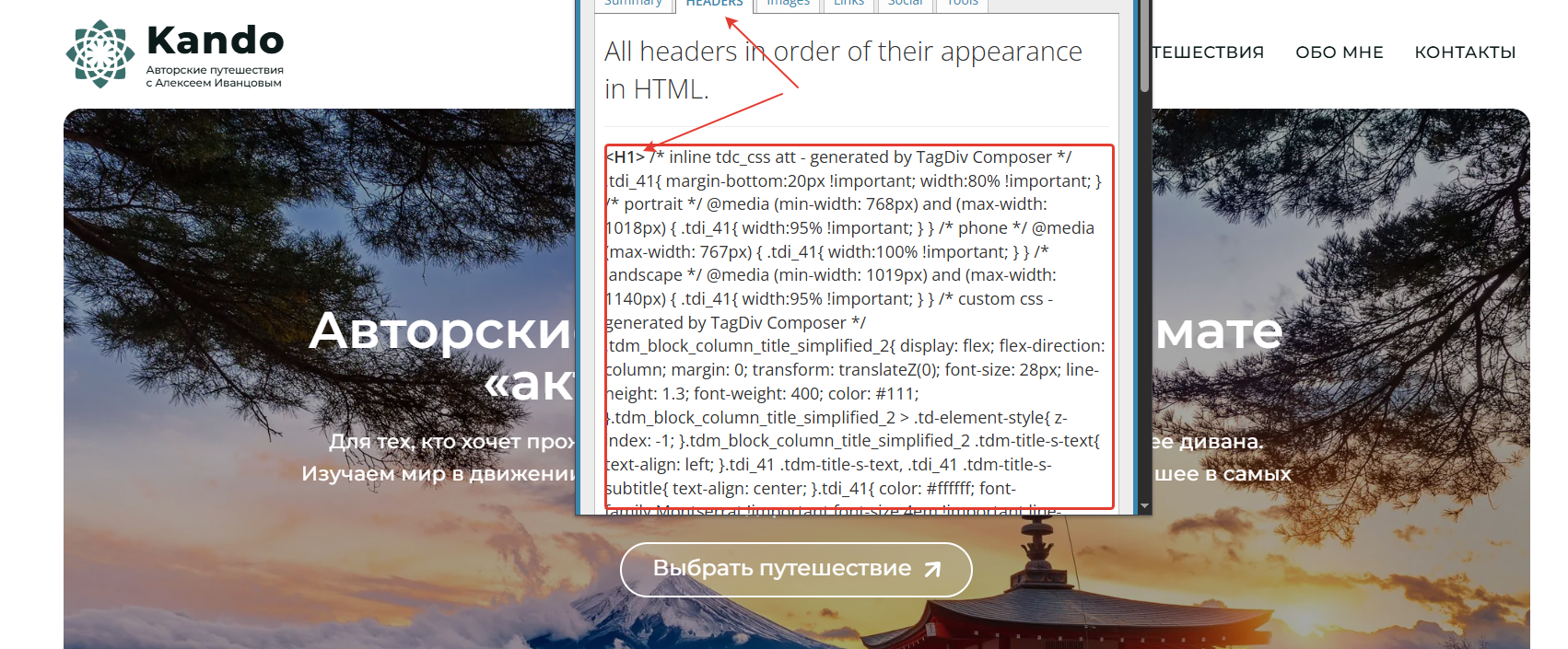
 robinspaul
Hi,
We are planning to use BlockChain Demo (Blue and Pink gradient banner):
https://demo.tagdiv.com/newspaper_blockchain_pro/
Could you please tell me how we can change the logo on the home page and other pages?
Thanks,
 Calin
Calin Hi,
I just checked the website and now the blocks from the website are not locked – https://i.imgur.com/tICKW1k.png https://i.imgur.com/ztIUXhk.png
Did you manage to resolve the situation?
Calin Hi,
Reducing the CSS is quite important but since you are using tagDiv Standard Pack and quite many blocks and options from it, removing this plugin is not an option in your case, but this will reduce the css by half from the size it has now.
Now related to the “fetchpriority=high should be applied”, please replace the element Big Grid Flex with the Big Grid element (same layout).
Use a plugin that can convert the images to WebP, for example, ewww image optimizer- https://wordpress.org/plugins/ewww-image-optimizer/
There is a banner image set that does not have a height and width – https://i.imgur.com/XCHOeoC.png. It can be resolved using tagDiv Composer, select that banner ad, and in the image tab, set the width and height for the mobile version of that banner.
Other suggestions are to use an optimization for css and js (Autoptimize) and a Cloudflare.
Calin Hi,
Unfortunately, there is no option for this. What can be used is the title length from the block, or an alternative is to use a custom css:
.td_flex_block_1 {

max-height: 380px;

overflow: overlay;

}
The above css will apply to all fle block 1 so what you should do is to set a class on those blocks you want to aply teh code and replace taht class with the class td_flex_block_1
It can be set in a raw CSS, after that you can change the number of articles that will be displayed, save the changes in tagDiv Composer and check it on the frontend.
Thank you!
robinspaulHi,
We are planning to use BlockChain Demo (Blue and Pink gradient banner):
https://demo.tagdiv.com/newspaper_blockchain_pro/
We have a few issues with the home page banner:
1. How to reduce the height of the home page blue banner?
2. How to change the blue and pink gradient colour of the banner?
3. When we try to replace the white image (image with tab) on the right hand side of the screen, it goes to the bottom of the blue banner. How do we keep it in the middle?
4. We like to use the same colour combination in the header area of the other pages as well. It is white at the moment on the header area of the other pages. How do we use the same gradient colour combination in the header area of other pages?
Could someone please help us?
Thanks
Calin Hi,
For this, you can use a media css code :
@media (min-width: 768px) {

#left {

width: 47%;

float: left;

margin-right:6%;

}

#right {

width: 47%;

float: left;

}

.clearfix:after {

content:"\0020";

display:block;

height:0;

clear:both;

visibility:hidden;

overflow:hidden;

margin-bottom:10px;

}

.clearfix {

display:block;

}

}
 AlanS
AlanSbrixtonblog.com
All the widgets blocks on the site are locked – a small padlock icon appears next to them in the list view
The contents of the blocks can be unlocked, but not the blocks themselves
I have tried various things, including:
switching back to classic widgets
deactivating all plug-ins/all plug-ins except the tag div ones that control the theme, both by deactivating via the theme and by disabling them via SFTP
switching the site to a standard WordPress site temporarily (Twenty Twenty one)
switching from a child theme to the main Newspaper theme
pausing Cloudflare
updated to WordPress 6.9
checking permissions
None of these had any effect
The widget screen also takes a very long time to open – which is why I want to delete most of them … but cannot.
 Jairo
Jairo Thank you for your prompt response. Before shortening the title, I’d like the blocks to adjust to the maximum height of the others.
 newzSupport
Hi,
I am using the Momentum prebuild but needed some functionality from Coach Pro for courses so I downloaded the Coach plugin. However, I am having a similar issue to https://forum.tagdiv.com/topic/coaching-pro-single-course-featured-video/ where the Course CPT entry or its taxonomies do not appear in ACF but the course field groups do. As a result I can’t get the Course domain taxonomy archives to list their associated courses.
This is the message that shows where the course list should have been on the Domain archives:
Flex Loop Builder: The Cloud Library Module Template set for this block is not valid or it no longer exists. Please select another Module Template.
Can you please point me to the JSON file to import to resolve? Or if there are alternate steps required, please let me know.
Thank you.
Calin Hi Iqtidar,
I’m sorry about the trouble with the transients, but I’m glad we were able to find a workaround for both issues in the end.
I’ve also shared a note with our developers to take a closer look at how the transients for the Flex Block cache option are intended to work and identify improvements, especially in handling and automatically clearing expired transients.
Thank you!
Calin Hi,
I’m not 100% sure that I correctly understand, but in case you are referring to the fact that when you have a long title that is no longer on one line and is going on the second line, the blocks are no longer in one line with images, title ….,
if so there are a few solutions, the most popular and simple is to use the title length on the block – https://i.imgur.com/l3IlKbh.png
JairoI’m designing a page with Flex Block 1, adding posts filtered by category. The problem is that if a post title exceeds the width, it inserts a line break, misaligning the container with the other posts. How can I make the container width adjust uniformly for all posts, regardless of their content?
Calin Hi,
Our featured video option will work as on this demo – https://demo.tagdiv.com/newspaper_video_news_pro/
Also, on the flex block, you’ll find the video option in the Layout tab – https://i.imgur.com/a0XJ5Bn.png. Autopay will apply when the pop-up video module is open. Also, when you are on article, if you want the video to start automatically then make sure that on the single post featured image you enabled this option – https://i.imgur.com/eqyuuyH.png
Thank you
Calin Hi,
This is related to the Contact Form 7 settings.
Now the simplest way to do it is to use a custom css like this one:
#left {

    width: 47%;

    float: left;

    margin-right:6%;

}

#right {

    width: 47%;

    float: left;

}

.clearfix:after {

    content:"\0020";

    display:block;

    height:0;

    clear:both;

    visibility:hidden;

    overflow:hidden;

    margin-bottom:10px;

}

.clearfix {

    display:block;

}
For this you can check this video https://www.youtube.com/watch?v=snH6YwCHEoE
Thank you!
Calin Hi,
Unfortunately, there is no option to just check the post that you want to be sticky at the top. You need to set the post id in the filter tab to have a post sticky all the time on that block – https://i.imgur.com/jHFxY0G.png
How to find the post ID? https://themesharbor.com/locating-the-id-of-wordpress-page-or-post/
Thank you!
Calin Hi,
Unfortunately, there is no option to just check the post that you want to be sticky at the top. You need to set the post id in the filter tab to have a post sticky all the time on that block – https://i.imgur.com/jHFxY0G.png
How to find the post ID? https://themesharbor.com/locating-the-id-of-wordpress-page-or-post/
Thank you!
Calin Hi,
1. I believe there has been a misunderstanding regarding the cloud templates.
In the General tab, you will find the standard cloud templates for a blog. These include templates for the header, footer, single post, category, tag, author, date, 404, attachment, and search pages.
The template that can be used for a single doctor is available under the Single Article cloud templates (see: https://i.imgur.com/xNZUSoK.png). However, the template you are trying to use is a Custom Post Type (CPT) template. CPT templates cannot be applied to regular single posts; they can only be used for their respective CPTs. Additionally, this CPT template is not part of the cloud templates—it was provided in my previous reply—and, as mentioned, it works only for CPTs, not for standard posts or articles.
If you want your regular posts to have a layout similar to the CPT layout, you will need to recreate it manually using the Theme Builder in tagDiv Composer. If custom fields are required, you can use the ACF plugin to achieve this.
To copy and paste the CPT template I provided, please edit a single under the Custom post type – https://i.imgur.com/ZvgMAhV.png hover over the 3 dots and click on “edit” https://imgur.com/NlMnH9L. After that, replace the code with the one from here https://cdn.tagdiv.com/wp-content/uploads/2026/01/Custom-Post-Type-CPT-Doctors-PRO.txt
2. As mentioned above, there is a misunderstanding. I believe this comes from trying to combine multiple prebuilt templates without fully understanding how the theme works. It seems there may be some confusion about core concepts such as what a post is, what a CPT (Custom Post Type) is, and the difference between categories and taxonomies, including how they are configured and how they are meant to function.
The section you are referring to (https://i.imgur.com/UrNPZOE.png) is displaying the Doctors CPT, and its layout is provided by the Doctors PRO Plugin. This plugin can be installed from Newspaper > Plugins > Dedicated Plugins for Prebuilt Websites (https://i.imgur.com/6eVC20P.png). Once the plugin is installed, you can use Flex Block X to select and display that module (https://i.imgur.com/nZpalQh.png). However, since the plugin creates the module using predefined code, we recommend creating your own custom module using the Module Builder, and then displaying it via the Flex Block Builder.
By doing this, you gain full control over the module’s layout and settings. For example, if you want to add an “Age” field, you can create a custom field using a plugin such as ACF, and then display it in your custom module using the Custom Field element.
Thank you!
 anastasios
Hello and Happy new year!
I would like to have the following in my site: on my homepage, for a given post, to have a Featured Video that will autoplay and when a user clicks on it and opens the post, to see the featured image there (hope I explained it well 🙂 ).
Tried from the Featured Video block (on post editing) but the video didn’t autoplay (neither from youtube nor a self-hosted video). Is this (the Featured Video block) the best way to achieve this or is there a better way?
I am available for any additional information. Thank you!
Best regards,
 uxengineer
 Or this has some syntax:
<span data-mce-type=”bookmark” style=”display: inline-block; width: 0px; overflow: hidden; line-height: 0;” class=”mce_SELRES_start”></span>eyJ0ZGNfaGVhZGVyX2Rlc2t0b3AiOiJbdGRjX3pvbmUgdHlwZT1cInRkY19oZWFkZXJfZGVza3RvcFwiIHRkY19jc3M9XCJleUpoYkd3aU9uc2lZbUZqYTJkeWIzVnVaQzFqYjJ4dmNpSTZJaU13TURBd01EQWlMQ0prYVhOd2JHRjVJam9pSW4xOVwiIGhfZGlzcGxheT1cIlwiIGhfcG9zaXRpb249XCJcIiB6b25lX3NoYWRvd19zaGFkb3dfb2Zmc2V0X2hvcml6b250YWw9XCIwXCIgZWxfY2xhc3M9XCJcIiBlbF9pZD1cIlwiXVt2Y19yb3cgZnVsbF93aWR0aD1cInN0cmV0Y2hfcm93XzE0MDAgdGQtc3RyZXRjaC1jb250ZW50XCIgdGRjX2Nzcz1cImV5SmhiR3dpT25zaWNHRmtaR2x1WnkxMGIzQWlPaUl4TUNJc0ltSmhZMnRuY205MWJtUXRZMjlzYjNJaU9pSWpabVptWm1abUlpd2laR2x6Y0d4aGVTSTZJaUo5ZlE9PVwiXVt2Y19jb2x1bW4gd2lkdGg9XCIzLzRcIl1bdGRiX2hlYWRlcl9sb2dvIGFsaWduX3ZlcnQ9XCJjb250ZW50LXZlcnQtYm90dG9tXCIgZGlzcGxheT1cImNvbHVtblwiIGljb25fcG9zPVwiYmV0d2VlblwiIHVybD1cIi9cIiBlbF9jbGFzcz1cIlBPU0lfSGVhZGVyX0xvZ29cIiBhbHQ9XCJVRzl6YVZSV1wiIHRpdGxlPVwiVUc5emFWUldcIiBtZWRpYV9zaXplX2ltYWdlX2hlaWdodD1cIjMwMFwiIG1lZGlhX3NpemVfaW1hZ2Vfd2lkdGg9XCIyNjVcIl1bdGRiX2hlYWRlcl9tZW51IG1haW5fc3ViX3RkaWNvbj1cInRkLWljb24tZG93blwiIHN1Yl90ZGljb249XCJ0ZC1pY29uLXJpZ2h0LWFycm93XCIgbW1fYWxpZ25faG9yaXo9XCJjb250ZW50LWhvcml6LWxlZnRcIiBtb2R1bGVzX29uX3Jvd19yZWd1bGFyPVwiMTAlXCIgbW9kdWxlc19vbl9yb3dfY2F0cz1cIjIwJVwiIGltYWdlX3NpemU9XCJ0ZF8zMjR4NDAwXCIgbW9kdWxlc19jYXRlZ29yeT1cImltYWdlXCIgc2hvd19leGNlcnB0PVwibm9uZVwiIHNob3dfY29tPVwibm9uZVwiIHNob3dfZGF0ZT1cIlwiIHNob3dfYXV0aG9yPVwibm9uZVwiIG1tX3N1Yl9hbGlnbl9ob3Jpej1cImNvbnRlbnQtaG9yaXotcmlnaHRcIiBtbV9lbGVtX2FsaWduX2hvcml6PVwiY29udGVudC1ob3Jpei1yaWdodFwiIG1lbnVfaWQ9XCI0XCIgZWxlbV9wYWRkPVwiMTBweCA4cHggMCA4cHhcIiBtb3JlX3R4dD1cIkxpc8Okw6RcIiBtb3JlX2ljb25fY29sb3I9XCJ2YXIoLS1ncmV5LTUpXCIgdGRzX21lbnVfYWN0aXZlPVwidGRzX21lbnVfYWN0aXZlMVwiIHRleHRfY29sb3I9XCIjMWIyMjI5XCIgZl9lbGVtX2ZvbnRfdHJhbnNmb3JtPVwibm9uZVwiIG1tX2FsaWduX3NjcmVlbj1cIlwiIG1tX3Bvc3RzX2xpbWl0PVwiXCIgbW1fc3ViY2F0c19wb3N0c19saW1pdD1cIjVcIiBtbV9jaGlsZF9jYXRzPVwiN1wiIG1tX2FqYXhfcHJlbG9hZGluZz1cInByZWxvYWRcIiBtbV9lbGVtX29yZGVyPVwiXCIgZXhjbF90eHQ9XCJUSUxBQUpJTExFXCIgdGltZV9hZ289XCJ5ZXNcIiB0aW1lX2Fnb19hZGRfdHh0PVwic2l0dGVuXCIgc3ViX2FsaWduX2hvcml6PVwiY29udGVudC1ob3Jpei1sZWZ0XCIgc3ViX2ljb25fcG9zPVwiXCIgc3ViX3BhZGQ9XCIxNXB4IDBcIiBtbV9zdWJfd2lkdGg9XCIxMjBcIiBtbV9zdWJfcGFkZD1cIjIycHggMFwiIG1vZHVsZXNfZXh0cmFfY2F0PVwiXCIgc2hvd19yZXZpZXc9XCJub25lXCIgcGFnX2ljb25zX3NpemU9XCIxNXB4XCIgY2F0X2JnPVwiIzYyODc5ZVwiIGZfZWxlbV9mb250X3NpemU9XCIyMHB4XCIgZl9lbGVtX2ZvbnRfZmFtaWx5PVwiNjExXCIgdGRjX2Nzcz1cImV5SmhiR3dpT25zaWNHRmtaR2x1WnkxMGIzQWlPaUl4TUNJc0luQmhaR1JwYm1jdFltOTBkRzl0SWpvaU16TWlMQ0prYVhOd2JHRjVJam9pSW4xOVwiIGFsaWduX2hvcml6PVwiY29udGVudC1ob3Jpei1sZWZ0XCIgZl9zdWJfZWxlbV9mb250X3NpemU9XCIxN3B4XCIgZl9zdWJfZWxlbV9mb250X3dlaWdodD1cIlwiIGZfZWxlbV9mb250X3dlaWdodD1cIjYwMFwiIHRkc19tZW51X2FjdGl2ZTEtdGV4dF9jb2xvcl9oPVwiIzAwMDAwMFwiIGVsX2NsYXNzPVwiUE9TSV9IZWFkZXJfTmF2X01haW5cIiB0ZHNfbWVudV9hY3RpdmUxLW1haW5fc3ViX2NvbG9yX2g9XCIjMDU3MGUyXCIgc3ViX2JnX2NvbG9yPVwicmdiYSgyNTUsMjU1LDI1NSwwLjc4KVwiIHNob3dfc3ViY2F0PVwieWVzXCIgaW5saW5lPVwieWVzXCIgbW9yZT1cInllc1wiIHRkc19tZW51X2FjdGl2ZTEtbGluZV9oZWlnaHQ9XCIzXCIgbWFpbl9zdWJfY29sb3I9XCIjMjA0ZjcwXCIgc2VwX2NvbG9yPVwidmFyKC0tZ3JleS01KVwiIHRkc19tZW51X2FjdGl2ZTEtbGluZV93aWR0aD1cIjkwJVwiIGZfZWxlbV9mb250X2xpbmVfaGVpZ2h0PVwiNDBweFwiIHN1Yl90ZXh0X2NvbG9yPVwiIzAwMDAwMFwiIHRkc19tZW51X3N1Yl9hY3RpdmUxLXN1Yl90ZXh0X2NvbG9yX2g9XCIjMjA0ZjcwXCJdWy92Y19jb2x1bW5dW3ZjX2NvbHVtbiB3aWR0aD1cIjEvNFwiXVt0ZGJfaGVhZGVyX3VzZXIgdXNyX2NvbG9yPVwiIzFiMjIyOVwiIGxvZ19jb2xvcj1cIiMxYjIyMjlcIiBsb2dfaWNvX2NvbG9yPVwiIzFiMjIyOVwiIGFsaWduX2hvcml6PVwiY29udGVudC1ob3Jpei1yaWdodFwiIGZsb2F0X3JpZ2h0PVwieWVzXCIgcGhvdG9fcmFkaXVzPVwiMjBcIiBsb2dvdXRfdGRpY29uPVwidGRjLWZvbnQtZmEgdGRjLWZvbnQtZmEtc2lnbi1vdXRcIiBsb2dpbl90ZGljb249XCJ0ZGMtZm9udC1mYSB0ZGMtZm9udC1mYS1zaWduLWluXCIgaWNvbl9zaXplPVwiMjBcIiBwaG90b19zcGFjZT1cIjNcIiBpY29uX3NwYWNlPVwiNlwiIGxpbmtzX3NwYWNlPVwiMTZcIiB1c3JfY29sb3JfaD1cIiMwMDAwMDBcIiBsb2dfaWNvX2NvbG9yX2g9XCIjMDAwMDAwXCIgbG9nX2NvbG9yX2g9XCIjMDAwMDAwXCIgZl91c3JfZm9udF9zaXplPVwiMTNcIiBmX2xvZ19mb250X3NpemU9XCIxM1wiIHRkY19jc3M9XCJleUpoYkd3aU9uc2ljR0ZrWkdsdVp5MTBiM0FpT2lJeU5pSXNJbkJoWkdScGJtY3RjbWxuYUhRaU9pSXhOU0lzSW5CaFpHUnBibWN0WW05MGRHOXRJam9pTUNJc0ltUnBjM0JzWVhraU9pSWlmWDA9XCIgZl91c3JfZm9udF9mYW1pbHk9XCI2MTFcIiBmX2xvZ19mb250X2ZhbWlseT1cIjYxMVwiIGZfbG9nX2ZvbnRfc3BhY2luZz1cIjAuNVwiIGZfdXNyX2ZvbnRfc3BhY2luZz1cIjAuNVwiIGZfdXNyX2ZvbnRfd2VpZ2h0PVwiNzAwXCIgZl9sb2dfZm9udF93ZWlnaHQ9XCI3MDBcIiBwaG90b19zaXplPVwiMzBcIiBlbF9jbGFzcz1cIlBPU0lfSGVhZGVyX05hdl9BY2NvdW50XCIgZl91c3JfZm9udF9saW5lX2hlaWdodD1cIjMwcHhcIiBmX2xvZ19mb250X2xpbmVfaGVpZ2h0PVwiMzBweFwiXVsvdmNfY29sdW1uXVsvdmNfcm93XVsvdGRjX3pvbmVdIiwidGRjX2hlYWRlcl9kZXNrdG9wX3N0aWNreSI6Ilt0ZGNfem9uZSB0eXBlPVwidGRjX2hlYWRlcl9kZXNrdG9wX3N0aWNreVwiIHNfdHJhbnNpdGlvbl90eXBlPVwiXCIgdGRjX2Nzcz1cImV5SmhiR3dpT25zaVpHbHpjR3hoZVNJNklpSjlmUT09XCIgaHNfdHJhbnNpdGlvbl90eXBlPVwiXCIgaHNfdHJhbnNpdGlvbl9lZmZlY3Q9XCJzbGlkZVwiIGhzX3N0aWNreV90eXBlPVwiXCJdW3ZjX3Jvd11bdmNfY29sdW1uXVsvdmNfY29sdW1uXVsvdmNfcm93XVsvdGRjX3pvbmVdIiwidGRjX2hlYWRlcl9tb2JpbGUiOiJbdGRjX3pvbmUgdHlwZT1cInRkY19oZWFkZXJfbW9iaWxlXCIgdGRjX2Nzcz1cImV5SndhRzl1WlNJNmV5SmthWE53YkdGNUlqb2lJbjBzSW5Cb2IyNWxYMjFoZUY5M2FXUjBhQ0k2TnpZM2ZRPT1cIl1bdmNfcm93XVt2Y19jb2x1bW5dWy92Y19jb2x1bW5dWy92Y19yb3ddWy90ZGNfem9uZV0iLCJ0ZGNfaGVhZGVyX21vYmlsZV9zdGlja3kiOiJbdGRjX3pvbmUgdHlwZT1cInRkY19oZWFkZXJfbW9iaWxlX3N0aWNreVwiIHRkY19jc3M9XCJleUp3YUc5dVpTSTZleUprYVhOd2JHRjVJam9pSW4wc0luQm9iMjVsWDIxaGVGOTNhV1IwYUNJNk56WTNmUT09XCIgbXNfdHJhbnNpdGlvbl9lZmZlY3Q9XCJleUpoYkd3aU9pSnZjR0ZqYVhSNUlpd2ljR2h2Ym1VaU9pSnpiR2xrWlNKOVwiIG1zX3N0aWNreV90eXBlPVwiXCJdW3ZjX3Jvd11bdmNfY29sdW1uXVsvdmNfY29sdW1uXVsvdmNfcm93XVsvdGRjX3pvbmVdIiwidGRjX2lzX2hlYWRlcl9zdGlja3kiOmZhbHNlLCJ0ZGNfaXNfbW9iaWxlX2hlYWRlcl9zdGlja3kiOmZhbHNlfQ==<span data-mce-type=”bookmark” style=”display: inline-block; width: 0px; overflow: hidden; line-height: 0;” class=”mce_SELRES_end”></span>
Calin Hi,
Yes, those transients are from the theme and the option for cache on flex blocks is used https://forum.tagdiv.com/use-flex-blocks-cache-option/
What you should do is to clear the old/expired transients, and this should resolve the problem.
How to Manage and Delete Transients in WordPress (The Easy Way)
Calin Hi,
This situation is related to an ad blocker. Please try using a different browser and make sure that no ad-blocking extensions are enabled. Normally, the frontend and the Composer view should look the same.
Also, after making all changes, please ensure that the cache is cleared.
If you’d like, I can remove the ad banners for you. To proceed, please contact us via email at contact@tagdiv.com and provide temporary wp-admin access.
Calin Please provide some screenshots from tagDiv Composer, it should be something like this – https://i.imgur.com/uqbhTKH.png https://i.imgur.com/HKEPdek.png or just select the block and delete it (use the right click on it and select the delete option from the right menu). You can add the ad box element later, where you want on your website.
Calin Hi,
If you’re encountering an infinite loading screen after clicking Save Settings in the theme panel, the issue is likely related to admin-ajax.php. To diagnose the problem, please open your browser’s developer console and check for any error messages.
This behavior is commonly caused by admin-ajax.php being blocked by modSecurity, your hosting provider’s firewall, or specific security plugins or server modules.
Thank you
Calin Hi,
I hope that this guide will help you Cookies & Consent Banner Jetpack widget
Cookie Consent Block
Thank you!



