
- NewsmagBlock settings tutorial
- NewsmagCategory tag on modules/blocks
- NewsmagtagDiv Composer Tutorial
- NewsmagWeather Widget
- NewsmagExchange widget
- NewsmagInstagram widget
- NewsmagHow to use the Visual Composer plugin
- NewsmagIntroduction
- NewsmagFooter templates
- NewsmagCustom ad spots
- NewsmagLoading image effects
- NewsmagSmart sidebar
- NewsmagFeatured images
- NewsmagGeneral settings
- Newsmag7 days post sorting
- NewsmagTheme thumbs
- NewsmagExcerpts introduction
- NewsmagTheme colors introduction
- NewsmagtagDiv slider gallery
- NewsmagVideo playlist
 richelo
In a Flex Block 1, when I select filter, and I select a sub-category which DOES have posts, the page just shows: No Posts.
It is clearly NOT reading the sub-category. When I select a main category, it works just fine.
 darknorth
 I thought maybe it was problems with the elements. Like this Post loop 2 element is the most sus. (screenshot here). Its not showing the last block. I tried adding a new same element but that also didn’t have last block. Is it normal or I am being too much picky on it?
 Anamaria
 Hello,
Did you check the console? You can tell them that the request to save settings is blocked; maybe you have the error 403, so please check the console.
Thank you!
 sco
sco Sorry I made a mistake and couldn’t edit the post…
Disregard this “Then, I changed this background color by editing the “Accent hover color” in red.”.
Actually, the default color for the header template “block header 4” is yellow and the default text color is white.
(1) I tested, leaving the configuration like this, without any modification and… the color of the header background of the block header 4,on the modal popup, remains black.
(2) I tested with this configuration :
* Title background color: green
* Title text color: white
* Accent hover color: red
Nothing changes on the modal popup… the header background remains black.
But I can confirm that the header background changes colors on tagdiv composer and also on the modal page when I visit it directly.
Regards,
 sco
sco Hi,
I’ll try to explain…
Go to you modal page… then through tagdiv composer :
add element>list menu > header settings
From third line “header template” I chosed Block header 4… which by default has a black background.
Then, I changed this background color by editing the “Accent hover color” in red.
What I get :
– all is fine from the right part of tagdiv composer the header has the right background color
– and everything is also fine when I visit directly the modal page.
But… once this modal page is called from the icon trigger… then the background color is missed and turns to black.
Thus… I guess… nothing to do with the background of the page.
As you requested… no background set for this page (transparent), nor for the list menu. And the modal has some white translucent background.
Thanks or your help,
Regards.
darknorthHi,
When I clear Cache, the theme is perfectly normal but when I come back after some time the blocks get messed up.
Attaching a Screenshot: Click here
Website: technorology.com
Please help
Thanks
 HotshotJacko
While making the mobile single cloud template, it has placeholder images. In the attached image, some pictures in the block will align left, some centre, and some right. Is there a way to make all images in this block align centre?
 justrealmoms
Hi Anamaria, thank you once again for ALL your help. We’re unifying our content website with our subdomain (which is currently Newspaper), and making it all in Newspaper (yay!), so countless issues are appearing.
Our content website is: https://www.justrealmoms.com.br
Our subdomain we use Newspaper is: https://guia.justrealmoms.com.br
So, what is happening now is: We now have TWO types of Post Formats we have to create:
1) Normal Blog Posts (for the content website/blog)
2) Pages of Suppliers part our our Supplier’s Guide with a curation of brands – which is created as a type of Blog Post
Once again, this Supplier’s Guide is what we’ve created using Newspaper (https://guia.justrealmoms.com.br).
The Supplier’s Page have specific fields and functionalities we need. Here is a page for your reference: https://guia.justrealmoms.com.br/mooui.
It has:
1) A right sidebar where each supplier has their contact infos (WhatsApp, Email, Social Channels, embedded Map)
2) The body – where we create as a normal Post (since we need to use Yoast, the filters, categories, etc)
3) A left sidebar with more general infos from the website.
We’ve created a copy of the website and we’re working on it: https://r22.861.myftpupload.com.
The issue is that for the Supplier’s Pages we had to create a new Taxonomy, since we needed it to be featured separately and differently on the website (ex: on the homepage) – here we used Post Loops for the Blog Posts (where there is NO FILTER option), and for the Suppliers Flex Block 1 (where there is filter and we also identified the Post Type as “Guia” (where all Supplier’s Guide pages/posts are set as, separated from the normal Blog posts).
So, the current problem is ONLY when we need to create the Supplier’s Page for each brand. They are all created currently here: https://guia.justrealmoms.com.br, BUT when we copied them to https://r22.861.myftpupload.com where we’re unifying both BLOG SITE + SUPPLIER’S SITE, it LOST the RIGHT SIDEBAR.
Remembering, we had to create a new Taxonomy. For EACH Supplier (on the current website – https://guia.justrealmoms.com.br), we had to create a separate Cloud Template, so each one would have their own set of contact infos on the Right Sidebar – SUPER IMPORTANT FUNCTIONALITY. And also for the SINGLE BACKGROUND IMAGE, if I’m not mistaken since each one has a different header image.
In the Cloud Templates, there are SINGLE TEMPLATES, which is what we used for each Supplier’s page. BUT, since we had to create a new Taxonomy to separate Blog Posts from Supplier Posts/Pages, we can’t now create a SINGLE TEMPLATES in Taxonomy.
So, the RightSide bar which is the most crucial information we need in the page – and in the mobile format it’s supposed to appear first – can’t be created and edited in TagDiv anymore.
Sorry for the MASSIVE text, but this is hard to explain, so I tried to be very detailed.
Also, do you guys offer Zoom assistance – even if it’s paid?
Thank you and keen to hear from you on this, as it’s probably the most importante feature on the website for UX.
 Calin
Calin Hi,
You can get a homepage like that using tagDiv composer and adding the slide element https://i.imgur.com/B88RW31.jpg and the block 11.
I hope this will help you!
 lucakr
 I tried both on Chrome and Safari. I can see that the problem is the “import section” modal/popup. It is blocking the YES NO popup. It´s stuck behind the Import modal. When I close the Import modal the YES NO import popup is also shutting down.
Any suggestions?
-
This reply was modified 3 years by
lucakr.
lucakrHi!
Im trying to import a block (Pre-designed Templates) from “tagDiv Cloud Library”.
I´m already working on a page, but would like to import a new premade block in to the design -> Hero – NFT PRO by tagDiv.
When I press IMPORT SECTION nothing happens.
What am I doing wrong?
In advance thank you for your help!
 leagcooks
Can someone please help how i get this style in the homepage please? i keep trying all the blocks and it doesnt look alike this? 🙁
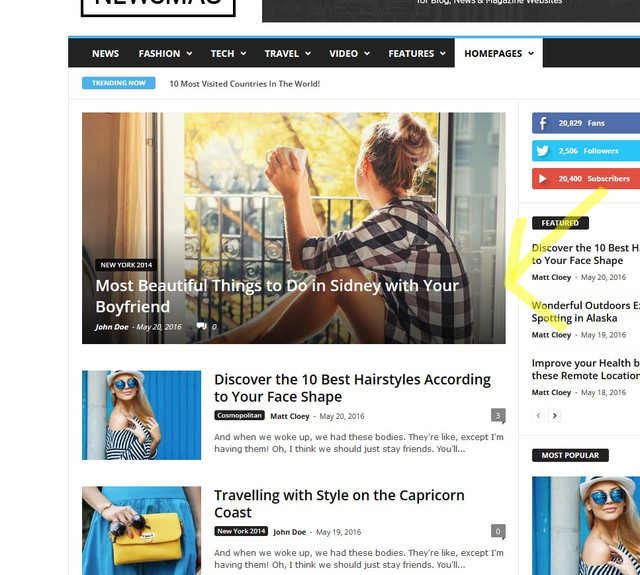
Thank you
 Mutazq
ِ
I am getting this error, I tried the suggested solutions in the forum but it did not work.
The PHP version is 7.4 and I am running last updated theme,
I tried also to disable the plugin and other plugins that may effect the theme bu again the theme is not loading and I can not access the dashboard.
the Error I get isL
Error E_COMPILE_ERROR line 47 in file /home2/rawashen/almeena.co/wp-content/plugins/td-composer/legacy/common/wp_booster/td_wp_booster_functions.php.
ِerror message : require_once(): Failed opening required ‘/home2/rawashen/almeena.co/wp-content/plugins/td-composer/legacy/common/wp_booster/td_block.php’ (include_path=’.:/opt/cpanel/ea-php74/root/usr/share/pear’)
Anamaria Hello,
Then you have some plugin or some settings/permission which blocks the request to install. Please check https://ithemes.com/blog/wordpress-file-permissions/#:~:text=Correct%20File%20Permissions%20for%20the%20wp%2Dcontent%20Folder&text=Setting%20the%20permission%20of%20the,right%20protection%20against%20unauthorized%20access.
Thank you!
Anamaria Hi,
We do not recommend setting two posts loop on the same page/template, please use a flex block or another block, because most of the settings from the first loop element will be set for the second one.
Also, make sure this issue is not from a plugin conflict.
Thank you!
Anamaria Hello,
You can create a sidebar like in this guide -> https://forum.tagdiv.com/sidebars-tutorial/. You can add the block with tagdiv Composer or the widgets.
If you want to have pagination, you can use Flex Block 1 and set the pagination -> https://forum.tagdiv.com/flex-block-settings-guide/
Thank you!
 u2them
How can I use the slide block and have articles rotate without click? Or is this not possible, if it isn’t, it certainly should be.
 From the Strait
 Thanks for replying – this is what came up in the Browser console (I wasn’t able to screenshot it):
JQMIGRATE: Migrate is installed, version 3.3.2
blocks.min.js?ver=69022aed79bfd45b3b1d:10 The block “yoast-seo/breadcrumbs” is registered with an invalid category “yoast-internal-linking-blocks”.
Yt @ blocks.min.js?ver=69022aed79bfd45b3b1d:10
deprecated.min.js?ver=6c963cb9494ba26b77eb:2 select( ‘core/edit-post’ ).getPreferences is deprecated since version 6.0. Please use select( ‘core/preferences’ ).get instead.
i @ deprecated.min.js?ver=6c963cb9494ba26b77eb:2
post-edit.js?ver=171c6f19994dc71467f4472e3c4f2dcb:11 Uncaught TypeError: Cannot read properties of undefined (reading ‘registerPlugin’)
at window.wpseoScriptData.window.wpseoScriptData.featuredImage.i.registerPlugin (post-edit.js?ver=171c6f19994dc71467f4472e3c4f2dcb:11:3839)
at new i (post-edit.js?ver=171c6f19994dc71467f4472e3c4f2dcb:11:3465)
at post-edit.js?ver=171c6f19994dc71467f4472e3c4f2dcb:11:4214
at HTMLDocument.<anonymous> (post-edit.js?ver=171c6f19994dc71467f4472e3c4f2dcb:11:5433)
jquery-migrate.min.js?ver=3.3.2:2 JQMIGRATE: Migrate is installed, version 3.3.2
js_files_for_wp_admin.min.js?ver=e815948e5c9ec5801de67b92a1d5a59fxx:42 Array(6)
wpeditor.php:1 Failed to load resource: the server responded with a status of 403 ()
bundle.js:2 Uncaught (in promise) Error: A listener indicated an asynchronous response by returning true, but the message channel closed before a response was received
at h (bundle.js:2:193979)
DevTools failed to load source map: Could not load content for chrome-extension://bmnlcjabgnpnenekpadlanbbkooimhnj/browser-polyfill.js.map: System error: net::ERR_BLOCKED_BY_CLIENT
VM1717 content-crop.js:77 {operation: ‘content_capture_fragment_scroll_search’}
VM1717 content-crop.js:77 {operation: ‘content_capture_fragment_scroll_search’}
VM1717 content-crop.js:77 {operation: ‘crop_after_clear_capture’}
VM1717 content-crop.js:77 {operation: ‘crop_after_clear_capture’}
VM1717 content-crop.js:77 {operation: ‘content_scroll_page’, scroll_crop: false, fragment: false, actionHideFixedElements: false}
VM1717 content-crop.js:77 {operation: ‘crop_data_screen’, dataUrl: ‘data:image/png;base64,iVBORw0KGgoAAAANSUhEUgAAAysA…eSGAAAAB6I4EBAADo7f8DIKCSQJuXKQYAAAAASUVORK5CYII=’, appType: ‘nimbus’}
VM1717 content-crop.js:77 {operation: ‘crop_data_screen’, dataUrl: ‘data:image/png;base64,iVBORw0KGgoAAAANSUhEUgAAAysA…AbyQwAAAAvZHAAAAA9Pa/joaQCq67dUEAAAAASUVORK5CYII=’, appType: ‘nimbus’}
VM1717 content-crop.js:77 {operation: ‘page_extension_activated’}
 northendagents
I’m working on my category template page. I have a Post Loop set to Latest but it’s showing yeas-old posts that seem to be the same as popular posts (in another Post Loop above it). The Flex Grid at the top of the page is also set to Latest and is working properly. I just updated everything – theme, plugins, WP core, etc. The offset is set to 2 so the first post should be the same as the first small block in the Flex Grid.
Anamaria Hello,
In the mega menu, you can’t set a Block. You can create a page menu or a simple page and set it like a menu -> https://forum.tagdiv.com/page-menu/ set the page id https://i.imgur.com/XcfSOSb.png.
In the mega menu, if you have set the category fashion, it will display the latest posts from that category.
Thank you!
 Bettina
 Hello @sco!
If you leave the field empty, then the search will only show pages and posts.
Unfortunately, we do not have filters in this search functionality. We have some filters on the search page, as well as a template in the element as a posts loop or flex blocks.
Thank you!
Anamaria Hello,
I think that I know what the problem is, please edit the cloud template with tagDiv Composer -> https://i.imgur.com/j8YvKks.png click on the block and remove the offset -> https://i.imgur.com/dJ0iFQu.png let that field empty.
Thank you!
Bettina Hello @andxtagdiv!
The best choice is to use CPTs. In order to display the custom fields for those CPTs in your flex loop, you need to create a custom module: https://forum.tagdiv.com/edit-modules-flex-block-x/
Thank you!
Bettina Hello @andxtagdiv!
The best choice is to use CPTs. In order to display the custom fields for those CPTs in your flex loop, you need to create a custom module: https://forum.tagdiv.com/edit-modules-flex-block-x/
Thank you!
 editor@thegoodnewshub.com
We wish to have different coulours for the category tags on our home page (“Big Grid Flex 1” & “Flex Block 5”) Currently these are hard set within the blocks as you can see here
However on the posts page these Category tags are infact linked to the category colour as you can see here:
How am I able to have this same effect on the homepage/in the tagdiv blocks?



