
- NewsmagBlock settings tutorial
- NewsmagCategory tag on modules/blocks
- NewsmagtagDiv Composer Tutorial
- NewsmagWeather Widget
- NewsmagExchange widget
- NewsmagInstagram widget
- NewsmagHow to use the Visual Composer plugin
- NewsmagIntroduction
- NewsmagFooter templates
- NewsmagCustom ad spots
- NewsmagLoading image effects
- NewsmagSmart sidebar
- NewsmagFeatured images
- NewsmagGeneral settings
- Newsmag7 days post sorting
- NewsmagTheme thumbs
- NewsmagExcerpts introduction
- NewsmagTheme colors introduction
- NewsmagtagDiv slider gallery
- NewsmagVideo playlist
 Calin
Calin Hi,
So you want to have a different page from homepage where to display the newest post from a specific category and the posts from that category to not be display on homepage, for this you need to have a category for these posts and filter the blocks, flex and grids from homepage to remove that category also on the new page edit the blocks, flex and grids to display only that category -> https://forum.tagdiv.com/flex-block-settings-guide/ -> https://i.imgur.com/2pTMA4c.png
If this is not what you mean, please provide some more details.
Thank you!
Calin Hi,
Unfortunately the pagination ca be set only on posts loop element ( https://i.imgur.com/JzRFUqq.png ), for the moment on blocks and flex are only next and prev buttons.
Thank you!
 sscom
sscom Hi Vlad,
thanks for the reply.
Actually, I do not really understand the difference between Standard Pack and Cloud Library. When I installed Newspaper theme, I was recommended to install both of them – it actually says, it’s required!
Now I have a site built with Standard Pack (Theme Panel) and this works fine for me. Only for certain sites (like homepage), I use TagDiv composer for displaying different content blocks. I don’t use Cloud Library at all, because I prefer building it up from scratch.
In my case, not CPU but RAM is the problem which is caused by PHP. I run a dedicated server (with 4GB RAM and no traffic!), so there shouldn’t be any problem with performance. I guess the problemes are rather caused by TagDiv Composer than Standard Pack, or am I wrong?
-
This reply was modified 6 years by
sscom.
 internath
 Hi
Ok thanks I can’t create a category. Posts are imported automatically.
it’s possible to modify or create a new block template with API plugin?
Modify only Query post with thumbnail
Thanks you
Calin Hi,
If the text is set in widgets then go there, select the block 3 and you have two options: one change the header template or two, change the continue button text -> https://i.imgur.com/fitdPex.png -> https://i.imgur.com/yuY8OAX.png -> https://i.imgur.com/20YNxWE.png if the field is let empty the Continue to the Category text will be set automatic.
Hope this will help you!
 BuddhaNET777
If i embed anything youtube video or instagram post it shows the url to the embed as the text preview unless i write a short description and put that above the embed. is there a way to disable to url from displaying as the post preview?
you can see what i mean by the post previews in this section… john speaker post has the url because i didnt put a text block in front of the embed
ie:https://www.buddhanet.world/category/art/
 Revive the Netherlands
 I am testing the mobile theme now. It is indeed faster then the normal theme -> https://imgur.com/vI1sWo8
I have some question about the mobile theme.
Is it possible to change the make a button instead of the search icon.
Like it is here -> https://imgur.com/WNQt0B2
Is it possible to change the color of the category button on the post and make the text button letters black and also change the category place from the latest articles grid.
Like this -> https://imgur.com/nBESLn5
I would also even better if can only show the PREMIUM category tag also for the desktop version. Like this -> https://imgur.com/dmVGYUA
Also with the mobile them sometimes featured pictures are not loading fast.
Like this -> https://imgur.com/i3ZWYWS and This-> https://imgur.com/vr4xKsi
I use a code from memberpress to block partial content on post.
It looks like with the mobile theme the code is not working and the content is not protected.
See here the problem -> https://imgur.com/jjju6gQ
You place the code here in the post -> https://imgur.com/XcY2OXK
Also it looks like the mobile theme is switching back to the normal theme sometimes.
If these problems can be fixed I am thinking to switch to the mobile theme.
I also tried to optimized the normal version for mobile. But google is still giving me bad scores for the normal theme. But people with mobile are also saying the normal website works fine on mobile.
I am testing the mobile theme on domain: revivemag.nl
The normal theme for mobile is running on revive.nl
Thanks for the help.
Sam
 sharppolo
I have encountered this issue when using Flex Block 3 on Animal Pro. The last 2 posts do not display the same spacing behavior as the rest on mobile version. Are there any solutions?
 danishh
I want the numbering in block 21 instead of the next prev Arrow sign
 channeltelegraph
Ok i have added a text box in as an element on a new page. I want to write some text in there. I have to go to the left hand side and enter the text in the “description box”. Fantastic! But now I want to bold some words and italisice other words – i cant do it! I can only change the entire sentence not individual words. Surely this is not THE only way to edit text – surely there is a proper text editor I can use? I tried to go back to WP Editor and all I see is code not the text. So please explain how I can properly edit that text. If this is the only way to edit text in Tag DivCompoSer I have wasted my money – it is great at adding elements etc- but if this is the only way to edit the text then I want my money back. If I create the page in WP Block Editor or Classic Editor first then try and edit it in Tag Div Composer you cant edit the text. Hopefully you can explain. Thanks
 Tethe
TetheHi!
Loving the theme so far, but a block text is giving me issues. When I insert an image looks like this on the frontend: https://prnt.sc/s4wdj9.
The backend looks ok and is configured to allow text around it. see here: https://prnt.sc/s4weu6 Any advice?
url: maryjopierce.com
 Vlad S
 Hello !
As mentioned above. This is not possible because the blocks will render all the posts. You can create a separate category for your posts without picture and exclude them from the blocks.
Thank you !
Calin Hi,
The POPULAR VIDEOS and MOVIE TRAILERS and GAMEPLAY and RECOMMENDED VIDEOS are only the Custom title for that flex blocks, usually in PRO demos the entire website is editable using tagDiv Composer , in this way you can filter and order the posts from blocks -> https://forum.tagdiv.com/flex-block-settings-guide/ -> https://i.imgur.com/XkiLv8t.png
If this is not what you mean, please provide me a link to your website and some more detsils.
Thank you!
 nycinsider
Hi – I’m using [tagdiv] block 3 in sidebars (all original theme, no TDC) and want to remove or shorten the words “Continue to the Category”. Those words and the arrow are overlapping all my category names as they only allow like 5 letters before they overlap. I’d appreciate steps written out without having to open 5-6 additional tabs to follow the directions. Thanks.
Calin Hi,
The SEO plugins can count/read only the words, our theme use shortcodes to display the blocks and the rest of the elements, only if you set some text in pages then this will be count/read. For the example the single post templates from tagDiv Cloud Library that are set on post will not be read, only the post content will be.
The search engine crawlers will work normal as long you have for pages set a text this will be read.
Thank you!
 cnbplegacyCalin
 Hi,
Unfortunately there are no settings for height of flex block, you can st it only using custom css -> https://i.imgur.com/e8dUVVd.png
.td_module_flex_1 .td-module-meta-info{

  height: 400px

}

.td_module_flex_1 .td-module-meta-info .td-read-more{

    position: absolute;

    bottom: 10px;

}
The code will be apply on all flex block 1 so to make it to apply only on flex you want you can add an extra class -> https://i.imgur.com/wFv7l5V.png and the code will be
.my-class .td_module_flex_1 .td-module-meta-info{

  height: 400px

}

.my-class .td_module_flex_1 .td-module-meta-info .td-read-more{

    position: absolute;

    bottom: 10px;

}
The code need to be set in theme panel> custom code> custom css.
Hope this will help you!
Thank you!
Vlad S Hello !
Blocks render posts from a category or by tag. You will have to create a category in order to render only the posts you want and add them to your category.
Thank you !
Vlad S Hello !
Thumbs can be adjusted by editing the block with tagDiv Composer as you can see here: https://imgur.com/jgzFhBe
Thank you !
Vlad S Hello !
For that you will have to start shaping your website using tagDiv Composer. Flex blocks are way more editable now: https://www.screencast.com/t/NxpOrdlPmg They can be customized to any form and shape sort to speak.
This task will require for you to start customizing a bit more and get more familiar with tagDiv Composer. But this will just help you in the long run.
Thank you !
 jamiesharpe
 Hi -this is very odd and I would like your help on this. So after 48 hours the images based on those links showed up. So I’d like to take a look at this in the most timely manner you can:
Here’s the HTML code I’m looking to add:
I’ve pasted this into an HTML block on this page: https://www.pinkluggageabroad.com/bergen-norway/. It’s the first HTML block and the image is showing up in preview but not on the published post https://www.screencast.com/t/1yKyeAapvtb
Please let me know what you think.
 abhaychauhanmak
it says newspaper form code is empty , please configure block .
how to do i configure it and how can let people sign up to my blog website.
 rnbjunk
 Ok Calin, the issue still pending, so I’ll take it here.
Even testing without cache enabled, the error is coming from webmastertools on mobile theme:

Messaggi della console JavaScript
3 messaggi
Errore
00:48.000
Uncaught O
https://pagead2.googlesyndication.com/pagead/js/adsbygoogle.js:62
Errore
00:48.000
Uncaught O
https://pagead2.googlesyndication.com/pagead/js/adsbygoogle.js:62
Log
00:50.000
Secure Privacy is not enabled
https://app.secureprivacy.ai/secureprivacy-plugin/web-plugin/secure-privacy-v1.js?v=0.4406271942425519:1
Altro errore
Script
https://www.rnbjunk.com/cdn-cgi/apps/head/n6xhyHpZY9SiIIpWYH2WP5M7qH4.js
Altro errore
Immagine
https://www.rnbjunk.com/foto/2020/04/logo-mobile-rnbjunk.png
Altro errore
Foglio di stile
https://www.rnbjunk.com/wp-content/cache/min/1/wp-content/plugins/td-composer/assets/fonts/font-awesome/font-awesome-c7e66a4cf67a20c78f6ca158cc582125.css
Altro errore
Foglio di stile
https://www.rnbjunk.com/wp-content/cache/min/1/wp-content/plugins/td-composer/mobile/style-6cbad46c691cf0f6310254790ca2a019.css
Altro errore
Script
https://www.rnbjunk.com/wp-content/plugins/td-composer/mobile/js/tagdiv_theme.min.js?ver=10.3.2
Altro errore
Foglio di stile
https://www.rnbjunk.com/wp-includes/css/dist/block-library/style.min.css?ver=5.4
Altro errore
Script
https://www.rnbjunk.com/wp-includes/js/jquery/jquery.js?ver=1.12.4-wp
 SquallSFU
Hi guys,
how can I customize the styles of this text that appears on the search results page when there are no results to display?
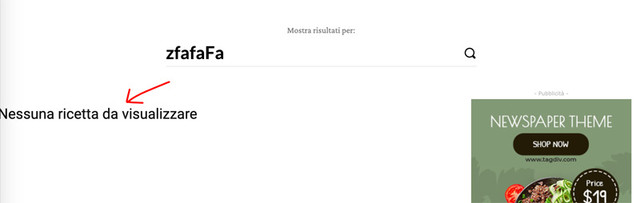
In tagDiv Composer I was unable to change the block without also changing the page with search results.
Calin Hi,
1-2. To fix this problem -> https://postimg.cc/B8YDDBvn you need to make sure that you set the mega menu correctly, please check carefully our documentation for mega menu this need to look like this -> http://prntscr.com/pyfl24 not like this with sub menus -> http://prntscr.com/pyfl9q
3. You can regenerate the thumbs using our documentation from here -> https://forum.tagdiv.com/thumbnails-fix-strange-looking-images-on-blocks/
Also you can use flex blocks elements, this type of blocks has more options for images -> https://i.imgur.com/YpFFI1Z.png
4. if you want to remove RECOMMENDED VIDEOS you need to edit the page using tagDiv Composer and use the right click on it.
5. If the breadcrumbs is set as element in a page or single post template it can be edited using tagDiv Composer -> https://i.imgur.com/oPbuBu1.png
If there is still a problem, please provide me a link to your website to inspect it.
Hope this will help you!
Thank you!



