
- NewsmagBlock settings tutorial
- NewsmagCategory tag on modules/blocks
- NewsmagtagDiv Composer Tutorial
- NewsmagWeather Widget
- NewsmagExchange widget
- NewsmagInstagram widget
- NewsmagHow to use the Visual Composer plugin
- NewsmagIntroduction
- NewsmagFooter templates
- NewsmagCustom ad spots
- NewsmagLoading image effects
- NewsmagSmart sidebar
- NewsmagFeatured images
- NewsmagGeneral settings
- Newsmag7 days post sorting
- NewsmagTheme thumbs
- NewsmagExcerpts introduction
- NewsmagTheme colors introduction
- NewsmagtagDiv slider gallery
- NewsmagVideo playlist
 HarrisonBands
We’re using WordPress, and recently upgraded to Newspaper X, then loaded the Livestyle Magazine template. We’ve created a new page in TAGDIV composer by importing blocks from the Cloud feature. Our page is now live, and we added it to our main menu. When used on a desktop, laptop or tablet, the page loads correctly when selected from the main menu. However, when using a mobile phone (I-Phone or Android) and selecting the item from the mobile menu, the page does not load. The address box loads the proper web address, and our header and footer load properly. The page title also loads. But the rest of the content does not load. The same thing occurs when the web address is entered directly from a mobile phone.
You can see this at http://www.harrisonbands.com, selecting the ALUMNI option from our menu.
Please help as we’ve been struggling with this for a few days, and have deleted and recreated the menu item, checked all page settings, etc. We’re eager to launch this new page in our final weeks of the school year.
 ludyma
 1. It depends on where, in the article or in the block, if it is a TagDiv composer block, each block has its access key.
2. As I mentioned before, the first option in the previous post with attached photo, that is to disable in the articles and the one answered in the second is for the one of the blocks.
3. It is the same as in Cotestacion 1, it depends on which block and where each one is individually modified, either from the tagdiv composer, widged, it sends a capture.
ludyma Thank you.
Point 2 is already almost controlled. Point 1. If I was disappointed not to be able to create or modify blocks. Point 3. you only see the photo but in the box that comes out, it neither increases nor gives back or forward options, nor does it zoom.
I have done the test of disabling the plugins except those of tagdiv, to see if loading the page without AMP module and TagDiv mobile theme the web was adapted, but this does not adapt to mobile devices at least in version X, in I think 9 does.
I also don’t know why you can’t see the advertising blocks, wheater, youtube, etc. In the mobile theme, only the articles appear and do not respect the blocks of the TagDiv composer, why?
It is also not possible to include groups of photos from the X newspaper topic, is there some form of origin or do I have to load a gallery module?
Greetings.
 qzconsulting
Hi,
I need to add a social sharing plugin that also shows sharecounts as well as sharecount recovery + tweet boxes etc. For this, I am trying to use Social Snap.
Unfortunately, now, if i update an article/post, it gives the error:
‘Updating failed. The response is not a valid JSON response.’
While on the nginx log it the website spews out the following:
2020/04/21 12:23:22 [error] 100706#100706: *975292 FastCGI sent in stderr: “PHP message: PHP Warning: count(): Parameter must be an array or an object that implements Countable in /www/techvise_686/public/wp-includes/post-template.php on line 317”, client: 66.249.73.203, server: tech-vise.com, request: “GET / HTTP/1.0”, host: “tech-vise.com”
I’ve gone through the website forum and its alarming to see that there is no support for any 3rd party social media plugin from you. You should have atleast one that is tried and tested thoroughly. Your theme is extremely popular and well built, however, very few plugins are properly tested and supported.
Kindly provide me with a workaround for this or atleast tell me how to go about fixing the error. I can take the help from plugin creators, however, you will need to guide me as to where to apply their fix.
Looking forward to favourable reply.
 Vlad S
 Hello !
You can edit the page using tagDiv Composer, click on the flex block and you will be able to customize it: https://www.screencast.com/t/yuRltbs60Hgu
At the moment the Support team is not 24/7 available. Please note that we answer the topics from Latest to Newest Monday – Friday from 08:00AM to 05:00PM GMT+2 So multiple replies to your topic will only make us to get harder to your topic.
Thank you !
 BlackPirates
Hi,
we have installed your Newspaper theme, I’ve some questions:
In home page we have used a flex bloc to display the post on 3 columns ( http://wip.gazzettaitalia.pl/it/ ), but the border line that divide the columns has different height, there is a way to display this line with the same height?
For the flex block I don’t have find a “general option” to set the font style/size that we have used (imported from your cloud library), where do I find it in the admin theme options? (actually I set it from the block itself, but a general option would be better for our final client)
I’ve used your login//signin features, and its ok, we have to custom the email but I suppose we need a plugin for that right?
And, after login, clicking on the name of the user it show a strange message “Non è stato trovato nessun prodotto che corrisponde alla tua selezione.” why? (il livello utente è cliente, e inoltre non vogliamo visualizzare la pagina di autoriparazione – se l’utente non è cliente, admin for example I could we have here the account page? We use woocommerce, so have we to replace the signin/login with the woocommerce signin/login?
And I’ve tried to creat a new page (contattaci) after insert the page title, I’ve clicked on TAG DIV COMPOSER.
and I have this error: Error at rows: 1(models) : 11(dom). The model does not match the content Current state has involved an issue. You could try an UNDO operation (CTRL+Z / CTRL+SHIFT+Z)
Why the composer give me this error and show me the home page inside? The page is blank, but the composer fill it with home page block!!!
Waiting your reply, regards.
 Calin
Calin Hi,
The place for the image will not be change if you change the image size, only the quality of the image (it will re-dimension another image), the size of thumb you can edited it using these settings -> https://i.imgur.com/jgzFhBe.jpg
Unfortunately the pagination ca be set only on posts loop element, for the moment on blocks and flex are only next and prev buttons.
Thank you!
 Auupa
AuupaHello:
Its possible to create new blocks or modify block design. For example, we want to change the Big Grid Flex 5 design changing some of the elements, author-date sorting and the format of the secondary news. Is there a documentation for this?
As second question, its possible to add an element in the format of “tab” with the “most viewed, most recent, most commented” way? I mean a block creation that shows that.
As last question, its possible to get, in homepage block, a selection of news and not the last ones? we mean, not always last news its the important ones.
Thanks
Calin Hi,
In order to regenerate these thumbs, please use the plugin provide in our documentation from here -> https://forum.tagdiv.com/thumbnails-fix-strange-looking-images-on-blocks/
Let me know the results!
Thank you!
Calin Hi,
Indeed there is an issue on Internet explorer + Flex Blocks, the IE do not recognize the flex css parameter.
Please try this code:
[class*="ie"] .td-module-container {

display: block;

}

[class*="ie"] .td-image-container {

height: auto;

flex: initial;

}
The code must be inserted here: https://www.screencast.com/t/J1Nxw5s5
Hope this will help you!
Thank you!
Calin Hi,
This form was created using a plugin, and was adjusted with custom work.
If you want to have only blocks for posts, the you can use flex blocks elements to achieve this, also you can import theme from cloud library and only adjust theme using tagDiv Composer -> https://i.imgur.com/97silCV.jpg
Also most of our theme api are posted here for the developers that want to modify the code -> https://forum.tagdiv.com/the-theme-api/, also this is not covered by support theme.
Thank you for your understanding!
Vlad S Hello !
The author can be shown by editing the block using tagDiv Composer as you can see here: https://www.screencast.com/t/yEzE2n3dU
Thank you !
Vlad S Hi,
Please make sure that you do not have a plugin conflict, please deactivate ALL plugins except tagDiv Composer, also if you are using child theme or cache plugin, deactivate them, clear all cache and try again.
If the problem persist, please set this code in functions.php -> wp-content/plugins/td-composer/legacy/Newspaper/functions.php
add_action('admin_head',function() {

echo '<style>.td-gutenberg-editor .editor-styles-wrapper .wp-block {max-width:726px;}</style>';

});
Or you can send us an email at contact@tagdiv.com and provide admin login, as well as cPanel or FTP if possible. We will take a look. Include a link to this topic in the email.
Thank you!
Vlad S Hello !
1. Unfortunately creating a block is not an option.
2. Please make sure that you do not have a plugin conflict, please deactivate ALL plugins except tagDiv ones, also if you are using child theme or cache plugin, deactivate them, clear all cache and try again.
3. This option lets you adjust images in posts: 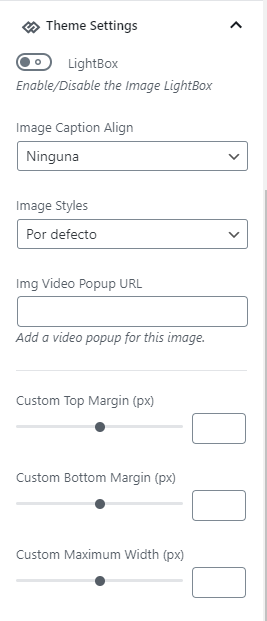
Thank you !
Vlad S Hello !
That is a simple flex block with an audio post in it. In order to create an audio post you can use only soundcloud: https://www.screencast.com/t/dvRSEqPew
Thank you !
 jamiesharpe
Hello – I’ve come across a few instances where I’m pasting HTML code into a block on a post, preview looks fine but when I update the post, no image is displayed. Here’s an example:

When I hit preview, looks fine: https://www.screencast.com/t/OLa9r3z0rMLa
When I update the post, I’m getting a blank space where the image should be: https://www.screencast.com/t/za9fuCIi3
Can you please tell me why?
 williamjieh
Hi,
When configure a block, at the “Header Settings” section, I can choose Header template. I want to create a new header template because current header templates don’t fit my need.
How can I create a new block header template?
Thank you
https://www.dropbox.com/s/usjz77nwaccf69y/Screenshot%20from%202020-04-20%2013-21-00.png?dl=0
ludyma Ok, that is for within the post, the one you are looking for is in the Block Secttings section -> meta info on module -> SHOW DATE
Enable or disable the post date (on blocks and modules) on / off
 B3nDoyle
Hello,
I’m trying to use the image info boxes.
How do I move the title position from the top to the bottom so it works across all devices?
I’ve used the following code:
.tdm_block_image_info_box .tdm-image-description {
position: absolute;
top: 0;
padding: 45% 7%;
width: 100%;
margin: auto;
pointer-events: none;
}
But it only works for desktop view. On mobile and table view, it sits just under the centre.
This is the page I’m working on: https://blufusion.net/treatments/
Can you help?
Thanks
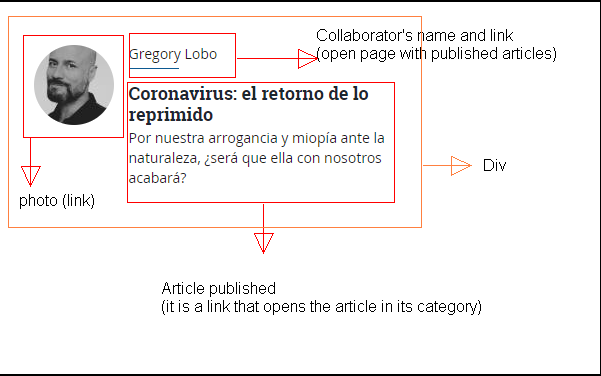
ludymaHello, how can I create a new block in the TD Composer?
The block that exists is this Autres list box.
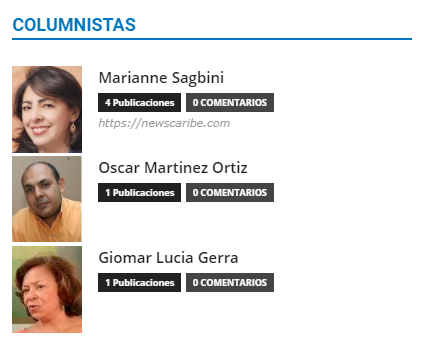
I want to create one like this.
 seyfigo
 HERE IS THE CODE :
[tdc_zone type=”tdc_content”][vc_row full_width="stretch_row_content td-stretch-content"][vc_column][/vc_column][/vc_row][vc_row full_width="stretch_row_content_no_space td-stretch-content" tdc_css="eyJhbGwiOnsicGFkZGluZy10b3AiOiIyMDAiLCJwYWRkaW5nLWJvdHRvbSI6IjEwMCIsImJhY2tncm91bmQtcG9zaXRpb24iOiJjZW50ZXIgY2VudGVyIiwiY29sb3ItMS1vdmVybGF5IjoicmdiYSgwLDAsMCwwLjUpIiwiY29udGVudC1oLWFsaWduIjoiY29udGVudC1ob3Jpei1jZW50ZXIiLCJkaXNwbGF5IjoiIn0sImxhbmRzY2FwZSI6eyJwYWRkaW5nLXRvcCI6IjE2MCIsImRpc3BsYXkiOiIifSwibGFuZHNjYXBlX21heF93aWR0aCI6MTE0MCwibGFuZHNjYXBlX21pbl93aWR0aCI6MTAxOSwicG9ydHJhaXQiOnsicGFkZGluZy10b3AiOiIxNjAiLCJkaXNwbGF5IjoiIn0sInBvcnRyYWl0X21heF93aWR0aCI6MTAxOCwicG9ydHJhaXRfbWluX3dpZHRoIjo3NjgsInBob25lIjp7InBhZGRpbmctdG9wIjoiMTYwIiwiZGlzcGxheSI6IiJ9LCJwaG9uZV9tYXhfd2lkdGgiOjc2N30=" content_align_vertical="content-vert-center" row_parallax="yes" el_class="td-spa-hero"][vc_column][tdm_block_column_title title_text=”RSVDNCU5Rml0bWVubGVyaW1peg==” title_tag=”h3″ title_size=”tdm-title-bg” content_align_horizontal=”content-horiz-center” tds_title1-title_color=”#ffffff” tds_title1-hover_title_color=”#ffffff” tdc_css=”eyJhbGwiOnsiZGlzcGxheSI6IiJ9fQ==” tds_title1-f_title_font_family=”438″ tds_title1-f_title_font_size=”eyJhbGwiOiI1NCIsInBob25lIjoiMzIiLCJwb3J0cmFpdCI6IjM2IiwibGFuZHNjYXBlIjoiNDIifQ==” tds_title1-f_title_font_line_height=”eyJhbGwiOiI2NnB4IiwicGhvbmUiOiI0MnB4IiwicG9ydHJhaXQiOiI0NnB4IiwibGFuZHNjYXBlIjoiNTRweCJ9″ tds_title1-f_title_font_weight=”400″][tdm_block_inline_text display_inline=”yes” description=”RSVDNCU5Rml0bWVuJTIwZWtpYmltaXpsZSUyMHRhbiVDNCVCMSVDNSU5RiVDNCVCMW4uLi4=” tdc_css=”eyJhbGwiOnsibWFyZ2luLXRvcCI6Ii0xMCIsIm1hcmdpbi1ib3R0b20iOiI1MCIsIndpZHRoIjoiNzAwIiwiZGlzcGxheSI6ImJsb2NrIn0sImxhbmRzY2FwZSI6eyJ3aWR0aCI6IjQwMCIsImRpc3BsYXkiOiIifSwibGFuZHNjYXBlX21heF93aWR0aCI6MTE0MCwibGFuZHNjYXBlX21pbl93aWR0aCI6MTAxOSwicG9ydHJhaXQiOnsid2lkdGgiOiI0MDAiLCJkaXNwbGF5IjoiIn0sInBvcnRyYWl0X21heF93aWR0aCI6MTAxOCwicG9ydHJhaXRfbWluX3dpZHRoIjo3NjgsInBob25lIjp7IndpZHRoIjoiYXV0byIsImRpc3BsYXkiOiIifSwicGhvbmVfbWF4X3dpZHRoIjo3Njd9″ content_align_horizontal=”content-horiz-center” description_color=”rgba(255,255,255,0.8)” f_descr_font_family=”507″ f_descr_font_line_height=”24px”][/vc_column][/vc_row][vc_row full_width="stretch_row_1600 td-stretch-content" tdc_css="eyJhbGwiOnsicGFkZGluZy10b3AiOiI4MCIsInBhZGRpbmctYm90dG9tIjoiMzAiLCJiYWNrZ3JvdW5kLWNvbG9yIjoiI2Y0ZjRmNCIsImRpc3BsYXkiOiIifSwibGFuZHNjYXBlIjp7InBhZGRpbmctdG9wIjoiNjAiLCJwYWRkaW5nLWJvdHRvbSI6IjEwIiwiZGlzcGxheSI6IiJ9LCJsYW5kc2NhcGVfbWF4X3dpZHRoIjoxMTQwLCJsYW5kc2NhcGVfbWluX3dpZHRoIjoxMDE5LCJwb3J0cmFpdCI6eyJwYWRkaW5nLXRvcCI6IjUwIiwicGFkZGluZy1ib3R0b20iOiIwIiwiZGlzcGxheSI6IiJ9LCJwb3J0cmFpdF9tYXhfd2lkdGgiOjEwMTgsInBvcnRyYWl0X21pbl93aWR0aCI6NzY4fQ==" gap="0"][vc_column tdc_css="eyJhbGwiOnsiZGlzcGxheSI6IiJ9fQ==" width="1/3"][tdm_block_team_member name=”Mary Thomas” job_title=”Eğitmen” description=”TWFyeSUyMCUyMGJ1JTIwbWFjZXJheWElMjA3JTIweSVDNCVCMWwlMjAlQzMlQjZuY2UlMjBiYSVDNSU5RmxhbSVDNCVCMSVDNSU5RiUyQyUyMDMwMCVFMiU4MCU5OWUlMjB5YWslQzQlQjFuJTIwa3VydW1zYWwlM0IlMjAxMDAwJUUyJTgwJTk5aW4lMjAlQzMlQkN6ZXJpbmRlJTIwYmlyZXlzZWwlMjBlJUM0JTlGaXRpbSUyMHZlcm1pJUM1JTlGdGlyLg==” tds_social=”tds_social3″ twitter=”#” instagram=”#” tds_team_member2-description_align_vertical=”content-vert-center” image_height=”600″ image_width=”600″ img_height=”100%” image_alignment=”bottom” tdc_css=”eyJhbGwiOnsicGFkZGluZy1yaWdodCI6IjYwIiwicGFkZGluZy1sZWZ0IjoiNjAiLCJkaXNwbGF5IjoiIn0sImxhbmRzY2FwZSI6eyJwYWRkaW5nLXJpZ2h0IjoiMjAiLCJwYWRkaW5nLWxlZnQiOiIyMCIsImRpc3BsYXkiOiIifSwibGFuZHNjYXBlX21heF93aWR0aCI6MTE0MCwibGFuZHNjYXBlX21pbl93aWR0aCI6MTAxOSwicG9ydHJhaXQiOnsicGFkZGluZy1yaWdodCI6IjIwIiwicGFkZGluZy1sZWZ0IjoiMjAiLCJkaXNwbGF5IjoiIn0sInBvcnRyYWl0X21heF93aWR0aCI6MTAxOCwicG9ydHJhaXRfbWluX3dpZHRoIjo3NjgsInBob25lIjp7Im1hcmdpbi1ib3R0b20iOiI4MCIsInBhZGRpbmctcmlnaHQiOiIwIiwicGFkZGluZy1sZWZ0IjoiMCIsImRpc3BsYXkiOiIifSwicGhvbmVfbWF4X3dpZHRoIjo3Njd9″ image_border_radius=”500″ content_align_horizontal=”content-horiz-center” youtube=”#” tds_social3-icons_background_hover_color=”#444444″ image=”809″ tds_team_member1-f_title_font_family=”548″ tds_team_member1-f_title_font_line_height=”50px” tds_team_member1-f_title_font_weight=”500″ tds_team_member1-f_descr_font_family=”507″ tds_team_member1-f_descr_font_size=”14″ tds_team_member1-f_descr_font_line_height=”24px” tds_social3-icons_background_color=”#cf1e25″ tds_team_member1-f_title_font_size=”30″][/vc_column][vc_column width="1/3"][tdm_block_team_member name=”Mark Smith” job_title=”Eğitmen” description=”TWFyayUyMCUyMGJ1JTIwbWFjZXJheWElMjA3JTIweSVDNCVCMWwlMjAlQzMlQjZuY2UlMjBiYSVDNSU5RmxhbSVDNCVCMSVDNSU5RiUyQyUyMDMwMCVFMiU4MCU5OWUlMjB5YWslQzQlQjFuJTIwa3VydW1zYWwlM0IlMjAxMDAwJUUyJTgwJTk5aW4lMjAlQzMlQkN6ZXJpbmRlJTIwYmlyZXlzZWwlMjBlJUM0JTlGaXRpbSUyMHZlcm1pJUM1JTlGdGlyLg==” tds_social=”tds_social3″ twitter=”#” instagram=”#” tds_team_member2-description_align_vertical=”content-vert-center” image_height=”600″ image_width=”600″ img_height=”100%” image_alignment=”bottom” tdc_css=”eyJhbGwiOnsicGFkZGluZy1yaWdodCI6IjYwIiwicGFkZGluZy1sZWZ0IjoiNjAiLCJkaXNwbGF5IjoiIn0sImxhbmRzY2FwZSI6eyJwYWRkaW5nLXJpZ2h0IjoiMjAiLCJwYWRkaW5nLWxlZnQiOiIyMCIsImRpc3BsYXkiOiIifSwibGFuZHNjYXBlX21heF93aWR0aCI6MTE0MCwibGFuZHNjYXBlX21pbl93aWR0aCI6MTAxOSwicG9ydHJhaXQiOnsicGFkZGluZy1yaWdodCI6IjIwIiwicGFkZGluZy1sZWZ0IjoiMjAiLCJkaXNwbGF5IjoiIn0sInBvcnRyYWl0X21heF93aWR0aCI6MTAxOCwicG9ydHJhaXRfbWluX3dpZHRoIjo3NjgsInBob25lIjp7Im1hcmdpbi1ib3R0b20iOiI4MCIsInBhZGRpbmctcmlnaHQiOiIwIiwicGFkZGluZy1sZWZ0IjoiMCIsImRpc3BsYXkiOiIifSwicGhvbmVfbWF4X3dpZHRoIjo3Njd9″ image_border_radius=”500″ content_align_horizontal=”content-horiz-center” youtube=”#” tds_social3-icons_background_hover_color=”#444444″ image=”808″ tds_team_member1-f_title_font_family=”548″ tds_team_member1-f_title_font_line_height=”50px” tds_team_member1-f_title_font_weight=”500″ tds_team_member1-f_descr_font_family=”507″ tds_team_member1-f_descr_font_size=”14″ tds_team_member1-f_descr_font_line_height=”24px” tds_social3-icons_background_color=”#cf1e25″ tds_team_member1-f_title_font_size=”30″][/vc_column][vc_column width="1/3"][tdm_block_team_member name=”Jane Brooke” job_title=”Eğitmen” description=”SmFuZSUyMCUyMGJ1JTIwbWFjZXJheWElMjA3JTIweSVDNCVCMWwlMjAlQzMlQjZuY2UlMjBiYSVDNSU5RmxhbSVDNCVCMSVDNSU5RiUyQyUyMDMwMCVFMiU4MCU5OWUlMjB5YWslQzQlQjFuJTIwa3VydW1zYWwlM0IlMjAxMDAwJUUyJTgwJTk5aW4lMjAlQzMlQkN6ZXJpbmRlJTIwYmlyZXlzZWwlMjBlJUM0JTlGaXRpbSUyMHZlcm1pJUM1JTlGdGlyLg==” tds_social=”tds_social3″ twitter=”#” instagram=”#” tds_team_member2-description_align_vertical=”content-vert-center” image_height=”600″ image_width=”600″ img_height=”100%” image_alignment=”bottom” tdc_css=”eyJhbGwiOnsicGFkZGluZy1yaWdodCI6IjYwIiwicGFkZGluZy1sZWZ0IjoiNjAiLCJkaXNwbGF5IjoiIn0sImxhbmRzY2FwZSI6eyJwYWRkaW5nLXJpZ2h0IjoiMjAiLCJwYWRkaW5nLWxlZnQiOiIyMCIsImRpc3BsYXkiOiIifSwibGFuZHNjYXBlX21heF93aWR0aCI6MTE0MCwibGFuZHNjYXBlX21pbl93aWR0aCI6MTAxOSwicG9ydHJhaXQiOnsicGFkZGluZy1yaWdodCI6IjIwIiwicGFkZGluZy1sZWZ0IjoiMjAiLCJkaXNwbGF5IjoiIn0sInBvcnRyYWl0X21heF93aWR0aCI6MTAxOCwicG9ydHJhaXRfbWluX3dpZHRoIjo3NjgsInBob25lIjp7Im1hcmdpbi1ib3R0b20iOiI4MCIsInBhZGRpbmctcmlnaHQiOiIwIiwicGFkZGluZy1sZWZ0IjoiMCIsImRpc3BsYXkiOiIifSwicGhvbmVfbWF4X3dpZHRoIjo3Njd9″ image_border_radius=”500″ content_align_horizontal=”content-horiz-center” youtube=”#” tds_social3-icons_background_hover_color=”#444444″ image=”810″ tds_team_member1-f_title_font_family=”548″ tds_team_member1-f_title_font_line_height=”50px” tds_team_member1-f_title_font_weight=”500″ tds_team_member1-f_descr_font_family=”507″ tds_team_member1-f_descr_font_size=”14″ tds_team_member1-f_descr_font_line_height=”24px” tds_social3-icons_background_color=”#cf1e25″ tds_team_member1-f_title_font_size=”30″][/vc_column][/vc_row][vc_row gap="0" full_width="stretch_row_1600 td-stretch-content" tdc_css="eyJhbGwiOnsicGFkZGluZy10b3AiOiI4MCIsInBhZGRpbmctYm90dG9tIjoiMzAiLCJkaXNwbGF5IjoiIn0sImxhbmRzY2FwZSI6eyJwYWRkaW5nLXRvcCI6IjYwIiwicGFkZGluZy1ib3R0b20iOiIxMCIsImRpc3BsYXkiOiIifSwibGFuZHNjYXBlX21heF93aWR0aCI6MTE0MCwibGFuZHNjYXBlX21pbl93aWR0aCI6MTAxOSwicG9ydHJhaXQiOnsicGFkZGluZy10b3AiOiI1MCIsInBhZGRpbmctYm90dG9tIjoiMCIsImRpc3BsYXkiOiIifSwicG9ydHJhaXRfbWF4X3dpZHRoIjoxMDE4LCJwb3J0cmFpdF9taW5fd2lkdGgiOjc2OH0="][vc_column width="1/3"][tdm_block_team_member name=”Mary Cook” job_title=”Eğitmen” description=”TWFyeSUyMCUyMGJ1JTIwbWFjZXJheWElMjA3JTIweSVDNCVCMWwlMjAlQzMlQjZuY2UlMjBiYSVDNSU5RmxhbSVDNCVCMSVDNSU5RiUyQyUyMDMwMCVFMiU4MCU5OWUlMjB5YWslQzQlQjFuJTIwa3VydW1zYWwlM0IlMjAxMDAwJUUyJTgwJTk5aW4lMjAlQzMlQkN6ZXJpbmRlJTIwYmlyZXlzZWwlMjBlJUM0JTlGaXRpbSUyMHZlcm1pJUM1JTlGdGlyLg==” tds_social=”tds_social3″ twitter=”#” instagram=”#” tds_team_member2-description_align_vertical=”content-vert-center” image_height=”600″ image_width=”600″ img_height=”100%” image_alignment=”bottom” tdc_css=”eyJhbGwiOnsicGFkZGluZy1yaWdodCI6IjYwIiwicGFkZGluZy1sZWZ0IjoiNjAiLCJkaXNwbGF5IjoiIn0sImxhbmRzY2FwZSI6eyJwYWRkaW5nLXJpZ2h0IjoiMjAiLCJwYWRkaW5nLWxlZnQiOiIyMCIsImRpc3BsYXkiOiIifSwibGFuZHNjYXBlX21heF93aWR0aCI6MTE0MCwibGFuZHNjYXBlX21pbl93aWR0aCI6MTAxOSwicG9ydHJhaXQiOnsicGFkZGluZy1yaWdodCI6IjIwIiwicGFkZGluZy1sZWZ0IjoiMjAiLCJkaXNwbGF5IjoiIn0sInBvcnRyYWl0X21heF93aWR0aCI6MTAxOCwicG9ydHJhaXRfbWluX3dpZHRoIjo3NjgsInBob25lIjp7Im1hcmdpbi1ib3R0b20iOiI4MCIsInBhZGRpbmctcmlnaHQiOiIwIiwicGFkZGluZy1sZWZ0IjoiMCIsImRpc3BsYXkiOiIifSwicGhvbmVfbWF4X3dpZHRoIjo3Njd9″ image_border_radius=”500″ content_align_horizontal=”content-horiz-center” youtube=”#” tds_social3-icons_background_hover_color=”#444444″ image=”814″ tds_team_member1-f_title_font_family=”548″ tds_team_member1-f_title_font_line_height=”50px” tds_team_member1-f_title_font_weight=”500″ tds_team_member1-f_descr_font_family=”507″ tds_team_member1-f_descr_font_size=”14″ tds_team_member1-f_descr_font_line_height=”24px” tds_social3-icons_background_color=”#cf1e25″ tds_team_member1-f_title_font_size=”30″][/vc_column][vc_column width="1/3"][tdm_block_team_member name=”Carrie Linch” job_title=”Eğitmen” description=”Q2FycmllJTIwJTIwYnUlMjBtYWNlcmF5YSUyMDclMjB5JUM0JUIxbCUyMCVDMyVCNm5jZSUyMGJhJUM1JTlGbGFtJUM0JUIxJUM1JTlGJTJDJTIwMzAwJUUyJTgwJTk5ZSUyMHlhayVDNCVCMW4lMjBrdXJ1bXNhbCUzQiUyMDEwMDAlRTIlODAlOTlpbiUyMCVDMyVCQ3plcmluZGUlMjBiaXJleXNlbCUyMGUlQzQlOUZpdGltJTIwdmVybWklQzUlOUZ0aXIu” tds_social=”tds_social3″ twitter=”#” instagram=”#” tds_team_member2-description_align_vertical=”content-vert-center” image_height=”600″ image_width=”600″ img_height=”100%” image_alignment=”bottom” tdc_css=”eyJhbGwiOnsicGFkZGluZy1yaWdodCI6IjYwIiwicGFkZGluZy1sZWZ0IjoiNjAiLCJkaXNwbGF5IjoiIn0sImxhbmRzY2FwZSI6eyJwYWRkaW5nLXJpZ2h0IjoiMjAiLCJwYWRkaW5nLWxlZnQiOiIyMCIsImRpc3BsYXkiOiIifSwibGFuZHNjYXBlX21heF93aWR0aCI6MTE0MCwibGFuZHNjYXBlX21pbl93aWR0aCI6MTAxOSwicG9ydHJhaXQiOnsicGFkZGluZy1yaWdodCI6IjIwIiwicGFkZGluZy1sZWZ0IjoiMjAiLCJkaXNwbGF5IjoiIn0sInBvcnRyYWl0X21heF93aWR0aCI6MTAxOCwicG9ydHJhaXRfbWluX3dpZHRoIjo3NjgsInBob25lIjp7Im1hcmdpbi1ib3R0b20iOiI4MCIsInBhZGRpbmctcmlnaHQiOiIwIiwicGFkZGluZy1sZWZ0IjoiMCIsImRpc3BsYXkiOiIifSwicGhvbmVfbWF4X3dpZHRoIjo3Njd9″ image_border_radius=”500″ content_align_horizontal=”content-horiz-center” youtube=”#” tds_social3-icons_background_hover_color=”#444444″ image=”813″ tds_team_member1-f_title_font_family=”548″ tds_team_member1-f_title_font_line_height=”50px” tds_team_member1-f_title_font_weight=”500″ tds_team_member1-f_descr_font_family=”507″ tds_team_member1-f_descr_font_size=”14″ tds_team_member1-f_descr_font_line_height=”24px” tds_social3-icons_background_color=”#cf1e25″ tds_team_member1-f_title_font_size=”30″][/vc_column][vc_column width="1/3"][tdm_block_team_member name=”Kaleb Black” job_title=”Eğitmen” description=”S2FsZWIlMjAlMjBidSUyMG1hY2VyYXlhJTIwNyUyMHklQzQlQjFsJTIwJUMzJUI2bmNlJTIwYmElQzUlOUZsYW0lQzQlQjElQzUlOUYlMkMlMjAzMDAlRTIlODAlOTllJTIweWFrJUM0JUIxbiUyMGt1cnVtc2FsJTNCJTIwMTAwMCVFMiU4MCU5OWluJTIwJUMzJUJDemVyaW5kZSUyMGJpcmV5c2VsJTIwZSVDNCU5Rml0aW0lMjB2ZXJtaSVDNSU5RnRpci4=” tds_social=”tds_social3″ twitter=”#” instagram=”#” tds_team_member2-description_align_vertical=”content-vert-center” image_height=”560″ image_width=”887″ img_height=”100%” image_alignment=”bottom” tdc_css=”eyJhbGwiOnsicGFkZGluZy1yaWdodCI6IjYwIiwicGFkZGluZy1sZWZ0IjoiNjAiLCJkaXNwbGF5IjoiIn0sImxhbmRzY2FwZSI6eyJwYWRkaW5nLXJpZ2h0IjoiMjAiLCJwYWRkaW5nLWxlZnQiOiIyMCIsImRpc3BsYXkiOiIifSwibGFuZHNjYXBlX21heF93aWR0aCI6MTE0MCwibGFuZHNjYXBlX21pbl93aWR0aCI6MTAxOSwicG9ydHJhaXQiOnsicGFkZGluZy1yaWdodCI6IjIwIiwicGFkZGluZy1sZWZ0IjoiMjAiLCJkaXNwbGF5IjoiIn0sInBvcnRyYWl0X21heF93aWR0aCI6MTAxOCwicG9ydHJhaXRfbWluX3dpZHRoIjo3NjgsInBob25lIjp7Im1hcmdpbi1ib3R0b20iOiI4MCIsInBhZGRpbmctcmlnaHQiOiIwIiwicGFkZGluZy1sZWZ0IjoiMCIsImRpc3BsYXkiOiIifSwicGhvbmVfbWF4X3dpZHRoIjo3Njd9″ image_border_radius=”500″ content_align_horizontal=”content-horiz-center” youtube=”#” tds_social3-icons_background_hover_color=”#444444″ image=”807″ tds_team_member1-f_title_font_family=”548″ tds_team_member1-f_title_font_line_height=”50px” tds_team_member1-f_title_font_weight=”500″ tds_team_member1-f_descr_font_family=”507″ tds_team_member1-f_descr_font_size=”14″ tds_team_member1-f_descr_font_line_height=”24px” tds_social3-icons_background_color=”#cf1e25″ tds_team_member1-f_title_font_size=”30″][/vc_column][/vc_row][/tdc_zone]
 magyarjelen
 I have adjusted that with site-wide settings and some custome css, so no need to answer.
.tagdiv-type blockquote {
text-align: left;
line-height: 1.25;
border-left: 4px solid #000000;
padding-left: 10px;
}
magyarjelenHi there,
I’d like to assign a different style to the excerpts. If I change it in my browser, the changes show up, but if I enter the code in the Additional CSS or in Child them’s style.css, the changes don’t show on the web site. Could you please point me to the right direction? Thanks.
Here is the code:
.tdi_116_4c9 .tdb-block-inner blockquote p {
font-family: Roboto;
font-size: 26px;
line-height: 1.3;
letter-spacing: -1.6px;
color: #ea1717;
text-align: left;
border-left: 4px solid #000000;
padding-left: 10px;
text-transform: none;
}
Too bad I can’t attach a screenshot!
 VT Geek
 Dear Calin,
Thank you. I’ve fixed the header on IPAD view. But it seems there is still an issue on the footer.
And there is also an issue on the 2nd language version. The block will be vanished if I put any value on the CSS margin field.
Please kindly check it.
Best,
CL
 IlCieloSopraEsquilino
 Hi,
I found an undesidered effect resulting from the custom code You suggested me to use.
When I put that code, images doesn’t link no more to their posts. I saw it on ‘Flex Block 5’ and ‘Flex Block 1’ modules. Otherwise, if I remove the code, images links correctly to the articles.
That comportament is not depending from the browser. Chrome and IE works in the same way.
Custom code is the following:
[class*=”ie”] .td-module-container {
display: block;
}
[class*=”ie”] .td-image-container {
height: auto;
flex: initial;
}
[class*=”ie”] .td_module_flex_1 .td-image-container, [class*=”ie”] .td_module_flex_3 .td-image-container, [class*=”ie”] .td_module_flex_4 .td-image-container, [class*=”ie”] .td_module_flex_5 .td-image-container{
z-index: -1;
}
Thanks
Riccardo



