
- ApiPractical example – How to add a new Block and Module
- Apitd_api_block::delete
- Apitd_api_block::update_key
- Apitd_api_block::update
- Apitd_api_block::add
- ApiAPI – Blocks – Introduction
- Apitd_api_thumb::update_key
- Apitd_api_thumb::update
- Apitd_api_thumb::add
- ApiAPI – Thumbnail – Introduction
- Apitd_api_category_top_posts_style::update_key
- Apitd_api_category_top_posts_style::update
- Apitd_api_category_top_posts_style::add
- ApiAPI – Category top section style – Introduction
- Apitd_api_module::update_key
- Apitd_api_module::update
- Apitd_api_module::add
- ApiAPI – Modules – Introduction
- ApiUsing the Theme API in plugins
- ApiThe Theme API
 Vlad S
 Hello !
Please note that gutenberg is not Newspaper Theme related. After a quick google search I’ve found this if it helps: https://gogutenberg.com/blocks/button/
Thank you !
 ChildhoodBiz
 Dear Vlad,
thanks for hinting at “check the plugins” (a standard…). I found out that “Toolset Blocks” does cause this issue. I also will call the support of Toolset to question if they know why the plugin breaks the “nextpage”-functionality…
 Calin
Calin Hi,
I think that you are referring to blockquotes, these are look different in backend, if is so, please provide me a link to your website and I will provide a solution for this.
Thank you!
Calin Hi,
What you can do is to regenerate the thumbs and check the results -> https://forum.tagdiv.com/thumbnails-fix-strange-looking-images-on-blocks/
Another thing that you can do is to use some flex block or a Big grid flex you have some more control over the featured image using this element -> https://i.imgur.com/9eZ0pJe.png -> https://i.imgur.com/HgOkyQp.png
If there is still a problem, please provide me a link!
Hope this will help you!
Thank you!
Vlad S Hi,
If you do not like that color, you can remove the extra class from flex blocks -> https://i.imgur.com/gfsHWKP.jpg or the class from theme panel -> https://i.imgur.com/Umuw7q0.png after that set your own color effect on flex blocks -> https://i.imgur.com/isPN1A6.png you can check more in our article from here -> https://tagdiv.com/blending-modes-newspaper-theme/
Also if you want you can use a custom css for all flex blocks that have the .td-background-blend class and change it like this -> https://i.imgur.com/iKRNU56.jpg
.td-fashion-pro .td-background-blend .td_module_wrap:hover .entry-thumb {

background-color: #d11a1a6b;

}
The color need to be transparent/opacity -> https://i.imgur.com/R4WsokU.png
The code need to be set in theme panel> custom code > custom css.
Thank you!
Calin Hi,
1. If you want to set the featured category on your posts please check our documentation from here -> https://forum.tagdiv.com/newsmag-featured-posts/ using our guide you’ll be able to set the posts in the featured category.
“Or if I select “Random” can I limit it to certain articles?” – random is an order option, if you want to filter the articles you can use this section -> https://i.imgur.com/X53PgLz.png you can check more in our guide from block options from here -> https://forum.tagdiv.com/newsmag-block-settings-tutorial/
The “Modified Date” is a new sort options, in order to use it you need to enable this option -> https://i.imgur.com/V0KS1np.png to display the modified date on modules and the order option “Modified Date” will sort the post in chronological order after modified date.
2. That numbers represent the post ids, each post have an unique id ( you can find it by hovering the post title -> https://i.imgur.com/nzuKO0l.png or inside the post in url -> https://i.imgur.com/F9MeFyq.png) all the numbers set in revolution slider represent a list of posts that were selected to be display using revolution slider.
If there is still something not clear, or you have other questions, let us know!
Hope this will help you!
Thank you
Calin Hi,
By default our “Trending now” option have the both options, is automatic changing and have the manual buttons, to set it on auto, you need to edit the page using tagDiv Composer like this -> https://i.imgur.com/BP1Uysn.png click on element and select auto an the number of post you want to slide -> https://i.imgur.com/oIO3qAp.png unfortunately there is no option to remove the arrow buttons from the element, but you can do it using this custom css
.td_block_trending_now .td-next-prev-wrap{

  display: none;

}
The code need to be set in theme panel> custom code> custom css.
If the Trending now is not slider automatic it can be a plugin conflict, , please deactivate ALL plugins except tagDiv plugins, also if you are using child theme or cache plugin, deactivate them, clear all cache and try again.
Hope this will help you!
Thank you!
 sscom
sscom First of all, thanks for your help.
Unfortunately, the topics you linked to don’t really help in my case, because I guess the structure of the Newspaper theme changed a lot since then.
I guess, I have to change files in the wp-content/plugins/….-folder now (instead of themes-folder). Nevertheless, I don’t really understand the structure. Can you maybe tell me, which files are for the Blocks (for example “Block 6” in TD Composer), the Slider and which ones for the category styles set in Theme Panel?
Otherwise, does TagDiv offer a paid customization service to get some changes like this done maybe?
Thanks a lot in advance.
-
This reply was modified 6 years by
sscom.
 emmalabbe
 Thank you, I better understand how to use the zone manager and cloud library. However, what happens when I built new content is different from what you explain:
– nothing is imported into my cloud library : when I import a template (section, block, whatever), the button “add” brings it into a page (the page I was working on, or it creates a new page). You can see here a new page that was automatically created when I tried to add the section “our specialties-Retro” to my Cloud library. It was created with a URL that I didn’t choose: https://devenirbilingue.com/our-specialties-restro/. And it was even automatically published !
– one of the issues is that there is an autosave in TagDiv Composer. I tried to import another section, “Call to Action – Fitness Pro” and this change has been saved without clicking on the Save button.
– I still don’t understand how to create a page by importing blocks and sections from the Cloud library. You can see that I tried twice to import the section “Call to Action – Fitness Pro” because I wanted it in 2/3 of a row. I thought it was an element that we can use in the left column of a row, not on full width. But I can’t import it where I want, since it goes in a new line each time I import it. And it still isn’t in my own cloud library (the only template in it is an old one I imported one year ago).
I hope you understand my issues.
Thanks for your help.
 Micha
MichaYou have different ways of advertising is to set the articles. In the theme options you can deactivate them for mobile etc. So far so good, but why can’t you set in the composer in the block “single post content”, that for example an InlineAd should not be shown mobile.
The problem is, if you display an ad in the article on the right, it looks pretty stupid in the mobile version. But since you can’t specify that the ad should be placed in the middle for mobile, this function is not necessary. (Example)
Furthermore, the word “advertisement” is displayed above the ad, which is quite a problem from a legal point of view.
It may be that Adsense does this automatically, but not everyone uses adsense
 imkimc
 My problem was resolved with a re-clone of the site and re-install of 10.3.2. I’m still having some minor interface issues but they are of little concern and the site is now working properly. Calin logged into my site and confirmed the issue but in trying to fix it the whole site became unstable, so clearly it was a bad clone because on setup of the new clone, it worked just fine. Thanks Calin!
Now I can get back to getting rid of the legacy code and using the newer blocks that are not dependent on the Standard Pack.
And I’ve finally found the combination of elements that replace the old block 11, which is flex block 1, image alignment set to float left and then spacing to suit your needs.
Other than a world wide pandemic, things are moving right along…
-
This reply was modified 6 years by
imkimc. Reason: (forgot to thank Calin)
 mita
mitaHi, I’ve just download and installed the latest version of the theme. Demo “COV-19 Italy Report PRO” (importing content) was installed.
My question is: When customizing the theme, many of the changes I’m performing are not being displayed. Like for example: Banners I’m adding, or if I change the the block header template. So something must be wrong. All necessary plugins are installed, as well as wp super cache.
I appreciate feedback and support. Thanks
 3kk
3kkHello, I’d like to inquire about the Tavdiv composer. No other than /wp-admin/post-new.php that works within that plug-in.
I would like to remove elements such as quote on block, via url, via name, etc. from the post setting section. But it is not being resolved normally.
Which file in the composer should I modify?
Calin Hi,
Indeed this new option is enable by default on all blocks and modules, unfortunately there is no general option for this, you need to disable it individual, by editing the page with tagDiv Compose, click on block, grid check the -> https://i.imgur.com/z0g9ZOU.png
Thank you for your understanding!
Calin Hi,
I do not understand what you want to achieve, please provide some more details.
If you want to create a new block then we recommend to use a flex block, these can be easily edited using tagDiv Composer.
Thank you!
 fatih-2
Hi
We insert url inside a post, it brings out simply embed preview. But the image size is not correct and dont display fully. It uses tagdiv block.
How do I make it display full and clear image?
https://pasteboard.co/J3BNRda.png
Thanks
Calin Hi,
In order to add that block, you need to use tagDiv Composer, edit the page -> https://i.imgur.com/82HqXoE.jpg and add the flex block 3 -> https://i.imgur.com/H3qj7M6.jpg after that edit it how you want https://i.imgur.com/ircxL9P.png -> https://i.imgur.com/sHUtHyB.png -> https://i.imgur.com/LQzmetz.png
Hope this will help you!
Thank you!
Vlad S Hello !
Sorry for misunderstanding !
This option will work but please note that you will need to use the custom html block and the next page must be inserted there: https://www.screencast.com/t/LI3jn3Gd2
Thank you !
Calin Hi,
We recommend to enable only the fonts you are using, if you are using only default fonts, then you disable the Google fonts if you do not use none of theme and you are using custom fonts -> https://i.imgur.com/IZGhOga.png, then you can disable both.
If you are using now a free theme, then all what you” have on your website will be text and indeed this will be load very fast, but with our theme, you’ll have blocks, images, modules, effects…
From what I see here -> https://i.imgur.com/oAdxdn2.png most of the css is form tagDiv Standard pack, we write an article about the theme plugin -> Newspaper Theme 10: Standard Pack or tagDiv Cloud Templates?, we recommend to replace the elements from standard pack and disable it, in this way the theme will load only the needed css, not entire css like standard pack.
Let me know the results!
Thank you!
Vlad S Hello !
1.You can use the filters on the blocks as you can see here: https://www.screencast.com/t/BZo2c54MX
2. I’m not sure I understand what exactly do you mean by Watched youtube gallery. The only gallery available is the Youtube playlist which can be edited using tagDiv composer: https://forum.tagdiv.com/video-playlist-2/
Thank you !
Calin Hi,
I just checked your website, and is possible to have a plugin conflict -> https://i.imgur.com/iUfEJ3t.png please deactivate ALL plugins except tagDiv plugins, also if you are using child theme or cache plugin, deactivate them, clear all cache and try again.
Thumbnails – Fix strange looking images on blocks -> https://forum.tagdiv.com/thumbnails-fix-strange-looking-images-on-blocks/
Let me know the results!
Thank you!
Vlad S Hello !
Unfortunately this option is not possible. Blocks will only render posts.
Thank you for your understanding !
 BuddhaNET777
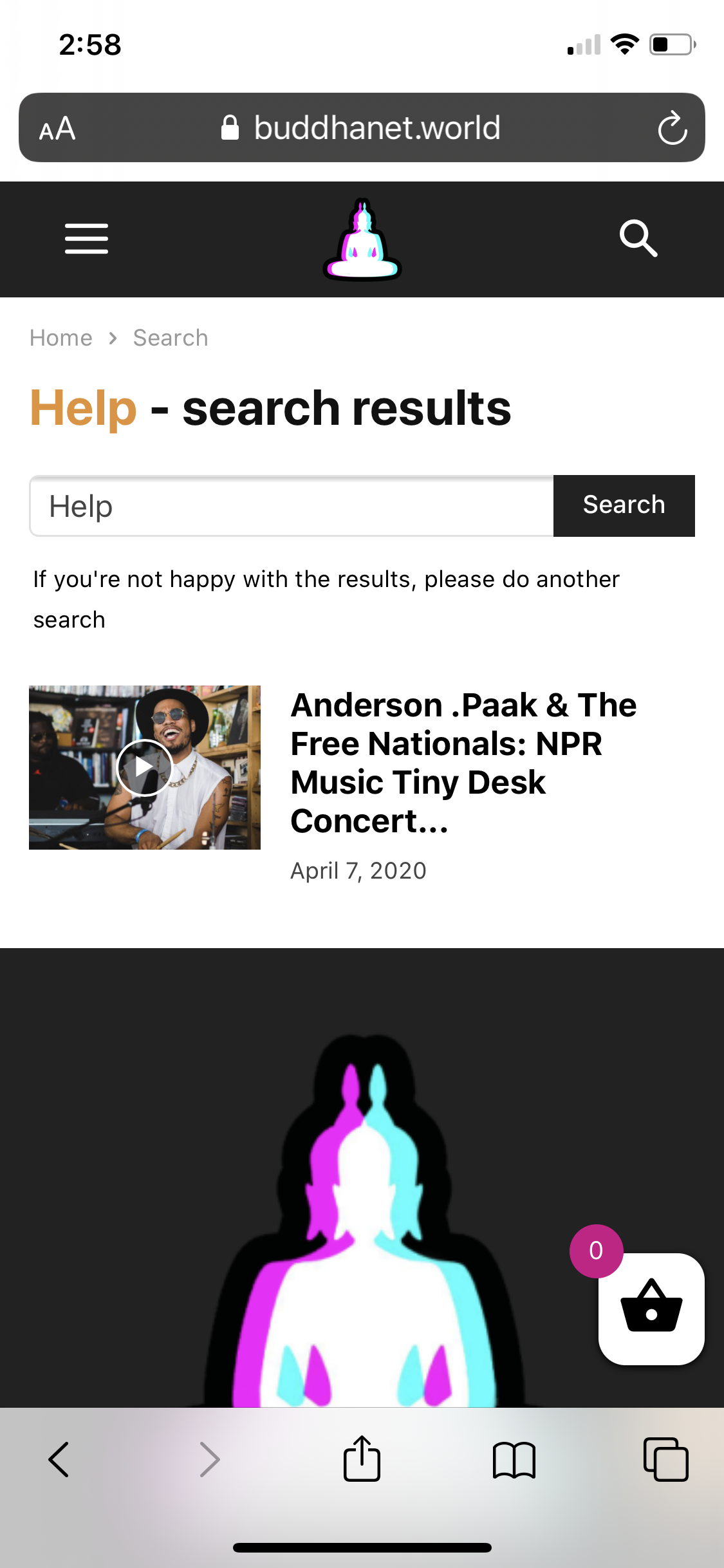
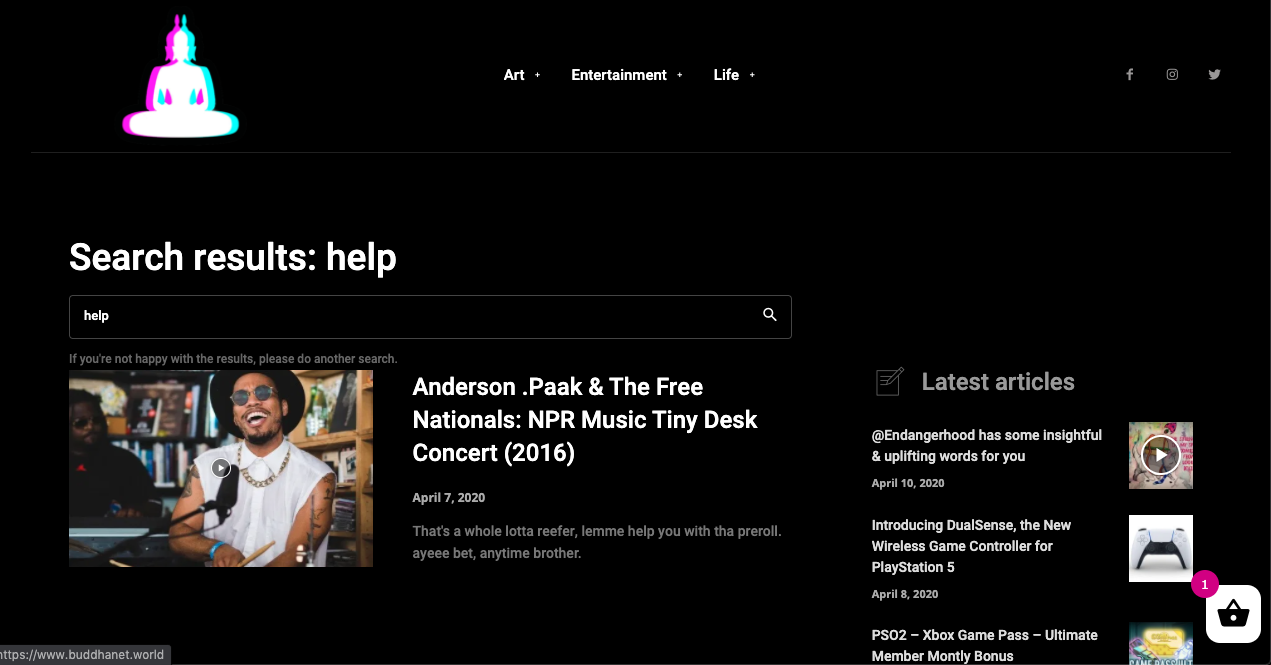
I have applied the black pro search template via theme panel, it works for the desktop version of theme but does not apply to the mobile version resulting in an ugly white block. please advise. both screenshots are below.
website: https://buddhanet.world
 Md. Abu Naser
Dear, I am a Newspaper theme user.
My Web- https://shikkhapedia.com/
now I need support-
in your demo site flex block showing with the menu bar- https://www.screencast.com/t/UkfzTeK0u48
but in my site not showing the menu bar- https://www.screencast.com/t/ugw0Aubo
Need your support, please.
 vivekchavhan


