
- NewsmagBlock settings tutorial
- NewsmagCategory tag on modules/blocks
- NewsmagtagDiv Composer Tutorial
- NewsmagWeather Widget
- NewsmagExchange widget
- NewsmagInstagram widget
- NewsmagHow to use the Visual Composer plugin
- NewsmagIntroduction
- NewsmagFooter templates
- NewsmagCustom ad spots
- NewsmagLoading image effects
- NewsmagSmart sidebar
- NewsmagFeatured images
- NewsmagGeneral settings
- Newsmag7 days post sorting
- NewsmagTheme thumbs
- NewsmagExcerpts introduction
- NewsmagTheme colors introduction
- NewsmagtagDiv slider gallery
- NewsmagVideo playlist
 bricolage-facile
 Hi,
In fact, I try to change the image in the “Single Image” block from the Composer. I can select an image from my WordPress Gallery, but no image appear in the first block and the image selected is not saved in the composer menu 🙁
The screenshot: 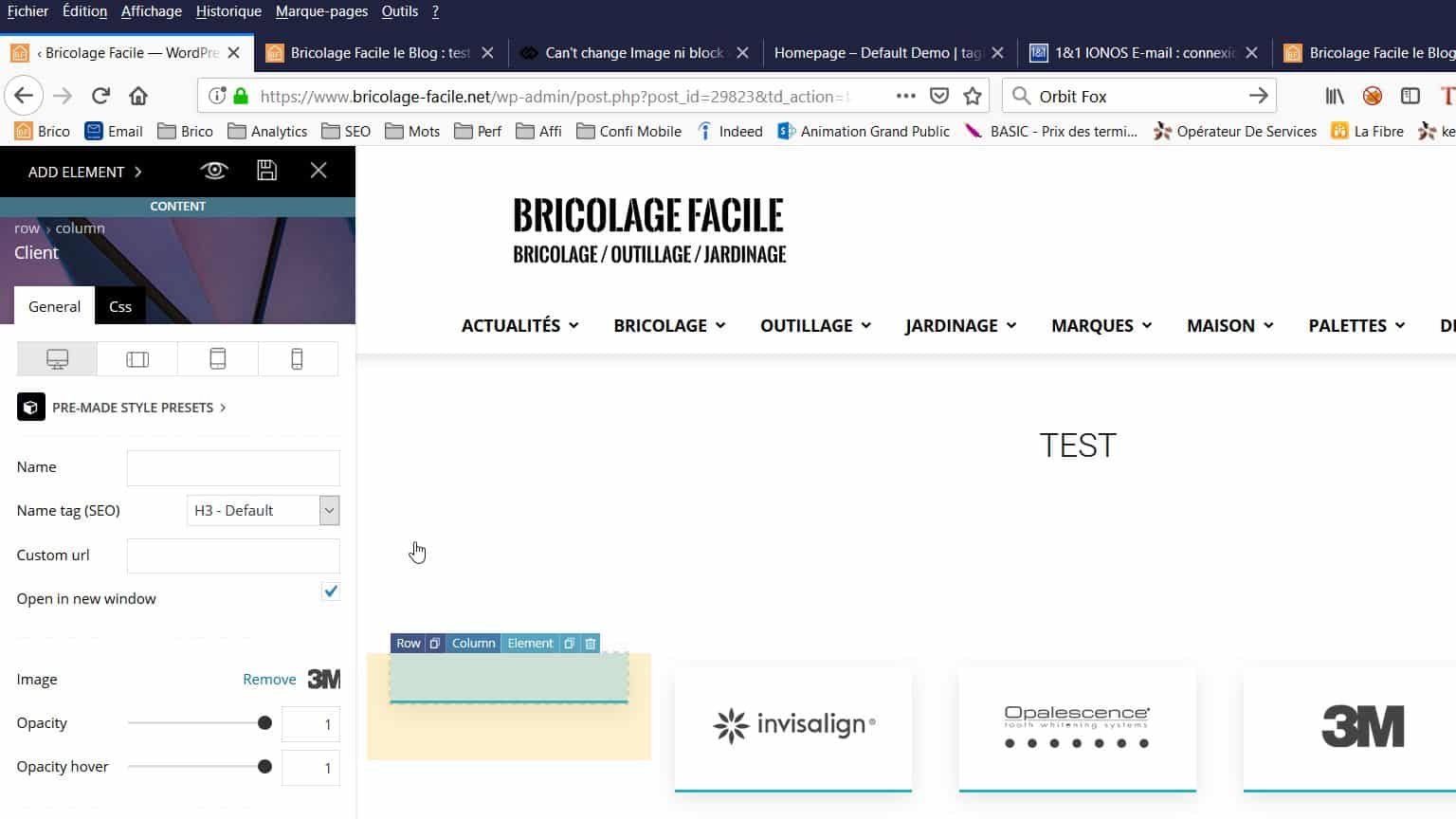
Many thanks for your help 🙂
Cédric
-
This reply was modified 7 years by
bricolage-facile.
 drunkonlife
 there is also “spaces” in between blocks that I’m trying to get rid of. They weren’t there last month. This month they are.
drunkonlifeI have built up my front page with blocks of content. It was looking good last month. But after updating some of the blocks, there are now large spaces inbetween some blocks as well as some blocks not even showing despite the fact that there is code within the blocks. Any help would be appreciated. https://hrprofessionalsmagazine.com
 Catalin
 Hi,
What exactly do you want to edit for Blocks and Big Grids? Notice that the theme core files were moved here -> https://www.screencast.com/t/yX6I5Rco5er
Thank you!
 Calin
Calin Hi,
Please check our documentation for modules and blocks ->https://forum.tagdiv.com/theme-blocks-modules/
-> https://www.screencast.com/t/66xtvGqd4MSW
also you can set the style from here
-> https://www.screencast.com/t/Gi6zvandZnv
Thank you!
 Simion C.
 Hi,
@ML You can edit the template of the category page, if it is a cloud category template
– https://cloud.tagdiv.com/#/load/Category
– https://forum.tagdiv.com/tagdiv-cloud-library-plugin/
The template can contain any of the elements available in the composer. You can add blocks, grids, text etc. Let me know if you need help or you have more questions.
Thanks
 mockaccino
 Hi Simion,
That would be unusual, there should be no difference regarding the content the block displays depending on the browser used
That was my contention too. These results are from people on different computers. It doesn’t make any sense and I got everyone to refresh their cache. It’s php – how can it vary? (Rhetorical question 🙂
Here is a link:
https://www.nbnnews.com.au/central-coast-news/
At first load, all the stories are from Central Coast.
If you use the pager then other regions (categories) populate it.
All the bottom menu items point to different regions (or categories).
Thanks for looking into it.
-
This reply was modified 7 years by
mockaccino.
Simion C. Hi,
That plugin cannot be used anymore since update 9.7, it has been replaced by a new plugin
– https://forum.tagdiv.com/developer-info/
You could use this plugin from now on. Or experiment with flex blocks, maybe what it used to be possible only with the api plugin, it is now possible with flex blocks and grids
– https://tagdiv.com/tagdiv-composer-flex-block-elements/
– https://tagdiv.com/tagdiv-composer-big-grid-flex-elements/
Thanks
Simion C. Hi,
That can be done, if you already achieved a result with two sidebars, for example like this – http://prntscr.com/njh6q4 now you can place a block in the content column, and limit it to a single post – http://prntscr.com/njh66c
Use a block of your choosing, check some cloud block designs as well
– https://cloud.tagdiv.com/#/load/Blocks
Let me know if you have more questions, or need more help.
Thanks
Calin Hi,
All you need to do is to play a little with the settings that the flex blocks have, for example
-> https://www.screencast.com/t/PHx3wmK6H
-> https://www.screencast.com/t/ThVhyKXZmw
-> https://www.screencast.com/t/fnn0oXF1Hnq6
For hover -> https://www.screencast.com/t/amqclEUt
-> https://www.screencast.com/t/Qg3bv2DPk3
After you do all those settings you can save the flex block as an element -> https://www.screencast.com/t/xx2lqyMe after that you can reuse that block with the settings you made.
Hope this will help you!
Thank you!
 Vlad S
 Hello !
You can add this code into theme panel’s custom code tab like here: https://www.screencast.com/t/pKs34hPeIxBm
.widget_recent_entries .block-title span  {

    font-family: 'arial;

}
Thank you !
Calin Hi,
Now in Newspaper v9.7 the path to the td_module_11.php for block12 is wp-content/plugins/td-composer/legacy/Newspaper/includes/modules/td_module_11.php
-> https://www.screencast.com/t/MIvdG0zu
Theme modules and blocks -> https://forum.tagdiv.com/theme-blocks-modules/
Also you can check some a similar topic -> https://forum.tagdiv.com/topic/custom-fields-in-block4-td_module_2-php/
Thank you!
 Mariak
Hi could you please help me. How do i edit featured articles Big Grid and other blocks?
Simion C. Hi,
That would be unusual, there should be no difference regarding the content the block displays depending on the browser used. Maybe it is a matter of browser cache, try to force refresh the pages in the browser (should be Ctrl+Shift+R).
Please post a link to this page so I can make some tests with multiple browsers.
Thanks
Calin Hi,
Please check our documentation for Block settings guide https://forum.tagdiv.com/block-settings-guide/ these are the only possibility that you have to sort the posts.
-> https://www.screencast.com/t/RW0nqgSPgBL
Also for category pull-down filter those are the only options -> https://www.screencast.com/t/ROIzW7UeM3 -> https://www.screencast.com/t/LZ3jaLW0UeJ
Thank you!
Simion C. Seems I missed that, sorry for the inconvenience. After you get to the result from above you could use some CSS to further style it – http://prntscr.com/njdyin
For the text with title I used these settings – http://prntscr.com/njdzc6
The CSS code is here
.td_block_text_with_title .td-pulldown-size {

border-bottom: 3px solid black;

border-radius: 5px 5px 0 0;

width:100%;

}

.td_block_text_with_title .block-title {

border-bottom: none;

}
Let me know if you have more questions.
Calin Hi,
Please check the blocks with tagDiv Composer and set on theme the changes for excerpt, for example -> https://www.screencast.com/t/1qRPJPdGz this settings will override the theme panel settings.
Thank you!
Calin Hi,
If that sidebar is made with widgets you can check our documentation for custom css -> https://tagdiv.com/how-to-create-custom-code-in-newspaper-theme/
Here is an example of code
.td-pb-span4 .td_block_1 {
margin-bottom: 10px;
}
If that sidebar is in one page and is make with tagDiv Composer you can edit it and change with tagDiv Composer.
Thank you!
Simion C. Hi,
I could take a look, please post a link to the website. Block 15 in a full row will indeed show 5 posts per row – http://prntscr.com/njdaw5 while on mobile it will show 2 posts
– http://prntscr.com/njdbc5
If it doesn’t look like this, there may be a problem. Let me know.
Thanks
Simion C. Hi,
Many of the theme files are now in the tagDiv composer plugin, including the header template files. This has happened after the 9.7 update, here is an article about it
– https://tagdiv.com/updating-the-core-of-tagdiv-themes/
So now the header files are here – http://prntscr.com/njd2d3
This also means these files can’t be modified in a child theme anymore, as it was possible before, only directly in the plugin.
Maybe you could use the header builder and a cloud header template to do what is needed. The header can now be built with the tagDiv composer
– https://tagdiv.com/newspaper-theme-customize-the-header-manager/
There are headers built by us that you can modify and use, or build your own using the header builder elements – http://prntscr.com/nfnapk
– https://cloud.tagdiv.com/#/load/Headers
So adding a block in the header would be a matter of drag and drop. You could experiment with these cloud header templates, maybe it is possible to do what you want using them. Let me know if you have more questions.
Thanks
Calin Hi,
Please make sure that you do not have a plugin conflict, please deactivate all non theme plugins, also if you are using child theme or cache plugin, please deactivate them, clear all cache and try again.
Or if you want you can add a custom css in Theme Panel > Mobile theme >Custom code> Css
.wp-block-image .aligncenter>figcaption

{

  display: block;

}
-> https://www.screencast.com/t/Myk3BZG0Mn
Thank you!
 fferrero
Hello,
We started to use Newspaper theme 9 or 10 months ago, the /upload/ folder is now 45 GB. We found out that every single thumbnail size was activated in Block setting so we have a lot of sizes for every single image.
We deactivated several of them. Then, we decided to do 2 things:
1 – Change every single post to the same template so every past article has just 1 image. My question is, Where is the post template setting saved at the database? We need to change them in bulk.
2 – Remove every single picture of the last month except the one that uses the template we are going to use. So the question is, where is the exact picture URL saved at the database?
Lastly, and most importantly, can you think a way to do this? This would be amazing for every user if we come up with a way to remove old pictures. Once they go out of home screen there is no reason to have 10 sizes of the same picture if the post is going to show just one every time for an old article.
Thank you very much!
Calin Hi,
Please provide me a link were I can inspect these modules, in this way I will be able to provide you an working answer or you can use the flex blocks, using flex will have more control over blocks layout.
Thank you for your understanding!
 MountainDewAddict
Hello.
Can i edit the template of the static page and only show the custom content?
I want to use the mobile theme and only show my custom grid (3 Posts) and Block 11 on the home site.
When i try to edit the site via Mobile Editor, the grid isnt shown and only Block 11 is shown, followed by the mobile theme’s “Latest Articles”.
If it is not possible to only show my custom content, can i at least edit the “Latest Article”-title?
 Craig
CraigI have posts under all my categories but when any other filter apart from “all categories”
the block will show no posts?
Appreciate any help
