
- NewsmagBlock settings tutorial
- NewsmagCategory tag on modules/blocks
- NewsmagtagDiv Composer Tutorial
- NewsmagWeather Widget
- NewsmagExchange widget
- NewsmagInstagram widget
- NewsmagHow to use the Visual Composer plugin
- NewsmagIntroduction
- NewsmagFooter templates
- NewsmagCustom ad spots
- NewsmagLoading image effects
- NewsmagSmart sidebar
- NewsmagFeatured images
- NewsmagGeneral settings
- Newsmag7 days post sorting
- NewsmagTheme thumbs
- NewsmagExcerpts introduction
- NewsmagTheme colors introduction
- NewsmagtagDiv slider gallery
- NewsmagVideo playlist
 Simion C.
 Hi,
All modules can display the category tag, it just has to be enabled in the theme panel
– https://forum.tagdiv.com/category-tag-on-modulesblocks/
Block 7 uses module 6 – https://forum.tagdiv.com/theme-blocks-modules/
So the category tag has to be enabled for module 6 and it will appear
– https://www.screencast.com/t/TR7MfGJCSSOm
If this is not what you meant, please try to explain in detail what you want to do.
Thanks
Simion C. Hi,
There are filters available in blocks for users to sort the content (like the ajax filter), but these filters don’t take into account or track which user does it and display personalized content based on the user actions.
The theme or the composer elements don’t have such a capability unfortunately. Plugins that may be able to do this may not work with the composer blocks, if there are such plugins.
Thanks
 Catalin
 Hi,
Did you have checked the Block Settings from here? -> https://www.screencast.com/t/rcVqVebfUiO
Thanks.
Simion C. The theme container width is 1068px by default, the rows used in the tagDiv composer can be stretched as shown above. Within these stretched rows it would be best to use flex blocks instead of the predefined blocks (1 to 25).
If you force the theme container to a different width with CSS, there will be problems overall. It is not recommended to do so as it may break the theme design. Please try and use the available composer settings to build the pages/cloud templates instead of using CSS.
 pavel@earnware.com
This is what I got after updating to 9.2.2: 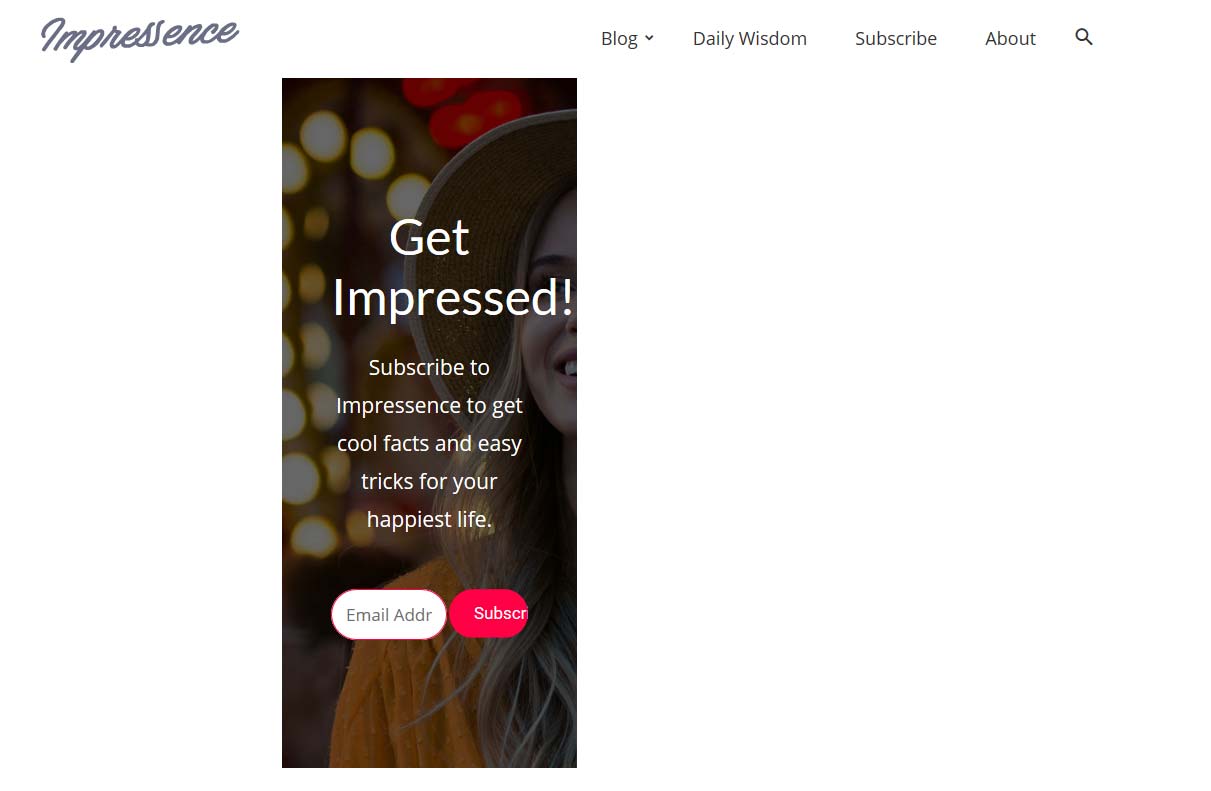
It works, only if using this setting: 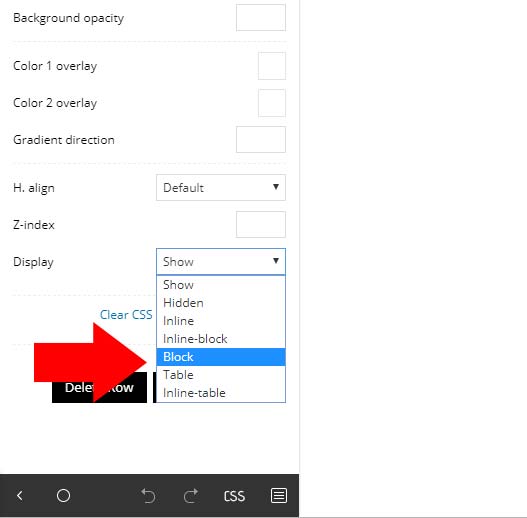 , if using just “Show” option – then in Firefox and Edge, it doesn’t work.
Any fixes for this in the next update?
 akshem
  unit45host
Hi,
What the exact tables are necessary to use with newspaper theme?
eg.: tdc_dirty_content tdc_icon_fonts tdc_google_fonts
-does not contain any usable information for me, I guess…
tdc_dirty_content, tdc_icon_fonts, tdc_google_fonts
1|1|1|1|1|1|1|1, a:0:{}, a:0:{}
Also with the same tables what is it changed through the time of development?
27/01/2018 1|1|1|1|1|1|1|1 a:0:{}|a:0:{} a:0:{}|a:0:{}
29/01/2018 1|1|1|1|1|1 a:0:{} a:0:{}
31/01/2018 1|1|1|1|1|1 a:0:{} a:0:{}
30/01/2018 1|1|1|1|1|1 a:0:{} a:0:{}
02/02/2018 1|1 a:0:{} a:0:{}
and since just 1 the other 2 tables empty…
Probably was theme update in those dates, but what was changed to less data input made, and what is those data…
What other important (if..) tables have the Newspaper theme?
The reason for this investigation is, because in December with the WordPress 5th version, and the Newspaper 9.0.1 ( not the latest 9.0.2 ) installed/upgraded/updated – all the POST theme settings have gone fishing…
I mean it not appears in the post edit screen. I believed before it is because I migrated from shared hosting to another vps. But I re-created several times the process with a number of migration software, and not that was the case – but the WordPress and/or the newspaper theme upgrade.
td_post_theme_settings
sample (
a:7:{s:14:”td_primary_cat”;s:4:”XXXX”;s:11:”td_subtitle”;s:19:”1000 Words Magazine”;s:18:”td_quote_on_blocks”;s19:”1000 Words Magazine”;s:9:”td_source”;s:19:”1000 Words Magazine”;s:13:”td_source_url”;s:19:”1000 Words Magazine”;s:6:”td_via”;s:19:”1000 Words Magazine”;s:10:”td_via_url”;s:59:”https://www.1000wordsmagazine.com/author/florian-gabriella/”;}
)
the data disappeared at date 02/02/2018 exactly where it shows some theme update (tdc_dirty_content 02/02/2018 1|1)
I would like to understand, which tables doing what to prevent these accidents in the future.
Thank you,
 tylerdavis7
I would like to change the number of articles showing in related articles section. I have a post template with no sidebar but I only want to show 3 articles vs 5. I am looking in this file (td_block_related_posts.php) to edit some code but I could use some help pointing me in the right direction. I basically always want it to spit out a 3 article related articles section every time, no matter if its sidebar or no sidebar.
 BenaresBulls
 Thanks Sir, from which country you are from. May be my hosting provider block som countries. Because my website is in hindi language and my target audience is from Varanasi, India. Sir the problem is now increase. At this time my posts are also center align, don’t know how. you can check this screenshots. please sir…Help me
http://prntscr.com/m2a4z9
https://prnt.sc/m2a5cc
https://prnt.sc/m2a5ob
 ashubais
I want to create this type of bordered block in content what is the best way to make these kind of blocks?? Please Tell me ASAP! It looks Damn cool.
See This – https://unsee.cc/80e5508d/
 Anonymous
I have on the mobile browser difrent blocks showing than in the Desktop version. Under the Big grid flex 4 are now smaler blocks showing.
Under the big Grid im useing block 4.
See http://www.eemskrant.nl on desktop and mobile
 gmgrundy
 Hi, I have a few more issues after deactivating Maintenance mode:
– gaps at the top of pages (I’ve checked CSS). It’s automatically doing it for all pages only. See link for example: https://www.lifewithoutmeat.com/contact-us/
https://www.lifewithoutmeat.com/
– gaps between text and above footer. See example links:
https://www.lifewithoutmeat.com/contact-us/
https://www.lifewithoutmeat.com/
– random block of white in row:
https://www.lifewithoutmeat.com/about/
Thanks
akshem Hi,
Thanks for helping. Can you please let me know the name of that block. I cannot find any with that name.
thanks.
 Arafat
How to change WordPress default bullet point to square bullet points? Like this: https://prnt.sc/m1wias or https://prnt.sc/m1wko6
Also, I want to use square bullet points post or page, not any blocks. So, how to do this?
gmgrundy Hi,
Thanks for your advice, I have edited the margins of each block now and it works. Perhaps before I was trying to edit the CSS of the wrong bit.
Thank you and hope you had a good Christmas and New Year
 gregy1403
Hi
Can i reverse latest posts in block 11? Form ASC to DESC or vice versa?
Thank you
 Imagine4D
I updated to 9.2.2 version of the template a few days ago. Today I noticed that all of my articles are now showing in a narrower block, while there is now a big white space between the content and the sidebar.
Screenshot: https://imgur.com/a/ijlFQkY
Live example: https://phnompenhexpat.com/city-life/benefits-of-phnom-penh-life/
Any ideas how to fix this, please advise, thanks!
 gomakeabuck
 I have a similar question but mine is the opposite.
How can I add more blocks after the review box? I don’t want it to be the last thing on the post.
 GiacomoLaw
 Getting this error: Mixed Content: The page at ‘<URL>’ was loaded over HTTPS, but requested an insecure script ‘<URL>’. This request has been blocked; the content must be served over HTTPS.
With all this:
(index):1 Mixed Content: The page at ‘https://thenerdystudent.com/2018/12/2018/’ was loaded over HTTPS, but requested an insecure script ‘http://thenerdystudent.com/wp-includes/js/wp-emoji-release.min.js?ver=5.0.2’. This request has been blocked; the content must be served over HTTPS.
f @ (index):1
(index):1 Mixed Content: The page at ‘https://thenerdystudent.com/2018/12/2018/’ was loaded over HTTPS, but requested an insecure script ‘http://thenerdystudent.com/wp-includes/js/jquery/jquery.js’. This request has been blocked; the content must be served over HTTPS.
(index):1 Mixed Content: The page at ‘https://thenerdystudent.com/2018/12/2018/’ was loaded over HTTPS, but requested an insecure script ‘http://thenerdystudent.com/wp-includes/js/jquery/jquery-migrate.min.js’. This request has been blocked; the content must be served over HTTPS.
(index):1 Mixed Content: The page at ‘https://thenerdystudent.com/2018/12/2018/’ was loaded over HTTPS, but requested an insecure script ‘http://thenerdystudent.com/wp-content/plugins/jetpack/_inc/build/photon/photon.min.js’. This request has been blocked; the content must be served over HTTPS.
(index):1 Mixed Content: The page at ‘https://thenerdystudent.com/2018/12/2018/’ was loaded over HTTPS, but requested an insecure script ‘http://thenerdystudent.com/wp-content/plugins/disqus-comment-system/public/js/comment_count.js’. This request has been blocked; the content must be served over HTTPS.
(index):1 Mixed Content: The page at ‘https://thenerdystudent.com/2018/12/2018/’ was loaded over HTTPS, but requested an insecure script ‘http://thenerdystudent.com/wp-content/plugins/disqus-comment-system/public/js/comment_embed.js’. This request has been blocked; the content must be served over HTTPS.
(index):1 Mixed Content: The page at ‘https://thenerdystudent.com/2018/12/2018/’ was loaded over HTTPS, but requested an insecure script ‘http://thenerdystudent.com/wp-content/themes/Newspaper/js/tagdiv_theme.min.js’. This request has been blocked; the content must be served over HTTPS.
(index):1 Mixed Content: The page at ‘https://thenerdystudent.com/2018/12/2018/’ was loaded over HTTPS, but requested an insecure script ‘http://thenerdystudent.com/wp-includes/js/comment-reply.min.js’. This request has been blocked; the content must be served over HTTPS.
(index):1 Mixed Content: The page at ‘https://thenerdystudent.com/2018/12/2018/’ was loaded over HTTPS, but requested an insecure script ‘http://thenerdystudent.com/wp-content/plugins/jetpack/_inc/build/lazy-images/js/lazy-images.min.js’. This request has been blocked; the content must be served over HTTPS.
(index):1 Mixed Content: The page at ‘https://thenerdystudent.com/2018/12/2018/’ was loaded over HTTPS, but requested an insecure script ‘http://thenerdystudent.com/wp-includes/js/wp-embed.min.js’. This request has been blocked; the content must be served over HTTPS.
(index):1 Mixed Content: The page at ‘https://thenerdystudent.com/2018/12/2018/’ was loaded over HTTPS, but requested an insecure script ‘http://thenerdystudent.com/wp-content/plugins/jetpack/_inc/build/sharedaddy/sharing.min.js’. This request has been blocked; the content must be served over HTTPS.
How can I set the minified files to be HTTPS?
 uitdezaanstreek
Hi,
My featured images won’t show in grid or blocks. See: https://md.uitdezaanstreek.nl/
How do I change this?
 McDohl
 Hi
You can use post loop block dude
 git
gitDear support team,
How do I add category tag of block7 articles?
 SoNowner
Hi there and happy holidays,
Could you help me with the api integration? Not sure if it’s the WP theme code or not, but i’m not getting the “Buy Images” overlay button when I try to wrap the image url the the tag div code they have instructed.
Here are their instructions: https://developers.canvaspop.com/documentation/integration-wordpress
Here’s the page on my website i’m trying to input the code:
the url is https://createfatemedia.com/for-sale
A few things to note:
1) looking at the code from the page it appears that it has recoded/shortened the standard code? See below
standard image url:
<img src=”http://lorempixel.com/200/200/”
my theme image url on the gallery page:
[tdm_block_inline_image image=”492″ display_inline=”yes” image_height=”560″ image_width=”1000″ tdc_css=”eyJhbGwiOnsicGFkZGluZy10b3AiOiIxMCIsInBhZGRpbmctcmlnaHQiOiIxMCIsInBhZGRpbmctYm90dG9tIjoiMTAiLCJwYWRkaW5nLWxlZnQiOiIxMCIsIndpZHRoIjoiMzMlIiwiZGlzcGxheSI6IiJ9LCJwaG9uZSI6eyJwYWRkaW5nLXRvcCI6IjUiLCJwYWRkaW5nLXJpZ2h0IjoiNSIsInBhZGRpbmctYm90dG9tIjoiNSIsInBhZGRpbmctbGVmdCI6IjUiLCJ3aWR0aCI6IjEwMCUiLCJkaXNwbGF5IjoiIn0sInBob25lX21heF93aWR0aCI6NzY3LCJwb3J0cmFpdCI6eyJwYWRkaW5nLXRvcCI6IjUiLCJwYWRkaW5nLXJpZ2h0IjoiNSIsInBhZGRpbmctYm90dG9tIjoiNSIsInBhZGRpbmctbGVmdCI6IjUiLCJkaXNwbGF5IjoiIn0sInBvcnRyYWl0X21heF93aWR0aCI6MTAxOCwicG9ydHJhaXRfbWluX3dpZHRoIjo3Njh9″ modal_image=”yes” content_align_horizontal=”content-horiz-center” media_size_image_height=”900″ media_size_image_width=”900″]
Thanks in advance for your help,
 BruceInLouisville
I have an idea for personalization, and wonder if it is possible.
I would like to give logged-in users a place where they can choose tags they are interested in (some sort of profile page, which I suppose I can figure out).
Then, I would like to present them a page where only posts with those tags are displayed.
Obviously, I could build a separate page for each member, but that is a maintenance nightmare.
So, I want a TD Composer page where I can add blocks with filtering based on the the user that is viewing the page. One page, that responds to the currently-logged-in user’s preferences. (Persons who are not logged in would not be able to see the page, I think.)
Is it possible to have blocks on a page be set to do this type of dynamic filtering? Or, is it possible to have even a standard blog page do dynamic filtering like this?
Thanks for any help you can give, or any pointers to plugins or ways of doing this.
 VIRTUALCHRONO
Hi,
is it possible to show – on posts blocks – the review points and not the review stars?
Thank you!
