
- NewsmagBlock settings tutorial
- NewsmagCategory tag on modules/blocks
- NewsmagtagDiv Composer Tutorial
- NewsmagWeather Widget
- NewsmagExchange widget
- NewsmagInstagram widget
- NewsmagHow to use the Visual Composer plugin
- NewsmagIntroduction
- NewsmagFooter templates
- NewsmagCustom ad spots
- NewsmagLoading image effects
- NewsmagSmart sidebar
- NewsmagFeatured images
- NewsmagGeneral settings
- Newsmag7 days post sorting
- NewsmagTheme thumbs
- NewsmagExcerpts introduction
- NewsmagTheme colors introduction
- NewsmagtagDiv slider gallery
- NewsmagVideo playlist
 Sound1
Hello,
Please I need help with my tagdiv newsletter.
I have added it rightly into the sidebar with the tagdiv composer, but after adding the embed code, it doesn’t change or get configured. It continues to show “Newsletter form code is empty. please configure this block/widget by entering a form code.
I have tried my Feedburner and Mailchimp, same thing – not configuring. I have also visited my homepage after saving in the tagdiv composer.
Look forward to a swift response.
Thank you.
 wilhard
Hello, after I delete the news ticker there are too much empty space betweent the first block and the header. How to fix it? See the screenshot: https://ibb.co/n4pTZq
Thank you in advance!
 konstantina-aposp
Hi there!
I’m having trouble editing the font size of titles in the option: Modules and Blocks – Article Title from the Theme Panel. When I click it, it seems to be loading but never expands so I can edit the options.
How can I fix this?
Thanks in advance!
 Simion C.
 Hi,
That would be possible. Are you using the default WordPress blog page? In that case you can choose a module that doesn’t display a thumb
– https://www.screencast.com/t/lrmCcahg
If you use a static page built with the tagDiv composer, use blocks that don’t display a thumbnail. Like these
– https://demo.tagdiv.com/newspaper/block-9/
– https://demo.tagdiv.com/newspaper/block-10/
Also note that flex blocks have an option to remove the thumbnail, and many other settings
– https://www.screencast.com/t/3C9J8naQJ
You can use those as well.
If you have more questions please let us know.
Thanks
 Calin
Calin Hi,
Please add the below custom css in Newspaper>Theme panel>Custom code>Custom css
.td-pb-article-list .td_module_wrap .td-module-meta-info {

    display: block!important;

}
https://www.screencast.com/t/bgWGz6LaynL
Thank you.
 Catalin
 Hello Tuudi,
Please notice that the number of database queries should not vary only if you made some pages changes and only if you have added more elements on pages, like blocks. For these queries, the theme uses wp_query and it does not have any custom library for database access. We recommend using a caching plugin to avoid loading these tasks every time. Our recommended and tested caching plugin is WP Super Cache.
Thanks for your understanding!
Simion C. Hi,
That would be the category tag, this tag can be disabled for each module
– https://forum.tagdiv.com/category-tag-on-modulesblocks/
Identify the block you are using there and disable the tag for it’s modules. That is block 5 so the setting is this one
– https://www.screencast.com/t/JfSG99oXZQ
Thanks
Calin Hi,
If you set full grids, then those will be set as full width, if you are using blocks that are not full, example big grid, you need to stretch the row ( for the grid ) in order to get full width and set width to 100%.
https://www.screencast.com/t/awWPRwAXj1
https://www.screencast.com/t/27qbJLISw
Thank you.
Calin Hi,
In order to have ajax dropdown you need to click on a block go in filter and look for ajax categories dropdown
https://www.screencast.com/t/kfJpGdtu
Thank you.
 Daniel Iceman
 Ok. I found it studying the database and ended up with my own solution: an if block checking if Newspaper fields exist, and if not, echoing the fields created for my new theme (since I didn’t found out yet how to convert Newspaper old fields to the new one, impossible to do manually in thousands of articles). Thank you.
 pavel_t
 Thank you for quick response!
In fact I mean general Latest Articles. Lets see Newspaper Theme with Business demo content: There is as a default Pages / Home / Template: “Pagebuilder + latest articles + pagination”
http://www.imagebam.com/image/ce1d061041359224
Of course I have all Meta Info on Modules / Blocks On:
http://www.imagebam.com/image/80bd1c1041359194
But Latest Articles on bottom of the page are still without Date and Author name…
http://www.imagebam.com/image/a0a8e81041359274
The same situation is when you go through pagination to archive posts…
 pbc
pbcHi, I see by default we have this structure in breadcrumbs: Home -> Authors-> Posts by Author
I want to create Authors page, and list on it all users with “author” role, with small bio and maybe posts counts.
Tried to create Authors page, and filtering authors using “[td_block_authors]” but it not accessible by clicking on Authors link on breadcrumbs

Thanks
 everton15m
Hello,
1. I would like to translate, using WPML, the text from this section:
Dashboard >> Newspaper >> Theme panel >> Footer >> Footer info content >> Footer Text. In the td_footer_extra.php file I’ve found this code (on line 64):
$buffy .= stripcslashes($td_footer_text);
I think I could add a method like _e() to make it tranlatable but I’m not sure and I can’t afford to make any mistakes because it’s a very big website (more than a few thousands posts).
I’ve also tried this: https://wpml.org/forums/topic/how-to-translate-my-footer-content/, but the website main language isn’t english so I wasn’t able to translate it to english.
2. How can I use the same widget ( here is: [tagDiv] Block 7 ) with different text for different languages? In Appearance >> Widgets >> [tagDiv] Block 7 >> Display on language, but when I hit save, it automatically switch the option back to All languages so the result is the same as before
3. Is it possible to translate News Ticker and Big Grid Slide from VisualComposer?
On front page I have a News Ticker with a Big Grid Slide, but on the translated version of the page it doesn’t show anymore.
Thank you in advance for your time
PS. I’m using Newspaper v8.7
Calin Hi,
I test your website on others browsers, only in edge and internet explore are look fine.
Please try the steps from this topics -> https://forum.tagdiv.com/topic/strange-chinese-symbols-replaced-icons-and-arrows/
-> https://crunchify.com/how-to-fix-access-control-allow-origin-issue-for-your-https-enabled-wordpress-site-and-maxcdn/
->https://www.gomahamaya.com/fix-access-font-origin-blocked-access-control-allow-origin-policy/
Thank you for your understanding.
 orrorea33giri
Hi
I’d like to use only the overall stars score (no numbers) for reviews in custom templates. There is no such option in the review block in Tdiv builder. Did I miss somethng or custom CSS is required?
Thank you
Calin Hi,
I think you want to achieve this https://www.screencast.com/t/dh14Nlppy7
In order to have the date on latest articles, you need to active the option from theme panel, please go in Newspaper>Theme panel>Block settings and expand meta info on Modules/Blocks and enable the show date.
https://www.screencast.com/t/xe5vIyj6Ovj
Hope this will help you.
Thank you.
Calin Hi,
You can do this in more ways, one of theme is to set a padding or margin on that element with td Composer
https://www.screencast.com/t/lkW69igE
Or you can insert a custom cee in Newspaper>theme panel>Custom code> Custom css ( or you can add it in Advanced css on device you want )
https://www.screencast.com/t/Wwr0xfdR6q
.td-block-width{

    padding-left: 25px;

    padding-right: 25px;

}
Thanks.
Calin Hi,
In order to make this crop center center you need to edit a theme file , please go in:
\wp-content\themes\Newspaper\includes\td_config.php
Go on line 1532 to td_api_thumb::add(‘td_218x150’, and set there center center
https://www.screencast.com/t/LqQM6pQChVG1
https://www.screencast.com/t/LBxgi7XdaC77
From now on all thumbs with this size will be crop center center, but you’ll need to regenerate all future image set until now.
In order to do that you need to install regenerate Thumbnails
select the feature image and click on regenerate
-> https://www.screencast.com/t/wut3hSoLW
https://www.screencast.com/t/cjGzRstlxxi
Hope this will help you.
Thanks.
 Bryanlim
Hi, right now I’m using Newsmag theme on my blog, to be exact, the Travel Theme from Newsmag.
When I changed my blog to Newsmag from previous theme, the Pagespeed for my blog went down from previously 87/100 to 17/100.
When I see what is causing this, Google Pagespeed give me a list of things that slowed my website.
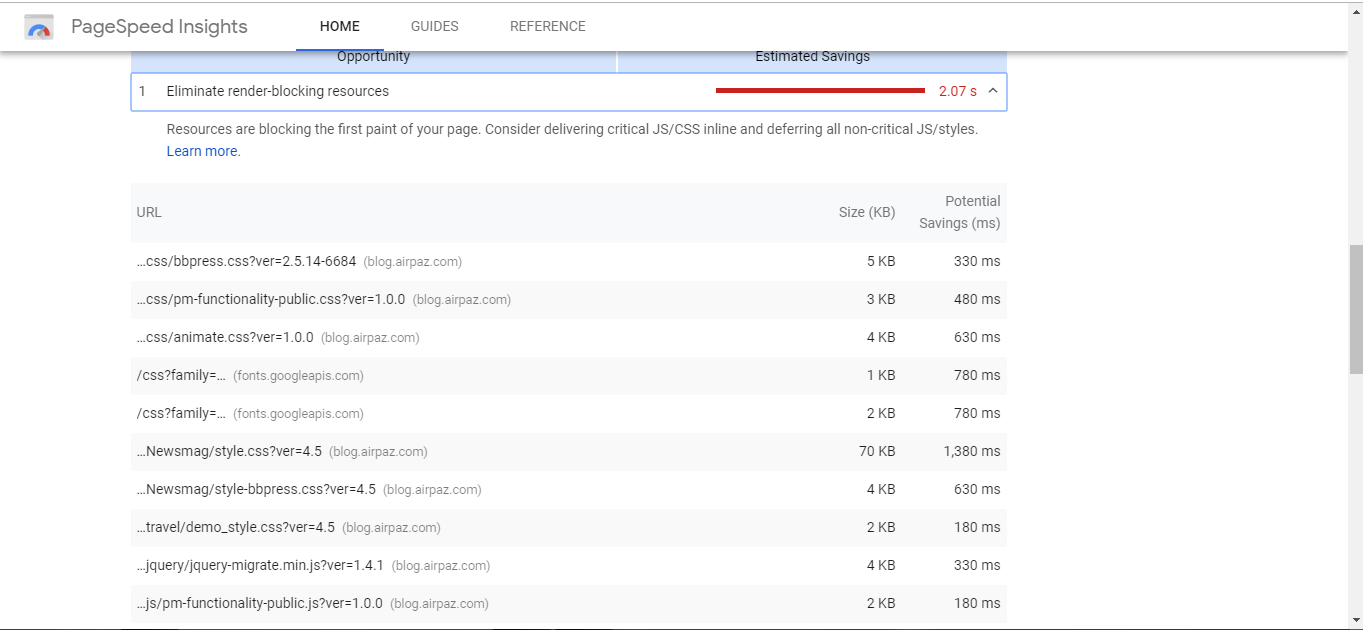
Some of the most time-consuming are from Newsmag, so I was wondering if there are any solution for this issue from you?
Thanks.
 drjeff_007
Hi, How can I make a full width row? Right now all my content areas are within a container.
I would like to put a content block that displays recent posts and want to be full screen width.
Calin Hi,
Please make sure that the meta-box are set well in yoast SEO
Also please check the meta info from the Newspaper>Theme panel>Block settings Meta info on modules/blocks
https://www.screencast.com/t/kMvFxyDmyU
Thank you for your understanding.
 meri
meriHi,
Do you plan to add blocks for posts?
At the moment, the only “fancy” block in “Media & Text” but it doesn’t work well as soon as you try to specify a specific value for the width of the columns. It would be great to have some templates…
meri This left hand bar should be red, not blue. Blockquotes shouldn’t be affected by the custom css, only links should be in blue.
meriHi,
The main accent color of my website is #dd3333
But I was to keep the links in blue (#4db2ec)
So Simion gave me a custom CSS that works perfectly on desktop:
.td-post-content a {

color: #4db2ec;

}
.td-page-content a {
color: #4db2ec;
}
.td_block_text_with_title a {
color: #4db2ec;
}
I copy/pasted the same code on the Mobile custom CSS field but it seems that the kind of blockquote blockquote class="td_quote_box td_box_center" isn’t working (on mobile).
Here is a screenshot: https://ibb.co/e3NQuq
The URL of the post is: https://www.coupdepoker.com/apprendre-jouer-poker/mains-combinaisons-poker/
Can you kindly help me to fix it?
 brianjcameron
I formally had my header and footer set to be stretched so it covered full width of the screen. I now wish to narrow the screen to see inframe ad space.
I have gone into theme panels, templates, force full width, and set all settings to “No Stretch” but still the header and footer are stretched to full width of the site.
I managed to fix the blocks within TagDiv composer.
Any advice on next steps ?
