
- NewspaperFlex Block Builder and Flex Loop Builder
- NewspaperHow to use the Flex Blocks cache option
- NewspaperHow to edit modules for Flex Block X
- NewspaperHow to insert a block inside the content of a post
- NewspaperFlex Block Settings Guide
- NewspaperMeta Info on Modules and Blocks
- NewspaperTheme modules and blocks
- TutorialsDefault Block Settings Guide
- NewsmagBlock settings tutorial
- NewsmagCategory tag on modules/blocks
- NewspaperThumbnails – Fix strange looking images on blocks
- NewspaperBlock settings tutorial
- NewspaperCategory Tag on Modules/blocks
- ApiPractical example – How to add a new Block and Module
- Apitd_api_block::delete
- Apitd_api_block::update_key
- Apitd_api_block::update
- Apitd_api_block::add
- ApiAPI – Blocks – Introduction
- NewspaperWP Rocket and Newspaper Theme: Optimization Guide
 Jongsoo
When I go to the homepage, there are 5 posts, and I want to insert in-feed ads except for one post (I am using ‘Flex Block 3’). How can I do it? Please let me know.
 Roman
RomanHi,
Please advise me on the following question…
On the site gif2you.com advertising is loading slowly. This is confirmed by Adsense statistics.
On the Adsense forum, there is an explanation from an expert: “Then the problem is in your site or hosters, for example, loading third-party scripts is blocked when rendering your layout and scripts.”
On the other two sites, ads load faster:
sunshinepic.com
en.sunshinepic.com
I moved a site with slow loading ads to the same hosting where two other sites are located. The problem has not been solved.
At the moment, the sites have everything set up identically:
– Hosting
– Geolocation – Dallas
– NewsPaper 12.6.8
– WordPress 6.6.2
– PHP Version 7.4.33
– WP Memory Limit 256 MB
– PHP Execution Time 240
– PHP Max Input Vars 10000
– The same set of plugins
– The same CloudLinux hosting support system
The difference is that the site gif2you.com is 6 years old, and the other two sites are young, both of them are no more than a year old.
Is it possible that using NewsPaper on gif2you.com 6 years old, after numerous updates, there are settings left that conflict with Adsense.
Please help me understand the issue.
Thank you.
 sco
scoHello,
Running some tests I noticed that my debug file was quickly filled with such deprecated messages:
PHP Deprecated: Creation of dynamic property tdb_single_post_favourite::$shortcode_atts is deprecated in /…/wp-content/plugins/td-cloud-library/shortcodes/single/tdb_single_post_favourite.php on line 78
PHP Deprecated: Creation of dynamic property tds_single_favorite1::$unique_block_class is deprecated in /…/wp-content/plugins/td-cloud-library/styles/tds_single_favorite/tds_single_favorite1.php on line 17
PHP Deprecated: rtrim(): Passing null to parameter #1 ($string) of type string is deprecated in /…/wp-includes/formatting.php on line 2819
Could you fix them for the next update ?
Regards.
 picturemeclubbing
 Sorry let me be more clear. I just made a new install of wordpress as a multisite. On the main site I installed the theme and template I wished to use. All I changed was the layout. No images. No added code. Just the layout. I didn’t import any new blocks or anything. I just moved around what was on the screen.
After I went to one of the sub-sites, installed the same theme. I went to the first install, copied what I created for my home page (as you showed above), then imported it to the sub-site. I made sure I selected all and copy/paste it. When I looked at the subs-site page the fonts were different, images were in the wrong area, and sections were missing.
 simchris
 Have you setup security hardening for your site, such as blocking access to XML-RPC, includes pages for core, etc. Database can be overloaded if you have too many hack attempts pummeling site at same time as normal access to pages touching the php and dbase system.
 Anamaria
 Hello,
Have you checked for admin-ajax error? Please verify the console when you try to import the template, usually, it displays a 403 or 404 error.
If you don’t use a security plugin, please ask your host about this, maybe you have a security module that blocks this.
If you use a plugin like Wordfence please set it in learning mode.
Also, make sure that you do not have a plugin conflict, please deactivate ALL plugins except tagDiv plugins, also if you are using a child theme or cache plugin, deactivate them, clear all cache and try again.
Also, please check if this code is missing from your .htaccess: https://www.screencast.com/t/iN0R93dD3p from our requirements https://forum.tagdiv.com/requirements-for-newspaper/ this requirement is not displayed in System Status.
Let me know the results!
Thank you!
Anamaria Hi,
Usually, that problem with icons is related to the CORS policy that blocks access. This problem can be solved using those guides:
– https://forum.tagdiv.com/topic/font-blocked-from-loading-by-cross-origin-resource-sharing-policy-no-access-co/
– https://stackoverflow.com/questions/25577981/font-from-origin-has-been-blocked-from-loading-by-cross-origin-resource-sharing
– https://webmasters.stackexchange.com/questions/71630/font-blocked-from-loading-by-cross-origin-resource-sharing-policy-no-access-co
Thank you!
Anamaria Hello,
You can see all our prebuilt websites here https://demo.tagdiv.com/select_demo/newspaper-prebuilt-websites/?demo-type=all The website that you have provided has a custom design, but you can find similar blocks in the cloud library and import it and customize -> https://cloud.tagdiv.com/#/load/All
Thank you!
Anamaria Hello,
We have this guide: https://forum.tagdiv.com/set-block-inside-post-content/, but you need to design the block as you want on the page and then set the code in the ads section.
Thank you!
 Bettina
 Hello!
I’ve tested the Rimont single template, but it seems to work just nicely, and the images are displaying like this: https://app.screencast.com/kL9BrGts9wdGU
Did you add the images in Gutenberg with the Image block?
You can delete any CSS or customize it in the tagdiv Composer. You can stretch the row only as you like.
Thank you!
Anamaria Hello,
You need to add the extra class to the block where you want to use the number rank and add that class to the code https://i.imgur.com/hp8FdJJ.png
Thank you!
 Tribun74
https://forum.tagdiv.com/topic/ranking-list-numbers-and-points-instead-of-stars/
Good morning,
A few weeks ago you showed me a CSS code that allows me to number a ranking or chart.
The problem is that I can no longer use this “Flex Builder/Flex Block 1-X” on any other page, as this enumeration is then ALWAYS displayed, even with normal content. However, this “Flex Block” is the only one that has all the functions I need to display content nicely.
Is there another individual CSS code that I can only use for the chart page?
I can then no longer use a “Flex Block”, as this numbering is then displayed everywhere. I am then limited to “Block 1-25” and “Big Grid Flex”, which is not ideal for my content.
Do you have any ideas on how I can solve this so that the numbering is only displayed in the charts overview? Thank you very much!
Best regards Frank
 Phil Creighton
 I’ve created this custom CSS to get there…
@media (max-width: 767px) {

    .tdi_7 .tdb-logo-svg-wrap {

        /* max-width: 26px; */

        display: none !important;

    }

}
@media (max-width: 767px) {
.tdi_7 .tdb-logo-text-title {
font-size: 20px !important;
display: none !important;
}
@media (max-width: 767px) {
.tdi_7 .tdb-logo-text-tagline {
font-size: 20px !important;
display: none !important;
}
}
@media (max-width: 767px) {
.tdb_header_logo .tdb-logo-text-title {
font-size: 36px;
display: none !important;
}
}
}
.tdi_7 .tdb-logo-svg-wrap+.tdb-logo-img-wrap {
display: block !important;
max-width: 60%;
}
Now I need to figure out how to add some padding underneath the header …

Anamaria Hello,
I recommend creating your own module > https://forum.tagdiv.com/modules-builder-newspaper-theme/ because those blocks are created in the code, so you need to change you need to edit the files of the plugin.
Please edit module 2 -> https://forum.tagdiv.com/edit-modules-flex-block-x/ and comment this section -> https://i.imgur.com/5dW8ye5.png and this section -> https://i.imgur.com/thY5Pu9.png
Thank you!
 zenlounge
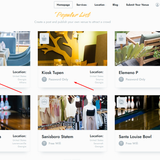
Hi all. Installed the eastcost theme with demo content. and some blocks have a wifi icon. I can’t figure out where I can remove it or replace it with others. And how can you replace the icons themselves for each of them?
Screen attached:
Anamaria Hello,
To increase page speed, I recommend checking which thumbnails you are using on your blocks. You might want to avoid having all of them enabled and optimize and regenerate images. You can use the EWWW Image Optimizer for image optimization and the OMGF plugin for fonts. Additionally, you can use the WP Rocket plugin.
here are many optimization guides provided by our users here in the forum, some made by us; you could check some of them
– https://www.infophilic.com/get-almost-100-pagespeed-newspaper-theme/
– https://forum.tagdiv.com/cache-plugin-install-and-configure/
– https://forum.tagdiv.com/how-to-make-the-site-faster/
– https://forum.tagdiv.com/topic/high-number-of-ajax-request/
– https://forum.tagdiv.com/topic/score-100100-pagespeed-with-newspaper-wordpress-theme/
– https://www.andraware.com/wp-rocket-for-newspaper-theme/
– https://forum.tagdiv.com/topic/page-speed-guide-for-2023-beginners-and-advanced/
– https://forum.tagdiv.com/topic/newspaper-theme-speedify-your-website/
– https://forum.tagdiv.com/topic/tutorial-chriss-custom-optimizations-for-functions-php-etc/
– https://forum.tagdiv.com/cloudflare-cdn/
– https://forum.tagdiv.com/topic/theme-causing-high-cpu-usage-2/
– https://forum.tagdiv.com/topic/sql-querys-high-cpu/
– https://forum.tagdiv.com/topic/newspaper-theme-slow-to-respond/
– https://premium.wpmudev.org/blog/optimizing-your-wordpress-database-a-complete-guide/
– https://underconstructionpage.com/optimize-wordpress-database/
– https://crunchify.com/better-optimize-wordpress-database-all-in-one-guide/
Thank you!
Anamaria Anamaria Hello,
For each category, on the flex block there is a special filter for the current category, which dynamically displays the posts from that category within each category.
The Posts Loop automatically filters the posts depending on the cloud template you set (for example, on the category page, there will be posted posts from that category) https://forum.tagdiv.com/posts-loop/
If there is an offset set, please check the block with “No posts” and delete it. Leave it empty with no space or value: https://app.screencast.com/Gh9jDf6t0XtLS
You can find the documentation here: https://forum.tagdiv.com/offset-feature/
Thank you!
 intmedia.adm
Hi, I want to add an icon in front of the record title depending on the content of the record. If there are pictures in the text, then a picture icon, if there is a video, then a video icon.
Such an icon should be displayed in all blocks where there is a record.
How can this be implemented?
 petar777
 Just reposting this, because you didn’t say anything about it
Also one suggestion – I think it would be a great idea to be able to style the tabs in the same way as the titles in the theme (I created my own css which does that but I think it would be good to have this as an option out of the box).
Anamaria Anamaria Hello,
You can set a video ad on the flex blocks -> https://i.imgur.com/bLf954N.png and posts loop.
Thank you!
Anamaria Hello,
Please edit the search page with the tagdiv Composer, click on the results(Posts Loop element) and delete the value of the offset posts. Let it empty with no space no value: https://app.screencast.com/Gh9jDf6t0XtLS
If you use a flex block there, then please set the special filter there Search – Current search.
Save the changes and view the results.
I hope that helps you!
Thank you!
Anamaria Hello,
Those are just blocks -> https://i.imgur.com/q30qPHt.png and elements from the Composer. Are you referring to editing the template? You can edit it like all the other templates.
Thank you!
Anamaria Hello,
I recommend using another block, maybe a flex block 1 and design like this https://i.imgur.com/nIKIeFm.png
Thank you!



