- TutorialsDefault Block Settings Guide
- NewspaperWP Rocket and Newspaper Theme: Optimization Guide
- TutorialsFrom WPBakery to tagDiv Composer
- TutorialsOffset Feature
- TutorialsWhat is Ajax preloading?
 acdmin
For those that need the Category Tag Cloud display (like the category cloud) – Template 2
 <?php

	$category = get_query_var('cat');

	$current_cat = get_category($cat);

$custom_query = new WP_Query( 'posts_per_page=-1&category_name='.$current_cat->slug.'' );

if ( $custom_query->have_posts() ) :

	while ( $custom_query->have_posts() ) : $custom_query->the_post();

		$posttags = get_the_tags();

		if ( $posttags ) {

			foreach( $posttags as $tag ) {

				$all_tags[] = $tag->term_id;

			}

		}

	endwhile;

endif;
$tags_arr = array_unique( $all_tags );
$tags_str = implode( ",", $tags_arr );
$args = array(
'smallest' => 12,
'largest' => 12,
'unit' => 'px',
'number' => 0,
'format' => 'flat',
'include' => $tags_str
);
wp_tag_cloud( $args );
?>
Styling with .td-post-small-box a, just add .tag-cloud-link
.td-post-small-box a, .tag-cloud-link{

  display: block;

  float: left;

  border: 1px solid #1b5b5b;

  margin-left: 4px;

  line-height: 8px;

  color: #ffffff;

  padding: 5px 8px;

  height: 20px;

  background-color: #1b5b5b;
}
 blukid
Newspaper Theme Version 8.7.2
I’ve noticed odd overlaying text when working with blocks. I’ve attached images of both the General and Style blocks while working in tagDiv Composer. Please advise on correcting this issue. Thanks.

 Simion C.
 Hi,
Most of the things you want to do would be solved by simply reading the block settings guide in the documentation
– https://forum.tagdiv.com/block-settings-guide/
Each grid and block can be set to display posts from the category you want, sorted as you want.
An invalid sorting will result in the elements not displaying any posts (no posts message). So please edit the page with the composer and configure the grids/blocks as you want (filter tab).
Please also try to post all the details in one reply, if you keep replying in your own topic you will only delay the response. We answer from oldest to newest, you will renew the topic if you keep replying.
Thanks
Simion C. Hi,
You can remove that plugin, it is helpful only in case of thumbnails problems
– https://forum.tagdiv.com/thumbnails-fix-strange-looking-images-on-blocks/
But after the regeneration process is done , the plugin would not be needed anymore. You can deactivate it safely.
Simion C. Hi,
Thank you very much for your appreciation. We try our best to provide a good theme for our users.
1. That seems to be a CORS problem, the loading of the font is denied
– https://www.screencast.com/t/dNU3i3AYa
These are some similar topics you can follow
– https://forum.tagdiv.com/topic/strange-chinese-symbols-replaced-icons-and-arrows/
– https://forum.tagdiv.com/topic/font-blocked-from-loading-by-cross-origin-resource-sharing-policy-no-access-co/
2. I don’t quite understand what you are referring to. This is how the main page looks
– https://www.screencast.com/t/gAXqiwNF
From what I see there is no background used. Under the header menu is a big grid, but I don’t know what you want to do with it. If you could provide some more details it would be helpful.
3. That is not possible with the options in the theme. The header logo is set once in the them panel and displayed on the whole website. It would only be possible with modifications in the theme files, like creating conditions based on category
– https://forum.tagdiv.com/topic/display-different-logo-on-specific-category/
An image would be possible in the category description if needed, if you have the Yoast SEO plugin this will add some more options in the category screen here
– https://www.screencast.com/t/jNmqGX5x
Thank you!
 Catalin
 Hello commandeleven,
You should regenerate the thumbnails using the Force Regenerate and Thumbnails Regenerate plugins. Please check the following documentation from here -> https://forum.tagdiv.com/thumbnails-fix-strange-looking-images-on-blocks/
Thanks for your understanding!
 rahul56
Hi,
Can you tell me how to edit the menu of Must Read Block in Home Page of Crafts Demo. It shows the categories but all the links point only to the home page.
Simion C. Indeed for the color change it will need a small modification, like this
– https://www.screencast.com/t/QCOagsCy
.td_block_big_grid_mob_1 .td_module_mob_2 .entry-title a {
}
That will work and you can change the color of the post titles. Sorry for my error. Please try again with that code.
Simion C. Hi,
The composer sidebar does not look as intended, seems to be broken. I have checked the text column widget, there is a text color setting in it with block header style 6
– https://www.screencast.com/t/cQeecwHR
Also in the text with title – https://www.screencast.com/t/UwgUWoq5Zz56
If you do not have these options, try deactivating the composer and removing it. Then install it again from the theme panel plugins section
– https://www.screencast.com/t/wumpbpYnRB5U
Check if the composer sidebar is affected by this. Also try in a different browser. Let us know.
Thanks
 Bogdan B.
 Hello,
This can only be done with customization. You will need to alter the css of the blocks in order to make them the same height. You will have to assigning an extra class to the slider and the block next to it so they can be targeted with css.
Here is an example on the default code, but this will alter every block that uses module mx1 and that is not desirable. That is why you need a custom class.
.td_module_mx1 .td-module-thumb{

height: 162px;

}

.td_block_14 .td-block-span12 .td_module_mx1 .td-module-thumb{

margin-top: 21px;

}
code with your custom class will look like so:
.mycustomclass .td_module_mx1 .td-module-thumb{

height: 162px;

}

.mycustomclass .td-block-span12 .td_module_mx1 .td-module-thumb{

margin-top: 21px;

}
result: https://www.screencast.com/t/29IpJWZZKCyi
There is also a responsiveness issue. The code needs to be adjusted for each of the 4 viewports. for desktop, tablets portrait and landscape as well as mobiles.
Change the values for each device to make it look properly on all devices. Use the advanced css box in the theme panel
Thank you!
Simion C. Hi,
That is the ajax filter, the categories that are shown there can be controlled if needed. You can enter specific category IDs in the ajax filter
– https://www.screencast.com/t/UHPYC7kcPS
Category IDs can be seen here for example
– https://www.screencast.com/t/vB8S5wxMB
– https://www.screencast.com/t/ceuiBY57O
More information about the block settings here in this guide
– https://forum.tagdiv.com/block-settings-guide/
The author name for blocks/modules can be removed here
– https://www.screencast.com/t/7WsCAb1jLkcM
Thank you!
 thebackbenchers
Hi i am unable to change posts in block header, my website is http://www.bankxpress.com please guide me
i want to change which post should appear there in
Block 15 of my home page
Block 19 around the world
and big image header home page style also vanished as like in demo business site
thank you
 dblackpro
Hello! Chose your product and was not mistaken – the best in the market. Thank you for your excellent work!
During the installation, there were several issues that could not be resolved independently. I would be grateful if you would give me answers.
1. I use a template with the plugin “WP Super Subdomains”, publishing categories on subdomains.
All functions and blocks of the theme work perfectly, except for the elements “td-icon-font”. On the main page, information pages, pages of archives and tags, icons are displayed (http://www.gorod-ok.info/).
And on subdomains of categories and on pages of posts – is not present (http://mendeleevo.gorod-ok.info/).
In which file should I specify the exact path to the library of this iconic font?
2. On the main page between the main menu and the content block, news from a specific tag is displayed (in my case, the tag ID = 9). And the picture of this news fills the main background of the site.
How to change the settings, that there would not be anything at this place, that is, immediately after the menu the content started, or the advertising banner was placed?
3. Is it possible to set different logos in each category (in my case – city emblems) or add a category image before heading on the category page?
Thank you.
 ctoweett
 Check under theme panel>block settings>thumbs on modules/blocks for the various thumbnails used by the theme.
 Freddy Meynard
Hi Guys
Im trying to create a layout using Block 9, which is essentially just a dynamic list of posts… however I really would like for the items to be sorted asc.
Alphabetically, currently items read left to right,
https://imgur.com/a/LwHjm
I would rather it be sorted on a typical list form, up and down, like so:
https://imgur.com/a/ITuul
How can this be achieved?
 rafael-l
Hi there, all my posts have a category for permalinks settings, and i need to exclude this specific category from the related articles, otherwise the related articles don’t work properly, i already tried everything that is on this forum like this: https://forum.tagdiv.com/topic/filtering-related-articles-at-bottom-of-post/
… and this: https://forum.tagdiv.com/topic/remove-category-from-related-articles-filter/
… and don’t work, i just need to the related articles don’t “get” a specific category, i was using this plugin: https://wordpress.org/plugins/wp-hide-category/ but it stoped working…
I’m using this option in the pannel : https://www.baixesoft.com/wp-content/uploads/2018/03/Hide-categories.jpg
… but the related articles “get” this category anyway…
I’m just wondering if i can try anithing different here
‘td_column_number’ => $td_column_number,
‘category_id’ => ‘-4’
If i use like this, all posts that have that category disappear from the block and the related articles don’t show nothing.
I appreciate any help, and please consider add more options in related articles in the theme pannel, users are asking for this since 2014. Thank you!
 ACT
ACT
Please tell me on your travel guide theme option, how to set the homepage–block 4, the top right side category? i do not need to show all, and only wish to list the ones we really want there, can we? check our site: https://asiacleantour.org/
Bogdan B. Hello,
You can add a bottom padding for the block to have the same spacing:
.wpp-list-with-thumbnails li{

padding-bottom: 26px;

}
Unfortunately you cannot add the date and timee with css.
The title seems to match the others.
Thanks.
 stockholmcff
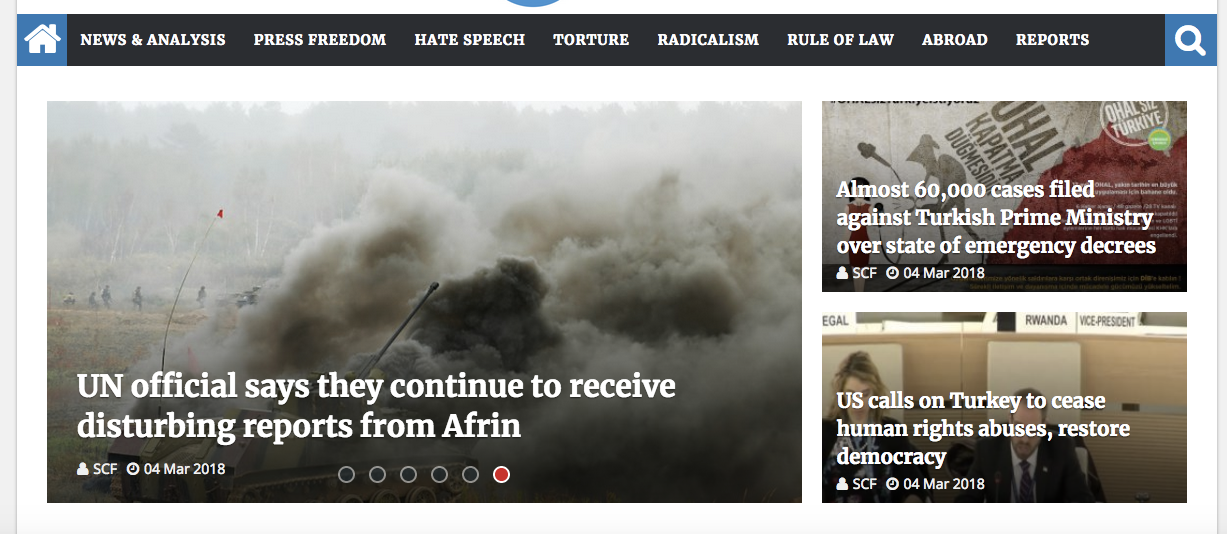
 As you could see in the picture, ( https://stockholmcf.org/wp-content/uploads/2018/03/1.png) I used “Slider” (the big box) and “block 14” with two posts in the same row. But could not arrange the height of slider. I want it to look like the grid with slider used in this page https://stockholmcf.org/ or in this pic (https://stockholmcf.org/wp-content/uploads/2018/03/2.png)
By the way, I am using Newspaper theme (news magazine).
Catalin Hello GregStewart,
That may be a thumbnail issue, please try to regenerate the thumbnails
– https://forum.tagdiv.com/thumbnails-fix-strange-looking-images-on-blocks/
The theme uses a center-top cropping for the thumbnails used by all modules
– https://forum.tagdiv.com/featured-image/
The resulting thumbnails are also affected by image aspect ratio
– https://forum.tagdiv.com/thumbnails-vs-featured-image-size/
If is not what you mean, please provide more details about your problem (provide some screenshots) and your website so I can identify the problem.
Thanks.
Catalin Hello Olya,
Unfortunately, I do not exactly understand what you mean. Do you want to display H3 or H4 in the sidebar? By default the title heading for Widgets in Sidebar is H4 and the theme does not allow you to change it from the panel, sorry! You should edit the theme core files and change the HTML for this, which is not a simple task, sorry! Also, if you want to have more header block styles at your sidebar’s elements please check here -> https://www.screencast.com/t/drI5417wMw If is not what you mean, please provide more details so I will be able to provide a more accurate response.
Hope this helps!
Thanks for your understanding!
Simion C. Inside the actual category page there is no spot for ad placement, at the moment. So you could only place ads in the sidebar. There are plans to modify the functionality of the category pages in a future update, to allow more customization. Sorry for any inconvenience caused.
You could try solutions provided in similar topics if you want
– https://forum.tagdiv.com/topic/ads-on-category-pages/
– https://forum.tagdiv.com/topic/how-to-add-or-created-ad-block-in-category-page/
Thanks
Catalin Hello espedfk2,
Unfortunately, the theme does not have any such an option that allows you to change these, sorry! All the settings regarding on pagination for blocks can be found here -> https://www.screencast.com/t/JwlBGgo3Up
Thanks for your understanding!
Bogdan B. Hello,
Please provide a link to your site so we can inspect the block.
Thank you!
 MacZil
Hi there,
Please help!
After updating my client’s site from Newspaper7 to Newspaper8 via the WordPress installation Method “C”, the site crashed and now I am unable to access the site both from the front-end and admin end.
This is the error message that is displayed when trying to load the site:
Fatal error: Class ‘td_config_helper’ not found in /home2/casablanca/public_html/wp-content/themes/Newspaper/includes/td_config.php on line 2582
Please can you help me sort this out ASAP.
Thanks!