
- NewsmagRequirements for Newsmag
- NewsmagHow to update the theme
- NewsmagtagDiv Social Counter tutorial
- NewsmagTop bar templates
- NewsmagAjax view count
 Anamaria
 Hello,
Please deactivate, delete and reinstall tagDiv Composer from Newspaper plugins => https://www.screencast.com/t/OrzLvR2j and clear all cache.
Thank you!
 Hispanic L.A.
 Thank you, Vlad. I always do that, using hispanicla.com/?nocache=1
Still, the big white space appears not in the desktop but in mobile.
Best, G
 Vlad S
 Hello!
Please make sure to clear your cache. I have investigated your website and everything seems to be in order on our side.
Thank you!
 Bettina
 Hello!
Please check your cache settings and clear the cache.
We tested with our theme the WP Super Cache and with the settings from our guide this is working correctly: https://forum.tagdiv.com/cache-plugin-install-and-configure/
Hope that helps you!
Thank you!
 fulrich101
 Yep, it was the WP Super Cache configuration.
Thanks. It worked.
Vlad S Hello !
This happens due to cache. Please follow our guide and make sure that WP Super Cache has been installed properly: https://forum.tagdiv.com/cache-plugin-install-and-configure/
Let us know the result.
Thank you !
Vlad S Hello!
You will have to first start looking for a plugin conflict. please deactivate ALL plugins except tagDiv ones, also if you are using child theme or cache plugin, deactivate them, clear all cache and try again.
Also you can try and remove and re-install the tagDiv Composer plugin and please send us a link to your website in order to take a look.
Let us know the results.
Thank you !
Vlad S Hello!
You will have to first start looking for a plugin conflict. please deactivate ALL plugins except tagDiv ones, also if you are using child theme or cache plugin, deactivate them, clear all cache and try again.
Also you can try and remove and re-install the tagDiv Composer plugin and please send us a link to your website in order to take a look.
Let us know the results.
Thank you !
Vlad S Hello!
I have inspected your website and it seems that your font is now working and everything seems to be in order. Please make sure to clear your cache.
Thank you!
Vlad S Hello!
Please check your tabs for ads. In Theme Panel – Ads – Header ads, please check, remove and re-add your ad code. Also make sure to clear your cache.
If possible send us a screenshot from Theme panel – Ads – Header ads.
Thank you!
 trispania
 Hi Anamaria,
I unistall no TagDiv Plugins (It’s installed Yoast SEO, WP Super Cache and AMP and tagDiv mandatory) but problem continue.
Thanks.
Rgds.
 rirakond
 Hello!
my website! Banglaseba
see the list of active third party plugins those i am using,
1- AMP
2- Easy Table of Contents
3- Jetpack
4- Rank Math SEO
5- Shortpixel Image Optimizer
6- WP Super Cache
I installed mobile theme manually. please see the attached screenshots.
https://imgur.com/Z376Y7Y
https://ibb.co/M5H0Hby
———————
If possible please let me know for image optimization which plugin should i use if not shortpixel?
and i like using rank math SEO.
kindly let me know if there is any problem from these mentioned plugins.
 Bettina
 Hello!
This could be a cache problem. We tested with our theme the WP Super Cache and with the settings from our guide this is working correctly: https://forum.tagdiv.com/cache-plugin-install-and-configure/
Please check also if is not a plugin conflict, deactivate ALL plugins except tagDiv ones, also if you are using child theme or cache plugin, deactivate them, clear all cache and try again.
Thank you!
Anamaria Hello,
I verify your website and seems that text comes from a plugin (I think is the cache plugin) => https://i.imgur.com/ZuILF0T.png, so, please do a test using tagDiv plugins, or you have set a code in Js Analytics (here https://www.screencast.com/t/9m4KbFeMdH2K)
Thank you!
 Racesport
 Hi Bettina,
Been a while but we found out that the cache plugin on status enable will have affect on our mobile version of the website.
We have widget in use wich will be dropped to the bottom of the website when we have our cache plugin enabled.
We can give you access to our test environment but it is hidden for the outside world.
Is there an IP address we can add to our white list so you can have a look?
 Kaino
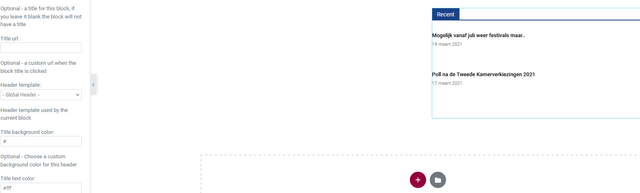
KainoOn a page in the elementor editor I’ve put a block which works fine, not showing the images in the editor but shows them live however the block header background and text color take the global color set in the theme or elementor.
So when I change the colors in the editor it shows but live it’s always the global colors.
I,ve check this on 3 different browsers, mobile, incognito browsers ofc with empty cache but the colors don’t change on the front end while when I change the color of a block header on the homepage made with tagDiv composer they will show up up after saving.
Could you investigate this?

Anamaria Hello,
Usually, this kind of problem is caused by the cache plugin that you use.
Also, if you are using Cloudflare, please make sure that is set as in our guide https://forum.tagdiv.com/cloudflare-cdn/, you need to disable the Rocket Loader.
Also, you can try to do a test using the theme plugins and other plugins that are tested with it, clear all cache and see if the problem persists.
Thank you!
Anamaria Hello,
Please make sure you have the tagDiv Standard Pack plugin activated, also clear your cache.
From the last update, this plugin is no longer required because the new demos are using cloud templates.
Thank you!
 IboroMW
Page views count on my post page is not going off after turning off the ajax page views count. I have purged all caches, but it is still the same.
Anamaria Hi,
Please make sure that you do not have a plugin conflict, please deactivate ALL plugins except tagDiv plugins, also if you are using child theme or cache plugin, deactivate them, clear all cache and try again.
Did you use WP Bakery? If yes, we strongly recommend using only one of those plugins with our theme (WP Bakery or tagDiv Cloud Library, but not both).
Thank you!
 Calin
Calin Hi Hardeep, so this problem is happening only using theme plugins?
Also sometimes this kind of problem can be from some shot configurations, too, for example if you use object cache, modSecurity …
Also if the problem persist, we’ll like to investigate it, for this please make a full backup, and contact us at contact@tagdiv.com, include wp-admin and cPaenl access, also add the link of this topic in mail to can identify you.
Thank you!
Anamaria Hello,
I saw in the video you have an admin-ajax error when you try to upload the image in post (isn’t a page) usually, this issue is related to a firewall or security module which blocks the admin-ajax.php request.
If you don’t use a security plugin, please ask your host about this, maybe you have a security module that blocks this.
If you use a plugin like Wordfence please set it in learning mode.
Also, if you are using Cloudflare, please make sure that is set as in our guide https://forum.tagdiv.com/cloudflare-cdn/, you need to disable the Rocket Loader.
Also, make sure that all the settings are like in our requirements, please follow the guide carefully: https://forum.tagdiv.com/requirements-for-newspaper/
and please increase all lower requirements, and follow all steps.
Also, as I said above, please do a test using only tagDiv plugins clear all cache (also from your browser) and try again.
Thank you!
Vlad S Hello!
Can you first confirm that all the settings in the WP Super Cache have been done accordingly to our guide: https://forum.tagdiv.com/cache-plugin-install-and-configure/
Thank you!
Vlad S Hello!
Please make sure that you are running the latest AMP version. Also please check for a plugin conflict. Disable all the plugin except AMP and Tagdiv ones,clear your cache and test to see if this works.
At the moment your homepage is not serving AMP at all.
Thank you!
 acsupport
After updating to Newspaper 11, the social share buttons are no longer displaying properly (image) and (live site).
I have already removed and reinstalled the tagDiv plugins and cleared the cache as suggested in other posts.
Thank you

