
- NewsmagRequirements for Newsmag
- NewsmagHow to update the theme
- NewsmagtagDiv Social Counter tutorial
- NewsmagTop bar templates
- NewsmagAjax view count
 Vlad S
 Hello!
First please reinstall the tagDiv Composer plugin, usually this may occur due to broken links. If this does not works, You will have to start looking for a plugin conflict. please deactivate ALL plugins except tagDiv ones, also if you are using child theme or cache plugin, deactivate them, clear all cache and try again.
Let us know the result!
Thank you!
 Bettina
 Hello!
For this problem, we recommend using WP Super Cache plugin with the settings from our guide: https://forum.tagdiv.com/cache-plugin-install-and-configure/
Thank you!
Bettina Hello!
First, clear your cache and please provide some screenshots from your iphone 12 with the issue.
Thank you!
 simchris
 AMP is mainly useful if you’re looking for a simpler, pure mobile experience for your information; kind of like the WordPress default themes. The idea is to make page load faster in places with slow internet, slow mobile connections, etc. — there is no inherent ‘better’ reason to do AMP vs normal desktop responsive layouts, unless you have very slow server and are unable to pass Google Lighthouse mobile/desktop tests for best practices.
In our case we use Newsmag desktop theme for desktop, ipad, and mobile. We use the AMP plugin as fallback for Google to serve that simple version to those on slow connections. AMP is something Google invented to cache popular content in the cloud for slow phone connections. Really not intended to replace ‘normal’ pages, site layouts, and almost nobody actually doing that unless a simple blog.
SEO is about pagespeed, best practices, optimization for loading elements, and the like. You can test your site using the Chrome web browser by learning to use the ‘console’ to see if your site is horribly slow — in that case AMP might be worth looking into as default format to serve, but it is not ‘better’ for SEO than normal pages. Having both normal pages and AMP format pages also does not hurt SEO as Google knows one is the ‘canonical’ version and one is ‘alt’ version.
(( I don’t work here, just longtime user. ))
 lyon
lyonHello, We are using Newspaper Theme version 10.4 on our multisite network, with WordPress 5.7.2. Ever since updating to 10.4, we’ve had an issue that affects just two of our sites on the network, one of which is the main site. All the other sites have no issue.
What happens is when we build a page with a sidebar in TD Composer, and leave the page template set to default, we are seeing a strange overlapping sidebar:
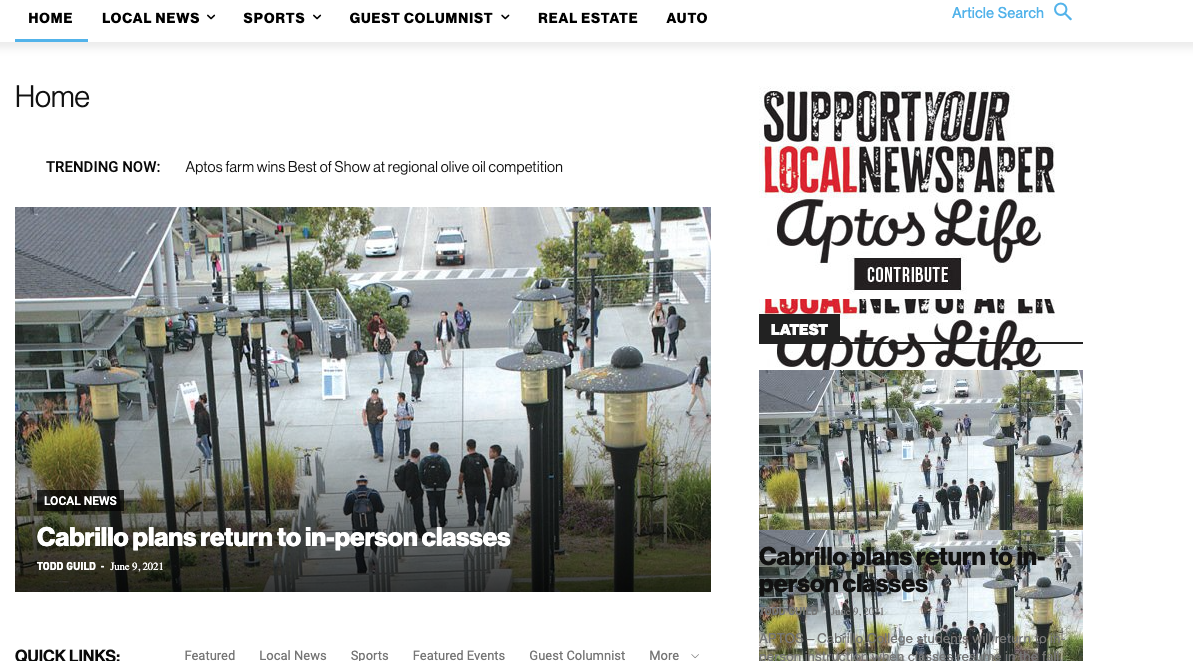
This is how we have the sidebar set in TD Composer:
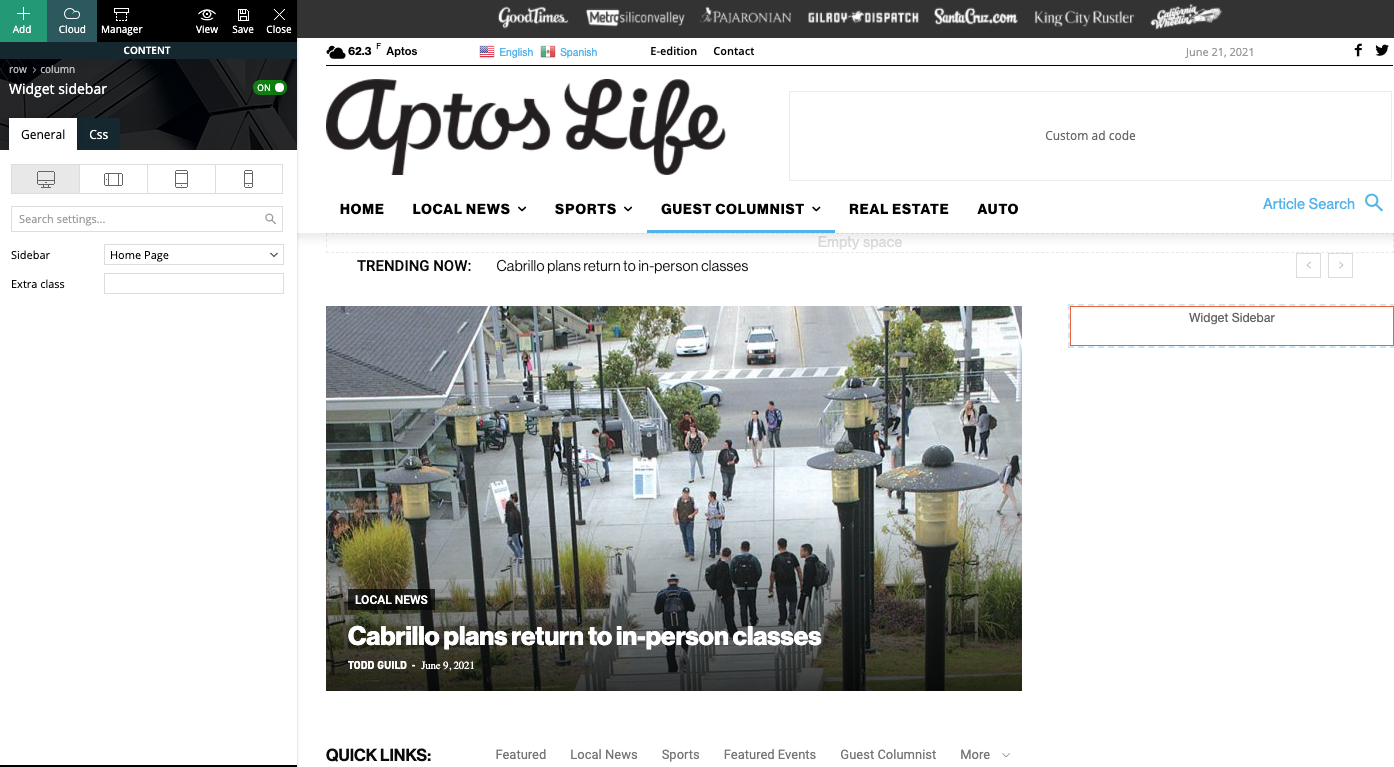
As a temporary workaround we can set the page template to Pagebuilder + latest articles + pagination, but this opens up a whole new set of problems. For example, if we try to change or hide the sidebar in the “Homepage latest articles” settings, no changes occur. Even something such as changing the title on the post loop won’t take affect.
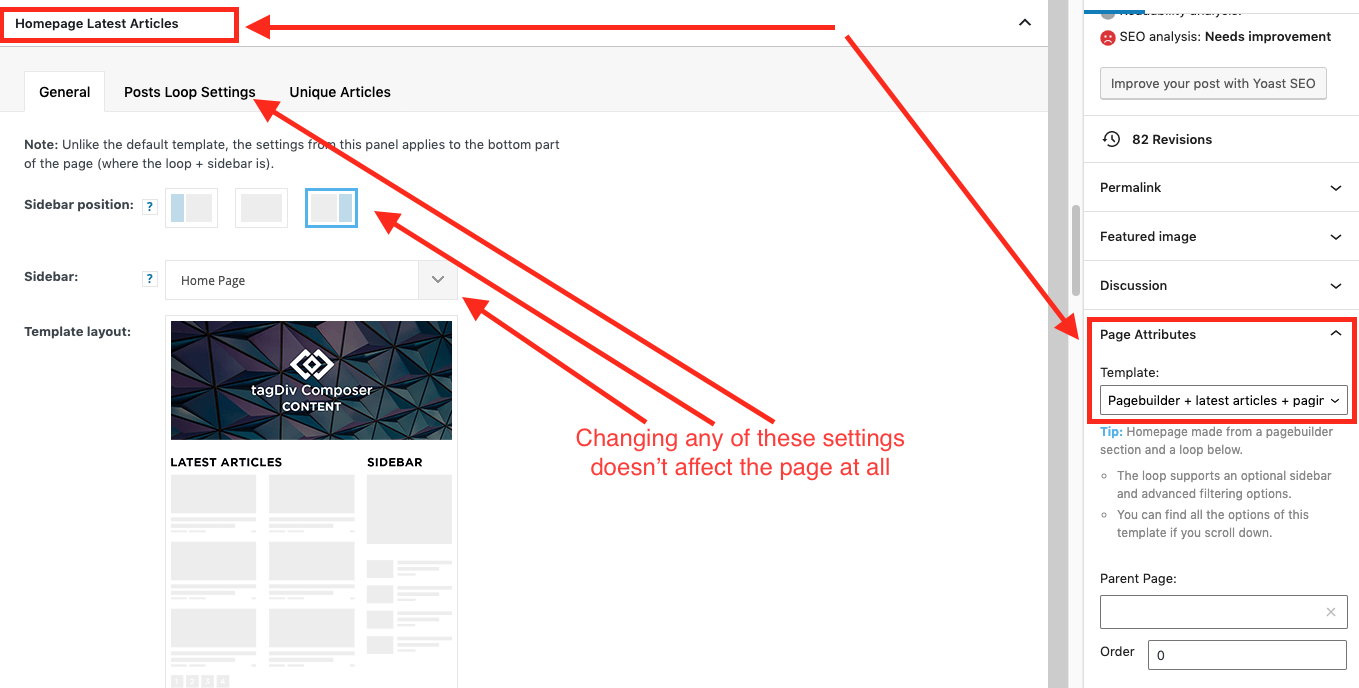
As a result, instead of two overlapping sidebars, we now have two duplicate sidebars stacked on top of each other:
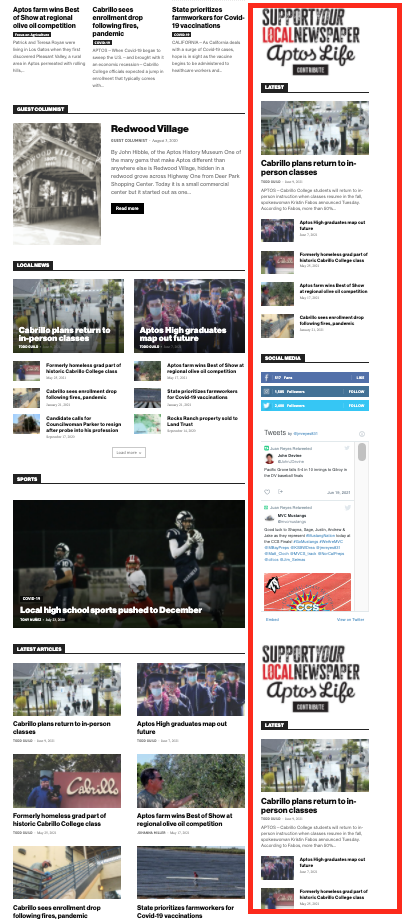
Is there any way to fix these issues? Ideally we would like to leave the page template set to default, with the overlapping sidebars eliminated.
We’ve already tried disabling all our plugins to check for conflicts. Here is some more info from the System Status panel:
Theme name Newspaper
Theme version 10.4
Theme database version 10.4
HTTP channel test wordpress
Installed demo Default – demo ID: default | install type: full
Theme Mobile Newspaper mobile version
php.ini configuration
Server software Apache/2.4.38 (Debian)
PHP Version 7.3.19-1~deb10u1
post_max_size 32M – You cannot upload images, themes and plugins that have a size bigger than this value. To see how you can change this please check our guide here.
max_execution_time 120
max_input_vars 3000
SUHOSIN installed false
PHP extensions
mbstring available
GD library available
WordPress and plugins
WP Home URL https://aptoslife.com
WP Site URL https://aptoslife.com
WP version 5.7.2
WP multisite enabled Yes
WP Language en_US
WP Memory Limit 1 GB/request
WP_DEBUG False
Caching plugin No caching plugin detected – for best performance we recommend using WP Super Cache
Bettina Hello!
Try to do these steps:
1. disable TagDiv Composer
2. uninstall(delete) TagDiv Composer
3. clear cache (if cache plugin exists)
4. install TagDiv Composer
5. activate TagDiv Composer
6. clear cache (if cache plugin exists)
Also, please make sure that all the requirements are met as you can see here: https://forum.tagdiv.com/requirements-for-newspaper/
Let me know the results!
Thank you!
Bettina Hello!
I checked your website and it seems to work just fine.
Did you solved your issue?
Please try to clear your cache and try again.
Thank you!
Bettina Hello!
If you want to use a mobile page, then you need to assign it to your homepage in order to be displayed. For more information about this mobile version please take a look in this article: https://tagdiv.com/newspaper-10-3-7-update-brings-customizable-and-fast-mobile-pages/
We recommend using the WP Super Cache plugin: https://forum.tagdiv.com/cache-plugin-install-and-configure/
Thank you!
Bettina Hello!
All seems to be alright now.
Did you solved your issue?
Please check for a plugin conflict and clear your cache.
Thank you!
Vlad S Hello!
Please make sure to clear your cache and always inspect your website using the Incognito mode too. I have followed your steps and the first issue does not occur. I always see different posts.
For the second problem, we need to take a look to see what can be done there. Please contact us via email at contact@tagdiv.com and provide the following:
– admin url and credentials
– A link to this topic in order to identify you
Our team will take a look ! Please note that at the moment the support is a bit crowded. Replying may take up to 48 hours.
Thank you !
 denya
denyaMy correct mobile version. loads in 2 seconds.
After. An unconfigured template is displayed.
Correct version.
https://prnt.sc/15wdgu2
Wrong version.
https://prnt.sc/15wdx6z
Here’s a video.
My actions
Clearing the cache didn’t help.
No plugin conflict.
My site nevessta.ru
The problem is with this mobile version.
https://nevessta.ru/platya/
 cdpragazzi
 you think it’s the cache, I didn’t think about it. I check
 Paata
Paata Bettina, thank you for advice. I did everything you told me, but still the problem was not fixed 🙁 I do not use the cache plugin. please, tell me what can i do Else?
plugin page:
https://drive.google.com/file/d/193mjxCyYkASNUNqUCcHAM5bpXrpZXcHw/view?usp=sharing
Composer:
https://drive.google.com/file/d/1bBN_BtVHHhT3GOuGO0rQcWDQSRgl8Aig/view?usp=sharing
web site:
https://drive.google.com/file/d/1ZcM0jlFE4zXe4eT9nyh9b2-lrBbf-Txc/view?usp=sharing
 Anamaria
 Hello,
This is strange. The issue can be from a plugin conflict, that’s why, please deactivate ALL plugins except tagDiv ones, also if you are using child theme or cache plugin, deactivate them, clear all cache(also from your browser) and try again.
Also, if you don’t have the red zone, please try with right-click menu to delete it https://www.screencast.com/t/9nWg97KsS.
Thank you!
Anamaria Hello,
The issue can be from a plugin conflict, that’s why, please deactivate ALL plugins except tagDiv ones, also if you are using a child theme or cache plugin, deactivate them, clear all cache and try again.
Also, if you use Rank Math plugin and All in One Seo plugin can interfere with our theme.
Thank you!
Bettina Hello!
This is strange. The issue can be from a plugin conflict, that’s why, please deactivate ALL plugins except tagDiv ones, also if you are using child theme or cache plugin, deactivate them, clear all cache(also from your browser) and try again.
If this problem is not solved after that, then we need to take a look and see what happened there.
Please contact us via email at contact@tagdiv.com and provide the following:
– admin url and credentials
– a link to this topic in order to identify you
Our team will take a look!
Thank you!
Anamaria Hello,
Seems you created a mobile page, the header and footer are taken from the standard ones.
So if you want to use a responsive version, please remove the mobile page, set it on “No mobile page” => https://www.screencast.com/t/E5FO7ZBH and then the responsive version will load.
Also, if you want to use the mobile page you need to edit the mobile page, and in Manager (Website Manager) you need to import or the easy way is to convert the existent footer like this => https://www.screencast.com/t/HrjOBNayd
This is a video about Responsive Newspaper Theme, AMP & Mobile Theme, Mobile Pages & Templates -> https://www.youtube.com/watch?v=SpGkOnJeNZY
Also, please clear your cache.
Thank you!
Anamaria Hello,
Usually, this issue is caused by a plugin conflict, that’s why, please deactivate ALL plugins except tagDiv ones, also if you are using a child theme or cache plugin, deactivate them, clear all cache and try again.
Also, if you are using Cloudflare, please make sure that is set as in our guide https://forum.tagdiv.com/cloudflare-cdn/ , you need to disable the Rocket Loader
Let me know the results!
Thank you!
Anamaria Hello,
What cache plugin do you use?
Please clean your cache (eve from your browser) and try again.
Also, please ask your host if it has a cache plugin installed.
Thank you!
 cyrus
cyrusHello,
We have 5 licenses to Newspaper 9 Themes. Our main site, theaiorganization.com is on old newspaper9 version. Our speed for homepage has never been faster than 2.4 seconds, and 1.6 for post pages, with usual 3.0 seconds on main page which is not satisfacory. Each technician we consulted with stated it is the coding inside Newspaper9.
1. When we updated to the new WordPress 5.72, it broke the Tagdiv Composer, we had to uninstall, reverse to previous wordpress version, and reset the entire website for theme to work with Tagdiv Composer. Is it because Tagdiv has bugs related to new wordpress or not yet compatible? Also, how should we get to upgrade to Newspaper 10 and to 11?
2. Tag Div AMP app for faster speed, after installing the AMP app, the Tagdiv Composer also has issues. Why?
3. What is the general speed Newspaper 9 is supposed to achieve for load in? Our testing process was with pingtool and mostly with Gmetrix speed test. We see other themes or your competitors, achieve 1.0 seconds with more data than we have, compapered to the Newspaper 9 3-4 seconds.
Please provide solutions and direct answers to each question and issue with pictures, and directions so we can obtain around 1 second. We use Cloudflare to ensure good security and fast service, so the Theme here is the issue. We also have Plugin for Cache.
Thank you,
Jill O’Connor
Staff,
The AI Organization
Bettina Hello!
If you mean TagDiv Composer, then be sure you use a cloud template and not a default one.
Try to do these steps also:
1. disable TagDiv Composer
2. uninstall(delete) TagDiv Composer
3. clear cache (if cache plugin exists)
4. install TagDiv Composer
5. activate TagDiv Composer
6. clear cache (if cache plugin exists)
Thank you!
Bettina Hello!
Try to do these steps:
1. disable TagDiv Composer
2. uninstall(delete) TagDiv Composer
3. clear cache (if cache plugin exists)
4. install TagDiv Composer
5. activate TagDiv Composer
6. clear cache (if cache plugin exists)
Please start looking for a plugin conflict, deactivate ALL plugins except tagDiv ones, also if you are using child theme or cache plugin, deactivate them, clear all cache(also from your browser) and try again.
Let me know the results!
Thank you!
 duck1970
 Hello Anamaria. I have uninstalled W3 cache and I have installed WS Super Cache, I notice that now everything works fine again. Thanks for your great help. All the best
 pduke7
Hello,
URL: https://prive.tipsmaker.net/ (staging)
Old URL to be updated : https://www.tipsmaker.net/. (Theme V.9)
Theme version 10.4
Updated from 9.xxx and i can see few new css files like “legacy” etc.
A good page example where the problem described below is happening
https://prive.tipsmaker.net/efage-gero-soto
In order to override css files i created a style.css in child theme’s folder. Styles from this file do not overide all default css.
As far as i can understand using Theme panel’s Custom code filed is the only way to override all css files. Including legacy_css files etc.
And it works. It is very incovinient to edit this field instead of a custom file, nevetheless it works.
BUT when the site loads, it first loads the default css and then changes to the css used in Custom code.
Widths load default and after a second they resize to the custom style.
Even with cache enabled.
How can i change this behaviour ? While the theme is great, this one gives a very bad impression to the visitor.
cheers
Pan
 Alex
Alex I tried disabling the plugins and clearing the cache but it didn’t fix. I will send an email to tagdiv with the credentials.
Thanks for the support.
