- NewspaperWP Rocket and Newspaper Theme: Optimization Guide
- TutorialsWhat is Ajax preloading?
 rafael-l
 Google Core Web Vitals hold us accountable for users bad connection and processing power. So, all we can do is our best… My scores are 100 in lab tests (with newspapper), but not so good in field data. And we also have AdSense and so on…
The Pro theme is ultra optimized for that, but I hope it can improve. Core Web Vitals is a very unfair and HARD thing in my opinion and I have a good investment in CDN (Cloudflare) and so on…
For last, I’m always here reading this forum for help in ways I can improve…
Thank’s!
 Anamaria
 Hello,
There are a lot of factors which can make your site slow. Make sure you use only some templates and fewer functionalities and options.
Some factors which you need to take into account are:
External factors: server speed, if you are using CDN or not, the external resources loaded by your website like ads, fonts, tracking scripts like Facebook Pixel, Google Analytics, Twitter analytics, Hotjar and so on.
Internal factors: the number of elements on the page, image size, image formats, if you are using mobile optimized layouts, console errors, if you are using the Standard Pack plugin or not, if you are using the PRO demo or a standard one.
we can take a look by email at contact@tagdiv.com, please provide the wp-admin access but we cannot guarantee that we can help you 100%, to increase your page speed.
Please note that page speed is not covered by the support team: https://forum.tagdiv.com/newspaper-theme-support/
Thank you!
Anamaria Hello,
There are a lot of factors which can make your site slow. Make sure you use only some templates and fewer functionalities and options.
Some factors which you need to take into account are:
External factors: server speed, if you are using CDN or not, the external resources loaded by your website like ads, fonts, tracking scripts like Facebook Pixel, Google Analytics, Twitter analytics, Hotjar and so on.
Internal factors: the number of elements on the page, image size, image formats, if you are using mobile optimized layouts, console errors, if you are using the Standard Pack plugin or not, if you are using the PRO demo or a standard one.
we can take a look by email at contact@tagdiv.com, please provide the wp-admin access but we cannot guarantee that we can help you 100%, to increase your page speed.
Please note that page speed is not covered by the support team: https://forum.tagdiv.com/newspaper-theme-support/
Thank you!
Anamaria Hi,
There are many optimization guides provided by our users here in the forum, some made by us; you could check some of them
– https://forum.tagdiv.com/cache-plugin-install-and-configure/
– https://forum.tagdiv.com/how-to-make-the-site-faster/
– https://forum.tagdiv.com/topic/high-number-of-ajax-request/
– https://www.infophilic.com/get-almost-100-pagespeed-newspaper-theme/
– https://forum.tagdiv.com/topic/score-100100-pagespeed-with-newspaper-wordpress-theme/
– https://www.andraware.com/wp-rocket-for-newspaper-theme/
– https://spraythemes.com/newspaper-theme/how-to-speed-up-the-newspaper-wordpress-theme-using-wp-rocket/
– https://forum.tagdiv.com/topic/newspaper-theme-speedify-your-website/
– https://forum.tagdiv.com/topic/tutorial-chriss-custom-optimizations-for-functions-php-etc/
– https://forum.tagdiv.com/cloudflare-cdn/
– https://forum.tagdiv.com/topic/theme-causing-high-cpu-usage-2/
– https://forum.tagdiv.com/topic/sql-querys-high-cpu/
– https://forum.tagdiv.com/topic/newspaper-theme-slow-to-respond/
– https://premium.wpmudev.org/blog/optimizing-your-wordpress-database-a-complete-guide/
– https://underconstructionpage.com/optimize-wordpress-database/
– https://crunchify.com/better-optimize-wordpress-database-all-in-one-guide/
Maybe your hosting provider can provide some advice as well.
Thank you!
 First Friend
Please provide a proper & exact guide to improve the newspaper theme. I have read your articles like this below, but speed is not increased after follow this all guide.
– https://forum.tagdiv.com/cache-plugin-install-and-configure/
– https://forum.tagdiv.com/how-to-make-the-site-faster/
– https://forum.tagdiv.com/topic/high-number-of-ajax-request/
– https://www.infophilic.com/get-almost-100-pagespeed-newspaper-theme/
– https://forum.tagdiv.com/topic/score-100100-pagespeed-with-newspaper-wordpress-theme/
– https://www.andraware.com/wp-rocket-for-newspaper-theme/
– https://spraythemes.com/newspaper-theme/how-to-speed-up-the-newspaper-wordpress-theme-using-wp-rocket/
– https://forum.tagdiv.com/topic/newspaper-theme-speedify-your-website/
– https://forum.tagdiv.com/topic/tutorial-chriss-custom-optimizations-for-functions-php-etc/
– https://forum.tagdiv.com/cloudflare-cdn/
– https://forum.tagdiv.com/topic/theme-causing-high-cpu-usage-2/
– https://forum.tagdiv.com/topic/sql-querys-high-cpu/
– https://forum.tagdiv.com/topic/newspaper-theme-slow-to-respond/
– https://premium.wpmudev.org/blog/optimizing-your-wordpress-database-a-complete-guide/
– https://underconstructionpage.com/optimize-wordpress-database/
– https://crunchify.com/better-optimize-wordpress-database-all-in-one-guide/
 ne7worker
Hi! I put different ads from Adsterra and PushAds on website but it is not showing up. How can I solve this issue?
Website: uncuts.net
Optimizing plugin: WP-Rocket
Security: Wordfence
CDN: Cloudflare
Anamaria Hi,
There are many optimization guides provided by our users here in the forum, some made by us; you could check some of them
– https://forum.tagdiv.com/cache-plugin-install-and-configure/
– https://forum.tagdiv.com/how-to-make-the-site-faster/
– https://forum.tagdiv.com/topic/high-number-of-ajax-request/
– https://www.infophilic.com/get-almost-100-pagespeed-newspaper-theme/
– https://forum.tagdiv.com/topic/score-100100-pagespeed-with-newspaper-wordpress-theme/
– https://www.andraware.com/wp-rocket-for-newspaper-theme/
– https://spraythemes.com/newspaper-theme/how-to-speed-up-the-newspaper-wordpress-theme-using-wp-rocket/
– https://forum.tagdiv.com/topic/newspaper-theme-speedify-your-website/
– https://forum.tagdiv.com/topic/tutorial-chriss-custom-optimizations-for-functions-php-etc/
– https://forum.tagdiv.com/cloudflare-cdn/
– https://forum.tagdiv.com/topic/theme-causing-high-cpu-usage-2/
– https://forum.tagdiv.com/topic/sql-querys-high-cpu/
– https://forum.tagdiv.com/topic/newspaper-theme-slow-to-respond/
– https://premium.wpmudev.org/blog/optimizing-your-wordpress-database-a-complete-guide/
– https://underconstructionpage.com/optimize-wordpress-database/
– https://crunchify.com/better-optimize-wordpress-database-all-in-one-guide/
Maybe your hosting provider can provide some advice as well.
Thank you!
 limitlessv
Hello,
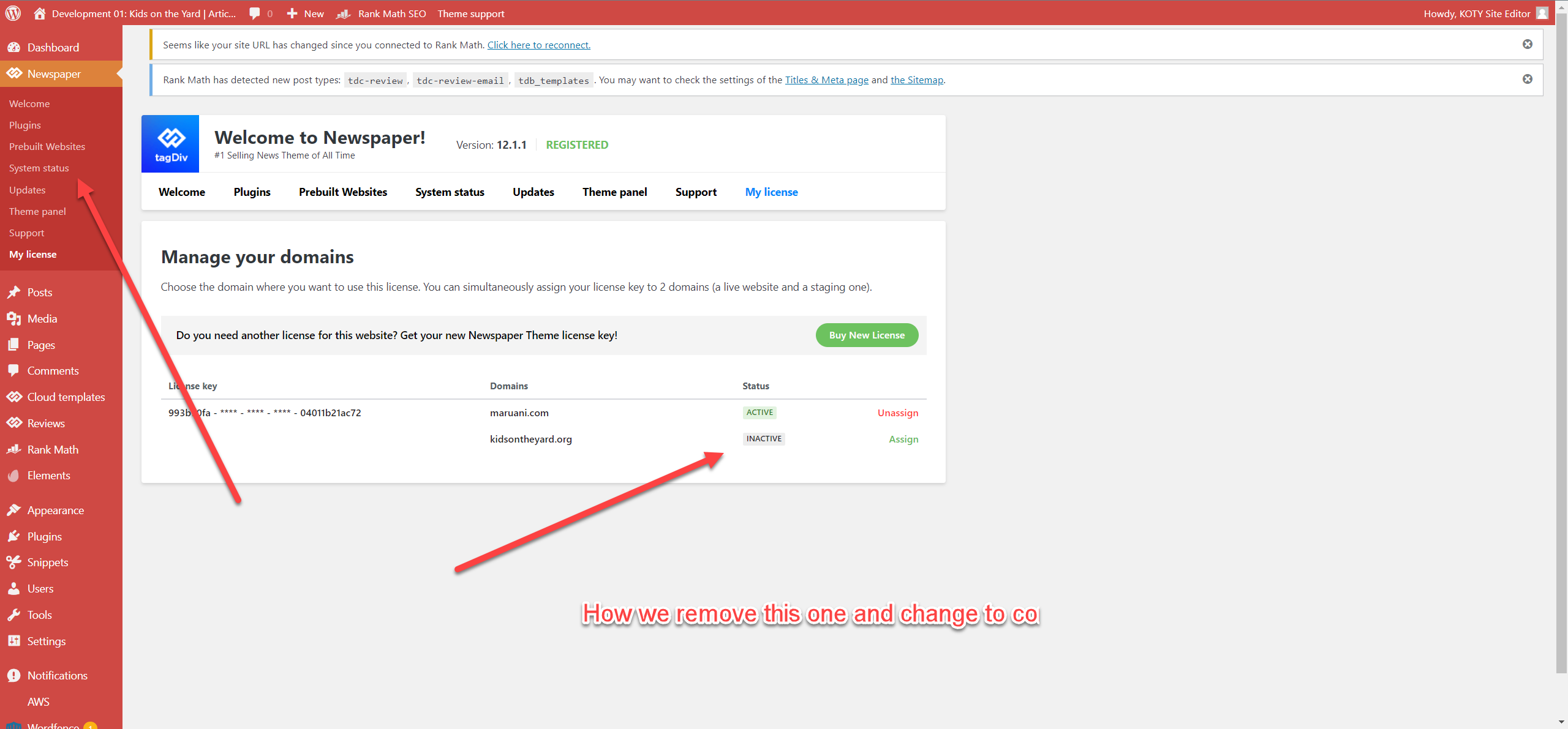
We have about 5 or 6 licenses for Newspaper.
We install a dev site, probably with the wrong licenses
How we replace it
https://media02.cdn.kidsontheyard.com/articles/wp-content/uploads/2022/11/23073544/2022-11-23_7-33-27.png
 John Prince
 I’ve got the same problem here as well…
https://mycdnprince.ca/Capture.PNG
 Calin
Calin Hi,
You can say it’s a “viral campaign” so many infections have been reported with different themes, not only with Newspaper or Newsmag.
I did more research and this malware is not from the theme, there are some viruses that are injected everywhere, in themes, plugins, and files.
Here are some reports and suggestions to fix the problem:
– https://wpxss.com/wp-admin/how-to-clean-trick-cofounderspecials-com-malware/
– https://guides.magefix.com/2022/09/cdn-weatherplllatform-com/
We will do more research and try to help as best we can!
Thank you!
 eCronik
Good morning,
I’ve started building the site without wanting the images to open up in a lightbox, but now changed my mind. So the global setting for modal is set to off, and all images in the posts have their link set to none.
I’ve turned on modal globally now, but the images don’t open in a lightbox. Do I need to go over all the posts to link every image to the media URL again (if so, is there any easier way?) or did I miss another setting in the theme panel?
Also I think there is a general problem with modal for my featured images (using image-CDN for all of them). Would be cool if you could help me out, here is a link to my site: https://tinyurl.com/3b2tv5d9
Thanks and best regards,
eC
Anamaria Hi,
For Edit Content, please check the console, maybe you have 403 or 404 error -> https://forum.tagdiv.com/topic/column-text-edit-content-doesnt-show-or-save/
There are many optimization guides provided by our users here in the forum, some made by us; you could check some of them
– https://forum.tagdiv.com/cache-plugin-install-and-configure/
– https://forum.tagdiv.com/how-to-make-the-site-faster/
– https://forum.tagdiv.com/topic/high-number-of-ajax-request/
– https://www.infophilic.com/get-almost-100-pagespeed-newspaper-theme/
– https://forum.tagdiv.com/topic/score-100100-pagespeed-with-newspaper-wordpress-theme/
– https://www.andraware.com/wp-rocket-for-newspaper-theme/
– https://spraythemes.com/newspaper-theme/how-to-speed-up-the-newspaper-wordpress-theme-using-wp-rocket/
– https://forum.tagdiv.com/topic/newspaper-theme-speedify-your-website/
– https://forum.tagdiv.com/topic/tutorial-chriss-custom-optimizations-for-functions-php-etc/
– https://forum.tagdiv.com/cloudflare-cdn/
– https://forum.tagdiv.com/topic/theme-causing-high-cpu-usage-2/
– https://forum.tagdiv.com/topic/sql-querys-high-cpu/
– https://forum.tagdiv.com/topic/newspaper-theme-slow-to-respond/
– https://premium.wpmudev.org/blog/optimizing-your-wordpress-database-a-complete-guide/
– https://underconstructionpage.com/optimize-wordpress-database/
– https://crunchify.com/better-optimize-wordpress-database-all-in-one-guide/
Maybe your hosting provider can provide some advice as well.
Thank you!
Calin Hello,
I checked your website and I see that you have an error in the console – https://i.imgur.com/X2V1fdc.png, this one is related to Rocket loader from CDN, please disable it and set its settings like in our guide – https://forum.tagdiv.com/cloudflare-cdn/
Also, after the error is resolved and the problem persists, please do a test using only tagDiv plugins, in case the problem persists, then please contact us via email at contact@tagdiv.com and please provide wp-admin access and also include the link of this topic to identify you.
Thank you!
 Bettina
 Hello David!
I can see an error from CDN, so please check this topic: https://forum.tagdiv.com/cloudflare-cdn/
Please disable the Rocket Loader.
I hope that helps you!
Thank you!
Anamaria Hello,
The problem is related to this error -> https://i.imgur.com/vAdzPE8.png
To fix this error please follow these articles
-> https://medium.com/@dtkatz/3-ways-to-fix-the-cors-error-and-how-access-control-allow-origin-works-d97d55946d9
-> https://developer.mozilla.org/en-US/docs/Web/HTTP/CORS/Errors/CORSMissingAllowOrigin
-> https://talhasariyuerek.com/en/cors-policy-no-access-control-allow-origin-solution/
-> https://crunchify.com/how-to-fix-access-control-allow-origin-issue-for-your-https-enabled-wordpress-site-and-maxcdn/
Thank you!
 deric
derichello
I have been using the newspaper theme for 5-6 months.
It was working quite fine since today(except for few things)
However, the theme is making a big error to my website today.(https://mugtimes.com)
A few hours ago, I found out that my website has gone too slow and showing 504 gateway time out error.
I asked my CDN support agent to check for this issue.
And he told me this.
———————————–
From what I can see the issue comes from the website theme as it is making more than 200K requests and is putting a load on the website making it unable to load properly and/or timing out.
What I can suggest in this case is to contact the theme developers and in the meantime to switch your website theme.
The query that is making so many requests is this one: wp-admin/admin-ajax.php?td_theme_name=Newspaper&v=12
You can provide it to the theme developers so that they can take a look at what the issue might be there.
You could provide them with the string I gave you: wp-admin/admin-ajax.php?td_theme_name=Newspaper&v=12
And ask them to investigate why it could be making that many requests – around 200K. Additionally you can ask them to look into a possible solution to the issue.
——————————————–
(Since, I am not very good at english, I had to attach the message from support agent of my CDN rather than ask you in my words. Please forgive me for this.)
Could you check this issue. I’m quite in hurry since I cannot access my website properly and so many traffic is coming in to my website these days.
Thank you
 nadiaafz
Hey, this is my website: https://ottmojo.com/
I’m using NFT News PRO template. I have used other templates as well but the design is still broken.
However if i’m logged in as Admin, website design looks fine.
I’m using BunnyCDN, i have purged many times and also disable the plugin to see if the problem gets resolved but it doesn’t.
BunnyCDN WP Settings: https://imgur.com/XqguBLA
BunnyCDN: https://imgur.com/mw6A8gs
Cloudflare Settings: https://imgur.com/6cdHxrL
Please help me resolve the issue as soon as possible!
Calin There are many optimization guides provided by our users here in the forum, some made by us; you could check some of them
– https://www.infophilic.com/get-almost-100-pagespeed-newspaper-theme/
– https://www.andraware.com/wp-rocket-for-newspaper-theme/
Also, if you are using Cloudflare, please make sure that is set as in our guide https://forum.tagdiv.com/cloudflare-cdn/, you need to disable the Rocket Loader.
Let me know the results!
Thank you!
Calin Hi,
The cache plugin is correctly set. I see that you also have the autoptimize plugin, please set it like in our guide -> https://forum.tagdiv.com/autoptimize-install-configuration/
Also, do you use Cloudflare (CDN), if yes, please check it like this -> https://forum.tagdiv.com/cloudflare-cdn/
The wp-rocket can be used too. The users who use it reported a better performance in speed, but this plugin is not free.
Thank you!
Anamaria Hello mgiannelis,
If you used the tagDiv Analyzer tool, then please use FTP, cPanel, or File manager and remove the generated files from this path wp-content/td_cache (sample delete all files from inside the td_cache). Normally the cache should apply only when the analyzer displays a green bullet.
On Cloudflare settings, a developer just tested the mentioned settings from this guide https://forum.tagdiv.com/cloudflare-cdn/ and using those settings there were no problems, we hope that he will also test Cloudflare APO in the following days.
About the litepseed and Guest Mode, as we have already discussed, it is an untested plugin and has many options that can interfere with the theme, if you want to use it is your choice, only that we cannot help with the options that must be set, mostly css and javascript options it interferes with the theme.
As for the “warnings” it is happening on Newspaper v12.1? if yes, can you please actually let us know what is that warning? In the screenshot, we see only the files but not the working message.
Thank you!
 mgiannelis
 Here is more information on this issue
As mentioned. If I turn off “Guest Mode” in litespeed or use another plugin. When clicking on my site from google.com search the site comes out broken.
Now. With guest mode turned on. And I add the following to css excludes in litepseed. The site will again be broken when clicking on it from google search (the front page and other pages such as posts)
tenup-tabs-style-inline-css
global-styles-inline-css
(tried removing these to see if would fix the menu issues with the drop down arrows not working and now also seeing issues with the left hand sidebar not being responsive when clicking into artciles from google search (from time time and only on some articles)
The same will also happen to cloudflare disabled and also with cloudflare turned on but told not no minify anything (proving again its the theme and not CDN) or plugins casuing the issue
-
This reply was modified 3 years by
mgiannelis.
mgiannelis Here is more information on this issue
As mentioned. If I turn off “Guest Mode” in litespeed or use another plugin. When clicking on my site from google.com search the site comes out broken.
Now. With guest mode turned on. And I add the following to css excludes in litepseed. The site will again be broken when clicking on it from google search (the front page and other pages such as posts)
tenup-tabs-style-inline-css
global-styles-inline-css
The same will also happen to cloudflare disabled and also with cloudflare turned on but told not no minify anything (proving again its the theme and not CDN)
mgiannelisI have made many tickets about this in the past. And support team keep blaming it on other things.
I am having big issues eith theme being broken in many cases. Such as with with the menu items not working correctly with the drop arrows not clicking and not loading the google fonts. And. If I turn off guest mode in litespeed or try any other caching plugins my site will load totally borken of you click on it from doing a google search.
My hosting compamy are a very good to me took a look for me and actually went out of there way to look at this and understand my issues (not even there job)
They found I am haivng some issues with CSS and refreshing or something. They advised I should contact the theme developers.
After much testing, it has been 100% concluded, Its not plugin conflicts, its not CDN or cludflare, its not googles caching. everything has been ruled out
Pausing cloudflare
Changing plugins (makes it even worse)
and more!
Done everything
Its the theme, and that is all there is too it! I am hoping this support will finally admit and understand and stop blaming other things after this information.
As the hosting company (did the theme developers job) and found there is a theme CSS issue. I found the tagdiv CSS analiyser is broken and I cannot use it this further proves theme css issues.
I cannot regenerate CSS or even remove generated CSS. It seems to be broken I cannot use the options or make it work
See the image
Its greyed out. I cannot use it.
Also. when click on the run css analyser. Its also broken, I cannot do anything in there or make changes
So. The is proof something is broken with this theme, And nothing else.. Unstalling plugins does not allow this CSS analyser section to work either.
Now. I would finally like someone to fix this please. After 1 year whole year of asking. No one even thought to mention or look at CSS issues!
mgiannelisHello
Now for the last 1 year. I have been trying to solve these issues. And now I know 100% for a FACT it is the theme that is the problem AND NOTHING ELSE
Current problem seen.
My site is http://www.techbusinessnews.com.au
If you go to google search. And do a search for this – “Tech News Australia” you will see my site listed in No.1
But when you click on my site form Google search result (the front page) the menu wont show the google fonts correctly and the drop down menu items cannot be clicked. (This problem used to be other way around and it was for artciles only) but now article pages (post pages) work fine when clicking on the from google search and the problem has now switched to happening on the front page.
I have.
1. Stopped CDNS
2. Used different cache plugins
3. Disabled many other plugs.
4. I have NOW totally rebuilt the header!
Still the same issue. This is confirmed a broken theme!
I hope someone there can now admit the theme is broken and not blame things on plugins or CDNS This problem I have had since moving to this theme
Calin Hi,
If the problem is from cache then the settings from the plugin needs to be checked, the CDN needs to be set like in this guide -> https://forum.tagdiv.com/cloudflare-cdn/
Also, if you can provide a link to your website to inspect some posts and see the problem I will be able to let you know the source of the problem.
Thank you!