
No search results were found in Documentation!
 sagoralibd
  Dear sir,
I want show popup ads like the image. How could i?
-
This reply was modified 5 years by
sagoralibd.
sagoralibd Anamaria
 Hello,
Unfortunately, you sent me the same screenshot, with the problem with admin-ajax.php => https://www.screencast.com/t/6wXIHwHQJl2
This page was created with tagDiv composer or did you use another page builder?
Also, if you use Cloudflare, please make sure that is set as in our guide https://forum.tagdiv.com/cloudflare-cdn/, you need to disable the Rocket Loader and see if the problem persists.
Thank you!
Anamaria Hello,
The page speed is not related only to the theme that you are using, this is affected by plugins/content/ads/ external resources, etc.
I just checked your website and it looks that your images and thumbs are not optimized, for example, you can use EWWW Image Optimizer plugin, also, you can try other plugins like Autoptimize. => https://www.screencast.com/t/dPuNRR9u Your website needs an optimal speed that’s why you need to make some settings also to help for the improvement.
By the way, we have such a great result with this new update and with our new tool: https://www.youtube.com/watch?v=tnkVapqhIHc
Our tool is running only on normal pages and not for posts or categories for example.
Also, to increase the page speed you can check these similar topics for more solutions:
– https://forum.tagdiv.com/topic/optimize-script-to-improve-site-speed/
– https://www.infophilic.com/get-almost-100-pagespeed-newspaper-theme/
– https://forum.tagdiv.com/topic/a-few-tips-for-newspaper-x-speed-high-cpu-usage-issues/
– https://tagdiv.com/how-to-increase-page-loading-speed/
However, page loading speed can depend on many factors, and each website is unique from this point of view.
Let me explain some of these factors and maybe they give you some starting points for optimizing your website.
External factors: server speed, if you are using CDN or not, the external resources loaded by your website like ads, fonts, tracking scripts like Facebook Pixel, Google Analytics, Twitter analytics, Hotjar and so on.
Internal factors: the number of elements on the page, image size, image formats, if you are using mobile optimized layouts, console errors, if you are using the Standard Pack plugin on not if you are using PRO demo or a standard one.
To remove CLS please check these guide => https://developers.google.com/web/tools/lighthouse/ -> https://www.sqlpac.com/en/documents/google-pagespeeds-lighthouse-6-new-features-lcp-cls.html -> https://web.dev/lighthouse-whats-new-6.0/
Also, please remove the logo and add it again => https://www.screencast.com/t/Qj9gb0vY
Hope this helps you!
Thank you!
Anamaria Hello,
As far as I know, the command is not from the theme files.
please check if the host settings for the theme match the one in our guide => https://forum.tagdiv.com/requirements-for-newspaper/
Check if the VPS host plan includes extra plugins (security, modules, CDN, etc) that you don’t have before.
Are there differences in settings from the old host to the new one?
Thank you!
Anamaria Hello,
Please check if this requirement is set in .htaccess => https://www.screencast.com/t/D3i2ZA7K
Also, if you use Cloudflare, please make sure that is set as in our guide https://forum.tagdiv.com/cloudflare-cdn/, you need to disable the Rocket Loader and see if the problem persists.
Also, if the problem persists this can be from some extra plugins, so please does a test using only tagDiv plugins, and if you have a child theme, please use the main theme and clear all cache(also from your browser).
Hope this helps you!
Thank you!
Anamaria Hello,
The issue can be from a plugin conflict, that’s why, please deactivate ALL plugins except tagDiv ones, also if you are using a child theme or cache plugin, deactivate them, clear all cache(also from your browser) and try again.
Also, if you are using Cloudflare, please make sure that is set as in our guide https://forum.tagdiv.com/cloudflare-cdn/ , you need to disable the Rocket Loader.
Let me know the results!
Thank you!
Anamaria Hello,
Sometimes, the issue can be from a plugin conflict, that’s why, please deactivate ALL plugins except tagDiv ones, also if you are using a child theme or cache plugin, deactivate them, clear all cache(also from your browser) and try again.
Also, if you are using Cloudflare, please make sure that is set as in our guide https://forum.tagdiv.com/cloudflare-cdn/ , you need to disable the Rocket Loader.
Let me know the results!
Thank you!
Anamaria Hello,
Sometimes, the issue can be from a plugin conflict, that’s why, please deactivate ALL plugins except tagDiv ones, also if you are using a child theme or cache plugin, deactivate them, clear all cache(also from your browser) and try again.
Also, if you are using Cloudflare, please make sure that is set as in our guide https://forum.tagdiv.com/cloudflare-cdn/ , you need to disable the Rocket Loader.
Let me know the results!
Thank you!
Anamaria Hello,
This request is on the list!
Also, in most cases when tagDiv Css Analyzer has stopped it when is use Cloudflare and the Rocket Loader is active (in our guide it is mentioned the Rocket Loader must be disabled).
Thank you!
 fantalab
Hi,
in order to optimize our website for Google web vitals, we were analyzing CSS and trying to figure out what stylesheets can be safely removed.
Currently the Newspaper theme automatically inserts the following stylesheets in all pages:
– <link rel=’stylesheet’ id=’wp-block-library-css’ href=’https://fantamaster.b-cdn.net/wp-includes/css/dist/block-library/style.min.css?ver=5.3.3′ type=’text/css’ media=’all’ />
– <link rel=’stylesheet’ id=’td-plugin-multi-purpose-css’ href=’https://fantamaster.b-cdn.net/wp-content/plugins/td-composer/td-multi-purpose/style.css?ver=78be34af347704c29acc8080ee49e259′ type=’text/css’ media=’all’ />
– <link rel=’stylesheet’ id=’js_composer_front-css’ href=’wp-content/plugins/js_composer/assets/css/js_composer.min.css?ver=4.11.2′ type=’text/css’ media=’all’ />
– <link rel=’stylesheet’ id=’td-theme-css’ href=’wp-content/themes/Newspaper/style.css?ver=10.4′ type=’text/css’ media=’all’ />
– <link rel=’stylesheet’ id=’td-legacy-framework-front-style-css’ href=’wp-content/plugins/td-composer/legacy/Newspaper/assets/css/td_legacy_main.css?ver=78be34af347704c29acc8080ee49e259′ type=’text/css’ media=’all’ />
– <link rel=’stylesheet’ id=’td-standard-pack-framework-front-style-css’ href=’wp-content/plugins/td-standard-pack/Newspaper/assets/css/td_standard_pack_main.css?ver=eccb2c408442ac58c2bcf4360ad09738′ type=’text/css’ media=’all’ />
– <link rel=’stylesheet’ id=’td-theme-demo-style-css’ href=’wp-content/plugins/td-composer/legacy/Newspaper/includes/demos/sport/demo_style.css?ver=10.4′ type=’text/css’ media=’all’ />
The demo stylesheet can probably be removed, what about the others? Are the two “legacy” stylesheets really needed? Is it safe to remove them?
For your information, we’re still using the old visual composer which leverages wp bakery, we haven’t yet migrated to the new td composer.
Thanks
 bookman53
 This is a live site so I deactivated only those plugins that did not affect the layout or functionality of the site. No difference at all.
I have successfully used WP-Rocket with this site for several months and have had zero issues that were caused by that plugin. However, I disabled it, cleared all caches – everywhere. No difference at all.
Again, I cleared all caches – browser, Wp-Rocket, CDN, etc..
There are a total of 4 different post templates involved in this issue, used according to category, etc.. Each post template has a mobile template. The issue is present for all of them.
Here is something that I’ve discovered today after going back through every template and double-checking everything.
TagDiv randomly displays a responsive version of the desktop template instead of the corresponding mobile template. Sometimes it does, most times it doesn’t and this is to the same device. When it does, the problem does not exist. Every ad displays where it should. BUT, if it serves the mobile template as it always should on phones, the ads in the post content do not display correctly.
In every instance and on every mobile post template, whether it is one ad or more, they will display one after the other at the top of the article before the first paragraph. This is true no matter where I tell TagDiv to display the ad. After the 15th paragraph? It will be at the top of the article? After the 8th paragraph? Same story. More than one ad will do the same, just stacked one above the other, but all before the first paragraph.
So, now there are two questions.
1) Why does TagDiv sometimes serve the responsive desktop template and other time it serves the mobile template – to the same device?
2) Why won’t the mobile template display ads where I tell them to go?
I will submit my info via email.
Thanks.
Anamaria Hello,
If you set that code from the requirements in .htaccess and you use Cloudflare, please make sure that is set as in our guide https://forum.tagdiv.com/cloudflare-cdn/ , you need to disable the Rocket Loader and see if the problem persists.
If this problem is not solved after that, then we need to take a look and see what happened there.
Please contact us via email at contact@tagdiv.com and provide the following:
– wp-admin URL and credentials
– cPanel URL and credentials
– a link to this topic in order to identify you
Our team will take a look!
Please note that at the moment the Support team is not 24/7 available. We answer the topics from Latest to Newest Monday – Friday from 08:00 AM to 05:00 PM GMT+2
Thank you!
bookman53I have 3 different page templates and corresponding mobile templates that I use for posts. The issue is the same on all of them.
The issue just seemed to start for no reason and I can’t say exactly what day it started. I had 3 ads inserted in the Ads settings with the first one to start after the 5th paragraph, the second one after the 11th paragraph, and the third after the 20th paragraph.
On the desktop sites, the ads display as they should. But on mobile, it began displaying two ads at the top of the post, one after the other below the title. The ads being there kept any content other than the title from displaying above the fold.
I thought it might be a conflict between the Amp plugin, TagDiv Mobile Theme plugin, and Mobile Templates. I deactivated and deleted both the Amp plugin and the Mobile Theme plugin, leaving just the mobile templates. The problem still exists.
As a test, I removed all ads from the content section. None displayed on desktop or mobile, which is as it should be.
I added one ad back in after the 11th paragraph. It worked as expected on the desktop, but displayed at the top of the content section on mobile.
I moved the ad to be after the 5th paragraph. Same result.
What’s even stranger is that even with only one ad inserted in the settings, the mobile template displays duplicate ads at the top of the post content section.
The settings won’t allow me to set different ad settings for desktop and mobile. I can insert two ads for desktop and save the settings, then go to the mobile settings for ads and remove one and save the settings. It removes the ad from desktop and mobile. That is after changing the settings for desktop and saving, then opening the mobile settings and save them. Always – change ads in either one, the other one changes, too.
No matter what settings, as long as there is at least one ad in the settings, two will display at the top of the content section on mobile.
Of course, I have cleared the caches in all browsers on mobile and desktop, cleared the cache in WP Rocket, cleared the CDN cache. The server cache refreshes every 60 seconds. None of those help the problem.
What could possibly be causing this?
Anamaria Hello,
That sidebar appears when using Cloudflare, please make sure that is set as in our guide https://forum.tagdiv.com/cloudflare-cdn/, you need to disable the Rocket Loader.
Thank you!
Anamaria Hello,
I don’t know exactly what effect you mean, but if you using Cloudflare, please make sure that is set as in our guide https://forum.tagdiv.com/cloudflare-cdn/ , you need to disable the Rocket Loader and see if the problem persists.
Thank you!
Anamaria Hello,
For errors, please sure your WordPress(5.7) and plugins are up to date.
It looks that your images and thumbs are not optimized, for example, you can use EWWW Image Optimizer plugin, also, you can try other plugins like Autoptimize. => https://www.screencast.com/t/1qWLnnA7G Your website needs an optimal speed that’s why you need to make some settings also to help for the improvement.
By the way, we have such a great result with this new update and with our new tool: https://www.youtube.com/watch?v=tnkVapqhIHc
Also, to increase the page speed you can check these similar topics for more solutions:
– https://forum.tagdiv.com/topic/optimize-script-to-improve-site-speed/
– https://www.infophilic.com/get-almost-100-pagespeed-newspaper-theme/
– https://forum.tagdiv.com/topic/a-few-tips-for-newspaper-x-speed-high-cpu-usage-issues/
– https://tagdiv.com/how-to-increase-page-loading-speed/
We are building a long term collaboration with our customers. You can see on our demos what page loading speed score can a website loaded with content can have. However, page loading speed can depend on many factors, and each website is unique from this point of view.
Let me explain some of these factors and maybe they give you some starting points for optimizing your website.
External factors: server speed, if you are using CDN or not, the external resources loaded by your website like ads, fonts, tracking scripts like Facebook Pixel, Google Analytics, Twitter analytics, Hotjar and so on.
Internal factors: the number of elements on the page, image size, image formats, if you are using mobile-optimized layouts, console errors, if you are using the Standard Pack plugin on not if you are using PRO demo or a standard one.
Thank you!
 sonno
sonnoSince the last update to 10.4, Tagdiv Composer does not work anymore.
When I drag and drop something here is the problem :
https://imgcdn.dev/i/NxQ92
Same screen with version 10.3.9.1, adding a Row or Weather is OK :
https://imgcdn.dev/i/NxiJi
I can’t update to 10.4 so I am forced to use the previous version.
Can’t you help me please ?
Best from France 🙂
 ranggen524
hello, i tried edit the post with tagdiv composer and can’t edit, it showing error like this. how to fix it?
https://imgcdn.dev/i/NrFM9
 azurik
I’m having issues using Classic Blog Pro where the mobile version is showing both the Classic Blog Pro responsive mobile design and Mobile Theme at various times. I’ve tried clearing my cache plug-in along with asking my host to clear their CDN cache, but both versions are still showing up.
I notice a “td_cache” subfolder under my “public_html” > “wp-content” folder. Could this have anything to do with it? Is it needed or can I remove this? It looks like it contains an index.html file and a css folder with another indiex.html file inside it.
I want to use Classic Pro Desktop with Mobile Theme for mobile view.
 Vlad S
 Hello !
I have searched the e-mails too but couldn’t find anything relevant from other users to match our issue here. In Autoptimize from what I can see on our demos only this option is enabled: https://www.screencast.com/t/EzN0exRLy0pm
After you enable this make sure to clear your cache. Also if you use CDN I would wait 24-48hours to see if something has changed.
I hope this was helpful and let us know the result !
Thank you !
 Bettina
 Hello!
Normally, when you click on author name, you should be redirect to author page.
For the problem with the author links, maybe the author archives are disabled in the Yoast plugin, if they are author links will be redirected to the homepage. Check if that is the case: http://prntscr.com/mbwwuk after that clear all cache, purge CDN(if you are using) and check the results.
Thank you!
 vistaradio
Hello,
I am trying to add an ad spot to the top of all my pages to be placed directly under the navigation bar.
I was able to do it no problems on the desktop pages but on the mobile pages, the edits just do not show.
I have added the ad spot to both my “Mobile header” as well as my “Desktop header, mobile view”.
Either will not show the ad spot – OR – anything i put under the navigation.
I have tried adding new rows, Inner row and even just using any element other than Ad spot … nothing takes on mobile view. Odd part, if I add it above the nav bar, it takes – just nothing below it!
Website is here: https://dev.mylethbridgenow.com/
Screenshots of my TagDiv composer.
You can clearly see the Ad Spot is there in its own row.
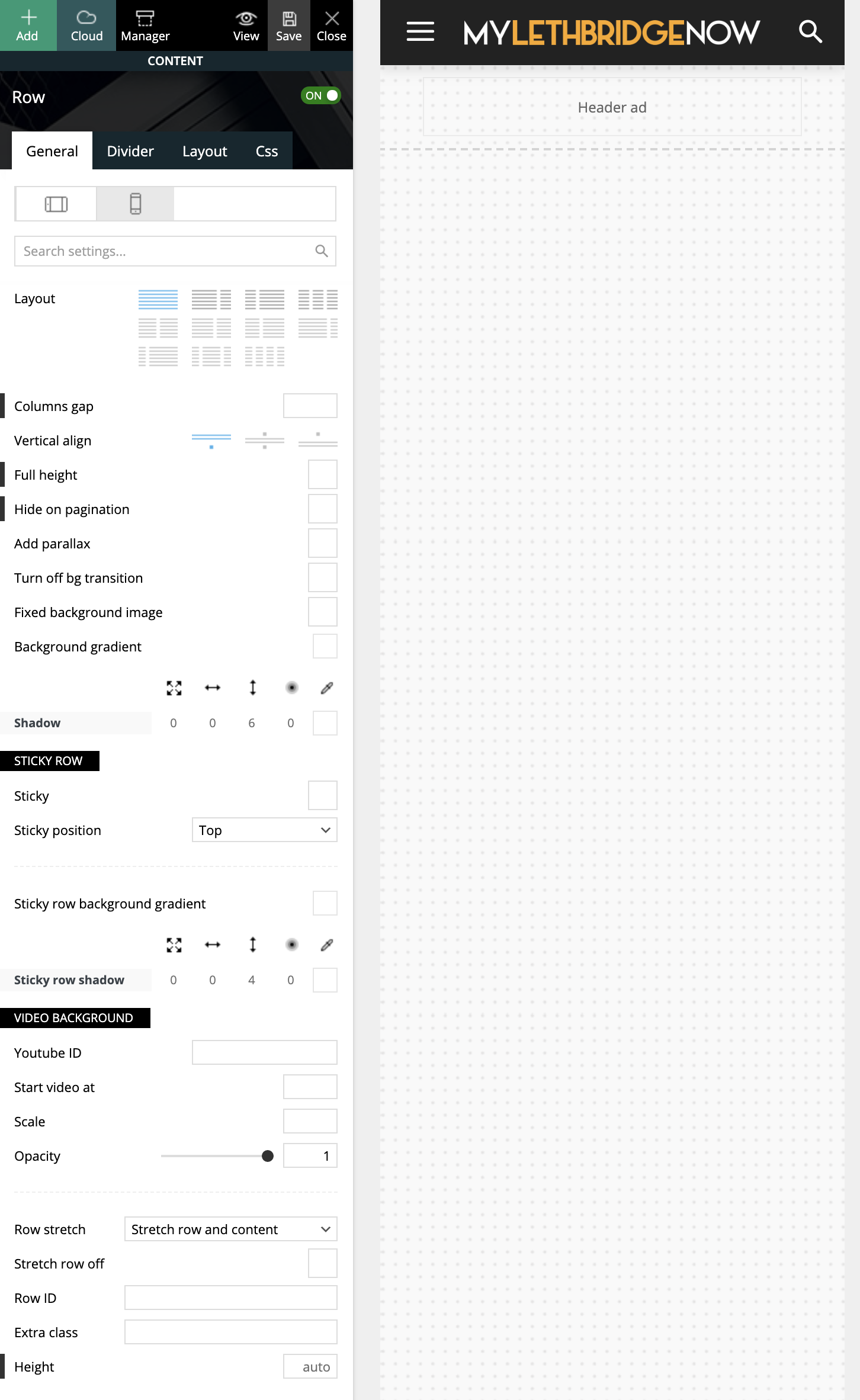
I have tried many attempts and many methods, which leads me here asking for guidance (or reporting a bug?!)
Cheers,
Ash
Anamaria Hello, @sabyp,
1. You’ll need to reset the license key from that website: https://www.screencast.com/t/Zt12bpyX and remove the theme (delete), in this way the license will be available for the new website and you can use the theme without any problems.
2. WP Rocket is not tested with the theme, but many users use it without problems, but you can check this guide -> https://www.infophilic.com/get-almost-100-pagespeed-newspaper-theme/
3. Cloudflare works well with the theme if it set as in our guide https://forum.tagdiv.com/cloudflare-cdn/
4. The Lite Speed Cache plugin is untested and may cause problems with unrecognized mobile theme plugins and mobile pages, for example, but you can try it.
Thank you!
I’m sorry and I know it is not nice to see your work destroyed.
 sabyp
sabypHi
Question 1. I know the newspaper license is valid for 1 site, so can i uninstall it from one and use it on another website? I need to change the host (upgrade to a VPS setup) and my primary website doesn’t seem to migrate properly due to previous host limitations.
Question 2. WP Rocket is a paid caching plugin but I prefer to use it because of added functionality and ease of configuration. Is the Newspaper theme compatible with WP Rocket?
Question 3. Does Newspaper theme work fine with Cloudflare CDN?
Question 4. Open Litespeed or Nginx for reverse proxy on apache server, is the theme compatible with them? Open Lite Speed uses its own caching plugin called Lite Speed Cache. Is Newspaper theme compatible with this cache plugin?
I will appreciate a faster response. I have just lost my 6 months of work with my previous site and am starting afresh. Your support will be highly appreciated.
