
 Calin
Calin Hi,
Most of this kind of errors are from untested plugins. Make sure that you do not have a plugin conflict, please deactivate ALL plugins except tagDiv plugins, also if you are using child theme, cache plugin or cloudflare (CDN), deactivate them, clear all cache and try again.
Also to have the same layout on mobile as on desktop, please do not use the mobile theme plugin -> https://forum.tagdiv.com/the-mobile-theme/
Let me know the results!
Thank you!
 Vlad S
 Hello !
Please make sure that you have accomplished all the system requirements as in our documentation here: https://forum.tagdiv.com/requirements-for-newspaper/
Please make sure that you do not have a plugin conflict, please deactivate ALL plugins except tagDiv ones, also if you are using child theme or cache plugin, deactivate them, clear all cache and try again.
Thank you !
Calin Hi,
Most of this kind of errors are from untested plugins. Make sure that you do not have a plugin conflict, please deactivate ALL plugins except tagDiv plugins, also if you are using child theme, cache plugin or cloudflare (CDN), deactivate them, clear all cache and try again.
Let me know the results!
Thank you!
Vlad S Hello !
Please make sure that you do not have a plugin conflict, please deactivate ALL plugins except tagDiv ones, also if you are using child theme or cache plugin, deactivate them, clear all cache and try again.
Thank you !
Vlad S Hello !
If you’re seeing only NAVER please make this adjustment in the tagdiv composer plugin:
https://www.screencast.com/t/HGX40TlcJgb
Then hit a save in the theme panel and then revert the code back to original, this will make the social icons appear properly again.
Please make sure that you have accomplished all the system requirements as in our documentation here: https://forum.tagdiv.com/requirements-for-newspaper/
Please make sure that you do not have a plugin conflict, please deactivate ALL plugins except tagDiv ones, also if you are using child theme or cache plugin, deactivate them, clear all cache and try again.
Thank you !
Calin Hi,
Make sure that you do not have a plugin conflict, please deactivate ALL plugins except tagDiv plugins, also if you are using child theme or cache plugin, deactivate them, clear all cache and try again.
Please make sure that all the settings are like in our requirements, please follow the guide carefully
– https://forum.tagdiv.com/requirements-for-newspaper/
and please increase all requirements that are lower, and follow all steps.
Let me know the results!
Thank you!
Calin Hi,
In order to achieve this you need to use a custom css like this one -> https://i.imgur.com/ULnwPhw.jpg
.td_module_mx8 .td-module-thumb a:last-child:after {

display: none;

}
The code need to be set in theme panel> custom code> custom css.
Thank you!
Calin Hi,
Please make one more try, please make sure that you do not have a plugin conflict, please deactivate ALL plugins except tagDiv ones, also if you are using child theme or cache plugin, deactivate them, clear all cache and try again.
Please make sure that all the settings are like in our requirements, please follow the guide carefully
– https://forum.tagdiv.com/requirements-for-newspaper/
and please increase all requirements that are lower, and follow all steps.
Let me know the results!
Calin Hi,
We do not tested the Yellow Pencil, therefore we can not say how this will work, sorry.
From Newspaper 10.3.2 you can make the theme updates using the one option from the theme -> https://i.imgur.com/3hmMMD5.png also the above phrase is referring for example to the post styles, these are no longer in the place that were before, now are moved in tagDiv Standard Pack, therefore, you need to set in the child theme a path (to directories) as in our documentation and to set there the post style templates.
Hope this will help you!
Calin Hi,
I just check the setting on may install an for me are working -> https://i.imgur.com/gRYEQU8.png -> https://i.imgur.com/UqqF6rr.png -> https://i.imgur.com/Kh0yhYI.jpg but as I can see in our screenshots you have a page set as a blog, this is different, please make sure that you do not have a plugin conflict, please deactivate ALL plugins except tagDiv ones, also if you are using child theme or cache plugin, deactivate them, clear all cache and try again.
Let me know the results!
Thanks.
Vlad S Hi,
Please make sure that you do not have a plugin conflict, please deactivate ALL plugins except tagDiv Composer, also if you are using child theme or cache plugin, deactivate them, clear all cache and try again.
At the moment the Support team is not 24/7 available. Please note that we answer the topics from Latest to Newest Monday – Friday from 08:00AM to 05:00PM GMT+2 So multiple replies to your topic will only make us to get harder to your topic.
Thank you !
Vlad S Hi,
Please make sure that you do not have a plugin conflict, please deactivate ALL plugins except tagDiv Composer, also if you are using child theme or cache plugin, deactivate them, clear all cache and try again.
If the problem persist, please set this code in functions.php -> wp-content/plugins/td-composer/legacy/Newspaper/functions.php
add_action('admin_head',function() {

echo '<style>.td-gutenberg-editor .editor-styles-wrapper .wp-block {max-width:726px;}</style>';

});
Or you can send us an email at contact@tagdiv.com and provide admin login, as well as cPanel or FTP if possible. We will take a look. Include a link to this topic in the email.
Thank you!
Vlad S Hello !
1. Unfortunately creating a block is not an option.
2. Please make sure that you do not have a plugin conflict, please deactivate ALL plugins except tagDiv ones, also if you are using child theme or cache plugin, deactivate them, clear all cache and try again.
3. This option lets you adjust images in posts: 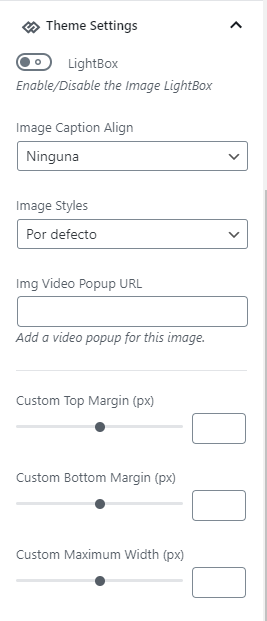
Thank you !
Vlad S Hello !
Please make sure that you do not have a plugin conflict, please deactivate ALL plugins except tagDiv ones, also if you are using child theme or cache plugin, deactivate them, clear all cache and try again.
Thank you !
Vlad S Hello !
Please make sure that you have accomplished all the system requirements as in our documentation here: https://forum.tagdiv.com/requirements-for-newspaper/
Please make sure that you do not have a plugin conflict, please deactivate ALL plugins except tagDiv ones, also if you are using child theme or cache plugin, deactivate them, clear all cache and try again.
Thank you !
Vlad S Hello !
Please make sure that you have accomplished all the system requirements as in our documentation here: https://forum.tagdiv.com/requirements-for-newspaper/
Please make sure that you do not have a plugin conflict, please deactivate ALL plugins except tagDiv ones, also if you are using child theme or cache plugin, deactivate them, clear all cache and try again.
Thank you !
Vlad S Hello !
Please make sure that you have accomplished all the system requirements as in our documentation here: https://forum.tagdiv.com/requirements-for-newspaper/
Please make sure that you do not have a plugin conflict, please deactivate ALL plugins except tagDiv ones, also if you are using child theme or cache plugin, deactivate them, clear all cache and try again.
Thank you !
Vlad S Calin Hi rpalit99,
Please make one more try, please make sure that you do not have a plugin conflict, please deactivate ALL plugins except tagDiv ones, also if you are using child theme or cache plugin, deactivate them, clear all cache and try again.
If there is still a problem, please provide some more details and a link where I can inspect the problem.
Thank you!
Vlad S Hello !
Please make sure that you do not have a plugin conflict, please deactivate ALL plugins except tagDiv ones, also if you are using child theme or cache plugin, deactivate them, clear all cache and try again.
Thank you !
Vlad S Hello !
Please make sure that you do not have a plugin conflict, please deactivate ALL plugins except tagDiv ones, also if you are using child theme or cache plugin, deactivate them, clear all cache and try again.
Thank you !
Calin Hi,
We’ll try to replay as soon as possible, also please note that we have few days off -> https://i.imgur.com/WkYBO8d.png
Most of this kind of errors are from untested plugins. Make sure that you do not have a plugin conflict, please deactivate ALL plugins except tagDiv plugins, also if you are using child theme, cache plugin or cloudflare (CDN), deactivate them, clear all cache and try again.
If the error persists, please provide some more details and some screenshots.
Let me know the results!
Thank you!
Vlad S Hello !
Please make sure that you do not have a plugin conflict, please deactivate ALL plugins except tagDiv ones, also if you are using child theme or cache plugin, deactivate them, clear all cache and try again.
Thank you !
Vlad S Hello !
Please make sure that you do not have a plugin conflict, please deactivate ALL plugins except tagDiv ones, also if you are using child theme or cache plugin, deactivate them, clear all cache and try again.
Thank you !
Vlad S Hello !
Please make sure that you do not have a plugin conflict, please deactivate ALL plugins except tagDiv ones, also if you are using child theme or cache plugin, deactivate them, clear all cache and try again.
Thank you !



