- NewspaperChild Theme Support
- NewspaperIntroduction to CPT and ACF with Newspaper Theme
- NewspaperHow to Update the Newspaper Theme
- NewspaperWhat’s Included in the Newspaper Theme Package
- NewspaperFlex Block Settings Guide
- NewspaperPrimary Category: Build a hierarchy for your website
- NewspaperBreadcrumbs
- NewspaperHow to Install Newspaper via FTP
- NewspaperHow to Install Newspaper via WordPress
 Calin
Calin Hi transcontinentaltimes,
Unfortunately, we do not have a code that can be applied in the child theme and this to remove the data from database. I believe it can be done, but I I believe that it is more danger then editing the database via PHPMyAdmin.
Thank you!
 transcontinentaltimes
 Is there any way to change this via the child theme code?
Thanks
 cloudhub
Hello,
How can i modify the Single Cloud Template – Romania News Pro from my child-theme?
To modify template files, I have seen from the documentation to copy the template file from wp-content\plugins\td-standard-pack\Newspaper\parts\single to the child folder to make modifications.
But which file should i copy for the Single Cloud Template – Romania News Pro please?
 suchstuff
I tried to modify the template header.php in the child theme, but Newsmag always takes the file from the parent theme.
After I deleted
do_action( 'tdc_header' );

if ( has_action( 'tdc_header' ) ) {

    return;

}
from header.php, the changes in header.php took effect, but the complete styling in the area
<div class="td-header-container td-header-wrap td-header-style-1">
was lost.
How can I do such modifications in Newsmag child theme?
Best regards,
Günter
 Bettina
 Hello!
I’m sorry, but I’m not taking the decisions, or the support team. You can build a child theme and implement this, so it won’t get overwritten by the updates.
Thank you for understanding!
 Anamaria
 Hello,
Please make sure the system status parameters are correctly increased according to our documentation from here -> https://forum.tagdiv.com/requirements-for-newspaper/ in config is WP_MEMORY_LIMIT not PHP Memory Limit (there is a typo, sorry) => https://www.screencast.com/t/88pK5QXpC
Also, please make sure that you do not have a plugin conflict, please deactivate ALL plugins except tagDiv ones, also if you are using a child theme or cache plugin, deactivate them, clear all cache and try again.
Also, please check the console when you try to import a template, maybe you have some errors and provide some screenshots.
Thank you!
Calin Hello,
The code from the child theme function seems to be ok.
From what you describe is like the child theme is not activate.
I made a test with a css on my install and for me this is apply correctly, so the wp-content/themes/Newspaper-child/style.css file is working for css.
If you want we can made some investigations at this. For this you can contact us via email at contact@tagdiv.com, please provide wp-admin access and we’ll check it as soon as we can.
Thank you!
Bettina Hello!
Please provide some screenshots with the child theme functions.php file.
Thank you!
 Beaker
My site is here:
I just started developing the site. I installed the child theme included in the download and it seems to be working properly, but when I make changes to the child theme CSS they won’t show up on the site.
Troubleshooting so far:
–If I navigate to https://redstateroundup.com/wp-content/themes/Newspaper-child/style.css in a browser the changes are there.
–The CSS is valid: It works when I test it in the CSS panel in Console, in the WP Customize tool and in the CSS field in Theme Panel > Custom Code.
–When I look at any page’s source code there’s no link to the child theme CSS.
–I checked functions.php to make sure the enqueue function is there.
–I deleted and reinstalled the child theme from scratch but it didn’t help.
–I flushed the cache in my browser and on my host (IONOS).
–I tried hard-coding a link to the child theme CSS in header.php but that didn’t help. The hard-coded CSS link doesn’t show up.
–When I make file changes and check in my FTP client (CyberDuck) the file changes and date modified time update.
As far as I can tell I’m doing everything right, but the site won’t write any child theme changes even though the files seem to be right where they belong.
I can use the Custom Code in Theme Panel if I have to, but also I need to modify PHP files in the child theme.
Any help greatly appreciated!
Calin Hi,
1. For this you need to edit the td_config.php from \wp-content\plugins\td-composer\legacy\Newsmag\includes\td_config.php you’ll need to search for “show_child_cat” -> https://i.imgur.com/vscSfJw.png
2.Indeed, the problem with tagDiv Composer could be due to this error in the console.
Most of the time that error is caused by a plugin, so you’ll need to make some tests only the theme plugins and see if the error persist and if the tagDiv Composer is working. If indeed is working, then you’ll need to find the plugin that is interfering with the theme builder.
Thank you!
 Norua
Norua Hi,
As I said the mobile theme layout I’m using is the same as the desktop version just adapted as mobile-friendly.
It has always been like this and that’s what the client wants so I deactivated the mobile theme plugin.
The problem still remains, every page except for the home page is not loading properly or completely because it’s like it’s trying to read your mobile theme even if it’s deactivated.
You can simply check the website on mobile version and see what I’m talking about, you can click everywhere, every child page or post and it’s not loading at all.
Anamaria Hello,
If you use the new child theme from the latest version it should work.
Please let me know if this issue arises when the main theme is set or if it only happens when the child theme is set.
Thank you!
 uitdezaanstreek
 Hi Bettina,
thanks for the reply. I’m familiar with updating themes manually. Just trying to get grip on the new way in v11, as i like the addition to be able to update the theme through the wp-backend (apart from staying updated/safe/etc).
install
I manually added the files (v11-theme and child in ‘wp-content/themes/’, plugins in ‘wp-content/plugins/’) on a clean devsite. Then i already get the message: “The parent theme is missing. Please install the “Newspaper” parent theme.”
I guess the issue is where i have to put the parent theme?:
https://forum.tagdiv.com/how-to-update-the-theme-2/ says in “/wp-content/themes”
https://forum.tagdiv.com/the-child-theme-support-tutorial/ says in “wp-content\plugins\td-standard-pack\”
paths in child theme
should i now change the paths to point to “wp-content\plugins\td-standard-pack\”?
-
This reply was modified 4 years by
uitdezaanstreek. Reason: typo
Bettina Hello!
Do not use both builders in the same time/pages.
I would gladly recommend you make a backup and update plugins and the theme via file transfer to the latest update: https://forum.tagdiv.com/how-to-update-the-theme-2/
The child theme is not overwritten by the update. An issue for that could be the compatibility of your child theme with the new version of our theme(if you use some files which were updated). If you’ll have some custom modifications directly in the theme files, then better save the code and replace it after the update.
Make sure that all the requirements are done as you can see here: https://forum.tagdiv.com/requirements-for-newspaper/
Thank you!
uitdezaanstreekHi there,
How can i upgrade from v9 to v11?
plugins:
I read that i should add the plugin ‘standard-pack’.
When installing it also says to add the plugin ‘tagdiv composer’. But we’re using the WPbakery composer – and i read we should only use one? For now i let them both co-exist.
(child-)theme
Now i upload the v11-child-theme to wp-content/themes. But in the WP-backend appearance > themes it doesn’t show and i get the message: “The parent theme is missing. Please install the “Newspaper” parent theme.”
other
Then the last is how can i add my code properly from child-v9 to child-v11? We’re using an extra line to implement some extra php:
“require_once(“additionals.php”);”
I’m confused here, hope you can point me in the right direction after this overhaul. Cheers, Ed’
 Greg19
 please try to put megamenu on Ειδήσεις –> (Ειδήσεις – [ id: 18949 ])
as you can see on live site you see that there are all categories and not only Ειδήσεις – [ id: 18949 ] child menu.
and the second if you try to update the theme you see that i tell you..
I have a backup so dont worry.
Thanks
Greg19hello i havec buy your theme but i have 2 issues:
1. i have problem with your mega menu as you can see when i unable display all categories not specific child.
2. when i try to update your theme my site destroyed why happened this?
https://www.greekaffair.news/
Thank you very much…
 Puck
PuckHi there,
I want to add Google Tag manager on my website: baby-kind.nl. I tried via the theme panel, but it’s not working.
Analytics code is working via the theme panel, but tag manager not. What’s the best way to implement tag manager. And please keep in mind that I want to keep the code there when the theme is updated. So I prefer to install in child theme.
Many thanks
Best,
Puck Hi there, Is there an update on this subject?
I want to add Google Tag manager on my website: baby-kind.nl. I tried via the theme panel, but it’s not working.
Analytics code is working via the theme panel, but tag manager not. What’s the best way to implement tag manager. And please keep in mind that I want to keep the code there when the theme is updated. So I prefer to instal in child theme.
Many thanks
Best,
Anamaria Hello @david.pavelka,
Please let me know if you have a child theme, if yes, please try to use the main theme and see if the problem persists.
Thank you!
 Satyajit3097
 Since two days, all my Web Stories showing Compatibility errors and indicate that this error can affect eligibility to appear on Google Search.
Google Search Console of my website showing following 10 errors:
1. The parent tag of tag ‘html’ must be ‘!doctype’.
2. Tag ‘amp-story’ is not allowed to have any sibling tags (‘body’ should only have 1 child).
3. A tag on this page requires an AMP component ‘script’ tag, which is missing.
4. A mandatory AMP HTML tag is missing from this document.
5. Tag found outside the document head which is only allowed as a direct child of the document head.
6. Only amp-boilerplate and amp-custom ‘style’ tags are allowed, and only in the document head.
7. Custom JavaScript is not allowed.
8. Disallowed attribute or attribute value present in HTML tag.
9.Tag or text which is only allowed inside the body section found outside of the body section.
10. Malformed URL found for attribute ‘href’ in tag ‘a’.
Summary:
1) AMP compatibility issue- 10 errors mentioned above
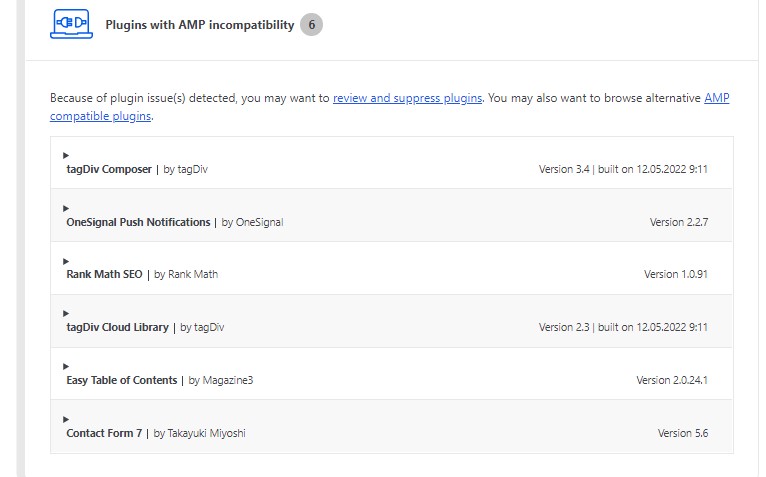
2) AMP Plugin Settings showing following compatibility issues
https://tazahindi.com/wp-content/uploads/2022/06/AMP-Scan-report.jpg
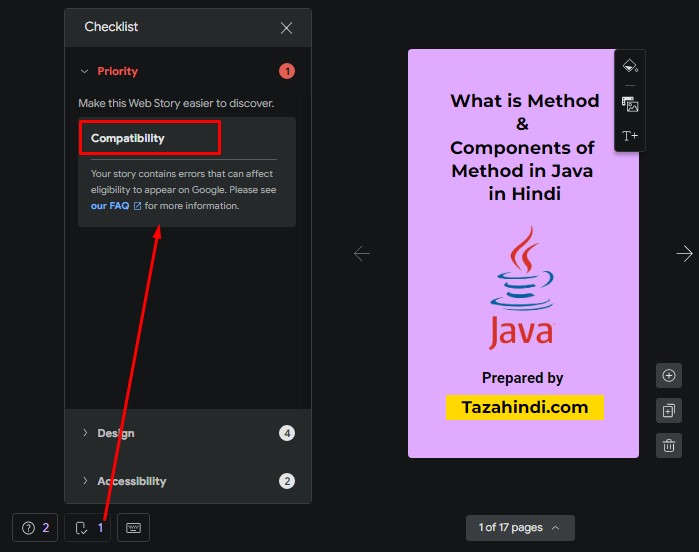
3) Google Web Stories Plugin compatibility issue:
https://tazahindi.com/wp-content/uploads/2022/06/Web-Stories-Compatibility-issue.jpg
4) Breadcrumbs issue-Either “name” or “item.name” should be specified
I am using wordpress and Newspaper premium theme to run my website. Because of above problem my view are reduced. Please help to solve above issues.
I have tried number of thing but unfortunately don’t work anyone for me. Please sort out my problem as early as possible, just because of that my page view is continuously decreasing.
Please help to solve above problems.
Thanks in Advance.
From Satyajit.
Satyajit3097Hi, I am Satyajit, since few days, view in Discover drastically decrease but can not find why this happen.
Yesterday night suddenly I got message from Google Search Engine about AMP 10 errors and end of today I got another 17 errors, total 27 errors in dashboard of my google search console. But could not manage to solve these problem. My website is Tazahindi.com
1. The parent tag of tag ‘html’ must be ‘!doctype’.
2. Tag ‘amp-story’ is not allowed to have any sibling tags (‘body’ should only have 1 child).
3. A tag on this page requires an AMP component ‘script’ tag, which is missing.
4. A mandatory AMP HTML tag is missing from this document.
5. Tag found outside the document head which is only allowed as a direct child of the document head.
6. Only amp-boilerplate and amp-custom ‘style’ tags are allowed, and only in the document head.
7. Custom JavaScript is not allowed.
8. Disallowed attribute or attribute value present in HTML tag.
9. Tag or text which is only allowed inside the body section found outside of the body section.
10. Malformed URL found for attribute ‘href’ in tag ‘a’.
I am running my website, with the help of wordpress and premium newspaper theme. It will be helpful for me, if anyone suggest or help me to solve these errors.
 DenverLifeMagazine
Our website currently has a CPT that is setup manually. As well as a custom page layout for the post that is defined in the child theme. This page is setup to utilize the appropriate custom header by using get_header() within the PHP file, but it appears the default header that is set for the site is overriding what is set.
Is there a way to ensure that that the header that is defined in the code is utilized and not overwritten by tagdiv?
The header was created in Tagdiv or reference, and is being utilized on other portions of the site with minimal issues, so this seems to be a bit odd from my perspective, and it prevents us from being able to maintain consistency in certain areas of the site.
Any assistance would be greatly appreciated!
The website/section in question starts on this page: https://www.denverlifemagazine.com/showhouse/meet-the-designers/
And this is a direct link to a post within the CPT that is not behaving correctly as it should have the same header as the page above: https://www.denverlifemagazine.com/2021-designer-showhouse/meet-the-designers/amy-nelson-sammi-conrey/
 Hellpress
 Thanks, Anamaria, it was the child theme!
Thanks!!
Anamaria Hello @Hellpress,
Please let me know if you have a child theme, if yes, please try to use the main theme and see if the problem persists.
Thank you!