No search results were found in Documentation!
 Anamaria
 Hello,
When this message appears “ Errors at columns: 1(models) : 0(dom). The model does not match the content Current state has involved an issue. You could try an UNDO operation (CTRL+Z / CTRL+SHIFT+Z)” then indeed it is a problem, most of the time the problem is from a code that is not compatible with our theme, therefore after you set it with tagDiv Composer and save the page/cloud template, the next time when you try to edit it, you’ll get that error. Please remove the code and see if the problem persists.
We have a guide for how to investigate this problem and fix it -> https://forum.tagdiv.com/tagdiv-composer-not-working/
You can try to add your code in Theme Panel -> Analytics/JS Codes => https://www.screencast.com/t/nou4AMaBhSMn
Also, you can use the cloud templates for header and footer, whence you can import one, and with tagDiv Composer, you can edit and style it as you wish.
Let us know about your results!
Thank you!
Anamaria Hello,
tagDiv Composer is a page and cloud builder, it can be used only for pages and cloud templates, therefore you can use it on a single post template from tagDiv cloud library to adjust the layout, but not to write the post content, for this, you need to use the WordPress editor.
You can edit the page with TD Composer in WordPress->Pages => https://www.screencast.com/t/AMOjYCA7Q7p, or in front side.
You can set a different single post template for each post if you want. Please check this guide for single post template: https://forum.tagdiv.com/design-post-pages-using-cloud-library-templates/
Thank you!
Anamaria Hello,
If you want to use the “Time ago format”, it can be use only for the posts and not for blocks, you need to use a single post template from tagDiv Cloud Library and edit it with tagDiv Composer click on single post date and enable the “Time ago format” -> https://www.screencast.com/t/HcjkFySnV
Hope this helps you!
Thank you!
 irmankarim
Hi! I am using various cloud library layout for different pages. And I like one of the hover effect which is the wiping shine effect: https://sunrider.blog/home-new/ (on the Recommended Articles for You section). Is it possible for me to apply the same hover effect for the other layouts?
Please advise and thank you in advance!
Anamaria Hi,
You can disable the mobile theme plugin without any problems. After that, it will be displayed responsive version.
The required plugins are: tagDiv Composer, tagDiv Cloud Library (if using Cloud Templates), tagDiv Standard Pack (if using Standard Templates, is not needed for Pro Demo), tagDiv Newsletter (for subscribe), tagDiv Social Counter (only if you use Social Counter), tagDiv Mobile Theme (is a light design version for post and is needed for new page content, this plugin is used to improve the mobile page speed, removing the fancy layout from desktop).
Thank you!
Anamaria Hello,
If you are referring to this line, it can be add on the standard header only with custom css => https://i.imgur.com/QxpOnXd.png, you need to add the custom code in Theme Panel -> Custom Code -> Advanced CSS -> Phones => https://www.screencast.com/t/1Wcj3wHXyR,
.td-header-style-10{

border-bottom: 2px solid red;

}
Also, it can be achieved, using a cloud header from tagDiv Cloud library, you can edit it with tagDiv Composer and add that line.
Hope this helps you!
Thank you!
 Vlad S
 Hello !
What you can do is to use cloud library templates, where you can use ad box element as you can see in our video guide: https://www.youtube.com/watch?v=fa7GenCHcBU&t=3s
Thank you !
Anamaria Hello,
tagDiv Composer is a page and cloud builder, it can be used only for pages and cloud templates, therefore you can use it on a single post template from tagDiv cloud library to adjust the layout, but not to write the post content, for this you need to use the WordPress editor.
You can edit the page with TD Composer in WordPress->Pages => https://www.screencast.com/t/AMOjYCA7Q7p, or in front side.
Thank you!
 Jose
JoseHello team,
I see that my problem is that I use too many fonts.
https://fotos.subefotos.com/c528c990453a84d3fb67d80dae962dc8o.jpg
I use the templates from the cloud library.
From the theme control panel: Is there a way to force the use of a single font?
I want to use the MULI font, just that one. But I don’t know how to disable all the others.
Can you help me with this please?
One other thing. I think you can load ghost fonts into the theme. But I’m a bit inept, and I don’t know very well how to do this. Should I download the font to my pc, turn it into Woff and upload it to the theme? What else should I configure to load that ghost font?
Where can I download the Muli font? I have looked at google fonts but do not see the option.
Do I need to download a font for each typeface? (300/400/600 etc…) Or do I only need a single file of the Muli font?
Thanks
Vlad S Hello !
All the cloud templates were created using tagDiv composer and tagDiv Composer has been built around them. Without using tagDiv Composer and Cloud library you will have theme panel options and templates. In my opinion it would be a waste to not use the templates. WP Bakery unfortunately does not work with the cloud templates and also does not have any templates.
You can use normal templates as you can see here: https://www.screencast.com/t/qVtbEIU2kH4 You will be able to customize this only using the theme panel and you will not use TagDiv Composer, this meaning that your customization options would be reduced and you will have to custom code a lot of changes.
We are able to offer you a refund if you make a request here: https://themeforest.net/refund_requests/new
We are sorry for the inconvenience !
Thank you !
 squallhajime
under default post setting (sitewide) it is suppose to show the single template from the demo account loaded. but it is not. please see screenshot: http://imgur.com/a/Kho9Js5
I am using arette pro single template
Anyone encountered this problem?
Anamaria Hello,
You can achieve the hours ago on blocks only with custom work, you can contact our team here => https://tagdiv.com/premium-customization-services/
If you want to use the “Time ago format” only for the post, you need to use a single post template from tagDiv Cloud Library and edit it with tagDiv Composer click on single post date and enable the “Time ago format” -> https://www.screencast.com/t/HcjkFySnV.
about this topic has been discussed here =>
https://forum.tagdiv.com/topic/implementing-the-time-ago/
https://forum.tagdiv.com/topic/changing-the-date-to-x-time-ago/
https://forum.tagdiv.com/topic/the-time-ago-in-block-3-is-correct-but-another-block-is-wrong-time/
Thank you!
Vlad S Hello !
If you are using a PRO Demo or Cloud library templates the sidebar is fully editable using tagDiv Composer as you can see here: https://www.youtube.com/watch?v=fa7GenCHcBU&t=3s
Thank you !
Vlad S Hello !
Indeed, our team is working on having the option to combine CPTs with Cloud library templates. At the moment there is no release date for this unfortunately.
Thank you !
 Bettina
 Hello!
The pro demos are made using tagDiv Composer and cloud templates from tagDiv Cloud Library, this can be edit only with tagDiv Composer. If you have WP Bakery enabled, then the cloud templates will not work correctly.
Also, we have a guide for how to investigate this problem and fix it: https://forum.tagdiv.com/tagdiv-composer-not-working/
Please disable the WP Bakery plugin and let us know about your results!
Thank you!
 vdaatland
Hi!
Just wondering if you guys are working on adding library-function for pages and custom post types? It would be awesome with the same functionality for custom post types and pages as is possible for single posts, that is to customize a uniqe template and use it on selected posts/pages.
BTW, you are doing a fantastic job. I’m in awe 🙂
 daehee.kim
 Hi Vlad,
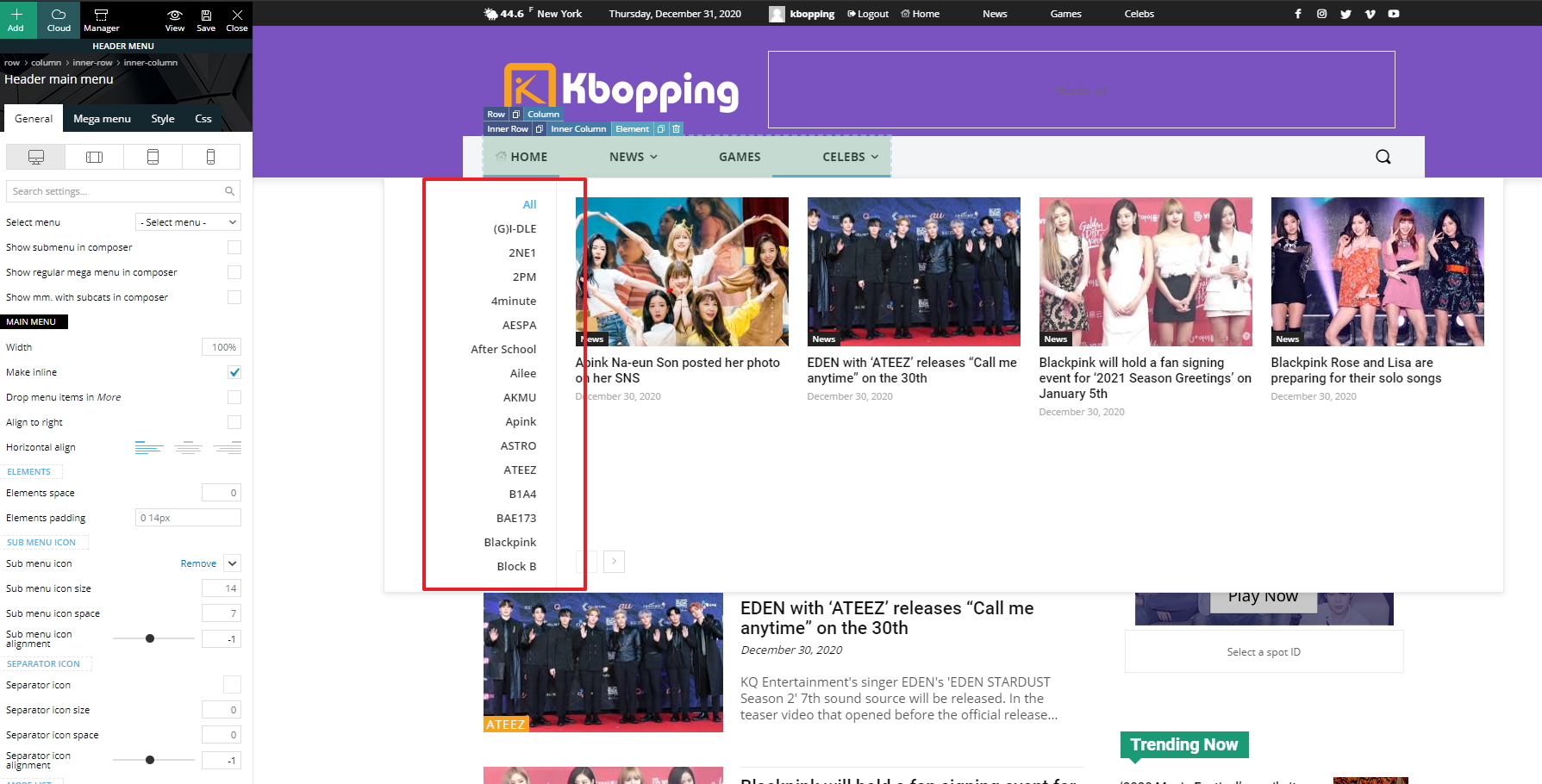
We applied a Cloud Library header and it looks good. However, I have a new issue. The left panel of submenus expands vertically and all menus are not displayed because there’s no scroll bar. How can we fix the height of the left panel and show a scroll bar?
https://kbopping.com/wp-content/imgs/kbopping.jpg
Thanks,
Jeannie
Vlad S Hello !
For this it is recommended to use a Cloud Library header in order to have full access in editing your menu and raising the limit as you can see here: https://www.screencast.com/t/cORqyewztd7 ; https://forum.tagdiv.com/header-manager/
Thank you !
Anamaria Hello,
Please make sure that you do not have a plugin conflict, please deactivate ALL plugins except tagDiv plugins, also if you are using child theme or cache plugin, deactivate them, clear all cache and try again.
Make sure that all the settings are like in our requirements, please follow the guide carefully
– https://forum.tagdiv.com/requirements-for-newspaper/
and please increase all requirements that are lower, and follow all steps.
All the pro DEMOS use cloud library templates meaning that they are fully editable using tagDiv Composer and also the theme will be lighter because the queries will be made only for the elements that are in the templates.
If you don’t resolve the problem, please send us a link for your website and some screenshots with the problem.
Hope this helps you!
Thank you!
Anamaria Hello,
The settings from Theme Color applies only for standard header style, if you have a header imported from Cloud Library Templates, you can edit the color with tagDiv Composer => https://www.screencast.com/t/Yokyw1IphTDD, there are several settings you can make.
With tagDiv Composer, you can edit everything on Pro Prebuilt Website.
Hope this helps you!
Thank you!
Anamaria Hello,
If you want those ads/banners to display only for specific categories, you can use a cloud category template from tagDiv cloud library. This can be edited with tagDiv Composer add the element -> ad box, where you can add the URL and custom code ad => https://www.screencast.com/t/R0v2Hksqb -> https://www.screencast.com/t/2dBFd0NjWz3.
Hope this helps you!
Thank you!
Anamaria Hello,
Unfortunately, the theme doesn’t have this option for the author box.
This can be done only using custom code. For this, you need to edit the file from this path => wp-content/plugins/td-cloud-library/shortcodes/single/tdb_single_author_box.php => https://i.imgur.com/l2PGKlc.png.
Hope this helps you!
Thank you!
 questit
Hey again,
The header 22 template you have in cloud library has a blurring – loading effect that makes the main menu appear a second after the loading of the page.
https://cloud.tagdiv.com/header-template-22-business/
How can we remove that effect?
Anamaria Hi,
You can achieve the hours ago on blocks only with custom work.
If you want to use the “Time ago format” only for post, you need to use a single post template from tagDiv Cloud Library and edit it with tagDiv Composer click on single post date and enable the “Time ago format” -> https://www.screencast.com/t/HcjkFySnV.
Hope that helps you!
Thank you!
 andreawebarts
 you need to update the theme, it s been since the deprecation of wrordpress you never fixed it
https://madamefigaro.cy/wp-content/plugins/td-composer/legacy/Newspaper/js/td_wp_admin.min.js: jQuery.fn.resize() event shorthand is deprecated
https://madamefigaro.cy/wp-admin/js/common.min.js: jQuery.fn.delegate() is deprecated
https://madamefigaro.cy/wp-admin/js/media-upload.min.js: jQuery.fn.resize() event shorthand is deprecated
https://madamefigaro.cy/wp-content/plugins/wordpress-seo-premium/js/dist/api-client-1461.js: jQuery.isFunction() is deprecated
https://madamefigaro.cy/wp-content/plugins/td-cloud-library/assets/js/js_files_wp_admin.min.js: jQuery.fn.click() event shorthand is deprecated
https://madamefigaro.cy/wp-content/plugins/td-composer/legacy/Newspaper/js/td_wp_admin.min.js: jQuery.fn.mousedown() event shorthand is deprecated
https://madamefigaro.cy/wp-content/plugins/td-composer/legacy/Newspaper/js/td_wp_admin.min.js: jQuery.fn.click() event shorthand is deprecated
https://madamefigaro.cy/wp-content/plugins/td-composer/legacy/Newspaper/js/td_wp_admin.min.js: jQuery.fn.change() event shorthand is deprecated
https://madamefigaro.cy/wp-content/plugins/td-composer/legacy/Newspaper/js/td_wp_admin.min.js: jQuery.fn.scroll() event shorthand is deprecated
https://madamefigaro.cy/wp-content/plugins/td-composer/legacy/Newspaper/js/td_wp_admin.min.js: jQuery.fn.focusout() event shorthand is deprecated
https://madamefigaro.cy/wp-content/plugins/td-composer/legacy/Newspaper/js/td_wp_admin.min.js: jQuery.fn.keydown() event shorthand is deprecated
https://madamefigaro.cy/wp-content/plugins/td-cloud-library/assets/js/js_files_wp_admin.min.js: jQuery.fn.change() event shorthand is deprecated
https://madamefigaro.cy/wp-content/themes/Newspaper/includes/wp-booster/wp-admin/js/tagdiv-theme-plugins-setup.js: jQuery.fn.load() is deprecated