
 Bettina
 Hello @meri!
I suggest you to use a cloud template, so you can easily achieve what you need(same as in homepage).
More documentation about the cloud templates is here:
– https://forum.tagdiv.com/cloud-library-templates/
– https://forum.tagdiv.com/design-post-pages-using-cloud-library-templates/
– https://forum.tagdiv.com/cloud-library-category-templates/
Thank you!
 yvrmark
 Hi Bettina
I did update everything (including plugins) to 12.6. I’ve cleared the caches and it still shows the old Twitter logo. https://prnt.sc/PEbl4tfTwRpU
I even tried re-adding the element to the single cloud template but it still shows the wrong logo.
Regards
Mark
Bettina Hello @obiwan !
In the cloud templates, you can add the ads when you edit the post with TagDiv Composer in the element called ” Single Post Content ” in the tab ADS. Documentation here: https://forum.tagdiv.com/article-ads/
Or you can use the element called “Ad Box” from TagDiv Composer, and there you need to add the ads: https://forum.tagdiv.com/ads-adsense-overview/
Thank you!
Bettina Hello @fishinfool !
I can rename a blank template as I want in the Cloud templates -> CPT.
Check the console to see if you encounter any error there.
Please update the theme and plugins to the latest version.
Thank you!
 fishinfool
 Hi Ana,
I agree, but it does.
These are the links I am sending you to demonstrate the template names are showing up( tdb_templates/custom-taxonomy-doctors-pro-3/ and /tdb_templates/blank-custom-post-type/)
I created the page, loaded the template, assigned the specific post type, save(from tag div composer, and click view. When it loads on the front end it uses the name of the templates instead of the post type or taxonomy.
When i try to do the same using the cloud template for /tdb_templates/blank-custom-post-type/ and /custom-taxonomy-doctors-pro-3/ it does not let me. it gives this message: Invalid template type! Please make sure your are editing a supported template type title.
I would add screen grabs but there is nowhere to attach files.
This is what I am trying to fix.
Any guidance on how to fix?
 Calin
Calin Hi aashishlowanshi,
Yes, you can utilized the directory with all pro demos, as long as those can be edited using tagDiv Composer the directory can be used – https://forum.tagdiv.com/introduction-cpt-acf-newspaper-theme/
The problem that you faced I think that it was related to the type that needed to be filtered in the flex block, by default the theme blocks are filtering the posts, but you can set the type you need, for example, posts, pages, books ….
Also, you can import from cloud the template, blocks, modules you need. If you want we can take a look together to this situation.
Using the App Find Pro plugin will need to do change to the plugin to change the url and other structures, in my opinion it will be better to use the CPT Ui to can make the cpt and taxonomies like you need.
Thank you!
Calin Hi taketwo10,
I just tested the option and for me seems to work ok – https://i.imgur.com/EiRDhsA.png – https://i.imgur.com/iJLDbe0.png but this will work only on mobile theme. If is a page or a cloud template it is possible to be set using the tagDiv Composer.
Thank you!
 Anamaria
 Hi,
The name of the cloud template should not be displayed in the URL when you display a CPT that uses that template.
Thank you!
Anamaria Hi,
Please click on the button to check for updates.
My recommendation is that before updating the theme to make a full backup for the database and current website, disbale the extra plugins during the update process, after that update the theme manually – https://forum.tagdiv.com/how-to-update-the-theme-2/ (after the theme update, make sure that the needed plugins are installed, like tagDiv Composer, maybe tagDiv Standard Pack and tagDiv Cloud Library).
In the worst cases, the settings in the theme panel may be lost (there have been isolated cases), in these cases, after the theme plugins that were previously used are activated, you will have to use a backup for the theme panel -> https://forum.tagdiv.com/import-export-theme-settings/
Thank you!
fishinfool Hello
This link does not help my problem.
I already have the slug of the custom post created as directed from the link you sent (4. If You Have Already Created a Custom Post Type (CPT) Using register_post_type Function – https://www.scratchcode.io/how-to-change-custom-post-type-slug-in-wordpress/)
My problem is i am using the cloud template for the custom taxonomy in one case (https://theledger.whatchacatchin.com/tdb_templates/custom-taxonomy-doctors-pro-3/) and the cloud template for the custom post type in another (https://theledger.whatchacatchin.com/tdb_templates/blank-custom-post-type/) but I cannot edit the bold italic part of the these links,
example: i used a regular template for https://theledger.whatchacatchin.com/podcasts-directory/ and I was able to edit the the page title from what the original title was to podcast directory from the tagdiv composer at the top of the composer above where it says Welcome to tagdiv composer. When i try to do the same using the cloud template for /tdb_templates/blank-custom-post-type/ and /custom-taxonomy-doctors-pro-3/ it does not let me. it gives this message: Invalid template type! Please make sure your are editing a supported template type title.
How can I edit this?
 jrh
jrh SOLVED! Since I am using the prebuilt Law Firm site, the non-editable header only allows a set number of menu items before breaking as reflected in the linked-to images above. It’s mindboggling that Tagdiv provides prebuilt sites that are not fully editable, i.e., cannot edit headers and footers–only replace with cloud templates that then do not match the prebuilt layout (theme and colors). Other than that, Newspaper theme rocks.
Anamaria Hi,
Please edit the cloud template with tagDiv Composer -> https://i.imgur.com/j8YvKks.png click on the block and remove the offset -> https://i.imgur.com/dJ0iFQu.png let that field empty.
Thank you!
 SNUDIFO67
Hello,
I’m using Newspaper Theme (www.snudifo67.fr). In one of my flexblock I want to make appear the latest articles from a category. But when I turn the filter on this category, the new article don’t appear (the sort order option is turned on “latest”).
I verified in my categories and the article is tagged whith this category. How can I fix this problem?
Thank you very mouch
link to the printscreen : https://e.pcloud.link/publink/show?code=XZKO5WZzM7bO6Qzmv8F3wJFXvoxiFlhJeCk
 odnaminytaadm
 Hi
1. rollback doesn’t help
2. restoring from a backup does not help (theme+ td-composer+td-standard-pack+td-cloud-library)
3. Some Parameters in the database?
 Carel
CarelHi
I am using last version 12.6 of Newspaper with cloud templates and ACF pro
I want to display an oembed acf player but when i do it with Tagdiv composer, it only shosw the url
https://www.construire.fr/maisons/maison-focus-74-city/
You will see that after “visite virtuelle”, it only shows the URL of the player https://mon.plan3d.immo/3dhd/vv/5759934/babeau_seguin_focus_79 but not the player
I tried to do it also with iframe but all this is blocked by tagdivcomposer
Calin Hello,
Indeed, if you are using a standard template, then you need to use the theme panel settings and those from the wordpress editor for Quote , but in case you are using a single post template from cloud, then you’ll need to edit it using the tagDiv Composer and set on it the style and size you need – https://i.imgur.com/WA7XMKF.jpg
Thank you!
Calin Hello,
Usually this kind of problems appears when after the theme update one of the theme plugins that were previously enabled now is no longer. To resolve the problem you’ll need to go to Newspaper > Plugins and install from there the plugins that you had previously (most of the time is related to tagDiv Composer, tagDiv Cloud Library and tagDiv Standard Pack).
In case that there are still some p problem please let me know! Also, if possible to provide some screenshots or a link where to check those problems.
Thank you!
Calin Hello,
To resolve the problem with the height on those videos you can use a custom css like this one:
.tdcpt_doctors-template-default .tdb_single_custom_field iframe{

height: 315px!important;

}
The code should be set in the theme panel > custom code> custom css or on the tdcpt_doctor cloud template in a css row.
I hope this will help you!
Anamaria Hi,
I recommend using a cloud template, or disable this option https://i.imgur.com/M4n57QK.png
Thank you!
Anamaria Hi,
Please make sure that you have installed all the plugins, like composer, social counter, and cloud.
Thank you!
 Ruffo
RuffoHello there,
My website uses the latest posts to display the blog post theme with pagination on the home page, and I use a header from the cloud pack. I have a landing page that I created, which is not a homepage. The problem is that everything I do on that page is automatically placed as a header below the menu on all my posts and pages. What can I do? What is happening? I’m looking for help from an enlightened mind to help me solve my problem.
Thank you very much.
Bettina Hello!
Choose to use a cloud header and add the ad code in the ad box element and place it in the header.
Thank you!
 gleloudas
 https://www.kynigesia.gr/kynigi/fterota/perasmata/perasmata-trygonion-o-agnostos-ch/
You can also see some screenshots here:
https://e.pcloud.link/publink/show?code=VZW7VWZQMpNGQ0nn7m6uL542uulJ4mWyOty
 nerevargio@gmail.com
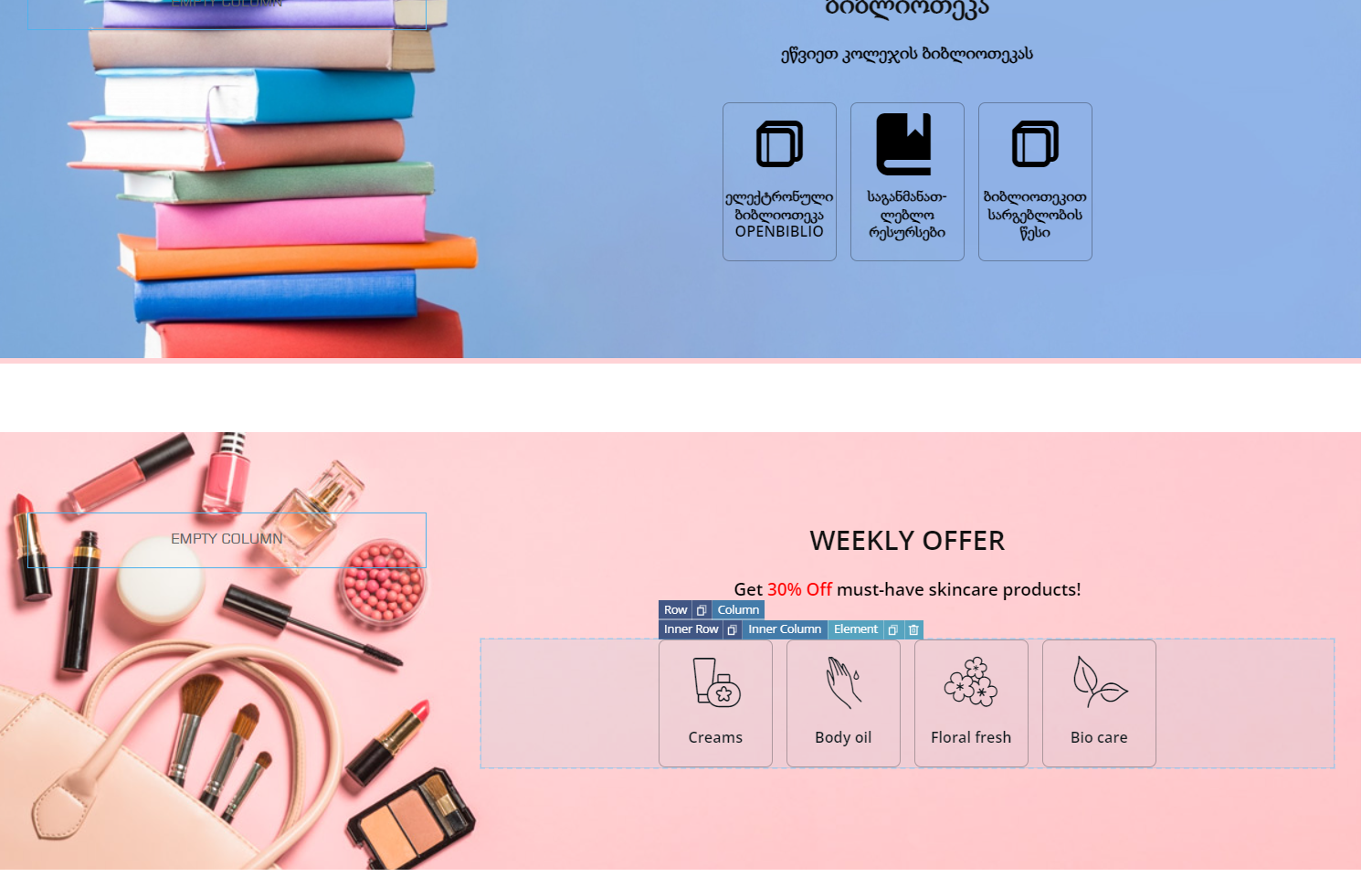
in cloud library there are some sections that have inner rows into columns, but I cannot make built new by myself?
I have prebuild theme that made in whole one row, and now I want separate one inner row by two columns, and one column separate one more time for icons, like this
Bettina Hello!
There are some settings for a cloud template in the theme panel -> Categories -> https://prnt.sc/CT4XIGHkwdSl
We recommend using the cloud templates instead of default templates.
Thank you!



