
 Bettina
 Hello!
Yes, this kind of pagination is not available for the Flex Block 1 element.
This feature should work well: https://prnt.sc/gjfNEMD7RE7I (Check if you do not use some extra plugins that may interfere there.)
The Posts Loop element doesn’t have a tab with all the filter options, like flex block elements.
The Posts Loop is automatically filtering the posts depending on the cloud template you set (for example, on the category page, there will be posts from that category).
1. This will require custom work, which is not covered by the support team.
For customization and other services, you can contact our custom work team here: https://tagdiv.com/premium-customization-services/.
2. Something should interfere there. I’ve tested this feature on the latest update of the theme and plugins, and it is working well.
3. The blocks are different and work differently. We cannot change the way blocks work, but we could add a new block with new features.
Thank you so much for your understanding!
Bettina Hello @Manikant !
If you use default templates, then you can not customize them with the TagDiv Composer.
We recommend using cloud/PRO templates in order to have the possibility to edit them with the TagDiv Composer, which contains a lot of functions and features, Please check our tutorial here: https://forum.tagdiv.com/tagdiv-composer-tutorial/
More documentation about the cloud templates is here:
– https://forum.tagdiv.com/cloud-library-templates/
– https://forum.tagdiv.com/design-post-pages-using-cloud-library-templates/
– https://forum.tagdiv.com/cloud-library-category-templates/
Thank you!
Bettina Hello Rachmat!
In the cloud templates, you can add the ads when you edit the post with TagDiv Composer in the element called ” Single Post Content ” in the tab ADS. Documentation here: https://forum.tagdiv.com/article-ads/
Make sure that all the settings are set correctly and that you have cleared all the cache.
Thank you!
Bettina Hello @ludyma!
If you use a default template, then this is not customizable with the TagDiv Composer.
A cloud workaround could be to use the flex block builder with a custom module which can be build as you like and also by using the ajax categories dropdown: https://prnt.sc/-kk2lu4rkftq
Documentation here:
– https://forum.tagdiv.com/flex-block-builder-flex-loop-builder/
– https://forum.tagdiv.com/modules-builder-newspaper-theme/
Thank you!
Bettina Hello Tim!
They are fully customized with the TagDiv Composer.
Check the documentation above.
The cloud templates do not have PHP files because they are stored in the database as custom post types.
Thank you!
Bettina Hello @marekporwol505 !
It’s possible to be from the firewall or security module which blocks the admin-ajax.php request, which usually displays a 403 or 404 error.
If you don’t use a security plugin, please ask your host about this, maybe you have a security module that blocks this.
If you use a plugin like Wordfence please set it in learning mode.
Also, if you are using Cloudflare, please make sure that is set as in our guide https://forum.tagdiv.com/cloudflare-cdn/, you need to disable the Rocket Loader.
Examine some other potential interfering factors: https://forum.tagdiv.com/general-options-may-interfere-newspaper-theme/
Check this topic: https://forum.tagdiv.com/topic/403-error-on-tagdiv-composer-when-trying-to-use-wp-editor-wpedito-php/
Thank you!
Bettina Hello!
You can use multiple templates for your pages if they are customizable with the TagDiv Composer. You can duplicate a template, make it global, or set it separately.
If you mean the single cloud template, then this is possible for you. If you mean the blog page from WordPress, then unfortunately, you cannot change it unless you add a new cloud page with that name.
More documentation about the cloud templates is here:
– https://forum.tagdiv.com/cloud-library-templates/
– https://forum.tagdiv.com/design-post-pages-using-cloud-library-templates/
– https://forum.tagdiv.com/cloud-library-category-templates/
Thank you!
 aadityabhatta
I can see different designs for the following URLs.
https://playersbio.com/justin-tafa-brother-junior-tafa-age-gap-and-family-tree/ (Not good)
https://playersbio.com/justin-tafa-brother-junior-tafa-age-gap-and-family-tree/?swcfpc=1 (Desired)
The end parameter “?swcfpc=1” is added by Cloudflare. I checked the templates and it looks fine. The user see URL that looks bad. How can I fix it?
 TheStormer
Hai,
The product detail page should have a different coloured background. As far as I know, only the class „td-ss-main-content“ in der single-product.phps would have to be renamed / redefined. Interestingly, all(!) changes I make to template file woocommerce/single-product.php have no effect at all. Even if I delete the whole <div> container ;=)
Am I making a thought error? The class td-ss-main-content and thus the <div> container is already displayed in the frontend, so it must be the template. Nowhere else outside of the Newspaper Theme have I found the class. Nothing seems to be stored in the database either. Caching has of course been deleted ?
Where is my error or is there another possibility to set an individual page background per page, for example for category.php, page.php or single.php? There is no access to the single-product.php via the Cloud templates. Also not via the Theme panel
At the moment, Newspaper version 12.1.1 is still in use. The update is scheduled for the next few days.
I know the disadvantages of changing something directly in the template and not using a child theme ;=)
Thx for supporting me!
Best Rgds
TheStormer
 jcmlny
Hi, I notice that in the AniGlobe Theme, when you try to duplicate a cloud template, does not work, the modifications that you make in the duplicated template also copies to the global and the others, be imposible to create several templates with different configurations … please fix that problem, I need to use different templates for different pages.
I also try to reinstall everything 3 times, local server, godaddy, …. seems to be that the problem is with the theme.
Thank you
https://drive.google.com/file/d/1_qYWt5EcEQwL5AeQUxPfnws29WGNfgJM/view?usp=drive_link
 Sudhin
Here’s what I’m seeing while clickin on cloud templates. Even after refreshing, nothing is appearing.
 MexicoNewsDaily
 Thank you for that information, Bettina.
So, since the Cloud templates are different than the Standard Pack Plugin Templates… where can I find the Cloud Templates in the directory structure if we want to make edits to them?
Thanks again 🙂
Tim
 newspatron
I am using WordPress engine with cloudflare. The site is on the Newspaper theme. The same can be found here
https://newspatron.com
I recently installed a plugin in order to optimize cloud flare. The plugin is Super Page Cache for Cloudflare. It speaks of adding the rules to configuration file.
“Browser caching rules
Open the configuration file of your domain and add the following rules:
location ~* \.(xml|xsl)$ { add_header Cache-Control “no-cache, no-store, must-revalidate, max-age=0”; expires -1; }
location /robots.txt { add_header Cache-Control “no-cache, no-store, must-revalidate, max-age=0”; expires -1; }
location /wp-cron.php { add_header Cache-Control “no-cache, no-store, must-revalidate, max-age=0″; expires -1; }
location = /wp-content/wp-cloudflare-super-page-cache/newspatron.com/debug.log { access_log off; deny all; }
Save and restart Nginx.”
Please let me know where the same could be added as obviously i am on Nginx.
Thanks
Bettina Hello Tim!
I can see that you use a cloud template. So, all the templates can be found in Dashboard -> Cloud templates. The Standard Pack plugin is used only for the default templates.
More documentation about the cloud templates is here:
– https://forum.tagdiv.com/cloud-library-templates/
– https://forum.tagdiv.com/design-post-pages-using-cloud-library-templates/
– https://forum.tagdiv.com/cloud-library-category-templates/
Thank you!
 mtdas99
 I think the Lightspeed is not fully compatible with the Newspaper theme. Page optimization with Lightspeed plugin breaking the site. I am using Lightspeed webs server and Quic.cloud CDN & cache service which need the Lightspeed plugin. Request to make it compatible for Lightspeed. Also the theme has some issues that causes high CPU load while loading a page or post. I searched everything, tweaked the server but nothing solved that. TTFB is high in the page speed console. Some pages consumes 90% CPU while loading a post. I have activated 26 essential plugins only( https://tinyurl.com/2ab22udm ). This actually disappoints me and stopped me to write articles instead searching for speeding solutions.
-
This reply was modified 3 years by
mtdas99.
Bettina Hello!
We have 3 options for mobile versions that you can use:
1. Responsive version: A responsive version of your website looks similar to the desktop version. TagDiv Composer is used to edit the page.Click on the mobile viewport: https://www.screencast.com/t/XDQJedlggSB. There, you can see your mobile version and edit or adjust the elements to look better.
2. Mobile pages: https://tagdiv.com/newspaper-10-3-7-update-brings-customizable-and-fast-mobile-pages
3. Mobile theme plugin: The Mobile Theme is a performance-optimized theme included in the main Newspaper theme that only loads on mobile devices. It comes with its own templates and designs for pages, posts, categories, etc., so your current templates from the desktop theme will get converted to the mobile theme layout. Please see https://forum.tagdiv.com/the-mobile-theme/ and https://forum.tagdiv.com/mobile-theme-introduction/ for more information.
A full explanation is here: https://www.youtube.com/watch?v=SpGkOnJeNZY
If you need to use the mobile version 1 or 2, then you need to uninstall the Mobile Theme plugin and AMP.
Unfortunately, AMP is not working with the cloud templates because the AMP’s layout is not fully customized.
The AMP version works best with default templates and not cloud templates. That’s why we integrated it with the Mobile theme plugin.
The feedback from our clients about AMP was negative and it is not used anymore, that’s why we didn’t add more customization options.
Thank you so much for understanding!
Bettina Hello!
Unfortunately, this is not implemented in our theme yet.
In order to do this, you should modify the code in the theme. After every update, you need to save the code somewhere and add it again.
Try to delete these lines: https://prnt.sc/aH_7MVLeIrGw ; tdb_single_user_reviews_form.php file, \wp-content\plugins\td-cloud-library\shortcodes\single path.
Thank you!
 vivreausmic
Hello,
On my website i have mobile plugin and amp plugin installed.
On the mobile plugin i choose Mobile + AMP
On the AMP plugin : Transitional mode with only AMP version on posts
I have a cloud template header and footer with mobile customized version.
When i navigate on my website in mobile all is perfect (menu, header, footer) in all the pages, but when i go to a post i have two choice : the mobile version i customized in cloud template with the header, the good fonts, colors,… and the AMP version with zero customisation, the website looks very bad.
I try to change the AMP version of the website in Theme Panel > Mobile Theme > Theme color, Theme fonts but no change !
2 questions :
– it’s possible to serve the mobile version customized in cloud template on the AMP version ?
– If the answer at the previous question is no, how to customized the AMP template ?
Sorry for my approximate english.
Thanks
Bettina Hello @lmulunda !
If you want to use a cloud template, then make sure that you use an element in that template which displays your featured image: https://prnt.sc/mr9yKECoGbXZ -> https://forum.tagdiv.com/featured-image-or-video/
More documentation about the cloud templates is here:
– https://forum.tagdiv.com/cloud-library-templates/
– https://forum.tagdiv.com/design-post-pages-using-cloud-library-templates/
– https://forum.tagdiv.com/cloud-library-category-templates/
Thank you!
Bettina Hello @nuggsog !
Your website can’t be reached. You should customize the homepage with the TagDiv Composer.
More documentation about the cloud templates is here:
– https://forum.tagdiv.com/cloud-library-templates/
– https://forum.tagdiv.com/design-post-pages-using-cloud-library-templates/
– https://forum.tagdiv.com/cloud-library-category-templates/
We have 3 options for mobile versions that you can use:
1. Responsive version: A responsive version of your website looks similar to the desktop version. TagDiv Composer is used to edit the page.Click on the mobile viewport: https://www.screencast.com/t/XDQJedlggSB. There, you can see your mobile version and edit or adjust the elements to look better.
2. Mobile pages: https://tagdiv.com/newspaper-10-3-7-update-brings-customizable-and-fast-mobile-pages
3. Mobile theme plugin: The Mobile Theme is a performance-optimized theme included in the main Newspaper theme that only loads on mobile devices. It comes with its own templates and designs for pages, posts, categories, etc., so your current templates from the desktop theme will get converted to the mobile theme layout. Please see https://forum.tagdiv.com/the-mobile-theme/ and https://forum.tagdiv.com/mobile-theme-introduction/ for more information.
A full explanation is here: https://www.youtube.com/watch?v=SpGkOnJeNZY
If you need to use the mobile version 1 or 2, then you need to uninstall the Mobile Theme plugin and AMP.
Thank you!
Bettina Hello Anurag Srivastava!
1. Edit an article with the tagdiv Composer, and there you can find all the settings for the text: https://prnt.sc/_14aOoDzEECt -> https://prnt.sc/ynfT5G_Zk7k2
2. Edit the homepage with the tagdiv Composer, click on those blocks and change the filters: https://forum.tagdiv.com/flex-block-settings-guide/
3. You can drag and drop the elements where you like in the page. Also, you can copy and paste the element after another: right-click on the element: https://prnt.sc/di9HxFxYhxDp -> right-click on the other element and choose paste after.
More documentation about the cloud templates is here:
– https://forum.tagdiv.com/cloud-library-templates/
– https://forum.tagdiv.com/design-post-pages-using-cloud-library-templates/
– https://forum.tagdiv.com/cloud-library-category-templates/
Thank you!
 ponhonhoi
what code can i add the function to disable the cloud model menu making it visible only to users with admin profile
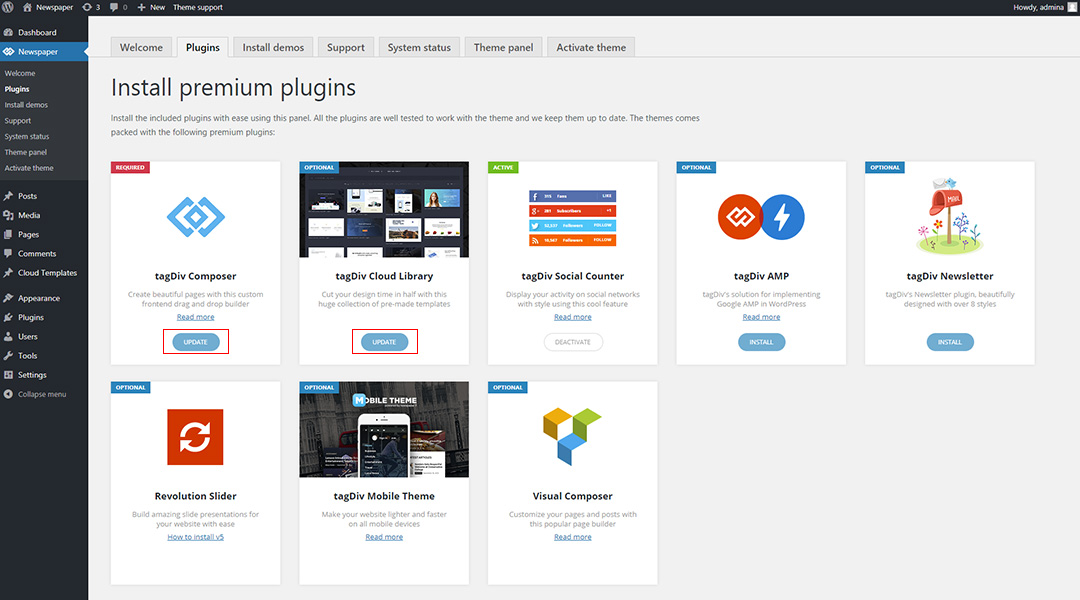
 Joophil
 Dear Support,
We have not installed any new Plugin or deactivated functionalities.
Before the Javascript was disabled and it was working properly.
We do use WP-Rocket as a cache plugin combined with Cloudflare and CDN.
When trying to activate the option (after saving it) it goes back to off mode again.
Very strange.
 gufran.develop
Hi,
I am getting this issue when trying to use cloud templates. I have a valid license and it worked a few days ago but now it’s not working. the error displays “cloud templates Envato key is missing or invalid. Please register your theme using a valid key and try again. Buy Newspaper Theme”. In the newspaper tab in WordPress, It shows I am a registered member, I also have activated my purchase code before so it not an activation issue as it worked before.

