Calin
Calin Hi dlicoppe,
As I mentioned above, after you translate a page or a cloud template from one liba to another, they cannot be translated automatically like a post, the layout will be read and the text will usually be changed using tagDiv Composer.
If you want, we can connect to check if there is a problem, but as I said, the texts must be translated manually with tagDiv Composer on each language because they are set in templates and pages with shortcodes.
Thank you!
 Anamaria
 Hi,
Those are for standard templates https://i.imgur.com/zSdgfgM.png, not cloud templates. You use cloud templates, also, this image wasn’t uploaded -> https://i.imgur.com/zgf8fk6.png
so please provide more details about what you want to achieve.
Thank you!
 modbias
 Hi, sorry for my slow response! Yes, everything is up to date:
* WordPress 6.2
* Newspaper 12.3.1
* tagDiv Composer 4.0
* tagDiv Cloud Library 2.6
 ludyma
 Hi, don’t get me wrong, but much of the information you give me is outdated. Only in the theme panel, there is little that you can configure the basics, after what you could use before that you can no longer use templates for mobile phones from the cloud, there are only a few and a blank base. True I can look it up by the mentioned tool. The mobile model, OS or device type is not relevant, for that you have to use the CSS to adapt, but I wanted it for the drop-down option of the submenus. Thanks for the information.
 Bettina
 Hello @mujassar!
In the cloud templates, you can add the ads when you edit the post with TagDiv Composer in the element called ” Single Post Content ” in the tab ADS. Documentation here: https://forum.tagdiv.com/article-ads/
Or you can use the element called “Ad box” from TagDiv Composer, and there you need to add the ads: https://forum.tagdiv.com/ads-adsense-overview/
Thank you!
Anamaria You can use a different template for every category if you use a cloud template. You can duplicate a template, install a new one and assign it to the category you like, or create one from scratch by importing a blank template and building it as you like.
Check this topic: https://forum.tagdiv.com/topic/different-logo-in-categorypage/; Here is explained how to duplicate a header correctly and make some changes for a category template or other templates.
You can assign the template for each category in Theme Panel -> Categories.
Thank you!
 dlicoppe
 it does not work…
Here is the proof that the page is modified and translated into English:
1. https://share.cleanshot.com/LkWhzvW3
2. https://share.cleanshot.com/SklQDDvN
We make the changes in English: https://share.cleanshot.com/KfgQkKdx
we record and nothing…
it returns to the original text, it does not take into account our modifications…: The test is always in French from the popup menu on all languages: https://share.cleanshot.com/q25CJ35y
There must be something wrong with your theme…
We can give you access, but be careful not to delete items!!! Because the last time you were given access, you deleted content from us…
We noticed there are many fields of your templates in the “pages” which are not translatable… why? ON is busy redesigning your entire theme on the “pages” part. Your theme is not suitable for multilanguage. All these types of fields in pages that are not linked to cloud templates cannot be detected by WMPL… ?
https://share.cleanshot.com/Ky94b8Mh
-
This reply was modified 3 years by
dlicoppe.
 alessandrogini1
Hi there,
I do not manage to work on tagDiv composer anymore.
The top bar looks weird and the composer never actually starts.
Please check the video:
https://www.loom.com/share/a3990b18fa33449b90ef25ca92a177c3
Also, please notice that ALL the plugins are deactivated but
tagDiv Cloud Library
tagDiv Composer
tagDiv Mobile Theme
tagDiv Newsletter
tagDiv Opt-In Builder
tagDiv Standard Pack
How can I fix this??
Thanks
 croboy
 It’s been a while since I asked question.
Some time ago I found the hook that works on desktop.
add_action( ‘wp_head’, function(){
$featured_img_url = get_the_post_thumbnail_url(get_the_ID(),’full’);
echo ‘<link rel=”preload” as=”image” href=”‘.$featured_img_url.'”/>’;
});
Could you suggest what to use for
$featured_img_url = get_the_post_thumbnail_url(get_the_ID(),’full’);
for mobile theme?
Same hook does not work on mobile.
On desktop I got LCP of 0,6 seconds which is great and shows my hosting and cloudflare works
 mbbaureihende
 I found this in my Debug File:
[08-May-2023 08:15:42 UTC] PHP Fatal error ob_start(): Cannot use output buffering in output buffering display handlers in /var/www/vhosts/mb-w124.de/sites/mb-baureihen.de/wp-content/plugins/td-cloud-library/shortcodes/header/tdb_header_menu.php on line 1505
[08-May-2023 08:15:27 UTC] PHP Notice Trying to get property ‘comment_type’ of non-object in /var/www/vhosts/mb-w124.de/sites/mb-baureihen.de/wp-includes/comment-template.php on line 1128
[08-May-2023 08:15:27 UTC] PHP Notice Trying to get property ‘comment_type’ of non-object in /var/www/vhosts/mb-w124.de/sites/mb-baureihen.de/wp-includes/comment-template.php on line 1142
[08-May-2023 08:15:27 UTC] PHP Notice Trying to get property ‘comment_ID’ of non-object in /var/www/vhosts/mb-w124.de/sites/mb-baureihen.de/wp-includes/comment-template.php on line 1142
[08-May-2023 08:15:27 UTC] PHP Notice Trying to get property ‘comment_type’ of non-object in /var/www/vhosts/mb-w124.de/sites/mb-baureihen.de/wp-includes/comment-template.php on line 1128
[08-May-2023 08:15:27 UTC] PHP Notice Trying to get property ‘comment_type’ of non-object in /var/www/vhosts/mb-w124.de/sites/mb-baureihen.de/wp-includes/comment-template.php on line 1142
[08-May-2023 08:15:27 UTC] PHP Notice Trying to get property ‘comment_ID’ of non-object in /var/www/vhosts/mb-w124.de/sites/mb-baureihen.de/wp-includes/comment-template.php on line 1142
-
This reply was modified 3 years by
mbbaureihende.
Bettina Hello!
Unfortunately, we do not have any option to achieve what you need. I recommend you to don’t use the mobile theme with the cloud templates.
Thank you!
Calin Hi,
Indeed, there were a few changes to the cloud templates. You need to translate the English (original language) header for each language in part – https://i.imgur.com/CDmeHCf.png you should have them for each language cloud template – https://i.imgur.com/4agmUtg.png
A much simpler and faster alternative is to duplicate the cloud template you want to use in another language, edit it and select the desired language – https://i.imgur.com/z1CqgBo.png (edit the name) – https://i.imgur.com/dPX8ROs.png – https://i.imgur.com/Lc81IgP.png This method needs to be used to translate all cloud templates.
The pages are created with tagDiv Composer which is a page builder, when WPML is used it cannot translate everything that was built with the page builder and must be edited for each language separately. Please open the page in the editor and click on translate – https://i.imgur.com/TXH6y1c.png
When you make the corrections, make sure you are on the page with the language you are editing, and if you use the cache, or object cache, please clear it.
Thank you!
Anamaria Hi,
Please edit the cloud template with tagDiv Composer -> https://i.imgur.com/j8YvKks.png click on the block and remove the offset -> https://i.imgur.com/dJ0iFQu.png let that field empty.
Thank you!
Anamaria Hi,
Please edit the cloud template with tagDiv Composer -> https://i.imgur.com/j8YvKks.png click on the block and remove the offset -> https://i.imgur.com/dJ0iFQu.png let that field empty.
Thank you!
Anamaria Hello,
You use a cloud template, so please delete the sidebar with right-click. You can delete rows/inner rows and elements, but not columns.
Also, after please change the row layout -> https://tagdiv.com/flexibility-rows-columns-newspaper-theme/
-> https://tagdiv.com/how-to-add-delete-and-duplicate-row-newspaper-theme/
Thank you!
Anamaria Hello,
You can import that block from tagDiv Cloud Library -> https://cloud.tagdiv.com/#/single/page/Blocks/973 -> https://forum.tagdiv.com/cloud-library-templates/
The block will be set at the bottom page content, but you can move it where you want, select the row => https://i.imgur.com/ddupL4m.jpg
Thank you!
ludymaI want to access the CSS, and see the configuration of the mobile menu, could you tell me where it is exactly.
Why are there no mobile themes in the cloud anymore?
 mattemkadia
Hi Guys,
I’m using a custom shortcode which I place in the sidebar on cloud archive templates and cloud single post templates.
The shortcode works fine with standard pack templates but fails to render anything in cloud templates.
The shortcode is really simple, like this.
if ( is_category(306) || ( is_single() && in_category(306) && !has_tag(array(464,37755)) ) )
{
echo do_shortcode(‘[bsa_pro_ad_space id=”63″ crop=”no”]’);
}
I assume it’s because the categories and tags aren’t being fetched by the cloud templates so is_category or in_category aren’t working properly.
What do I need to do in order for the shortcode to work in cloud templates?
Do I need to declare the queried object id’s somehow?
Thanks
Matt
 ezioboy
 TagDiv Composer → Cloud
A page was imported from TagDiv Composer → Cloud. Now I have to fix this in my own way.
When you want to erase the part highlighted in red, point the cursor
https://ibb.co/zZkhzDg In this state
If I right mouse → Delete >> https://ibb.co/dmLYJSB I get this status How can I clear the yellow box as well? Can I leave this as is and continue working? If you delete this too, everything will be erased.
 Montelent
Please help me, I tried to redesign my single page before then I found out that the Cloud templates are nonsense, I can’t do a better design like when I was using Elementor/Wpbakery. now my single page is conflicting with the old design. how do I fix this?
Check these 2 links and you will understand what I mean: https://www.cloudorian.com/sony-shuts-down-concrete-genie-studio-pixelopus/
https://www.cloudorian.com/virtual-proximity-sensing-vps/
dlicoppe Good morning,
We only have one problem left to solve and we need you.
All “cloud template” models have been translated except 1.
The default template of “Homepage templates” cannot be translated into several languages, i.e. you cannot create a “homepage template” per language, because your theme only accepts one “hottempage template” by default for all languages. WPML does not know how to translate everything that is put in these fields:
Screenshot 1 : https://share.cleanshot.com/5tJC5QtG
Screenshot 2 : https://share.cleanshot.com/fXyNWqBR
Screenshot 3 : https://share.cleanshot.com/KFbBf1zf
…
And also impossible to translate some other elements of the “popup-menu” page: https://share.cleanshot.com/1CqhnD0Z
All the custom fields of the template are not translatable for WPML, it does not detect them…
How to solve this problem?
-
This reply was modified 3 years by
dlicoppeHello,
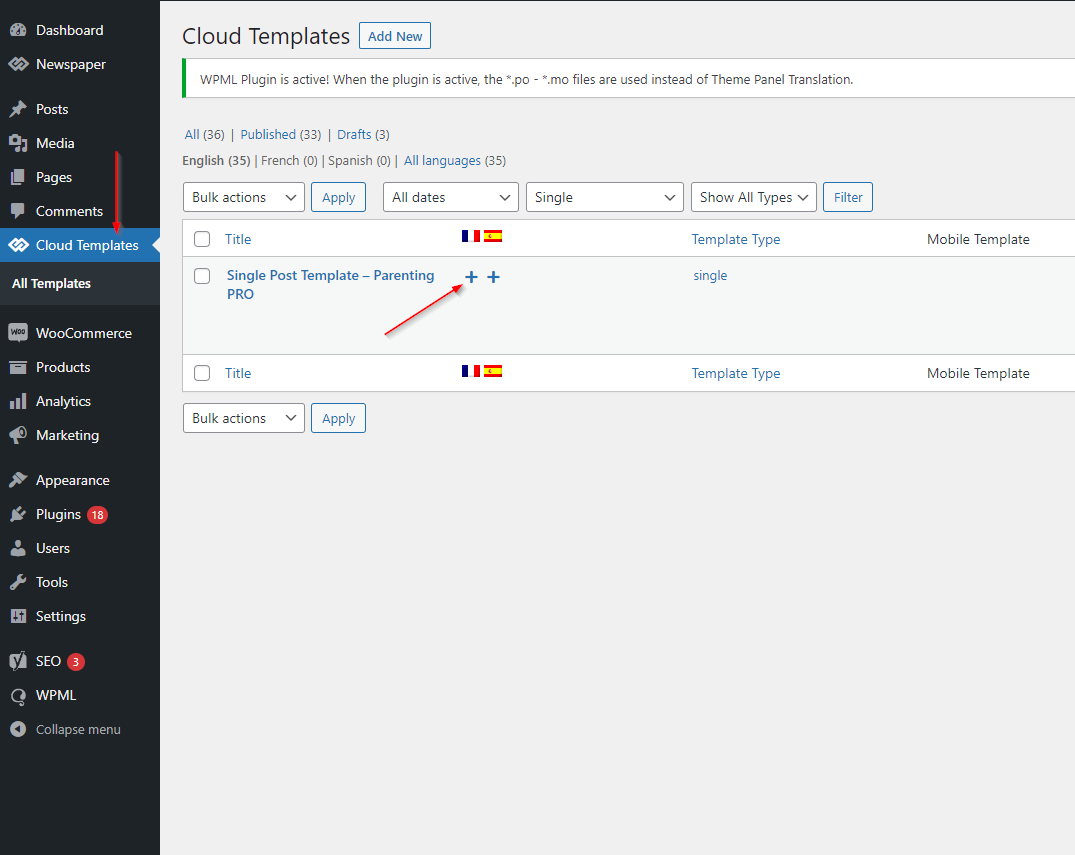
We followed your guide here for our WPML setup: https://forum.tagdiv.com/using-theme-translations-together-wpml/, but there is a problem because according to your guide it was easy to translate each “cloud templates” that we have defined: https://forum.tagdiv.com/wp-content/uploads/2017/04/wpml-3.png. Except that your guide is not up to date because this poster no longer exists in the wordpress with the theme today, it is this display now: https://share.cleanshot.com/1ygN7qmp
how can we duplicate our models from our default language in all languages and then translate them?
 gct
gctHi There,
I would like to know if i am able to create a page layout that will use the featured image i have set as a “banner” for each page only. ideally i would like the featured image i have set to pull through to the front end but i am not sure if i do this under the header and create a custom cloud header to apply to pages only.
is this possible with the Newspaper theme?
Bettina Hello!
I’m not sure. I recommend you to manually convert them online and then upload it to your Media Library. For example, try this link: https://cloudconvert.com/jpg-to-webp
Thank you!
Anamaria Hi,
You can apply global templates from here -> https://i.imgur.com/r3Hqlto.png -> https://i.imgur.com/KkmGNFN.png
All the templates are in cloud library -> https://forum.tagdiv.com/how-use-tagdiv-cloud-library-templates/ -> https://forum.tagdiv.com/cloud-library-templates/
Thank you!