
 Anamaria
 Hi,
Yes, you can use the same license on two websites.
Please set the wp-memory and the requirements like our guide -> https://forum.tagdiv.com/requirements-for-newspaper/ also, make sure that you are using SSL and you have a good bandwidth; the one from our server is 1GB/s, and the one that I use at home is 500MB/s, if you have low bandwidth, then you can access parts of the cloud, this can be done from the frontend, for example, if you are on a post -> https://i.imgur.com/4G74M7F.jpg or from tagDiv Composer -> https://i.imgur.com/2F6MhfI.png or from backend -> https://www.screencast.com/t/wekHmc7kJ8J
Also, you can check the console if you receive a message error.
Thank you!
Anamaria Hi,
Please set the wp-memory and the requirements like our guide -> https://forum.tagdiv.com/requirements-for-newspaper/ also, make sure that you are using SSL and you have a good bandwidth; the one from our server is 1GB/s, and the one that I use at home is 500MB/s, if you have low bandwidth, then you can access parts of the cloud, this can be done from the frontend, for example, if you are on a post -> https://i.imgur.com/4G74M7F.jpg or from tagDiv Composer -> https://i.imgur.com/2F6MhfI.png or from backend -> https://www.screencast.com/t/wekHmc7kJ8J
Also, you can check the console if you receive a message error.
Thank you!
Anamaria Hello,
You can import a block like that from tagDiv Cloud Library -> https://cloud.tagdiv.com/#/single/page/Blocks/1817 there are many blocks like this,
also, you can do the changes like this -> https://www.screencast.com/t/JGb3jwMv2IKu
The block will be set at the bottom page content, but you can move it where you want, select the row => https://i.imgur.com/ddupL4m.jpg
Thank you!
 lstamellos
A WordPress “critical error” message takes place when displaying a post that contains in itself an automatically embedded post block, after upgrading to 12.3.1. The same post is displayed properly and without errors after reverting back to the previous version (12.3).
The apache error log:
[Thu Apr 13 00:19:49.404503 2023] [proxy_fcgi:error] [pid 3031902] [client XX.XX.XX.XX:50148] AH01071: Got error 'PHP message: PHP Fatal error: Uncaught TypeError: call_user_func_array(): Argument #1 ($callback) must be a valid callback, class td_video_support does not have a method "embed_oembed_html_process_embed_html" in /home/user/public_html/wp-includes/class-wp-hook.php:308\nStack trace:\n#0 /home/user/public_html/wp-includes/plugin.php(205): WP_Hook->apply_filters()\n#1 /home/user/public_html/wp-includes/class-wp-embed.php(289): apply_filters()\n#2 /home/user/public_html/wp-includes/class-wp-embed.php(464): WP_Embed->shortcode()\n#3 [internal function]: WP_Embed->autoembed_callback()\n#4 /home/user/public_html/wp-includes/class-wp-embed.php(446): preg_replace_callback()\n#5 /home/user/public_html/wp-includes/class-wp-hook.php(308): WP_Embed->autoembed()\n#6 /home/user/public_html/wp-includes/plugin.php(205): WP_Hook->apply_filters()\n#7 /home/user/public_html/wp-content/plugins/td-cloud-library/state/single/tdb_state_single.php(514): apply_filters()\n#8 /home/user/public_html/wp-conte...'
 muterobert
 It looks like this behavior is happening within the header itself, not the page.
Here I created a new blank header via Cloud Templates. All I did was add a text box, and you can see that it’s visible in all other viewports, but it disappears on the Phone viewport: https://imgur.com/a/UhhfSJv
 webteamsas
Hi we run on wordpress.com fresh installation. And our license is activated. No other plugins have been installed.
But the cloud library does not load templates. It continues to be unresponsive and stuck at “loading templates screen”
How do we proceed ?
Also the prebuilt website option shows “An issue has been encountered while trying to validate your license key”, though we have a registered and newly purchased theme.
Kindly help
 Luca
LucaSal , încerc să încarc o temă pentru un magazin ca temă secundară, dar se blochează în felul următor.
Poți folosi ziarele temei principale și o temă pentru magazin în același timp ?
Care este problema ?
Mulțumim , Luca.
 Rosemarie
Hi,
The cloud template failed to load, what should I do?
please check: https://prnt.sc/RXqyq1wkgHKS
Thanks.
 ngotuannghia
Dear Admin,
Today, I try to get template from Tagdiv Cloud Plugin but it not show anythings.
I check the console tab and see some errors.
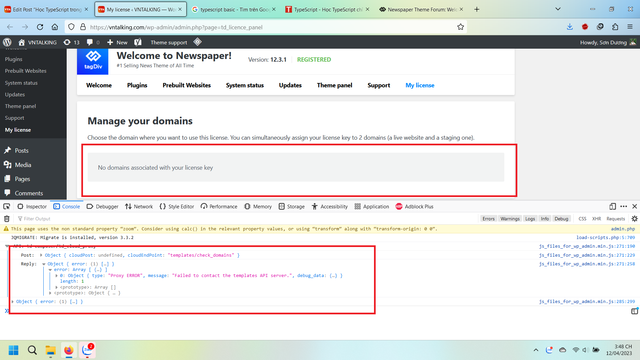
I also change to the other wifi – 4G… but the issue still occurs.
Please kindly help guide me.
Thanks
 Calin
Calin Hi,
We do our best to help you, but this problem seems to be a 403 coming from Cloudflare (CDN), so please check the settings from CDN.
Thank you!
ngotuannghiaDear Admin,
I have an issue relate Header layout which build by Tagdiv Cloud plugin.
The Header layout blinking before loaded. I think this issue maybe belong critical css. But I dont know how to fix it.
Here is the step reprocedure the issue:
Video: https://streamable.com/h2srwz
Image: https://i.ibb.co/fHhMX2M/Screenshot-2023-04-12-131719.png
Please kindly suggest me.
Thanks
Calin Hi,
In such cases, we recommend using WPML with cloud templates – https://forum.tagdiv.com/using-theme-translations-together-wpml/
As an alternative, maybe that function can be combined with this one – https://pastebin.com/d7nU6Y92
Thank you!
Calin Hi,
You need to have a single post template set as global for posts, you edit this cloud template and set the review on it – https://i.imgur.com/JlIgbrH.png – https://i.imgur.com/3XbtyLF.png save the changes and now the customer can set a review for each post.
Thank you!
 norbiQue
 A screenshot of the query monitor console next to each post. This problem occurs on all pages with your theme, and I have multiple licenses, the problem is even when I disable all other plugins.
wp-includes/taxonomy.php:4589
get_term_link()
wp-content/plugins/td-composer/legacy/common/wp_booster/td_social_sharing.php:1206
td_social_sharing::get_service_share_info()
wp-content/plugins/td-composer/legacy/common/wp_booster/td_social_sharing.php:1139
td_social_sharing::render_generic()
wp-content/plugins/td-cloud-library/shortcodes/single/tdb_single_post_share.php:387
tdb_single_post_share->render()
wp-content/plugins/td-composer/legacy/common/wp_booster/td_global_blocks.php:27
td_global_blocks::proxy_function()
wp-includes/shortcodes.php:355
do_shortcode_tag()
wp-includes/shortcodes.php:355
preg_replace_callback()
wp-includes/shortcodes.php:227
do_shortcode()
wp-content/plugins/td-composer/includes/tdc_composer_block.php:279
tdc_composer_block->do_shortcode()
wp-content/plugins/td-composer/includes/shortcodes/vc_column.php:316
vc_column->render()
wp-content/plugins/td-composer/legacy/common/wp_booster/td_global_blocks.php:27
td_global_blocks::proxy_function()
wp-includes/shortcodes.php:355
do_shortcode_tag()
wp-includes/shortcodes.php:355
preg_replace_callback()
wp-includes/shortcodes.php:227
do_shortcode()
wp-content/plugins/td-composer/includes/tdc_composer_block.php:279
tdc_composer_block->do_shortcode()
wp-content/plugins/td-composer/includes/shortcodes/vc_row.php:1145
vc_row->render()
wp-content/plugins/td-composer/legacy/common/wp_booster/td_global_blocks.php:27
td_global_blocks::proxy_function()
wp-includes/shortcodes.php:355
do_shortcode_tag()
wp-includes/shortcodes.php:355
preg_replace_callback()
wp-includes/shortcodes.php:227
do_shortcode()
wp-content/plugins/td-composer/includes/tdc_composer_block.php:279
tdc_composer_block->do_shortcode()
wp-content/plugins/td-composer/includes/shortcodes/tdc_zone.php:591
tdc_zone->render()
wp-content/plugins/td-composer/legacy/common/wp_booster/td_global_blocks.php:27
td_global_blocks::proxy_function()
wp-includes/shortcodes.php:355
do_shortcode_tag()
wp-includes/shortcodes.php:355
preg_replace_callback()
wp-includes/shortcodes.php:227
do_shortcode()
wp-includes/class-wp-hook.php:308
apply_filters(‘tdb_template_content’)
wp-content/plugins/td-cloud-library/wp_templates/tdb_view_single.php:139
 observatorulprahovean
Hi there,
We are using Newspaper theme on our website, with LSCache WordPress plugin active. We are running a Core Web Vitals audit and the LiteSpeed team is tuning the plugin in order to achive the best results on CWV.
During the tuning, we found out that Google bot is not seeing the updated version of the category pages, on which we are using a TagDiv cloud template.
I am pasting below the answer and asking you to help us with this.
The LSCache team told us that the template we are using to generate the category view is not recognized as official Category view/pages, so they can’t be purged automatically, once a new article is added on the category.
Thank you for those details, I also got the logs and indeed these templates are not recognized as official Category pages, which is why they are not purged.
However, in order to do this, the only way is to contact the plugin owner and ask them to integrate with LSCWP API, so that they can trigger a purge on their URL’s when an update is done.
Regards,
Ciprian Pap
 tanteidee
Hi!
I absolutely need to use WPBakery Page Builder in some pages and posts of my site, I use a global cloud header and global cloud footer. I am aware of the conflict with your tagDiv Composer, and in fact the header and footer in the pages where I use WPBakery Page Builder is for example not formatted properly.
Can you recommend me any solution on how to make WPBakery Page Builder + tagDiv Composer + global cloud header + global cloud footer coexist?
Thanks!
tanteideeHi!
I need to use a specific cloud template header and footer only in some parts of the website, when the phrase “/en/” (english site) is in the URL of the site like mysite.com/en/about (yes), mysite.com/chi-siamo (no), without setting it manually. This thing waiting to switch to WPML plugin.
Can you suggest me a code snippet to put in the functions.php file?
In the past, when I not use cloud template, I used for menu:
// Function to use specific menu on different page
add_filter( ‘wp_nav_menu_args’, ‘menu_switcher’ );
function menu_switcher( $args ){
$url = ‘https://’ . $_SERVER[‘SERVER_NAME’] . $_SERVER[‘REQUEST_URI’];
if (strpos($url,’/en/’) !== false) {
if( ‘header-menu’ == $args[‘theme_location’] )
$args[‘menu’] = ‘Principale EN’;
}
return $args;
}
Thanks!
 firebrandmedia
 I am having issues with the theme and the updates. I accidentally ran the most recent update, and the default header I was using is no longer an option in the dashboard, and now I have to use a cloud version. This has messed up the ad serving with desktop and mobile. It was working great, and the update killed it. I had DFP serving 728×90 on desktop and 300×250 on mobile for the top leaderboard. Not the mobile ad is gone, and I have no idea what to do. Is there any way to dump these cloud elements and get the theme back to allow for the header and ad design in the dashboard? https://www.lagunabeachindy.com/
 mikeante
the plugin disables itself and generates problems on the header and footer of the site
Anamaria Hi,
This block is available in Single Post Templates where was used, but in the new template, this template is removed -> https://i.imgur.com/Y3xBVxz.png
You can import from Cloud Library on your page -> https://i.imgur.com/056P42f.png-> https://i.imgur.com/Xwb3E5T.png. The block will be set at the bottom page content, but you can move it where you want, select the row => https://i.imgur.com/ddupL4m.jpg
Thank you!
Anamaria Hello,
This is a block, not a homepage template https://i.imgur.com/iXp8igj.png, so please first import a homepage template.
You can import from Cloud Library on your page -> https://i.imgur.com/056P42f.png-> https://i.imgur.com/Xwb3E5T.png. The block will be set at the bottom page content, but you can move it where you want, select the row => https://i.imgur.com/ddupL4m.jpg
Thank you!
Calin Hi,
What you can do are the follow:
1. Make sure that you have the last theme version 12.3.1
2 Use only necessary plugins (for example you can go only on standard templates using tagDiv Standard pack or you can go with cloud templates that can be customized using the tagDiv Composer, you can use both, but this will consume more resources, so you can use only one of them).
3. Use the cache option on your flex blocks – https://forum.tagdiv.com/use-flex-blocks-cache-option/
4. Make sure that all theme requirements are set – https://forum.tagdiv.com/requirements-for-newspaper/
5. Use a database cache.
I hope this will help you!
 cloudmark
 Hi there,
It’s really annoying to have announcements everywhere!!
It gives the impression that they are in need of business, that they are on the verge of bankruptcy.
For everything there is a right way and an easy but wrong way to do things. You were doing the right thing with the newsletters from time to time and you changed it to the easy and wrong by placing banners all over the interface with images that you serve from your own site!
https://cloud.tagdiv.com/services-img/banner-theme-panel.png
https://cloud.tagdiv.com/services-img/banner-composer.png
I didn’t authorize you to inject your content on my property.
 ludyma
 But if it is obsolete, because they are still in software, they should remove what should not be used so that it does not generate errors or discomfort. One question, where the blocks are downloaded from the cloud, before, now how is it done?
 Bettina
 Hello @Nissfone !
Please note that you can edit only the cloud template with the TagDiv Composer. If you use a cloud template, then edit it with the tagDiv Composer, click on the featured image element and add a parallax(fixed image): https://prnt.sc/EDynoC7vWa2S
Thank you!



