
 toursuk
 Hi Calin,
I am now testing the Flex Block 1 and other elements locally and I am still having the errors. Please see the video.
https://share.icloud.com/photos/056iisPK5F3u4yoRDk6VDD8fw
Regards,
Justin
 vikasnangia
 I dont think you understood my requirement.
On the post details page (rendered via the single post template from the cloud), I simply want to show the video link I added to the featured video field.
Pleasea advise how this can be achieved.
 Calin
Calin Hello,
This issue can occur for different reasons. One possible cause could be a plugin conflict, so please run a test using only the tagDiv plugins and check if the verification process works.
Another possible reason could be the permalinks. Please perform a test by setting the permalinks to ‘Plain’ and then check if the verification process works.
If it does work, it’s likely that you’re using an NGINX server, and you’ll need to configure pretty links accordingly -> https://cloudarcade.net/tutorial/pretty-url-on-nginx-server/ -> https://www.cyberciti.biz/faq/how-to-configure-nginx-for-wordpress-permalinks/
If none of these solutions work, a hosting option may be interfering.
Please check these two solutions, and if the issue still persists, please contact us via email at contact@tagdiv.com and provide wp-admin and cPanel access.
Thank you!
Calin Hi,
By default, there is no option to filter only the featured video, but if you have set a specific category or tag, then you can filter your block after that category/tag.
Now, in case you have a single post template from the cloud, then you can use tagDiv Composer to create the sidebar https://forum.tagdiv.com/sidebars-tutorial/
For the standard template, you must use widgets (you can use a block widget).
Thank you!
Calin Hi Sim2,
Yes, you can use the old templates; for this, you just need to make sure that the plugin tagDiv Standard Pack is enabled. This can be installed/enabled from Newspaper > plugins https://i.imgur.com/xRM2JwH.png
Then in the theme panel in the header section for cloud, make sure is set the -no template- and choose the header style you need (i think is style 1) – https://i.imgur.com/QFTEkF2.png
Thank you!
 Sim2
Sim2 Thanks a lot for that Calin, that is a good idea.
Can we still use the classic header in version 12.7.3?
I have turned off the cloud template header and looking to put the header back like version 9 but can’t see the options to have a header logo to the left and ad box to the right, like screenshot.
Can we do this in the theme panel?

Calin Hello,
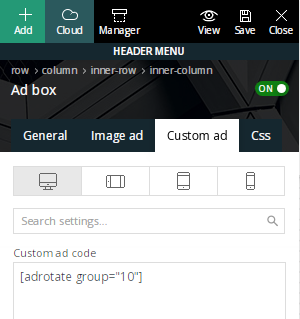
From the images the settings are done ok for the ad box. It is possible that it is just a period, but if you think that this situation is possible from cloud templates, maybe it would be better to do a test, set a classic header (which was used before) and see if the header status returns to the values it had before.
Thanks!
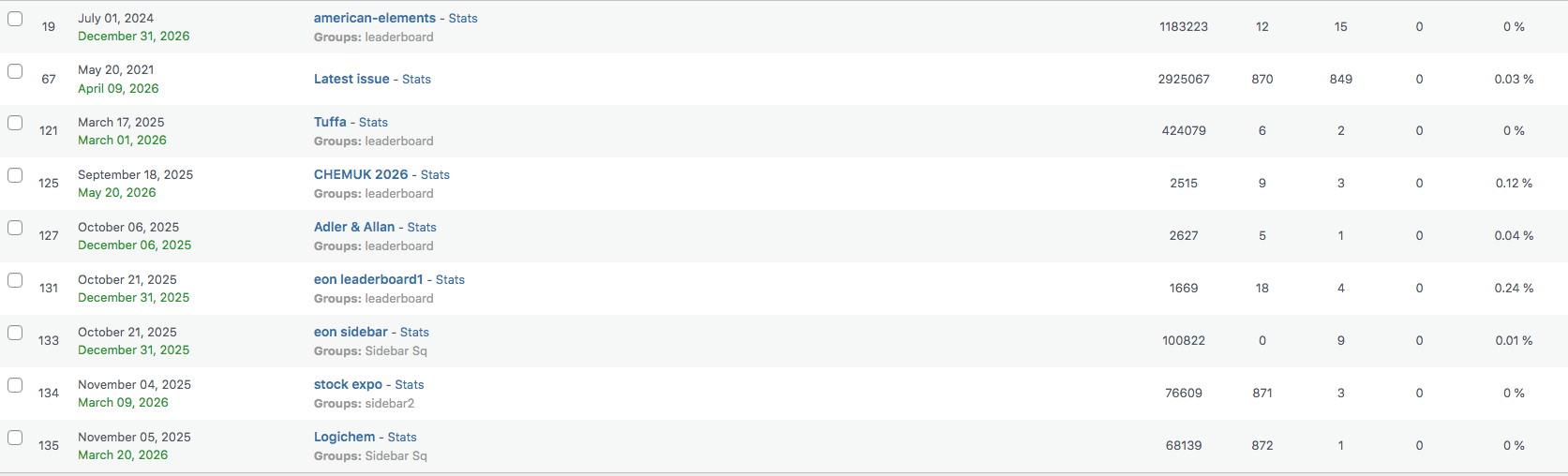
Sim2We use newspaper theme on our website chemicalindustryjournal.co.uk and we use a plugin called adrotate that manages ads on our site. Before we updated to newspaper 12 the stats for impressions from the header and the sidebar were consistently the same but since we have started to use the cloud templates the header stats have dropped down dramatically.
We use shortcodes in the ad box in header to place the ads and in the sidebar too, see screenshot, and we are just trying to work out why this is happening, does that make sense?
Calin Hi,
I saw that the way the filter is working on the 2 links is different, and even the options under formats seem to be different https://francegallcollection.fr/formats/cd/. Here seems to have no main. Do you have a different cloud template set on it, or is it the same as the one seen, for example, on https://francegallcollection.fr/disques/?
Is it possible to contact us via email at contact@tagdiv.com and provide us with a temporary wp-admin access so we can better investigate the situation?
Thank you!
 xposedigital
 Hello, I have deactivated all plugins except the tagDiv Cloud Library & tagDiv Composer and the newspaper theme activated. But the issue persists. I can’t edit anything with the builder on a new test page. I need help with this.
Kindly help look into it.
Cheers
Calin Hi,
Please make a test on a new page. If tagDiv Composer is working, then it is related to something from that page; if it is not working, then it can be from the cloud header, cloud footer, or even from an extra plugin.
Thank you!
Calin Hi,
Most of the time, the problem is from a shortcode that is not compatible with our theme or a plugin conflict; therefore, after you set it with tagDiv Composer and save the page/cloud template, the next time you try to edit it, you’ll get that error.
If is only for one page or a cloud template (it can be on the header or footer, you can change them for tests and see if the problem persists), this is from some settings/shortcodes set on it and it can be fixed using the page revision https://wordpress.com/support/page-post-revisions/
Thank you!
 habershamnews
 That might not even be the right link. I modified a cloud template for single post to include the “Single post share” item but I can’t find a button under the Newspaper -> Theme Template -> Post Settings that lets me enable/disable social share or anything like that. Please help.
 signals
 TY for getting back. Yes I understand that a cloud footer can be used but that does not seem to solve this problem. If i try to edit it with theme builder it gives me an error.
I have disabled both mobile and amp but the regular theme, in responsive mode does not seem to display properly on mobile. How do I solve this?
 Tsako79
Hello all.
I have a strange problem and I can’t find a solution. Tried everything!
I have already built my website with the newspaper theme and I have used cloud templates for header and footer. As a last step I add the polylang plugin to create a second language (Main Greek secondary English). I ‘ve used this in the past many times without a problem but right now I have a strange conflict.
When I add my second language (english) and I create the pages, everything at this step works fine. But when I add a new menu and trying to check it as an English header menu, the checkbox unchecked automatically (screenshot 1). As a result, there is no way to add an english menu and even in the english pages, the greek menu appears always.

I’ve contact Polylang support already and they told me it’s a theme conflict.
Any help or any ideas please?
Calin Hi,
If the footer displays a text that can not be edited (when you hover it), then you are using a standard header, not a cloud header/footer, and it can be edited using the theme panel settings. In case you want to edit it with the theme builder, use cloud templates.
Thank you!
Calin Hi,
VERY IMPORTANT! If you have install a pre-built website with content. The pre-built website content added by the pre-built website install (pages, articles, categories, theme panel settings …) will get removed when uninstalling the theme or switching pre-built websites. If you want to keep the content as your own, please create a copy of the page and use the copy as your content. In case you want to install a PRO demo, what you can do is to get the cloud template and sample pages for that demo from the cloud (without installing a new pre-built website) -https://i.imgur.com/JTmrIeu.png
Also, you can use a staging area where you can make those tests so the main website will not be affected.
Thank you!
Calin Please check this identical topic – https://forum.tagdiv.com/topic/tagdiv-cloud-library-plugin-3-9-2-cross-site-scripbility/#post-537051
 sebaslucas10
Hi there as i see the plugin has a vulnerability, are u planning to fix it anytime soon ?
WordPress tagDiv Cloud Library plugin < 3.9.2 – Cross Site Scripting (XSS) vulnerability
Cross Site Scripting (XSS) vulnerability discovered by João Pedro S Alcântara (Kinorth) in WordPress Plugin tagDiv Cloud Library (versions < 3.9.2)
 raghavendra,vikram02
Hello team,
I hope you are doing well.
I am using the Newspaper theme for my news website, and I really need some assistance. I am not very technical, so I’m worried about breaking something on my site.
Recently, I found a theme/template inside tagDiv Cloud that I really liked and want to apply. But before I do that, I am scared that I might:
Lose my existing posts, pages, categories, or design settings
Misplace my logo
Mess up the homepage layout
Break the mobile/desktop structure
Or accidentally overwrite something important
I genuinely do not have much experience with WordPress or theme editing, so I kindly request help from someone in the team or any senior member who can guide me step-by-step.
What exactly I need help with:
Safely applying the new theme/template without losing any existing data.
Keeping all my categories intact and mapped correctly.
Adding my logo in the correct place matching the new design.
Making sure my homepage looks clean and matches the template I am selecting.
Any recommended settings to avoid layout issues.
If needed, I can share screenshots or temporary access (after instructions) so the process is done safely.
I will be extremely grateful if someone from the tagDiv team or an experienced community member can help me, as I’ve been struggling with this for a long time and really want to improve my website and please help me as I honestly have no technical knowledge
Thank you so much in advance!
 thesenegambiao
Hello,
I am using the Newspaper Theme on my domain:
https://thesenegambiaobserver.com
I am facing a major problem:
Whenever I try to edit any page with tagDiv Composer OR open the Cloud Library, it shows a 404 page.
I have tried the following steps already:
1.Regenerated permalinks (saved twice)
2.Deactivated all plugins, only Newspaper Theme plugins kept active
3.Switched to default .htaccess
4.Increased PHP limits:
5.max_input_vars = 5000
6.memory_limit = 256M
7.Cleared CDN and browser cache
8.Disabled RankMath SEO plugin
9.Tried switching to parent theme only
10.Deleted custom code from functions.php
11.Reinstalled tagDiv Composer and Newspaper theme
But the problem continues:
Cloud Library always returns 404. Nothing loads.
Please help me check what is blocking the tagDiv Cloud Library from loading on my site.
If you need:
– System Info
I can provide it.
Thank you.
toursuk Hi Calin,
Here’s a screenshot: https://www.icloud.com/iclouddrive/01bcPC8z9PBZx68SjMhI9hTyQ#Tours-UK-Console
1) I have not used Google Maps in theme panel or any plugin so I am confused on those 3 warnings
2) JavaScript is not within my skillset but it seems to be a Yoast SEO conflict.
Thanks,
Justin.
Calin Hello,
1. Please edit the cloud category template and select the first block, then look in the filter tab and set the filter on the current category. Also, check the second block, the posts loop, and in general, look for offset, make sure that the number of articles is set above, so those will not repeat – https://i.imgur.com/HQp7gF8.png – https://i.imgur.com/Qqia5ii.png
2. Are you referring to the fact that the articles are repeated? If so, then there are 2 options:
– use the unique article option.
– edit the page using tagDiv Composer and on each block set a category filter.
Thank you!
 brockpod
When I activate the AMP plugin is lists nearly all my activated plugins as incompatible. It includes some very popular plugins, like AIOSEO, Advanced Ads Pro, Smush Pro, Jetpack, tagDIV, Wordfence, Woo Commerce.
Even Bluehost’s simple plug-in is listed as incompatible. What do I do? These other plugins are needed. List is below,
tagDiv Composer
by tagDiv
Version 5.4.2 | built on 22.10.2025 10:59
Advanced Ads
by Advanced Ads
Version 2.0.14
tagDiv Cloud Library
by tagDiv
Version 3.9.2 | built on 22.10.2025 10:59
Jetpack
by Automattic
Version 15.2
Real Media Library
by devowl.io
Version 4.22.57
tagDiv Opt-In Builder
by tagDiv
Version 1.7.3 | built on 22.10.2025 10:59
Advanced Ads – Slider
by Advanced Ads
Version 2.0.2
Wordfence Security
by Wordfence
Version 8.1.2
WooCommerce
by Automattic
Version 10.3.5
Advanced Ads – PopUp and Layer Ads
by Advanced Ads
Version 2.0.2
WPMU DEV Dashboard
by WPMU DEV
Version 4.11.29
All in One SEO Pro
by All in One SEO Team
Version 4.9.0
Smush Pro
by WPMU DEV
Version 3.22.1
The Bluehost Plugin
by Bluehost
Version 4.7.2
Broken Link Checker by AIOSEO
by All in One SEO Team
Version 1.2.6
Advanced Ads Pro
by Advanced Ads
Version 3.0.8
 janamtrup
Hello
I cannot get my ADS top banner for artickle to show. Used TagDiv 10 years, never used this before with Top Banner.
The code I use for Custom Ad 1-5 have no problems. SO I reuse same form of code for the top Ad.
One of my template the space is accupied when settig coe in Theme Panelm but hide the image it self. In another template there is now reaction. Cloud based templated both.
Wehere can I see a correct code for the Top Article Ad ?
Thanks
Jan



