
 Anamaria
 Hello,
I recommend you to use a Single Post Template from tagdiv Cloud Library, and you can design it with tagdiv Composer.
To display the related articles or more from author, you can use Flex Block and filter it https://www.screencast.com/t/SEmxo13Fo2X -> https://i.imgur.com/YIg3nPP.png
if you want to keep those templates the only way to remove the “more from author” tab is to use a custom CSS like this one:
.single .td-related-right{

 display: none;

 }
Set the code in Theme Panel ->Custom code -> Custom CSS
I hope this helps you!
Thank you!
Anamaria Hello,
You can use a different template for every category if you use a cloud template. You can duplicate a template, install a new one and assign it to the category you like, or create one from scratch by importing a blank template and building it as you like.
Check this topic: https://forum.tagdiv.com/topic/different-logo-in-categorypage/; Here is explained how to duplicate a header correctly and make some changes for a category template or other templates.
You can assign the template for each category in Theme Panel -> Categories.
Thank you!
 phubner
When trying to add a hero modules to pages I am getting the following error. This is happening on multiple sites of mine.
I created a simple test page that was blank and just tried to add the hero module. The page just has the spinner and never completes adding the hero module. In the console this is logged
tdcJobManager.addJob - Error callback - textStatus: parsererror errorThrown: SyntaxError: Unexpected token 'a', "array(569)"... is not valid JSON
jobRequest ...
shortcode
:
"[vc_row full_width=\"stretch_row_content td-stretch-content\"][vc_column][tdm_block_hero title_text=\"SGVybw==\" title_tag=\"h3\" title_size=\"tdm-title-bg\" description=\"V2VsY29tZSB0byB0aGUgZnV0dXJlIG9mIGJ1aWxkaW5nIHdpdGggV29yZFByZXNzLiBUaGUgZWxlZ2FudCBkZXNjcmlwdGlvbiBjb3VsZCBiZSB0aGUgc3VwcG9ydCBmb3IgeW91ciBjYWxsIHRvIGFjdGlvbiBvciBqdXN0IGFuIGF0dGVudGlvbi1jYXRjaGluZyBhbmNob3IuIFdoYXRldmVyIHlvdXIgcGxhbiBpcywgb3VyIHRoZW1lIG1ha2VzIGl0IHNpbXBsZSB0byBjb21iaW5lLCByZWFycmFuZ2UgYW5kIGN1c3RvbWl6ZSBlbGVtZW50cyBhcyB5b3UgZGVzaXJlLg
I did verify that I could add other modules, Author box, Flex grid, Client list, Image info box … etc.
site : staging.crossfitverve.com
Newspaper Version : 12.1.1
plugins : tagDiv Composer, tagDiv Cloud Library, YOAST SEO, Forminator Pro, Jetpack, WPMU DEV Dashboard
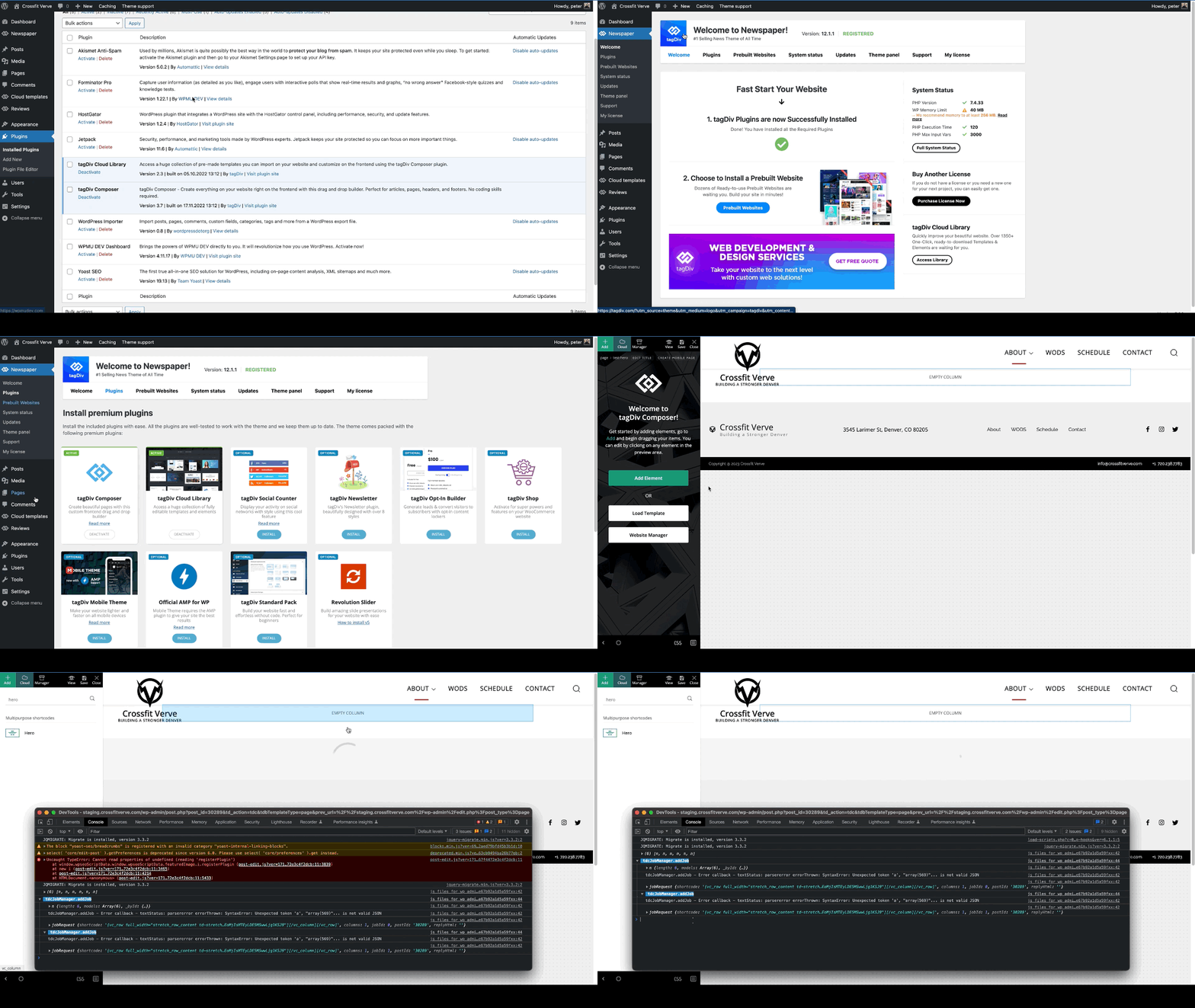
 vangeorgo
Hello,
I have Social counter installed on my homepage through TagDiv composer and also Social icons in the header with Cloud Library using TD composer. On my homepage Social counter/Social icons are using very weird font on Safari (looks kinda Japanese) and on Chrome there are only squares.
This problem occurs only on my homepage and I cannot find any setting that could possibly cause this. Can you please help me?
Also, how can I change the label in my sidebar that says “Followers” etc.? Thanks
URL with wrong font: https://svetapple.sk (check upper right corner and sidebar)
URL with correct font: https://svetapple.sk/featured/titanova-konstrukcia-nove-tlacidla-aj-vacsia-ram-toto-vsetko-prinesie-iphone-15-pro/
 justrealmoms
 Hey Anamaria, thank you! We will try the copying the code.
Regarding the Taxonomy, what I meant is that each Supplier’s page is currently created with individual Cloud Templates – Single Templates.
But, in the news website, since they are now in CPT/Taxonomies (we created a 2nd Post Type for them), and not under General (where the standard Blog Posts are), the CPT/Taxonomies does not have an option to create separate Single Templates for each Supplier.
So, we have 2 Post Types:
– Posts – where we have blog posts – all functioning well.
– Posts Guia – which we created and is in Taxonomies, which we are not sure where to create Single Cloud Templates for each Supplier page – to create the specific sidebars for each suppler with their unique information. The sidebar is not the same for all. Each one has their own contact details. Here:
https://guia.justrealmoms.com.br/co-study-school-for-life
https://guia.justrealmoms.com.br/mooui
(Each Right sidebar is different, with specific contact infos, which we created by having Single Cloud Templates for each). This is what we need to know how to create now, since they are all under a new Taxonomy and this info is crucial in each page.
Let me know if I was able to explain my self better this time.
Thanks!
 devendraiiit
 My query is that if it is Jetpack related issue then why it is not happening for Standard Post template and only happening for tagDiv Cloud Template.
Also I am seeing Loading animation in the end of post. Can you please suggest next step on this front:
Cloud Template: https://www.wordzz.com/how-to-develop-motivation-in-yourself-cloud-template/?live
Screen: https://imgur.com/gallery/vFlOVie
 Krimiwa
Hi there,
we really enjoy creating cloud templates for our diverse content with your theme.
While creating custom tag templates, we just discovered that the global header is displayed in all templates, even though we chose a different one through Website Manager in tagDiv Composer.
Interesting details:
– The individually chosen header is displayed in tagDiv composer. But not on the Website.
– We use category templates with different headers as well. It works fine there.
Do you have any idea what the problem might be?
Thanks in advance,
Kristof
 observatorulprahovean
Hi there,
We are having an issue that is continuously raising the warning below since 15.11.2022 until now.
It is related to TD Composer WP Booster and specialy to the td_wp_booster_functions.php
Can you help us with it? We are using Newspaper Theme 12.1.1 and PHP Version 8.0.25.
Today, we got a lot of Cloudflare 522 error on WordPress admin actions and found out this.
[15-Nov-2022 22:33:30 UTC] PHP Warning: Attempt to read property “ID” on null in /home/____/public_html/wp-content/plugins/td-composer/legacy/common/wp_booster/td_wp_booster_functions.php on line 2046
————————-
[04-Jan-2023 14:56:16 UTC] PHP Warning: Attempt to read property “ID” on null in /home/____/public_html/wp-content/plugins/td-composer/legacy/common/wp_booster/td_wp_booster_functions.php on line 2046
Thanks!
Anamaria Hello,
I recommend you to use a Single Post Template from tagdiv Cloud Library, and you can design it with tagdiv Composer.
To display the related articles or more from author, you can use Flex Block and filter it https://www.screencast.com/t/SEmxo13Fo2X -> https://i.imgur.com/YIg3nPP.png
You can set the ads in Single Post Template from tagDiv Cloud Library and you can set top ad, 3 inline ads set after x paragraphs and bottom ad, please check this article -> https://forum.tagdiv.com/article-ads/ and video https://www.youtube.com/watch?v=biTpVVlr8j8
Thank you!
Anamaria Hello,
I think that I know what the problem is, please edit the cloud template with tagDiv Composer -> https://i.imgur.com/j8YvKks.png click on the block and remove the offset -> https://i.imgur.com/dJ0iFQu.png let that field empty.
Thank you!
 Calin
Calin Hello sco,
This situation can be easily resolved, all you need to do is to edit the search cloud template and replace the post loop element with a flex loop element and let the filter empty – https://i.imgur.com/bL0rGQk.png this should resolve the problem.
Let me know the results!
Thank you!
 darknorth
 Hi,
I was using 10 Web Booster Caching, I have disabled its caching feature only and instead installed wp super cache.
The Plugins I have now
10Web Booster
410 for WordPress
Auto Image Attributes
Cloudflare
EWWW Image Optimizer
Head & Footer Code
Instant Indexing
Loginizer
MC4WP: Mailchimp for WordPress
NicheTable
Rank Math SEO
Really Simple SSL
Simple Social Icons
Site Kit by Google
Spectra
tagDiv
UpdraftPlus
WebP Express
WP Super Cache
I am testing with the WP Super Cache, so far no problem, but a new thing happend today. when I opened the main domain in browser it kept opening a blog post (just like redirect). I tried incognito and same blogpost was opening so I deleted the cache 🙂 and the homepage is now visible/working.
This site needs a doctor lol.
Anamaria Hello,
You can find the code in this path wp-content/plugins/td-cloud-library/shortcodes/category/tdb_category_subcategories.php https://i.imgur.com/1OHjFdS.png
Thank you!
Anamaria Hello,
So, you want to use an External/Affiliate product. In the next update, which is soon, you can use the cloud template; until then, only the standard template is applied.
Usually, it should work well.
Thank you!
Anamaria Hi,
There are many optimization guides provided by our users here in the forum, some made by us; you could check some of them
– https://forum.tagdiv.com/cache-plugin-install-and-configure/
– https://forum.tagdiv.com/how-to-make-the-site-faster/
– https://forum.tagdiv.com/topic/high-number-of-ajax-request/
– https://www.infophilic.com/get-almost-100-pagespeed-newspaper-theme/
– https://forum.tagdiv.com/topic/score-100100-pagespeed-with-newspaper-wordpress-theme/
– https://www.andraware.com/wp-rocket-for-newspaper-theme/
– https://spraythemes.com/newspaper-theme/how-to-speed-up-the-newspaper-wordpress-theme-using-wp-rocket/
– https://forum.tagdiv.com/topic/newspaper-theme-speedify-your-website/
– https://forum.tagdiv.com/topic/tutorial-chriss-custom-optimizations-for-functions-php-etc/
– https://forum.tagdiv.com/cloudflare-cdn/
– https://forum.tagdiv.com/topic/theme-causing-high-cpu-usage-2/
– https://forum.tagdiv.com/topic/sql-querys-high-cpu/
– https://forum.tagdiv.com/topic/newspaper-theme-slow-to-respond/
– https://premium.wpmudev.org/blog/optimizing-your-wordpress-database-a-complete-guide/
– https://underconstructionpage.com/optimize-wordpress-database/
– https://crunchify.com/better-optimize-wordpress-database-all-in-one-guide/
Also, pagespeed is not covered by support -> https://forum.tagdiv.com/newspaper-theme-support/
Thank you!
 HotshotJacko
While making the mobile single cloud template, it has placeholder images. In the attached image, some pictures in the block will align left, some centre, and some right. Is there a way to make all images in this block align centre?
justrealmomsHi Anamaria, thank you once again for ALL your help. We’re unifying our content website with our subdomain (which is currently Newspaper), and making it all in Newspaper (yay!), so countless issues are appearing.
Our content website is: https://www.justrealmoms.com.br
Our subdomain we use Newspaper is: https://guia.justrealmoms.com.br
So, what is happening now is: We now have TWO types of Post Formats we have to create:
1) Normal Blog Posts (for the content website/blog)
2) Pages of Suppliers part our our Supplier’s Guide with a curation of brands – which is created as a type of Blog Post
Once again, this Supplier’s Guide is what we’ve created using Newspaper (https://guia.justrealmoms.com.br).
The Supplier’s Page have specific fields and functionalities we need. Here is a page for your reference: https://guia.justrealmoms.com.br/mooui.
It has:
1) A right sidebar where each supplier has their contact infos (WhatsApp, Email, Social Channels, embedded Map)
2) The body – where we create as a normal Post (since we need to use Yoast, the filters, categories, etc)
3) A left sidebar with more general infos from the website.
We’ve created a copy of the website and we’re working on it: https://r22.861.myftpupload.com.
The issue is that for the Supplier’s Pages we had to create a new Taxonomy, since we needed it to be featured separately and differently on the website (ex: on the homepage) – here we used Post Loops for the Blog Posts (where there is NO FILTER option), and for the Suppliers Flex Block 1 (where there is filter and we also identified the Post Type as “Guia” (where all Supplier’s Guide pages/posts are set as, separated from the normal Blog posts).
So, the current problem is ONLY when we need to create the Supplier’s Page for each brand. They are all created currently here: https://guia.justrealmoms.com.br, BUT when we copied them to https://r22.861.myftpupload.com where we’re unifying both BLOG SITE + SUPPLIER’S SITE, it LOST the RIGHT SIDEBAR.
Remembering, we had to create a new Taxonomy. For EACH Supplier (on the current website – https://guia.justrealmoms.com.br), we had to create a separate Cloud Template, so each one would have their own set of contact infos on the Right Sidebar – SUPER IMPORTANT FUNCTIONALITY. And also for the SINGLE BACKGROUND IMAGE, if I’m not mistaken since each one has a different header image.
In the Cloud Templates, there are SINGLE TEMPLATES, which is what we used for each Supplier’s page. BUT, since we had to create a new Taxonomy to separate Blog Posts from Supplier Posts/Pages, we can’t now create a SINGLE TEMPLATES in Taxonomy.
So, the RightSide bar which is the most crucial information we need in the page – and in the mobile format it’s supposed to appear first – can’t be created and edited in TagDiv anymore.
Sorry for the MASSIVE text, but this is hard to explain, so I tried to be very detailed.
Also, do you guys offer Zoom assistance – even if it’s paid?
Thank you and keen to hear from you on this, as it’s probably the most importante feature on the website for UX.
 jaiessi
I have newspaper version 12.1.1 and am having a super hard time with my logo. I have uploaded regular and retina logos and neither is reflecting on the front end of my website. TagDiv Composer just says “this type of header is not editable with tagdiv composer. Please use a cloud template!” I need help with fixing this issue as it’s beyond frustrating!!
Anamaria Hi,
Please check if you made the settings like in our guide -> https://forum.tagdiv.com/autoptimize-install-configuration/
There are many optimization guides provided by our users here in the forum, some made by us; you could check some of them
– https://forum.tagdiv.com/cache-plugin-install-and-configure/
– https://forum.tagdiv.com/how-to-make-the-site-faster/
– https://forum.tagdiv.com/topic/high-number-of-ajax-request/
– https://www.infophilic.com/get-almost-100-pagespeed-newspaper-theme/
– https://forum.tagdiv.com/topic/score-100100-pagespeed-with-newspaper-wordpress-theme/
– https://www.andraware.com/wp-rocket-for-newspaper-theme/
– https://spraythemes.com/newspaper-theme/how-to-speed-up-the-newspaper-wordpress-theme-using-wp-rocket/
– https://forum.tagdiv.com/topic/newspaper-theme-speedify-your-website/
– https://forum.tagdiv.com/topic/tutorial-chriss-custom-optimizations-for-functions-php-etc/
– https://forum.tagdiv.com/cloudflare-cdn/
– https://forum.tagdiv.com/topic/theme-causing-high-cpu-usage-2/
– https://forum.tagdiv.com/topic/sql-querys-high-cpu/
– https://forum.tagdiv.com/topic/newspaper-theme-slow-to-respond/
– https://premium.wpmudev.org/blog/optimizing-your-wordpress-database-a-complete-guide/
– https://underconstructionpage.com/optimize-wordpress-database/
– https://crunchify.com/better-optimize-wordpress-database-all-in-one-guide/
Maybe your hosting provider can provide some advice as well.
Thank you!
 lucakr
Hi!
Im trying to import a block (Pre-designed Templates) from “tagDiv Cloud Library”.
I´m already working on a page, but would like to import a new premade block in to the design -> Hero – NFT PRO by tagDiv.
When I press IMPORT SECTION nothing happens.
What am I doing wrong?
In advance thank you for your help!
 lami
lamiHello, I was trying add sidebars to all of my categories but it does not let me unless i change the CATEGORY CLOUD LIBRARY TEMPLATE setting to theme template or no theme. My setting is currently on category template -week pro and inherit from global setting.
devendraiiitHi Team,
I am planning to move away from Standard Post template to tagDiv Cloud Template, to gain latency benefits and remove unnecessary dependency. I tried to create a cloud post template to mimic standard post template (‘Single Post template 5’) without any sidebar.
During my testing, I found that post content image is not covering whole width of the post which is happening in standard post template. I have tried setting ‘Content width’ for ‘Single Post Content’ to ‘auto’ or ‘100%’ but no success on this front. I have tried to replicate this issue by cloning one existing post where you can observe that second link’s image is not covering whole width. Can you please guide on this front to achieve full width for the image.
Standard Post template-5: https://www.wordzz.com/how-to-develop-motivation-in-yourself/?live
Cloud Template: https://www.wordzz.com/how-to-develop-motivation-in-yourself-cloud-template/?live
Thanks,
Dev
Anamaria Hello,
Unfortunately, I do not exactly understand what you mean or your request. Please provide more details about your encountered problem, you can include screenshots.
A solution for sending a screenshot is this:
Download, capture, send: https://www.techsmith.com/jing-tool.html
Using our theme you can choose from 3 mobile versions
-> mobile responsive => https://www.screencast.com/t/oJ2ShOp47
-> mobile theme plugin => https://forum.tagdiv.com/the-mobile-theme/
-> mobile page => https://tagdiv.com/newspaper-10-3-7-update-brings-customizable-and-fast-mobile-pages/
Suppose you created the mobile pages with tagDiv Composer. In that case, when you install the Mobile Theme plugin, your pages will be overwritten by the plugin (the mobile theme comes with its templates for page, post, category, etc so your current templates from the desktop theme will get converted to the mobile theme layout, the page content is made without builders in mobile editor => https://www.screencast.com/t/xbgZG8kH also, the options that are provided to edit the mobile theme version are limited (this keeps the things simple)).
This is a video about Responsive Newspaper Theme, AMP & Mobile Theme, Mobile Pages & Templates -> https://www.youtube.com/watch?v=SpGkOnJeNZY
So, the mobile responsive is what you see then that you select the viewport on phone => https://www.screencast.com/t/matV17hH, so some settings may apply for each viewport(where is the border blue), and others are not(where the border is black).
The mobile page has the mobile templates from Cloud Library => https://www.screencast.com/t/YCcZ8rL8
Mobile responsive version of the theme and the mobile page editor can be edit with tagDiv Composer, the mobile theme plugin not.
For example, you can have the mobile theme plugin activate and use the mobile page/mobile responsive version for the homepage/pages, but for the categories pages/404 page you can’t use the mobile page/mobile responsive version if you have the mobile theme plugin activate.
So, if you want to design the pages with tagDiv Composer, you can use the mobile page or mobile responsive version.
Thank you!
Anamaria Hello,
You can create a page with tagdiv Composer -> https://forum.tagdiv.com/add-contact-form/. You can create one page and edit it with tagdiv Composer.
You can add the text/shortcodes in the column text or text with title.
“Column text” and “text with title” elements have a button called “edit content” and if you click on that button, the WP Editor will open and you can add some text/code/shortcode there. Close the WP Editor from X, save the changes from Composer and view the page to see the changes.
The theme comes with a few predefined page templates; they can be used on any page. When you import a page template, you can find the page imported in the pages section -> https://i.imgur.com/dC9uTep.png and edit the pages with tagdiv Composer.
You can find pages for contact, login -> https://cloud.tagdiv.com/#/load/Pages
Thank you!
Anamaria Hello,
I think that I know what the problem is, please edit the cloud template with tagDiv Composer -> https://i.imgur.com/j8YvKks.png click on the block and remove the offset -> https://i.imgur.com/dJ0iFQu.png let that field empty.
Thank you!



