
- NewsmagRequirements for Newsmag
- NewsmagtagDiv Social Counter tutorial
 Anamaria
 Hello,
You need to have only those plugins activated, for example, which you use such as composer, cloud library, opt-in builder -> https://i.imgur.com/uzlGnZa.png , the other plugins you use must be disabled.
Thank you!
 Calin
Calin Hi,
I’m not referring to make a new cloud template from search page, what I mean is a test using only tagDiv plugin -> https://i.imgur.com/7oGcKEJ.png because it is possible to have installed some extra plugins that can interfere, this should also verify the problem with TGM.
Also if you want we can take a close look via email (at contact@tagdiv.com), where if you agree you can provide wp-admin access and we can check to see from where are coming those problems and fix them there.
Thank you!
 bilalm
Hello. I can’t edit this fields. https://share.getcloudapp.com/8Lupd5qd
Where i can change text fields?
Calin Hi Dibbes,
On thing that can be done is to replace all standard templates with cloud templates and disable the tagDiv Standard Pack. This is loading all resources even if those are not used.
About the DB queries, if those queries are inside the post, it can be only form the elements that are displayed inside that post.
Thank you!
Calin Hi,
I just checked via email and it looks that Bettina replayed to muchaneta@icloud.com now I also reply it to the muchaneta20@yahoo.com.
Thank you!
Calin Hi andreaskas,
I see that you are still using cdn, please disable the Rocket loader from it -> https://forum.tagdiv.com/cloudflare-cdn/ and check again.
Let me know the results!
 djzah71
 Search is working, never mind. I just opened up the page, saved it and tried and it works. Of course it doesn’t match the cloud template which should show in the results the image to the left but at least I have results. 🙂
Thank You
 deepakk
Hi,
My website is https://www.navbihartimes.com.
When I try editing a prebuilt cloud template, I get the following error page:
This site can’t be reached The webpage at https://www.navbihartimes.com/wp-admin/post.php?post_id=88&td_action=tdc&tdbTemplateType=404&prev_url=%2F%2Fwww.navbihartimes.com%2Fwp-admin%2Fedit.php%3Fpost_type%3Dtdb_templates might be temporarily down or it may have moved permanently to a new web address.
ERR_HTTP2_PROTOCOL_ERROR
Kindly help me address this.
Thanks and regards
Deepak
Anamaria Hello,
The tagDiv Composer is a builder and it can be used for building pages and cloud templates, but not for creating posts. For this, you’ll need to use the Gutenberg or classic editor.
Using tagDiv Composer, you can build/edit the single post template (the layout of the posts).
Here is a video that will show you how to use the builder to create a website from scratch https://www.youtube.com/watch?v=SoGQ0d5kIBg to do this you’ll need to already have the posts.
Also, on our channel https://www.youtube.com/channel/UCOT1RiNysIPCTPSnVZskwtQ, you can find more videos that can help you and documentation https://forum.tagdiv.com/newspaper-theme-documentation/ and you can ask us here on the forum or email if you have any questions.
I hope this will help you!
Thank you!
Calin Hi,
The page loading speed can depend on many factors, and each website is unique from this point of view. Let me explain some of these factors and maybe they give you some starting points for optimizing your website.
External factors: server speed, if you are using CDN or not, the external resources loaded by your website like ads, fonts, tracking scripts like Facebook Pixel, Google Analytics, Twitter analytics, Hotjar and so on.
Internal factors: the number of elements on the page, image size, image formats, if you are using mobile optimized layouts, console errors, if you are using the Standard Pack plugin on not, if you are using PRO demo or a standard one.
What I recommend is to make a full backup to your website and install a pre pre-build website, after that disable tagDiv Standard pack, in this way you load some les resources and increase the some speed.
Also, please check our guide from page speed -> https://forum.tagdiv.com/how-to-make-the-site-faster/
Thank you for your understanding!
 andreaskas
 Hello,
I managed to fix the issue with the JS it was related to cloudflare cdn.
But the issue with the shifting layout still exists. You can see the video attached where the unstyled page is shown for a second.
Calin Hi bidhi, please do not share the credentials here on forum.
I just checked your website and it looks that the problem is only for the homepage, unfortunately, I don’t see page revision, did you disable it? -> https://www.wpbeginner.com/beginners-guide/complete-guide-to-wordpress-post-revisions/
So, the only suggestion that I have is to make a new homepage (you can got one from the cloud and just edit it).
mmindex@268 please check the answer from the topic you made, I hope the steps from there will help you.
Thank you!
Anamaria Hello,
Please provide more details about your issues.
Also, if you have only shortcodes on the page/post, please make sure you have the tagDiv plugins activated, like tagDiv Composer, tagDiv Cloud Library and tagDiv Standard Pack.
Thank you!
Calin Hi SAMYTHEBIGJUICY,
Yes, I was referring to some cache plugins, cache on host or cloudflare.
The WP Super cache plugins is the one that we tested with our theme and we made a guide for it, but you can use other cache plugins, all that needs is to find the right settings.
About the ads, it is possible to have some ads left on some pages or cloud templates, on those were are display, use tagDiv Composer and replace/remove them-> https://forum.tagdiv.com/ads-adsense-overview/ also this is still compatible and can be downloaded https://i.imgur.com/akfvnKC.png
Thank you!
Calin Hi kennethhede, yes, this is a good practice to not index the cloud templates. There will be no problems with the posts. Those will be indexed and delivered without problems.
Here is a similar topic -> https://forum.tagdiv.com/topic/sir-i-have-one-issue-with-my-paid-theme/
Thank you!
Calin Hi AK Rayhan,
Our theme as a special filed that will set the code between the
Our theme has 3 header files, on in theme, one in tagDiv Composer (wp-content/plugins/td-composer/legacy/Newspaper/header.php) and one in tagDiv Standard Pack (wp-content/plugins/td-standard-pack/Newspaper/header.php), now if the standard pack is enable and you do not use a cloud template then you’ll use the file from standard pack, if this plugin is disable or you use a cloud header from tagDiv Cloud Library then it will be used the file from composer, if both of these are disable will be display the one from theme (wp-content/themes/Newspaper/header.php).
I hope this will help you!
Thank you!
 Mediaguy2021
 I have looked an check:
1.Do you have a site map of the page where are all the blocks and sections. I have not found any on you support Site.
DIVTAG EDITOR does not work. It will not bring up the page. Like how your videos show.. I have full control of the backend of the site. None of these solutions work. I have tried them all. I need to change some other things also.. This is not the not only issue I have. I am trying to get this page ready so we can launch it. I have screen shots but can’t upload them here.. If possible it need to have someone reach out to me..
2.There is an error in Theme Panel the Footer has no Drop downs.
3. I have to change the headings of some of the blocks.
4.These are all installed Plugins
tagDiv Composer
tagDiv Cloud Library
tagDiv Social Counter
tagDiv Newsletter
tagDiv Shop
tagDiv Mobile Theme
Official AMP for WP
tagDiv Standard Pack
Revolution Slider
-
This reply was modified 4 years by
Mediaguy2021.
-
This reply was modified 4 years by
-
This reply was modified 4 years by
 Suphani
Hi,
we are not using a cloud template for header and footer, but since many years the TagDiv Composer footer on https://mrsbridal.de/
since a theme update, we cannot change the footer widgets anymore, f.e. the recomended post section on the footer is empty and we would like to add some posts here like we had earlier.
how can we edit the no-cloud-footer and no-cloud-header with Newspaper 11.4?
Thank you
 ikaris
Hi,
I am facing issues importing templates from the Cloud Library. I am trying to import Cloud Templates. I pressed the ‘add new’ button and chose my template.
The issue is, that I am seeing the page in which it says the template is “Installing” and the bar is not moving at all. It essence, the import is not taking at all. I’ve been waiting for a long time. What’s the issue and how to solve?
 thepremedicallatina
Hello,
I have created a category cloud template with my Newspaper theme to avoid editing every single category’s page. However, when I click on different categories to test whether the template works, it shows a default page instead of the customized template.
Is there any way around this?
 knthdgd
Hi!
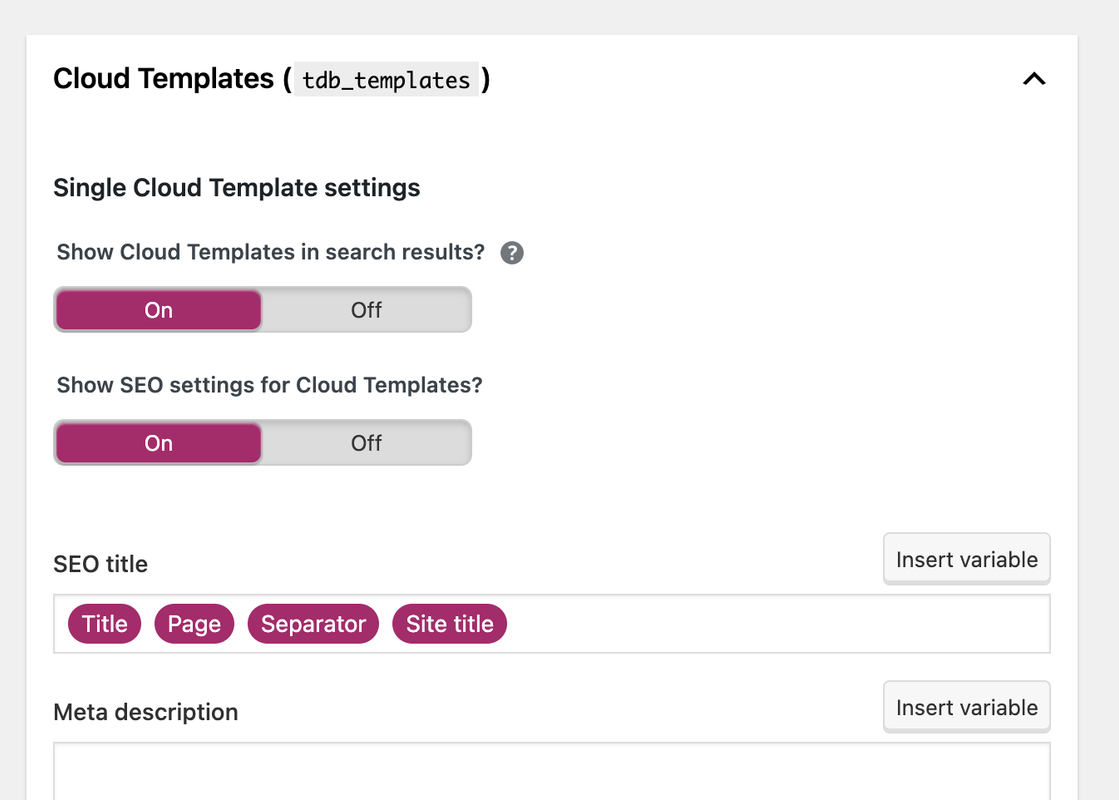
I just installed Yoast SEO plugin.
Do we agree that I should set “Show Cloud Templates in search results” to “Off”?
Because I do not want Google to index templates? This should not interfere with my real posts, pages and archives using the templates, correct?
 iwebuserstudio
Hello,
I installed single post page template(Single Post Template – Magazine PRO) from cloud template
However the background disappear when it installed in my WP.
demo :
https://tinyurl.com/y2ybzgca
after install in my WP
https://tinyurl.com/y6djdno4
Would you tell me how to set it back >
Calin Hi,
All those change can be mad using tagDiv Composer, the theme builder. The pre-build website are made using cloud templates , also we have some video tutorials here -> https://www.youtube.com/watch?v=SoGQ0d5kIBg&list=UUOT1RiNysIPCTPSnVZskwtQ
I hope this will help you!
Happy New Year!
Calin Hi,
Indeed, for the moment there are not much options to add extra levels for breadcrumbs -> https://i.imgur.com/Yac8WYU.png the file for that element is on this path td-cloud-library/shortcodes/common/tdb_breadcrumbs.php we hope to add new options soon.
If you want to set Yoast breadcrumbs then will be need some custom changes.
Thank you!
Calin Hi yeahthatskosher,
1. This situation appears because the cloud header that you are using is set as an overlay on content. Please edit the homepage using tagDiv Composer, select an element from header and click on the header -> https://i.imgur.com/vfLelhI.png then change the display option on default -> https://i.imgur.com/7dOQpHA.png
2. In page’s template is the wordpress editor, is only “default” when tagDiv Standard pack is not installed (because is no need for other settings, now those can be done with tagDiv Composer).
A page to be editable with tagDiv Composer this must be made from the start with the theme builder.
If when you edit the page and you can not edit the content, then most probably that content was set is the wordpress editor, That text should be set in tagDiv Composer in a column text or a text with title.
I hope this will help you!
Happy New Year!



