
 gabfreit
 The theme is giving us trable in high level of usage of PHP Apache memory upto 9 gb
We have 32GB ram 16CP cloud
 robgomes
 Hi Anamaria
I installed as informed, only the template of the store I intend to configure, but the only page that came was the Shop Base Page. Categories, Search and Product Page items are not available in Theme Panel>Shop>WooCommerce. I also didn’t find these individual pages for download in the cloud template. Tagdiv does not provide templates for these individual pages. Is there any other configuration or download to be done besides the store template?
Thanks
 Abder Fath
 Hello,
I always keep the theme and plugins up to date.
I didn’t install Standard pack plugin, I just use Cloud library
 Anamaria
 Hello,
Using our theme you can choose from 3 mobile versions
-> mobile responsive => https://www.screencast.com/t/oJ2ShOp47
-> mobile theme plugin => https://forum.tagdiv.com/the-mobile-theme/
-> mobile page => https://tagdiv.com/newspaper-10-3-7-update-brings-customizable-and-fast-mobile-pages/
This is a video about Responsive Newspaper Theme, AMP & Mobile Theme, Mobile Pages & Templates -> https://www.youtube.com/watch?v=SpGkOnJeNZY
So, the mobile responsive is what you see then that you select the viewport on phone => https://www.screencast.com/t/matV17hH, so some settings may apply for each viewport(where is the border blue), and others are not(where the border is black).
The mobile page has the mobile templates from Cloud Library => https://www.screencast.com/t/YCcZ8rL8
The mobile theme comes with its own templates for page, post, category, 404 etc so your current templates from the desktop theme will get converted to the mobile theme layout, the page content is made without builders in mobile editor => https://www.screencast.com/t/xbgZG8kH also, the options that are provided to edit the mobile theme version are limited (this keeps the things simple).
Mobile responsive version of the theme and the mobile page editor can be edit with tagDiv Composer, the mobile theme plugin not.
For example, you can have the mobile theme plugin activate and use the mobile page/mobile responsive version for the homepage/pages, but for the categories page/404 page you can’t use the mobile page/mobile responsive version if you have the mobile theme plugin activate.
Thank you!
Anamaria Hello,
Please let me know what template you use for the footer, to display the Instagram feed for the standard template you need to connect to your Instagram Personal account and set the Instagram ID in Footer -> Instagram Settings => https://www.screencast.com/t/OAludoEzaoRI
if you have a footer template from Cloud Library, then you can use Instagram Bussines.
For this error “Example — The “media_image” block was affected by errors and may not function properly. Check the developer tools for more details.—” you have a plugin which is not compatible with the latest version WordPress, v5.8.
Thank you!
 Bettina
 Hello!
I think you mean this: https://www.screencast.com/t/mQW6rICbUQ
This is on a cloud post template, in the content.
Thank you!
Abder Fath Hello,
I didn’t install a prebuilt website, I just made my own using tagdiv composer and tagdiv cloud library
Anamaria Hello,
Please let me know how you set the tagline.
If you use a standard template, you can set the font size from Theme Panel -> Theme Fonts -> Header => https://i.imgur.com/2y5vGQo.png if you have a cloud template, you need to edit with tagDiv Composer, select the logo and set the font size like this => https://i.imgur.com/bEKETfK.png
Thank you!
Anamaria Hello,
If you import only the templates (not the whole prebuilt website) for the shop from Cloud Library, will not affect your blog.
Thank you!
 msakande
Dear,
I cannot get cloud template.
I get this error : Invalid reply from server endpoint.
https://iev.wju.mybluehost.me/wp-content/uploads/2021/08/Invalid-reply-from-server-endpoint..png
note: The system Status is correct https://iev.wju.mybluehost.me/wp-content/uploads/2021/08/System-Status.png
robgomes Hi AnaMaria
Thanks for the answer. Do you mean that installing one of the store templates available in the cloud templates won’t influence the Romanian blog template part, but only the woocommerce part? That was my question…Is that correct?
Roberto Gomes
Anamaria Hello,
Please tell me what you mean by “no template”, you don’t have any template or you have a Standard Template from the tagDiv Standard Pack plugin.
Unfortunately, is possible to take a little longer until the Cloud Library loads because it has many templates with different customizations and functionalities.
Thank you!
Anamaria Hi,
If you want to have the same category template for all categories, but with some changes, then duplicate the existing template and for assigning another template go to Newspaper -> Theme panel -> Categories -> Select a category you want and there you can find the setting “Category cloud library template” and choose the template from that dropdown for each category, also you can change the title of template for each category => https://www.screencast.com/t/BMP2o0nqJ
When you set a block on a category template, you need to set the filer on the Current category => https://www.screencast.com/t/hAAhXSJ5 to display the posts from that category.
Hope this helps you!
Thank you!
Anamaria Hi,
I’m glad that you manage the situation!
The tagDiv Standard Pack plugin from version 10.4, is no longer required because the new demos are using cloud templates.
Have a nice day!
Anamaria Hello,
To assigning another template go to Newspaper -> Theme panel -> Categories -> Select a category you want and there you can find the setting “Category cloud library template” and choose the template from that dropdown for each category https://www.screencast.com/t/z4purbea
Thank you!
Bettina Hello!
For cloud templates, you should add the ads when you edit the post with TagDiv Composer in the element called ” Single Post Content ” in the tab ADS or you can use the element called “Ad box” from TagDiv Composer and there you need to add the ads.
Thank you!
Bettina Hello!
Is possible to be from the firewall or security module which blocks admin-ajax.php request. Please verify the console for error while saving the settings on the Theme Panel, usually, it displays a 403 or 404 error.
If you don’t use a security plugin, please ask your host about this, maybe you have a security module that blocks this.
If you use a plugin like Wordfence please set it in learning mode.
Also, if you are using Cloudflare, please make sure that is set as in our guide https://forum.tagdiv.com/cloudflare-cdn/ , you need to disable the Rocket Loader.
Also, make sure that you do not have a plugin conflict, please deactivate ALL plugins except tagDiv plugins, also if you are using a child theme or cache plugin, deactivate them, clear all cache and try again.
Thank you!
Bettina Hello!
For default templates, the settings are here: https://www.screencast.com/t/UbJfGnXERMEv
and for cloud templates, you should add the ads when you edit the post with TagDiv Composer in the element called ” Single Post Content ” in the tab ADS or you can use the element called “Ad box” from TagDiv Composer and there you need to add the ads.
Hope that helps you!
Thank you!
 coralcode
After adding new posts flex box 1 on home page doesn’t show any posts
Even filtered by all categories
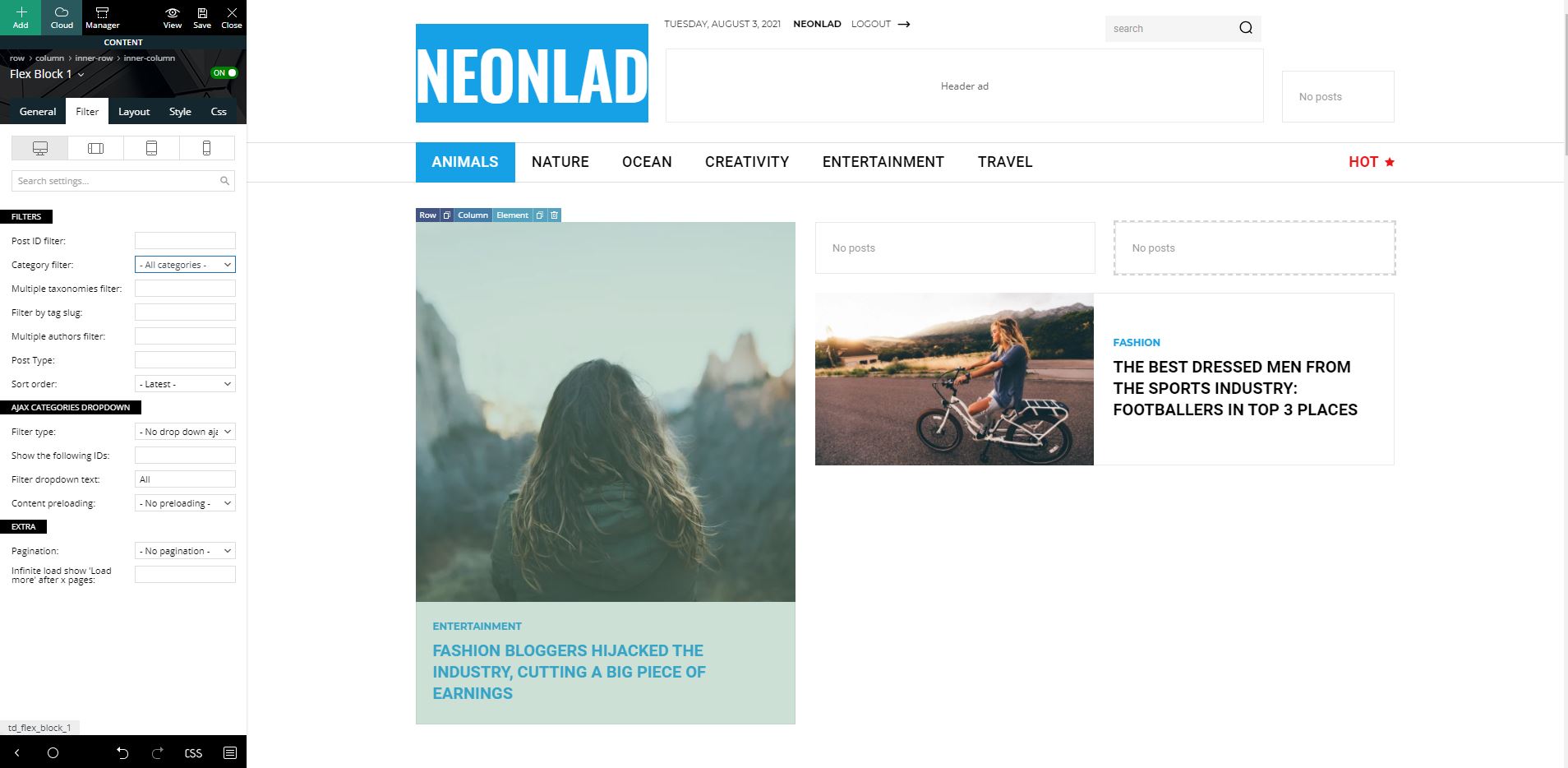
 hebdo24
Hello,
I need help solving an issue with tagdiv composer, each time we setup the mobile version, it works only at 1st launch and once we refresh the page, all elements come to the default layout and completely ignore our templates from cloud library.
We urgently need your help.
Regards.
 admin143
 please understand the problem.
only when I use the cloud header template then page loads in 30 seconds.
if I use no template then it load faster.
please assist asap
 ianternet
I just updated my Newspaper and everything was smooth but certain things are not where they are. For example /blog which displays all the recent posts shows the full context and not an excerpt – where can I change it?
Individual blog posts now have next and previous posts now… where can I change that… help docs are not updated and spend like 45 mins looking through every option
Category layout now needs cloud templates which is cool but why do I have to set one for each archive, search, 404, cant I just use search template for all of them?
 itictmedia-nl
 Hello Anamaria,
Thank you for answering, but as stated in my first message, I already tried doing this, but even with only the tagdiv cloud library, tagdiv composer, tagdiv opt-in builder and tagdiv standard pack plugins active the CSS analyser does give the same results, only a white screen for a short time.
The issue is at: https://itexecutive.nl
Huub
Anamaria Hello,
Please deactivate, delete and reinstall tagDiv Composer from Newspaper plugins => https://www.screencast.com/t/OrzLvR2j and clear all cache.
In most cases when you get a similar message “ Error at zones: 6(models): 0(dom). The model does not match the content Current state has involved an issue. You could try an UNDO operation (CTRL+Z / CTRL+SHIFT+Z)” then indeed it is a problem, most of the time the problem is from a shortcode that is not compatible with our theme, therefore after you set it with tagDiv Composer and save the page/cloud template, the next time when you try to edit it, you’ll get that error.
For this error, you can check our guide from here at point 5 -> https://forum.tagdiv.com/tagdiv-composer-not-working/ also after trying the steps from our guide you do not solve the issue, you can send us an email at contact@tagdiv.com and provide wp-admin login, as well as cPanel and credentials. We will take a look. Include a link to this topic in the email.
Also, please make a full backup to all files and databases.
Thank you!
Abder FathHello,
I get this error “An error occured while trying to access the server:error” (https://i.ibb.co/y5RCgkV/tag.png) when I want to add a TAG template, I already made a Tag template using Tagdiv cloud, but it’s doesn’t appear (https://i.ibb.co/NSYWcBQ/taag.png).
PS: this problem happens only with Tag template, the other templates are working perfectly



